# AI Web Agent (`apify/ai-web-agent`) Actor
Use natural language prompts to browse the web, click on elements, fill and submit forms, extract data, and take screenshots using the OpenAI API.
- **URL**: https://apify.com/apify/ai-web-agent.md
- **Developed by:** [Apify](https://apify.com/apify) (Apify)
- **Categories:** AI, Agents, Open source
- **Stats:** 1,853 total users, 7 monthly users, 57.6% runs succeeded, 103 bookmarks
- **User rating**: 4.20 out of 5 stars
## Pricing
Pay per usage
This Actor is paid per platform usage. The Actor is free to use, and you only pay for the Apify platform usage, which gets cheaper the higher subscription plan you have.
Learn more: https://docs.apify.com/platform/actors/running/actors-in-store#pay-per-usage
## What's an Apify Actor?
Actors are a software tools running on the Apify platform, for all kinds of web data extraction and automation use cases.
In Batch mode, an Actor accepts a well-defined JSON input, performs an action which can take anything from a few seconds to a few hours,
and optionally produces a well-defined JSON output, datasets with results, or files in key-value store.
In Standby mode, an Actor provides a web server which can be used as a website, API, or an MCP server.
Actors are written with capital "A".
## How to integrate an Actor?
If asked about integration, you help developers integrate Actors into their projects.
You adapt to their stack and deliver integrations that are safe, well-documented, and production-ready.
The best way to integrate Actors is as follows.
In JavaScript/TypeScript projects, use official [JavaScript/TypeScript client](https://docs.apify.com/api/client/js.md):
```bash
npm install apify-client
```
In Python projects, use official [Python client library](https://docs.apify.com/api/client/python.md):
```bash
pip install apify-client
```
In shell scripts, use [Apify CLI](https://docs.apify.com/cli/docs.md):
````bash
# MacOS / Linux
curl -fsSL https://apify.com/install-cli.sh | bash
# Windows
irm https://apify.com/install-cli.ps1 | iex
```bash
In AI frameworks, you might use the [Apify MCP server](https://docs.apify.com/platform/integrations/mcp.md).
If your project is in a different language, use the [REST API](https://docs.apify.com/api/v2.md).
For usage examples, see the [API](#api) section below.
For more details, see Apify documentation as [Markdown index](https://docs.apify.com/llms.txt) and [Markdown full-text](https://docs.apify.com/llms-full.txt).
# README
> ⚠️ The AI Web Agent is an experimental project and is currently not actively maintained. While we have plans for long-term improvements, these will not be implemented in the near future. We welcome and appreciate any contributions, including pull requests or documentation enhancements.
>
### 😎 How does AI Web Agent work?
The AI Web Agent is a tool that allows you to browse the web and extract data from websites using simple, natural language instructions. It combines the powers of the Apify platform and large language models from [OpenAI API](https://openai.com/) to generate actions that should be performed.
You can use AI Web Agent to **automate any action on the web:**
🌐 Go to URL
🖱️ Click on element
📝 Fill and submit forms
📦 Extract data from the page
💾 Save data to output
📊 Save data to dataset
📸 Take and save a screenshot💸
### 📚 How to use AI Web Agent?
AI Web Agent was designed for an easy start even if you've never tried automating tasks on the web before. To get started, you need to:
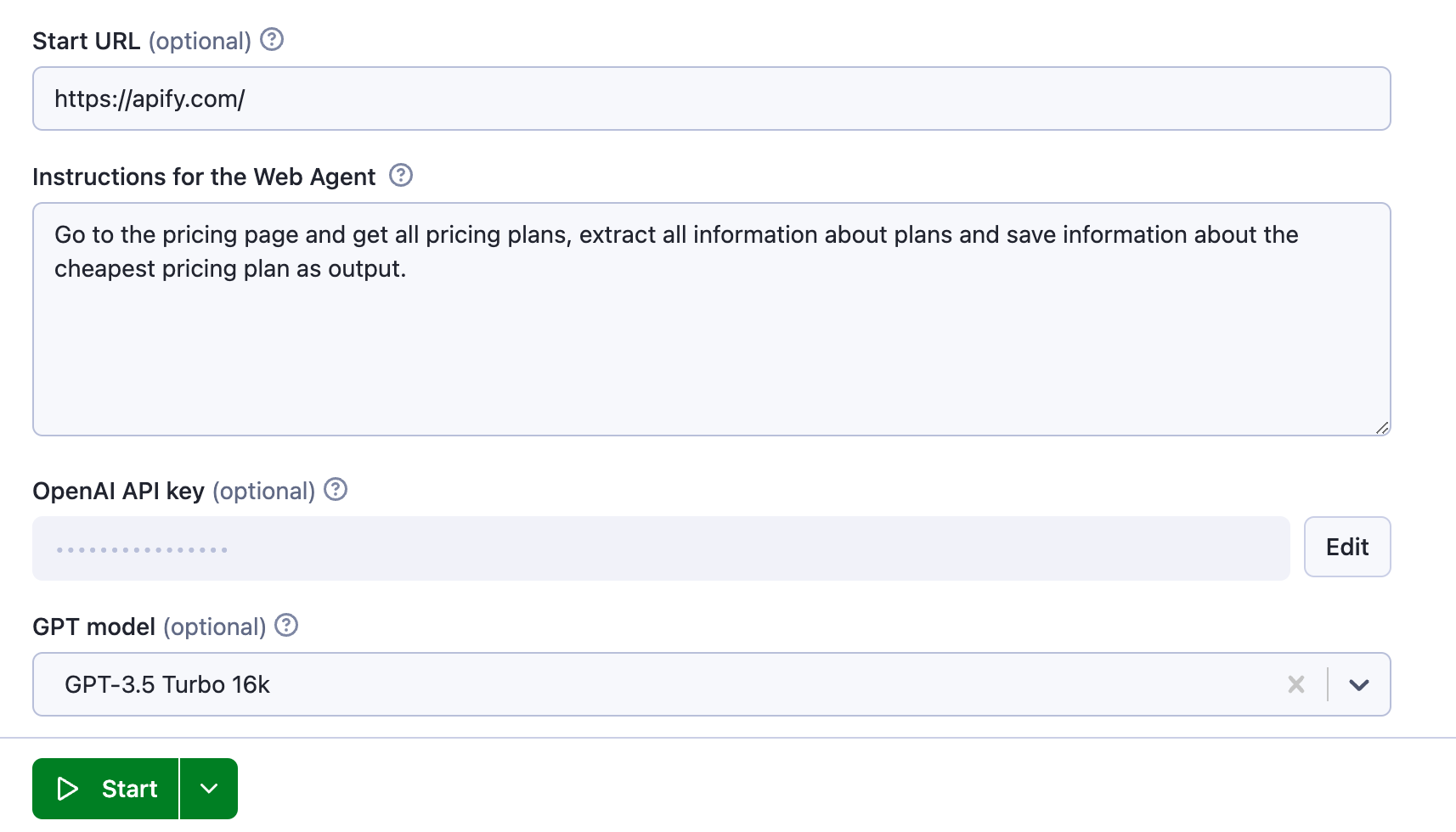
1. **Add page URL** that you want the Web Agent to start with.
2. Provide **Instructions** on what the Web Agent should do while on that page. Use simple and straightforward language.
3. Set up **OpenAI API key**. You can get it from OpenAI platform.
4. Choose **GPT Model** that decyphers your prompt to the Web Agent: GPT-4o-mini, GPT-4o, o1-mini, o3-mini, GPT-3.5 Turbo 16k, GPT-4, GPT-4 32k.
5. Click **Start**.
For example, to browse a website such as [https://apify.com/](https://apify.com/) and get the cheapest pricing plan, you can use the following instructions:
 ### ⬇️ Input
AI Web Agent accepts the following configuration settings:
**Start URL**
The **Start URL** (`startUrl`) field represents the initial page URL that the Agent will visit.
**Instructions**
This field instructs the Web Agent how to browse the web.
**OpenAI API key**
The API key for accessing OpenAI. You can get it from OpenAI platform.
**GPT Model**
The **GPT Model** (`model`) option specifies which GPT model to use. You can find more information about the models on the [OpenAI API documentation](https://platform.openai.com/docs/models/overview). Keep in mind that each GPT model has different pricing and features.
**Proxy configuration**
The **Proxy configuration** (`proxyConfiguration`) option enables you to set proxies. The Web Agent will use these to prevent getting blocked by target websites. You can use both [Apify Proxy](https://apify.com/proxy) and custom HTTP or SOCKS5 proxy servers.
You can enter these either directly in [Apify Console](https://console.apify.com/) or programmatically in a JSON object using the [Apify API](https://apify.com/docs/api/v2#/reference/actors/run-collection/run-actor). Watch [this video](https://www.youtube.com/watch?v=ViYYDHSBAKM) to learn how get your data via the cURL command and with both Apify's API clients (Python and Node.js).
[AI Web Agent API](https://www.youtube.com/watch?v=ViYYDHSBAKM)
### ⬇️ Output
You can find the results of the run in the **Storage tab → Key-value store** under the `OUTPUT` key. You can also view the recorded Web Agent's browsing session under`recording.mp4`.
### 💸 How much does it cost to use AI Web Agent?
Your total cost will be calculated based on **combined costs for running OpenAI’s LLMs and browser runtime**.
**Cost of the OpenAI API**
The cost depends on the model you are using and the action browser process. The cost is calculated based on the number of tokens used. You can see the cost in the log of the Actor run. You can find the cost of the OpenAI API on the [OpenAI pricing page](https://openai.com/pricing).
**Cost of the running browser**
The Web Agent uses a headless browser. The cost of the browser is based on the amount of time it takes to run the Agent. You can find information about the cost on the [pricing page](https://apify.com/pricing).
### 📘 Resources
- [What are AI Agents?](https://blog.apify.com/what-are-ai-agents/)
- [11 AI agent use cases (on Apify)](https://blog.apify.com/ai-agent-use-cases/)
- [AI agent workflow: building an agent to query Apify datasets](https://blog.apify.com/ai-agent-workflow/)
# Actor input Schema
## `startUrl` (type: `string`):
URL to start with automation, if not filled you need to specify it in instructions.
## `instructions` (type: `string`):
Instruction how agent browse the web and extract the data.
## `openaiApiKey` (type: `string`):
The API key for accessing OpenAI. You can get it from OpenAI platform.
## `model` (type: `string`):
Select a GPT model. See models overview. Keep in mind that each model has different pricing and features.
## `proxyConfiguration` (type: `object`):
Specifies proxy servers that will be used by the scraper in order to hide its origin.
### ⬇️ Input
AI Web Agent accepts the following configuration settings:
**Start URL**
The **Start URL** (`startUrl`) field represents the initial page URL that the Agent will visit.
**Instructions**
This field instructs the Web Agent how to browse the web.
**OpenAI API key**
The API key for accessing OpenAI. You can get it from OpenAI platform.
**GPT Model**
The **GPT Model** (`model`) option specifies which GPT model to use. You can find more information about the models on the [OpenAI API documentation](https://platform.openai.com/docs/models/overview). Keep in mind that each GPT model has different pricing and features.
**Proxy configuration**
The **Proxy configuration** (`proxyConfiguration`) option enables you to set proxies. The Web Agent will use these to prevent getting blocked by target websites. You can use both [Apify Proxy](https://apify.com/proxy) and custom HTTP or SOCKS5 proxy servers.
You can enter these either directly in [Apify Console](https://console.apify.com/) or programmatically in a JSON object using the [Apify API](https://apify.com/docs/api/v2#/reference/actors/run-collection/run-actor). Watch [this video](https://www.youtube.com/watch?v=ViYYDHSBAKM) to learn how get your data via the cURL command and with both Apify's API clients (Python and Node.js).
[AI Web Agent API](https://www.youtube.com/watch?v=ViYYDHSBAKM)
### ⬇️ Output
You can find the results of the run in the **Storage tab → Key-value store** under the `OUTPUT` key. You can also view the recorded Web Agent's browsing session under`recording.mp4`.
### 💸 How much does it cost to use AI Web Agent?
Your total cost will be calculated based on **combined costs for running OpenAI’s LLMs and browser runtime**.
**Cost of the OpenAI API**
The cost depends on the model you are using and the action browser process. The cost is calculated based on the number of tokens used. You can see the cost in the log of the Actor run. You can find the cost of the OpenAI API on the [OpenAI pricing page](https://openai.com/pricing).
**Cost of the running browser**
The Web Agent uses a headless browser. The cost of the browser is based on the amount of time it takes to run the Agent. You can find information about the cost on the [pricing page](https://apify.com/pricing).
### 📘 Resources
- [What are AI Agents?](https://blog.apify.com/what-are-ai-agents/)
- [11 AI agent use cases (on Apify)](https://blog.apify.com/ai-agent-use-cases/)
- [AI agent workflow: building an agent to query Apify datasets](https://blog.apify.com/ai-agent-workflow/)
# Actor input Schema
## `startUrl` (type: `string`):
URL to start with automation, if not filled you need to specify it in instructions.
## `instructions` (type: `string`):
Instruction how agent browse the web and extract the data.
## `openaiApiKey` (type: `string`):
The API key for accessing OpenAI. You can get it from OpenAI platform.
## `model` (type: `string`):
Select a GPT model. See models overview. Keep in mind that each model has different pricing and features.
## `proxyConfiguration` (type: `object`):
Specifies proxy servers that will be used by the scraper in order to hide its origin.
For details, see Proxy configuration in README.
## Actor input object example
```json
{
"startUrl": "https://apify.com",
"instructions": "Go to the pricing page, extract information about all pricing plans, and save it into dataset.",
"model": "gpt-4o-mini",
"proxyConfiguration": {
"useApifyProxy": true
}
}
````
# API
You can run this Actor programmatically using our API. Below are code examples in JavaScript, Python, and CLI, as well as the OpenAPI specification and MCP server setup.
## JavaScript example
```javascript
import { ApifyClient } from 'apify-client';
// Initialize the ApifyClient with your Apify API token
// Replace the '' with your token
const client = new ApifyClient({
token: '',
});
// Prepare Actor input
const input = {
"startUrl": "https://apify.com",
"instructions": "Go to the pricing page, extract information about all pricing plans, and save it into dataset.",
"model": "gpt-4o-mini",
"proxyConfiguration": {
"useApifyProxy": true
}
};
// Run the Actor and wait for it to finish
const run = await client.actor("apify/ai-web-agent").call(input);
// Fetch and print Actor results from the run's dataset (if any)
console.log('Results from dataset');
console.log(`💾 Check your data here: https://console.apify.com/storage/datasets/${run.defaultDatasetId}`);
const { items } = await client.dataset(run.defaultDatasetId).listItems();
items.forEach((item) => {
console.dir(item);
});
// 📚 Want to learn more 📖? Go to → https://docs.apify.com/api/client/js/docs
```
## Python example
```python
from apify_client import ApifyClient
# Initialize the ApifyClient with your Apify API token
# Replace '' with your token.
client = ApifyClient("")
# Prepare the Actor input
run_input = {
"startUrl": "https://apify.com",
"instructions": "Go to the pricing page, extract information about all pricing plans, and save it into dataset.",
"model": "gpt-4o-mini",
"proxyConfiguration": { "useApifyProxy": True },
}
# Run the Actor and wait for it to finish
run = client.actor("apify/ai-web-agent").call(run_input=run_input)
# Fetch and print Actor results from the run's dataset (if there are any)
print("💾 Check your data here: https://console.apify.com/storage/datasets/" + run["defaultDatasetId"])
for item in client.dataset(run["defaultDatasetId"]).iterate_items():
print(item)
# 📚 Want to learn more 📖? Go to → https://docs.apify.com/api/client/python/docs/quick-start
```
## CLI example
```bash
echo '{
"startUrl": "https://apify.com",
"instructions": "Go to the pricing page, extract information about all pricing plans, and save it into dataset.",
"model": "gpt-4o-mini",
"proxyConfiguration": {
"useApifyProxy": true
}
}' |
apify call apify/ai-web-agent --silent --output-dataset
```
## MCP server setup
```json
{
"mcpServers": {
"apify": {
"command": "npx",
"args": [
"mcp-remote",
"https://mcp.apify.com/?tools=apify/ai-web-agent",
"--header",
"Authorization: Bearer "
]
}
}
}
```
## OpenAPI specification
```json
{
"openapi": "3.0.1",
"info": {
"title": "AI Web Agent",
"description": "Use natural language prompts to browse the web, click on elements, fill and submit forms, extract data, and take screenshots using the OpenAI API.",
"version": "0.2",
"x-build-id": "wQr1bgl5lzPMaX6H2"
},
"servers": [
{
"url": "https://api.apify.com/v2"
}
],
"paths": {
"/acts/apify~ai-web-agent/run-sync-get-dataset-items": {
"post": {
"operationId": "run-sync-get-dataset-items-apify-ai-web-agent",
"x-openai-isConsequential": false,
"summary": "Executes an Actor, waits for its completion, and returns Actor's dataset items in response.",
"tags": [
"Run Actor"
],
"requestBody": {
"required": true,
"content": {
"application/json": {
"schema": {
"$ref": "#/components/schemas/inputSchema"
}
}
}
},
"parameters": [
{
"name": "token",
"in": "query",
"required": true,
"schema": {
"type": "string"
},
"description": "Enter your Apify token here"
}
],
"responses": {
"200": {
"description": "OK"
}
}
}
},
"/acts/apify~ai-web-agent/runs": {
"post": {
"operationId": "runs-sync-apify-ai-web-agent",
"x-openai-isConsequential": false,
"summary": "Executes an Actor and returns information about the initiated run in response.",
"tags": [
"Run Actor"
],
"requestBody": {
"required": true,
"content": {
"application/json": {
"schema": {
"$ref": "#/components/schemas/inputSchema"
}
}
}
},
"parameters": [
{
"name": "token",
"in": "query",
"required": true,
"schema": {
"type": "string"
},
"description": "Enter your Apify token here"
}
],
"responses": {
"200": {
"description": "OK",
"content": {
"application/json": {
"schema": {
"$ref": "#/components/schemas/runsResponseSchema"
}
}
}
}
}
}
},
"/acts/apify~ai-web-agent/run-sync": {
"post": {
"operationId": "run-sync-apify-ai-web-agent",
"x-openai-isConsequential": false,
"summary": "Executes an Actor, waits for completion, and returns the OUTPUT from Key-value store in response.",
"tags": [
"Run Actor"
],
"requestBody": {
"required": true,
"content": {
"application/json": {
"schema": {
"$ref": "#/components/schemas/inputSchema"
}
}
}
},
"parameters": [
{
"name": "token",
"in": "query",
"required": true,
"schema": {
"type": "string"
},
"description": "Enter your Apify token here"
}
],
"responses": {
"200": {
"description": "OK"
}
}
}
}
},
"components": {
"schemas": {
"inputSchema": {
"type": "object",
"required": [
"instructions",
"openaiApiKey"
],
"properties": {
"startUrl": {
"title": "Start URL",
"type": "string",
"description": "URL to start with automation, if not filled you need to specify it in instructions."
},
"instructions": {
"title": "Instructions for the Web Agent",
"type": "string",
"description": "Instruction how agent browse the web and extract the data."
},
"openaiApiKey": {
"title": "OpenAI API key",
"type": "string",
"description": "The API key for accessing OpenAI. You can get it from OpenAI platform."
},
"model": {
"title": "GPT model",
"enum": [
"gpt-4o-mini",
"gpt-4o",
"o3-mini",
"o1-mini",
"gpt-3.5-turbo-16k",
"gpt-4",
"gpt-4-32k",
"gpt-4-1106-preview"
],
"type": "string",
"description": "Select a GPT model. See models overview. Keep in mind that each model has different pricing and features.",
"default": "gpt-4o-mini"
},
"proxyConfiguration": {
"title": "Proxy configuration",
"type": "object",
"description": "Specifies proxy servers that will be used by the scraper in order to hide its origin.
For details, see Proxy configuration in README.",
"default": {
"useApifyProxy": false
}
}
}
},
"runsResponseSchema": {
"type": "object",
"properties": {
"data": {
"type": "object",
"properties": {
"id": {
"type": "string"
},
"actId": {
"type": "string"
},
"userId": {
"type": "string"
},
"startedAt": {
"type": "string",
"format": "date-time",
"example": "2025-01-08T00:00:00.000Z"
},
"finishedAt": {
"type": "string",
"format": "date-time",
"example": "2025-01-08T00:00:00.000Z"
},
"status": {
"type": "string",
"example": "READY"
},
"meta": {
"type": "object",
"properties": {
"origin": {
"type": "string",
"example": "API"
},
"userAgent": {
"type": "string"
}
}
},
"stats": {
"type": "object",
"properties": {
"inputBodyLen": {
"type": "integer",
"example": 2000
},
"rebootCount": {
"type": "integer",
"example": 0
},
"restartCount": {
"type": "integer",
"example": 0
},
"resurrectCount": {
"type": "integer",
"example": 0
},
"computeUnits": {
"type": "integer",
"example": 0
}
}
},
"options": {
"type": "object",
"properties": {
"build": {
"type": "string",
"example": "latest"
},
"timeoutSecs": {
"type": "integer",
"example": 300
},
"memoryMbytes": {
"type": "integer",
"example": 1024
},
"diskMbytes": {
"type": "integer",
"example": 2048
}
}
},
"buildId": {
"type": "string"
},
"defaultKeyValueStoreId": {
"type": "string"
},
"defaultDatasetId": {
"type": "string"
},
"defaultRequestQueueId": {
"type": "string"
},
"buildNumber": {
"type": "string",
"example": "1.0.0"
},
"containerUrl": {
"type": "string"
},
"usage": {
"type": "object",
"properties": {
"ACTOR_COMPUTE_UNITS": {
"type": "integer",
"example": 0
},
"DATASET_READS": {
"type": "integer",
"example": 0
},
"DATASET_WRITES": {
"type": "integer",
"example": 0
},
"KEY_VALUE_STORE_READS": {
"type": "integer",
"example": 0
},
"KEY_VALUE_STORE_WRITES": {
"type": "integer",
"example": 1
},
"KEY_VALUE_STORE_LISTS": {
"type": "integer",
"example": 0
},
"REQUEST_QUEUE_READS": {
"type": "integer",
"example": 0
},
"REQUEST_QUEUE_WRITES": {
"type": "integer",
"example": 0
},
"DATA_TRANSFER_INTERNAL_GBYTES": {
"type": "integer",
"example": 0
},
"DATA_TRANSFER_EXTERNAL_GBYTES": {
"type": "integer",
"example": 0
},
"PROXY_RESIDENTIAL_TRANSFER_GBYTES": {
"type": "integer",
"example": 0
},
"PROXY_SERPS": {
"type": "integer",
"example": 0
}
}
},
"usageTotalUsd": {
"type": "number",
"example": 0.00005
},
"usageUsd": {
"type": "object",
"properties": {
"ACTOR_COMPUTE_UNITS": {
"type": "integer",
"example": 0
},
"DATASET_READS": {
"type": "integer",
"example": 0
},
"DATASET_WRITES": {
"type": "integer",
"example": 0
},
"KEY_VALUE_STORE_READS": {
"type": "integer",
"example": 0
},
"KEY_VALUE_STORE_WRITES": {
"type": "number",
"example": 0.00005
},
"KEY_VALUE_STORE_LISTS": {
"type": "integer",
"example": 0
},
"REQUEST_QUEUE_READS": {
"type": "integer",
"example": 0
},
"REQUEST_QUEUE_WRITES": {
"type": "integer",
"example": 0
},
"DATA_TRANSFER_INTERNAL_GBYTES": {
"type": "integer",
"example": 0
},
"DATA_TRANSFER_EXTERNAL_GBYTES": {
"type": "integer",
"example": 0
},
"PROXY_RESIDENTIAL_TRANSFER_GBYTES": {
"type": "integer",
"example": 0
},
"PROXY_SERPS": {
"type": "integer",
"example": 0
}
}
}
}
}
}
}
}
}
}
```