# Export Instagram Comments and Posts (`apify/export-instagram-comments-posts`) Actor

Scrape Instagram posts and their comments in one run. Add a username and get post details: caption, likes, tagged users, timestamp, and comment details: text, usernames, profile pics, and likes. Export scraped data, schedule via API, and integrate with other tools or AI workflows.

- **URL**: https://apify.com/apify/export-instagram-comments-posts.md
- **Developed by:** [Apify](https://apify.com/apify) (Apify)
- **Categories:** Social media
- **Stats:** 4,396 total users, 121 monthly users, 99.6% runs succeeded, 69 bookmarks
- **User rating**: 3.07 out of 5 stars

## Pricing

Pay per usage

This Actor is paid per platform usage. The Actor is free to use, and you only pay for the Apify platform usage, which gets cheaper the higher subscription plan you have.

Learn more: https://docs.apify.com/platform/actors/running/actors-in-store#pay-per-usage

## What's an Apify Actor?

Actors are a software tools running on the Apify platform, for all kinds of web data extraction and automation use cases.
In Batch mode, an Actor accepts a well-defined JSON input, performs an action which can take anything from a few seconds to a few hours,
and optionally produces a well-defined JSON output, datasets with results, or files in key-value store.
In Standby mode, an Actor provides a web server which can be used as a website, API, or an MCP server.
Actors are written with capital "A".

## How to integrate an Actor?

If asked about integration, you help developers integrate Actors into their projects.
You adapt to their stack and deliver integrations that are safe, well-documented, and production-ready.
The best way to integrate Actors is as follows.

In JavaScript/TypeScript projects, use official [JavaScript/TypeScript client](https://docs.apify.com/api/client/js.md):

```bash
npm install apify-client
```

In Python projects, use official [Python client library](https://docs.apify.com/api/client/python.md):

```bash
pip install apify-client
```

In shell scripts, use [Apify CLI](https://docs.apify.com/cli/docs.md):

````bash
# MacOS / Linux
curl -fsSL https://apify.com/install-cli.sh | bash
# Windows
irm https://apify.com/install-cli.ps1 | iex
```bash

In AI frameworks, you might use the [Apify MCP server](https://docs.apify.com/platform/integrations/mcp.md).

If your project is in a different language, use the [REST API](https://docs.apify.com/api/v2.md).

For usage examples, see the [API](#api) section below.

For more details, see Apify documentation as [Markdown index](https://docs.apify.com/llms.txt) and [Markdown full-text](https://docs.apify.com/llms-full.txt).


# README

### 💬📝 What is Export Instagram Comments and Posts Tool?

Export Instagram Comments and Posts Tool is a specialized scraping tool designed to **extract all comments and post details from Instagram profiles.** Just **provide the Instagram profile**, and the tool will scrape **comments, post captions, usernames, timestamps, likes, and more.**

### ⚙️ How does Export Instagram Comments and Posts Tool work?

> 🔗 Finds the Instagram profiles you add →  📝 Extracts post details: caption, likes, tagged users, timestamp  → 💬 Scrapes comments, including usernames, profile pics, and likes → 📊 Combines comments and post data into a single dataset
> 

With this tool, you can:

📬 Extract **comments and posts** from any public Instagram profile

⏰ **Extract post and comments content**, including media URLs, timestamps, likes, captions and hashtags

💰 Get **more than 1,000 results for free**

📦 **Export results** via API or in JSON, CSV, or Excel containing all the comments and post details.

### 📕 What data can this Instagram Comments & Posts Export tool extract?

Export Instagram Comments & Posts tool can currently extract the following Instagram posts and comments data:
Here is the updated table based on the new dataset:

<table>
    <tr>
        <td>📝 <strong>Comment details</strong></td>
        <td></td>
        <td></td>
    </tr>
    <tr>
        <td>💬 Comment text</td>
        <td>🙋‍♂️ Commentator username</td>
        <td>🖼️ Commentator profile picture</td>
    </tr>
    <tr>
        <tr>  <td></td><td></td>
        <td></td></tr>
        <td>🖼️ <strong>Post details</strong></td>
        <td></td>
        <td></td>
    </tr>
    <tr>
        <td>🔗 Post URL</td>
        <td>🔢 Post ID</td>
        <td>📝 Post caption</td>
    </tr>
    <tr>
        <td>🙋‍♂️ Post owner username</td>
        <td>👤 Post owner full name</td>
        <td>🖼️ Post owner profile picture</td>
    </tr>
    <tr>
        <td>📅 Post timestamp</td>
        <td>👍 Likes count</td>
        <td>🎥 Video view count</td>
    </tr>
    <tr>
        <td>🎞️ Video play count</td>
        <td>⏱️ Video duration</td>
        <td>🔗 Video URL</td>
    </tr>
    <tr>
        <td>🎶 Music artist name</td>
        <td>🎵 Song name</td>
        <td>🔊 Uses original audio</td>
    </tr>
    <tr>
        <td>📄 Post type</td>
        <td>🔖 Shortcode</td>
        <td>📺 Product type</td>
    </tr>
    <tr>
        <td>📏 Dimensions (width x height)</td>
        <td>🖼️ Display URL</td>
        <td></td>
    </tr>
</table>

### 🛠️ How to export Instagram comments and posts

It's easy to extract Instagram comment and post data. Just follow these steps:

1. Find [Export Instagram Comments and Posts Tool](https://apify.com/apify/export-instagram-comments-posts) on Apify Store and click the **Try for free** button.
2. Add one or multiple Instagram profiles.
3. Indicate the number of posts and comments to be scraped.
4. Click "Start" and wait for the data to be extracted.
5. View the extracted comments and post details.
6. Export your dataset in JSON, CSV, Excel, or using API.

If you need guidance on how to run the scraper, you can follow our [video guide](https://www.youtube.com/watch?v=np1xfW5Pe8A) ▷ on YouTube.

https://www.youtube.com/watch?v=np1xfW5Pe8A

### 💸 Is Export Instagram Comments and Posts Tool free?

While this tool itself is free (only charging for [Compute Units](https://help.apify.com/en/articles/3490384-what-is-a-compute-unit)), it triggers two other
Actors: [Instagram Post Scraper](https://apify.com/apify/instagram-post-scraper) and [Instagram Comments Scraper](https://apify.com/apify/instagram-comment-scraper), both of which are pay-per-event (PPE) at $2.30 per 1,000 scraped results.

This means that running this Actor will result in three separate runs:
- Export Instagram Comments and Posts (this Actor) – charges for CUs.
- [Instagram Post Scraper](https://apify.com/apify/instagram-post-scraper) – price is based on the number of extracted posts.
- [Instagram Comments Scraper](https://apify.com/apify/instagram-comment-scraper) – price is based on the number of extracted comments.

So even though the main Actor is free, the charges from the other triggered Actors will apply. You can monitor these runs under your account with a full breakdown of the charges per each run. Just check the Runs tab in **Actors → ▷ Runs**.

### ⬇️ Input

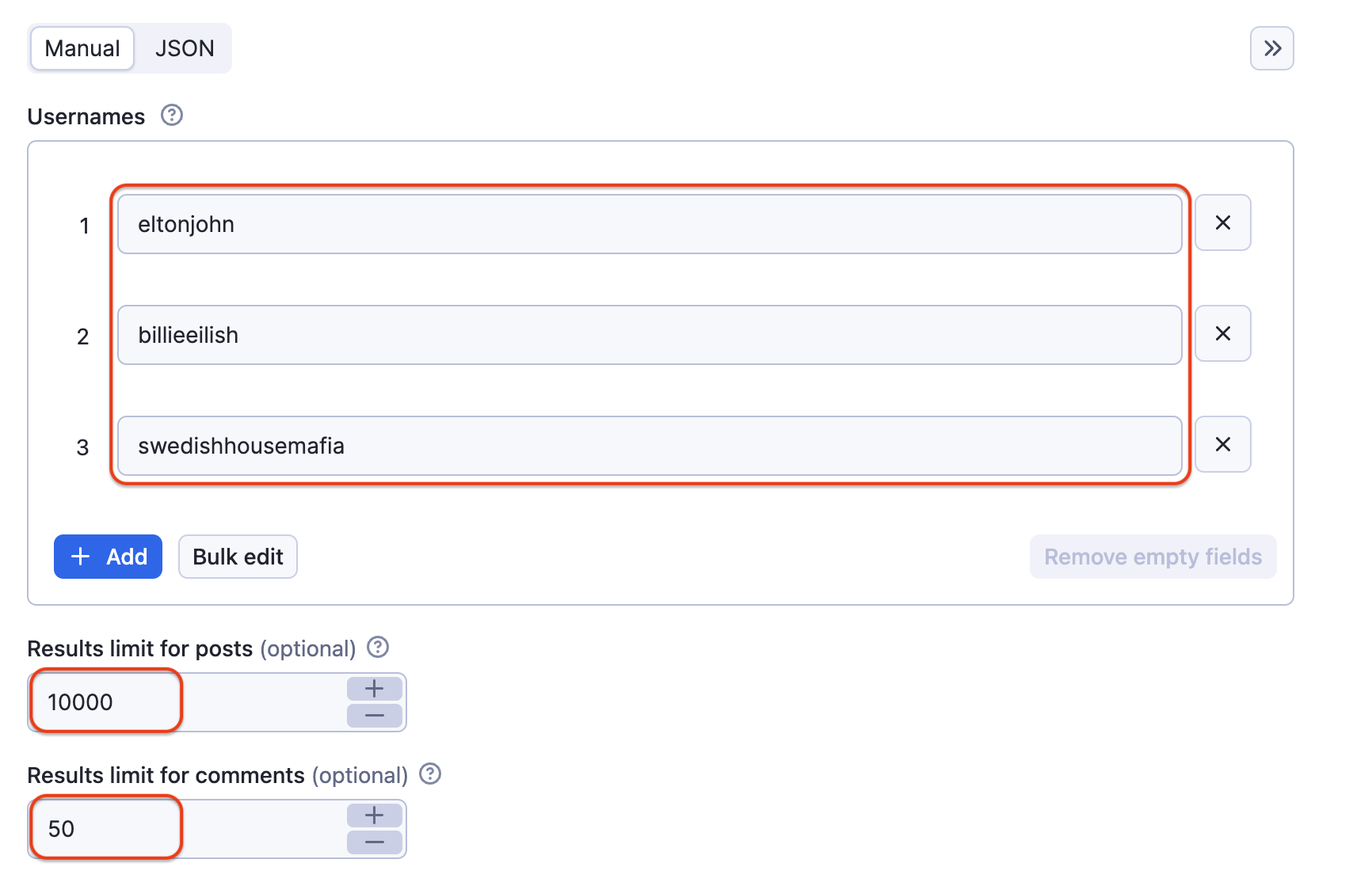
To scrape Instagram comments and posts, the input for Export Instagram Comments and Posts Tool should be **Instagram profiles and number of posts and comments to scrape**. You can add profiles one by one or all at once.

<a href="https://console.apify.com/actors/dIKFJ95TN8YclK2no">
    <img src="https://raw.githubusercontent.com/apify-projects/actor-readme-images/ea0a6dc5136e6b4e960b7b0c6ac73a0e2f9fd7df/Export%20Instagram%20Comments%20and%20Posts.png" alt="Export Instagram Comments and Posts input" style="width: 70%;">
</a>


You can input data by filling out fields, using JSON, or programmatically via an API. For more details on how to configure input in JSON, see the [input tab](https://apify.com/apify/export-instagram-comments-posts/input-schema).

### ⬆️ Output sample

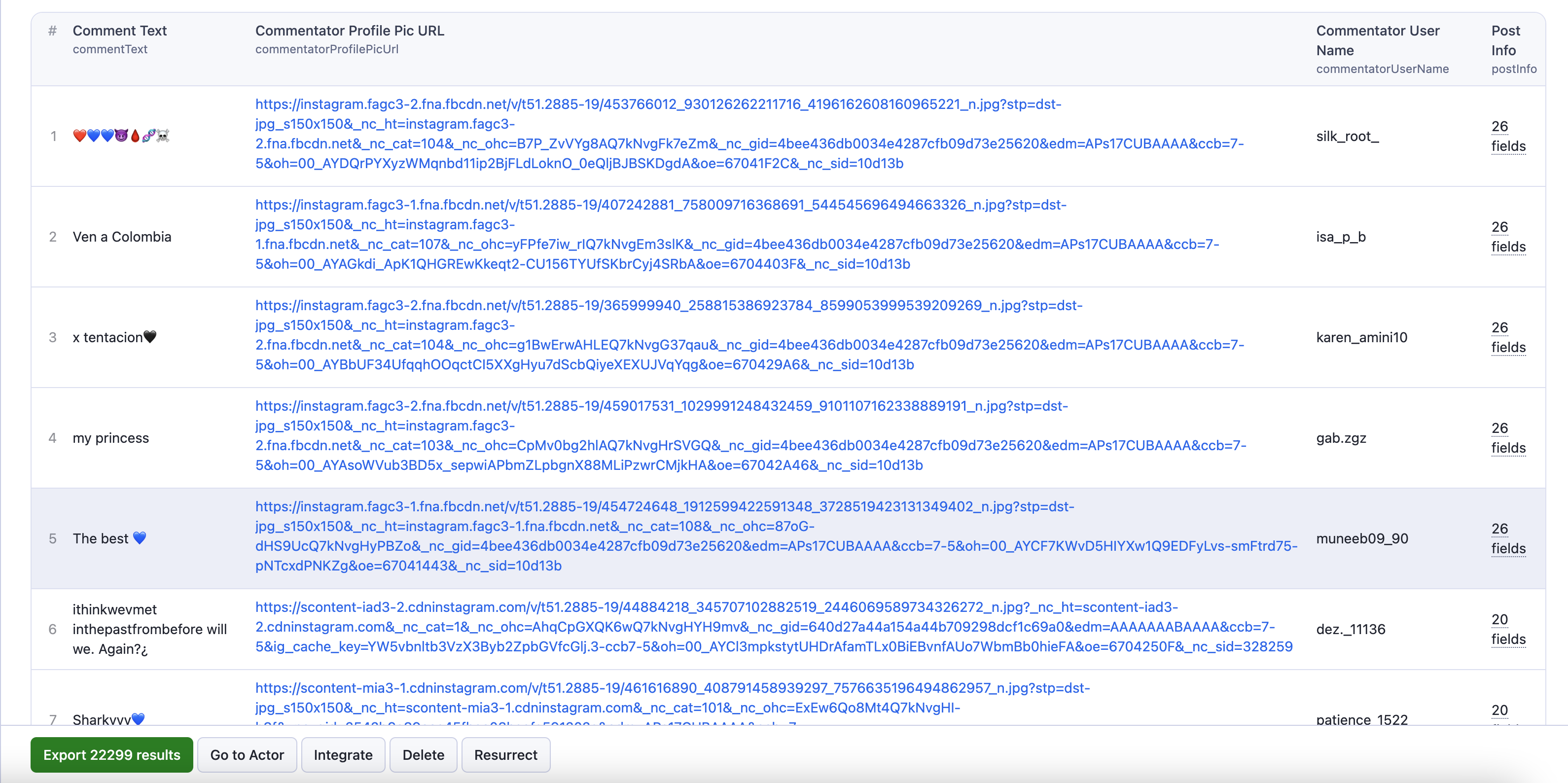
The results will be wrapped into a dataset that you can find in the **Output** tab. Here's an example of the data from the input above:

[![Export Instagram Comments and Posts output](https://raw.githubusercontent.com/apify-projects/actor-readme-images/refs/heads/master/Export%20Instagram%20Comments%20and%20Posts%20output.png
)](https://console.apify.com/actors/dIKFJ95TN8YclK2no)

You can preview all the fields in **Storage** and **Output** tab and choose in which format to export Instagram comment data you’ve extracted: JSON, CSV, Excel, HTML table, or XML. Here below is the same dataset in JSON:

#### **🗨️ Instagram comments and posts**

```json
[
  {
    "commentText": "@maddyfulmino STANDING BY THIS TBH",
    "commentatorUserName": "_mimimann",
    "commentatorProfilePicUrl": "https://scontent-atl3-2.cdninstagram.com/v/t51.2885-19/442421369_997730532057125_3228331504604916551_n.jpg?stp=dst-jpg_s150x150&_nc_ht=scontent-atl3-2.cdninstagram.com&_nc_cat=105&_nc_ohc=HTzlgBAiHNAQ7kNvgHLoIwz&_nc_gid=a929de9d7c01449eae7fcf75ba84d232&edm=APs17CUBAAAA&ccb=7-5&oh=00_AYAnh7EQaE1JZkIeQ0oRRUjC0qGjAEj7F0aVuIQ5adIxtw&oe=670443F8&_nc_sid=10d13b",
    "postInfo": {
      "inputUrl": "https://www.instagram.com/eltonjohn",
      "id": "879248723928966527",
      "type": "Image",
      "shortCode": "wzuA5TAGV_",
      "caption": "Please join us this Sunday @DavidFurnish and I will be posting special moments from our big day. #ShareTheLove #EltonJohn #DavidFurnish",
      "hashtags": [
        "ShareTheLove",
        "EltonJohn",
        "DavidFurnish"
      ],
      "mentions": [
        "DavidFurnish"
      ],
      "url": "https://www.instagram.com/p/wzuA5TAGV_/",
      "dimensionsHeight": 640,
      "dimensionsWidth": 640,
      "displayUrl": "https://instagram.flko7-2.fna.fbcdn.net/v/t51.2885-15/928686_1519779531627015_760476514_n.jpg?stp=dst-jpg_e15&_nc_ht=instagram.flko7-2.fna.fbcdn.net&_nc_cat=103&_nc_ohc=ezFvujE0qQEQ7kNvgFdiK0i&_nc_gid=433f5871a97043c3b14bc113b6cd41e9&edm=APs17CUBAAAA&ccb=7-5&oh=00_AYAYWIl7jugUnCxDkWKPmakh_kJftnFNGvsSbAVmCKDBRw&oe=67043514&_nc_sid=10d13b",
      "images": [],
      "alt": "Photo shared by Elton John on December 19, 2014 tagging @eltonjohn, and @davidfurnish.",
      "likesCount": 4218,
      "timestamp": "2014-12-20T00:17:17.000Z",
      "ownerFullName": "Elton John",
      "ownerUsername": "eltonjohn",
      "ownerId": "1604340024",
      "isSponsored": false,
      "taggedUsers": [
        {
          "full_name": "Elton John",
          "id": "1604340024",
          "is_verified": true,
          "profile_pic_url": "https://instagram.flko7-4.fna.fbcdn.net/v/t51.2885-19/26303398_144489719564885_3817408997594497024_n.jpg?stp=dst-jpg_s150x150&_nc_ht=instagram.flko7-4.fna.fbcdn.net&_nc_cat=1&_nc_ohc=byyO6T-uFxoQ7kNvgGSxqfX&_nc_gid=433f5871a97043c3b14bc113b6cd41e9&edm=APs17CUBAAAA&ccb=7-5&oh=00_AYDXIMrLbvotsc12J39Xx4rCfUCrwnjE9HrzHxHV3O4mzg&oe=67044814&_nc_sid=10d13b",
          "username": "eltonjohn"
        },
        {
          "full_name": "David Furnish",
          "id": "180102238",
          "is_verified": true,
          "profile_pic_url": "https://instagram.flko7-2.fna.fbcdn.net/v/t51.2885-19/271628455_254627536782316_666715840125669476_n.jpg?stp=dst-jpg_s150x150&_nc_ht=instagram.flko7-2.fna.fbcdn.net&_nc_cat=104&_nc_ohc=-z9IMTpzaA8Q7kNvgHGjuve&_nc_gid=433f5871a97043c3b14bc113b6cd41e9&edm=APs17CUBAAAA&ccb=7-5&oh=00_AYABpWgzui_xeyB1d51stWJhys1XL_rnSNBBKuwn6rNE7A&oe=67041C16&_nc_sid=10d13b",
          "username": "davidfurnish"
        }
      ]
    }
  },
  {
    "commentText": "@_mimimann 😜",
    "commentatorUserName": "maddyfulmino",
    "commentatorProfilePicUrl": "https://scontent-atl3-2.cdninstagram.com/v/t51.2885-19/405216517_2183475765182075_6067587865810158698_n.jpg?stp=dst-jpg_s150x150&_nc_ht=scontent-atl3-2.cdninstagram.com&_nc_cat=111&_nc_ohc=CuoJy5sDUgUQ7kNvgE79C39&_nc_gid=a929de9d7c01449eae7fcf75ba84d232&edm=APs17CUBAAAA&ccb=7-5&oh=00_AYC7KwI94UlEreb5AUTdkIaWn1MP0dImMRL2W5JvNwwdqQ&oe=6704410C&_nc_sid=10d13b",
    "postInfo": {
      "inputUrl": "https://www.instagram.com/eltonjohn",
      "id": "879248723928966527",
      "type": "Image",
      "shortCode": "wzuA5TAGV_",
      "caption": "Please join us this Sunday @DavidFurnish and I will be posting special moments from our big day. #ShareTheLove #EltonJohn #DavidFurnish",
      "hashtags": [
        "ShareTheLove",
        "EltonJohn",
        "DavidFurnish"
      ],
      "mentions": [
        "DavidFurnish"
      ],
      "url": "https://www.instagram.com/p/wzuA5TAGV_/",
      "dimensionsHeight": 640,
      "dimensionsWidth": 640,
      "displayUrl": "https://instagram.flko7-2.fna.fbcdn.net/v/t51.2885-15/928686_1519779531627015_760476514_n.jpg?stp=dst-jpg_e15&_nc_ht=instagram.flko7-2.fna.fbcdn.net&_nc_cat=103&_nc_ohc=ezFvujE0qQEQ7kNvgFdiK0i&_nc_gid=433f5871a97043c3b14bc113b6cd41e9&edm=APs17CUBAAAA&ccb=7-5&oh=00_AYAYWIl7jugUnCxDkWKPmakh_kJftnFNGvsSbAVmCKDBRw&oe=67043514&_nc_sid=10d13b",
      "images": [],
      "alt": "Photo shared by Elton John on December 19, 2014 tagging @eltonjohn, and @davidfurnish.",
      "likesCount": 4218,
      "timestamp": "2014-12-20T00:17:17.000Z",
      "ownerFullName": "Elton John",
      "ownerUsername": "eltonjohn",
      "ownerId": "1604340024",
      "isSponsored": false,
      "taggedUsers": [
        {
          "full_name": "Elton John",
          "id": "1604340024",
          "is_verified": true,
          "profile_pic_url": "https://instagram.flko7-4.fna.fbcdn.net/v/t51.2885-19/26303398_144489719564885_3817408997594497024_n.jpg?stp=dst-jpg_s150x150&_nc_ht=instagram.flko7-4.fna.fbcdn.net&_nc_cat=1&_nc_ohc=byyO6T-uFxoQ7kNvgGSxqfX&_nc_gid=433f5871a97043c3b14bc113b6cd41e9&edm=APs17CUBAAAA&ccb=7-5&oh=00_AYDXIMrLbvotsc12J39Xx4rCfUCrwnjE9HrzHxHV3O4mzg&oe=67044814&_nc_sid=10d13b",
          "username": "eltonjohn"
        },
        {
          "full_name": "David Furnish",
          "id": "180102238",
          "is_verified": true,
          "profile_pic_url": "https://instagram.flko7-2.fna.fbcdn.net/v/t51.2885-19/271628455_254627536782316_666715840125669476_n.jpg?stp=dst-jpg_s150x150&_nc_ht=instagram.flko7-2.fna.fbcdn.net&_nc_cat=104&_nc_ohc=-z9IMTpzaA8Q7kNvgHGjuve&_nc_gid=433f5871a97043c3b14bc113b6cd41e9&edm=APs17CUBAAAA&ccb=7-5&oh=00_AYABpWgzui_xeyB1d51stWJhys1XL_rnSNBBKuwn6rNE7A&oe=67041C16&_nc_sid=10d13b",
          "username": "davidfurnish"
        }
      ]
    }
  },
  {
    "commentText": "POV you scrolled all the way down",
    "commentatorUserName": "camdenrussell10",
    "commentatorProfilePicUrl": "https://scontent-atl3-2.cdninstagram.com/v/t51.2885-19/275179222_1340602959745069_7151886747674990462_n.jpg?stp=dst-jpg_s150x150&_nc_ht=scontent-atl3-2.cdninstagram.com&_nc_cat=101&_nc_ohc=KUN0nNBEYPUQ7kNvgHxceQD&_nc_gid=a929de9d7c01449eae7fcf75ba84d232&edm=APs17CUBAAAA&ccb=7-5&oh=00_AYA2uRNts6Pcz6wOijmRMVOqLGnWdbxIFPc2gXeYVl5ByQ&oe=670428A3&_nc_sid=10d13b",
    "postInfo": {
      "inputUrl": "https://www.instagram.com/eltonjohn",
      "id": "879248723928966527",
      "type": "Image",
      "shortCode": "wzuA5TAGV_",
      "caption": "Please join us this Sunday @DavidFurnish and I will be posting special moments from our big day. #ShareTheLove #EltonJohn #DavidFurnish",
      "hashtags": [
        "ShareTheLove",
        "EltonJohn",
        "DavidFurnish"
      ],
      "mentions": [
        "DavidFurnish"
      ],
      "url": "https://www.instagram.com/p/wzuA5TAGV_/",
      "dimensionsHeight": 640,
      "dimensionsWidth": 640,
      "displayUrl": "https://instagram.flko7-2.fna.fbcdn.net/v/t51.2885-15/928686_1519779531627015_760476514_n.jpg?stp=dst-jpg_e15&_nc_ht=instagram.flko7-2.fna.fbcdn.net&_nc_cat=103&_nc_ohc=ezFvujE0qQEQ7kNvgFdiK0i&_nc_gid=433f5871a97043c3b14bc113b6cd41e9&edm=APs17CUBAAAA&ccb=7-5&oh=00_AYAYWIl7jugUnCxDkWKPmakh_kJftnFNGvsSbAVmCKDBRw&oe=67043514&_nc_sid=10d13b",
      "images": [],
      "alt": "Photo shared by Elton John on December 19, 2014 tagging @eltonjohn, and @davidfurnish.",
      "likesCount": 4218,
      "timestamp": "2014-12-20T00:17:17.000Z",
      "ownerFullName": "Elton John",
      "ownerUsername": "eltonjohn",
      "ownerId": "1604340024",
      "isSponsored": false,
      "taggedUsers": [
        {
          "full_name": "Elton John",
          "id": "1604340024",
          "is_verified": true,
          "profile_pic_url": "https://instagram.flko7-4.fna.fbcdn.net/v/t51.2885-19/26303398_144489719564885_3817408997594497024_n.jpg?stp=dst-jpg_s150x150&_nc_ht=instagram.flko7-4.fna.fbcdn.net&_nc_cat=1&_nc_ohc=byyO6T-uFxoQ7kNvgGSxqfX&_nc_gid=433f5871a97043c3b14bc113b6cd41e9&edm=APs17CUBAAAA&ccb=7-5&oh=00_AYDXIMrLbvotsc12J39Xx4rCfUCrwnjE9HrzHxHV3O4mzg&oe=67044814&_nc_sid=10d13b",
          "username": "eltonjohn"
        },
        {
          "full_name": "David Furnish",
          "id": "180102238",
          "is_verified": true,
          "profile_pic_url": "https://instagram.flko7-2.fna.fbcdn.net/v/t51.2885-19/271628455_254627536782316_666715840125669476_n.jpg?stp=dst-jpg_s150x150&_nc_ht=instagram.flko7-2.fna.fbcdn.net&_nc_cat=104&_nc_ohc=-z9IMTpzaA8Q7kNvgHGjuve&_nc_gid=433f5871a97043c3b14bc113b6cd41e9&edm=APs17CUBAAAA&ccb=7-5&oh=00_AYABpWgzui_xeyB1d51stWJhys1XL_rnSNBBKuwn6rNE7A&oe=67041C16&_nc_sid=10d13b",
          "username": "davidfurnish"
        }
      ]
    }
  },
  {
    "commentText": "Hi Elton, my girlfriend is a HUGE fan!! Honestly I think she loves you more than me. It’s her birthday on the 5th of December. It would mean the world to her if you could send her a video message of you wishing her a happy birthday?",
    "commentatorUserName": "louiesparkes_22",
    "commentatorProfilePicUrl": "https://scontent-atl3-2.cdninstagram.com/v/t51.2885-19/286074697_193073796384014_8869911703206761910_n.jpg?stp=dst-jpg_s150x150&_nc_ht=scontent-atl3-2.cdninstagram.com&_nc_cat=102&_nc_ohc=Bzoh_YuB4sgQ7kNvgGTRNkQ&_nc_gid=a929de9d7c01449eae7fcf75ba84d232&edm=APs17CUBAAAA&ccb=7-5&oh=00_AYASJk7kubQaGTkL-XpgTGYRDpfN_dje2_hTRSRlzdRQvA&oe=6704305C&_nc_sid=10d13b",
    "postInfo": {
      "inputUrl": "https://www.instagram.com/eltonjohn",
      "id": "879248723928966527",
      "type": "Image",
      "shortCode": "wzuA5TAGV_",
      "caption": "Please join us this Sunday @DavidFurnish and I will be posting special moments from our big day. #ShareTheLove #EltonJohn #DavidFurnish",
      "hashtags": [
        "ShareTheLove",
        "EltonJohn",
        "DavidFurnish"
      ],
      "mentions": [
        "DavidFurnish"
      ],
      "url": "https://www.instagram.com/p/wzuA5TAGV_/",
      "dimensionsHeight": 640,
      "dimensionsWidth": 640,
      "displayUrl": "https://instagram.flko7-2.fna.fbcdn.net/v/t51.2885-15/928686_1519779531627015_760476514_n.jpg?stp=dst-jpg_e15&_nc_ht=instagram.flko7-2.fna.fbcdn.net&_nc_cat=103&_nc_ohc=ezFvujE0qQEQ7kNvgFdiK0i&_nc_gid=433f5871a97043c3b14bc113b6cd41e9&edm=APs17CUBAAAA&ccb=7-5&oh=00_AYAYWIl7jugUnCxDkWKPmakh_kJftnFNGvsSbAVmCKDBRw&oe=67043514&_nc_sid=10d13b",
      "images": [],
      "alt": "Photo shared by Elton John on December 19, 2014 tagging @eltonjohn, and @davidfurnish.",
      "likesCount": 4218,
      "timestamp": "2014-12-20T00:17:17.000Z",
      "ownerFullName": "Elton John",
      "ownerUsername": "eltonjohn",
      "ownerId": "1604340024",
      "isSponsored": false,
      "taggedUsers": [
        {
          "full_name": "Elton John",
          "id": "1604340024",
          "is_verified": true,
          "profile_pic_url": "https://instagram.flko7-4.fna.fbcdn.net/v/t51.2885-19/26303398_144489719564885_3817408997594497024_n.jpg?stp=dst-jpg_s150x150&_nc_ht=instagram.flko7-4.fna.fbcdn.net&_nc_cat=1&_nc_ohc=byyO6T-uFxoQ7kNvgGSxqfX&_nc_gid=433f5871a97043c3b14bc113b6cd41e9&edm=APs17CUBAAAA&ccb=7-5&oh=00_AYDXIMrLbvotsc12J39Xx4rCfUCrwnjE9HrzHxHV3O4mzg&oe=67044814&_nc_sid=10d13b",
          "username": "eltonjohn"
        },
        {
          "full_name": "David Furnish",
          "id": "180102238",
          "is_verified": true,
          "profile_pic_url": "https://instagram.flko7-2.fna.fbcdn.net/v/t51.2885-19/271628455_254627536782316_666715840125669476_n.jpg?stp=dst-jpg_s150x150&_nc_ht=instagram.flko7-2.fna.fbcdn.net&_nc_cat=104&_nc_ohc=-z9IMTpzaA8Q7kNvgHGjuve&_nc_gid=433f5871a97043c3b14bc113b6cd41e9&edm=APs17CUBAAAA&ccb=7-5&oh=00_AYABpWgzui_xeyB1d51stWJhys1XL_rnSNBBKuwn6rNE7A&oe=67041C16&_nc_sid=10d13b",
          "username": "davidfurnish"
        }
      ]
    }
  },
  {
    "commentText": "And so the best IG Page begins",
    "commentatorUserName": "thorlarshanson",
    "commentatorProfilePicUrl": "https://scontent-atl3-2.cdninstagram.com/v/t51.2885-19/271981252_257914406423557_8961318292265786228_n.jpg?stp=dst-jpg_s150x150&_nc_ht=scontent-atl3-2.cdninstagram.com&_nc_cat=101&_nc_ohc=fa_b2rZX07wQ7kNvgGHa5-l&_nc_gid=a929de9d7c01449eae7fcf75ba84d232&edm=APs17CUBAAAA&ccb=7-5&oh=00_AYALCyopDmE8VyTJfk0zuxDh02RXxlGx1TUJAAi5usLpYA&oe=67043812&_nc_sid=10d13b",
    "postInfo": {
      "inputUrl": "https://www.instagram.com/eltonjohn",
      "id": "879248723928966527",
      "type": "Image",
      "shortCode": "wzuA5TAGV_",
      "caption": "Please join us this Sunday @DavidFurnish and I will be posting special moments from our big day. #ShareTheLove #EltonJohn #DavidFurnish",
      "hashtags": [
        "ShareTheLove",
        "EltonJohn",
        "DavidFurnish"
      ],
      "mentions": [
        "DavidFurnish"
      ],
      "url": "https://www.instagram.com/p/wzuA5TAGV_/",
      "dimensionsHeight": 640,
      "dimensionsWidth": 640,
      "displayUrl": "https://instagram.flko7-2.fna.fbcdn.net/v/t51.2885-15/928686_1519779531627015_760476514_n.jpg?stp=dst-jpg_e15&_nc_ht=instagram.flko7-2.fna.fbcdn.net&_nc_cat=103&_nc_ohc=ezFvujE0qQEQ7kNvgFdiK0i&_nc_gid=433f5871a97043c3b14bc113b6cd41e9&edm=APs17CUBAAAA&ccb=7-5&oh=00_AYAYWIl7jugUnCxDkWKPmakh_kJftnFNGvsSbAVmCKDBRw&oe=67043514&_nc_sid=10d13b",
      "images": [],
      "alt": "Photo shared by Elton John on December 19, 2014 tagging @eltonjohn, and @davidfurnish.",
      "likesCount": 4218,
      "timestamp": "2014-12-20T00:17:17.000Z",
      "ownerFullName": "Elton John",
      "ownerUsername": "eltonjohn",
      "ownerId": "1604340024",
      "isSponsored": false,
      "taggedUsers": [
        {
          "full_name": "Elton John",
          "id": "1604340024",
          "is_verified": true,
          "profile_pic_url": "https://instagram.flko7-4.fna.fbcdn.net/v/t51.2885-19/26303398_144489719564885_3817408997594497024_n.jpg?stp=dst-jpg_s150x150&_nc_ht=instagram.flko7-4.fna.fbcdn.net&_nc_cat=1&_nc_ohc=byyO6T-uFxoQ7kNvgGSxqfX&_nc_gid=433f5871a97043c3b14bc113b6cd41e9&edm=APs17CUBAAAA&ccb=7-5&oh=00_AYDXIMrLbvotsc12J39Xx4rCfUCrwnjE9HrzHxHV3O4mzg&oe=67044814&_nc_sid=10d13b",
          "username": "eltonjohn"
        },
        {
          "full_name": "David Furnish",
          "id": "180102238",
          "is_verified": true,
          "profile_pic_url": "https://instagram.flko7-2.fna.fbcdn.net/v/t51.2885-19/271628455_254627536782316_666715840125669476_n.jpg?stp=dst-jpg_s150x150&_nc_ht=instagram.flko7-2.fna.fbcdn.net&_nc_cat=104&_nc_ohc=-z9IMTpzaA8Q7kNvgHGjuve&_nc_gid=433f5871a97043c3b14bc113b6cd41e9&edm=APs17CUBAAAA&ccb=7-5&oh=00_AYABpWgzui_xeyB1d51stWJhys1XL_rnSNBBKuwn6rNE7A&oe=67041C16&_nc_sid=10d13b",
          "username": "davidfurnish"
        }
      ]
    }
  }
]
````

You can preview all the fields in the **Storage** tab and choose the format in which to export the data you've extracted: JSON, CSV, Excel, or other format.

### 🔍 Want more tools for scraping Instagram data?

Apify Store is always expanding with newer, more reliable, and more versatile scrapers, contributed either by Apify or the community. Feel free to explore some of the following web scrapers that extract data from Instagram:

<table>
<tr>
<td>📱 <a href="https://apify.com/tri_angle/social-media-finder">Social Media Finder</a></td>
<td>🤔 <a href="https://apify.com/tri_angle/social-media-sentiment-analysis-tool">Social Media Sentiment Analysis Tool</a></td>
</tr>
<tr>
<td>#️⃣ <a href="https://apify.com/apify/social-media-hashtag-research">Social Media Hashtag Research</a></td>
<td>🎵 <a href="https://apify.com/apify/instagram-profile-scraper">Instagram Profile Scraper</a></td>
</tr>
<tr>
<td>🧲 <a href="https://apify.com/compass/social-media-leads-analyzer">Social Media Leads Analyzer</a></td>
<td>#️⃣ <a href="https://apify.com/apify/instagram-hashtag-scraper">Instagram Hashtag Scraper</a></td>
</tr>
<tr>
<td>📷 <a href="https://apify.com/apify/instagram-reel-scraper">Instagram Reel Scraper</a></td>
<td>＠ <a href="https://apify.com/apify/instagram-tagged-scraper">Instagram Tagged Scraper</a></td>
</tr>
</table>

### ❓ FAQ

#### Is it legal to scrape Instagram comments?

When using Export Instagram Comments and Posts Tool, ensure you comply with Instagram's terms of service and any applicable laws regarding privacy and data protection. If you have any doubts, seek legal advice. Read our blog post: [Is web scraping legal?](https://blog.apify.com/is-web-scraping-legal/)

#### Does Export Instagram Comments and Posts Tool have an API?

Yes, you can use the Apify API to access the tool programmatically. The API allows you to manage, schedule, and run Apify Actors, access datasets, and more.

For detailed information and code examples, refer to the [API tab](https://apify.com/apify/export-instagram-comments-posts/api/client) or the [Apify API documentation](https://docs.apify.com/api/v2).

#### Can I integrate Export Instagram Comments and Posts tool with other apps?

Yes. This tool can be connected with almost any cloud service or web app thanks to [integrations](https://apify.com/integrations) on the Apify platform.

These include:

- [Make](https://docs.apify.com/platform/integrations/make)
- [Zapier](https://docs.apify.com/platform/integrations/zapier)
- [Slack](https://docs.apify.com/platform/integrations/slack)
- [Airbyte](https://docs.apify.com/platform/integrations/airbyte)
- [GitHub](https://docs.apify.com/platform/integrations/github)
- [Google Drive](https://docs.apify.com/platform/integrations/drive)
- and [much more](https://docs.apify.com/platform/integrations).

Alternatively, you can use [webhooks](https://docs.apify.com/platform/integrations/webhooks) to carry out an action whenever an event occurs, e.g. get a notification whenever Export Instagram Comments\&Posts tool successfully finishes a run.

#### Your feedback

If you’ve got any feedback or found a bug, please create an issue on the tool’s [Issues tab](https://apify.com/apify/export-instagram-comments-posts/issues/open).

# Actor input Schema

## `username` (type: `array`):

The usernames of the Instagram accounts.

## `resultsLimitPosts` (type: `integer`):

The maximum number of posts to scrape.

## `resultsLimitComments` (type: `integer`):

The maximum number of comments to scrape (per post)

## Actor input object example

```json
{
  "username": [
    "natgeo"
  ],
  "resultsLimitPosts": 20,
  "resultsLimitComments": 10
}
```

# API

You can run this Actor programmatically using our API. Below are code examples in JavaScript, Python, and CLI, as well as the OpenAPI specification and MCP server setup.

## JavaScript example

```javascript
import { ApifyClient } from 'apify-client';

// Initialize the ApifyClient with your Apify API token
// Replace the '<YOUR_API_TOKEN>' with your token
const client = new ApifyClient({
    token: '<YOUR_API_TOKEN>',
});

// Prepare Actor input
const input = {
    "username": [
        "natgeo"
    ],
    "resultsLimitPosts": 20,
    "resultsLimitComments": 10
};

// Run the Actor and wait for it to finish
const run = await client.actor("apify/export-instagram-comments-posts").call(input);

// Fetch and print Actor results from the run's dataset (if any)
console.log('Results from dataset');
console.log(`💾 Check your data here: https://console.apify.com/storage/datasets/${run.defaultDatasetId}`);
const { items } = await client.dataset(run.defaultDatasetId).listItems();
items.forEach((item) => {
    console.dir(item);
});

// 📚 Want to learn more 📖? Go to → https://docs.apify.com/api/client/js/docs

```

## Python example

```python
from apify_client import ApifyClient

# Initialize the ApifyClient with your Apify API token
# Replace '<YOUR_API_TOKEN>' with your token.
client = ApifyClient("<YOUR_API_TOKEN>")

# Prepare the Actor input
run_input = {
    "username": ["natgeo"],
    "resultsLimitPosts": 20,
    "resultsLimitComments": 10,
}

# Run the Actor and wait for it to finish
run = client.actor("apify/export-instagram-comments-posts").call(run_input=run_input)

# Fetch and print Actor results from the run's dataset (if there are any)
print("💾 Check your data here: https://console.apify.com/storage/datasets/" + run["defaultDatasetId"])
for item in client.dataset(run["defaultDatasetId"]).iterate_items():
    print(item)

# 📚 Want to learn more 📖? Go to → https://docs.apify.com/api/client/python/docs/quick-start

```

## CLI example

```bash
echo '{
  "username": [
    "natgeo"
  ],
  "resultsLimitPosts": 20,
  "resultsLimitComments": 10
}' |
apify call apify/export-instagram-comments-posts --silent --output-dataset

```

## MCP server setup

```json
{
    "mcpServers": {
        "apify": {
            "command": "npx",
            "args": [
                "mcp-remote",
                "https://mcp.apify.com/?tools=apify/export-instagram-comments-posts",
                "--header",
                "Authorization: Bearer <YOUR_API_TOKEN>"
            ]
        }
    }
}

```

## OpenAPI specification

```json
{
    "openapi": "3.0.1",
    "info": {
        "title": "Export Instagram Comments and Posts",
        "description": "Scrape Instagram posts and their comments in one run. Add a username and get post details: caption, likes, tagged users, timestamp, and comment details: text, usernames, profile pics, and likes. Export scraped data, schedule via API, and integrate with other tools or AI workflows.",
        "version": "0.0",
        "x-build-id": "0XjxXJtFmagPPB3uh"
    },
    "servers": [
        {
            "url": "https://api.apify.com/v2"
        }
    ],
    "paths": {
        "/acts/apify~export-instagram-comments-posts/run-sync-get-dataset-items": {
            "post": {
                "operationId": "run-sync-get-dataset-items-apify-export-instagram-comments-posts",
                "x-openai-isConsequential": false,
                "summary": "Executes an Actor, waits for its completion, and returns Actor's dataset items in response.",
                "tags": [
                    "Run Actor"
                ],
                "requestBody": {
                    "required": true,
                    "content": {
                        "application/json": {
                            "schema": {
                                "$ref": "#/components/schemas/inputSchema"
                            }
                        }
                    }
                },
                "parameters": [
                    {
                        "name": "token",
                        "in": "query",
                        "required": true,
                        "schema": {
                            "type": "string"
                        },
                        "description": "Enter your Apify token here"
                    }
                ],
                "responses": {
                    "200": {
                        "description": "OK"
                    }
                }
            }
        },
        "/acts/apify~export-instagram-comments-posts/runs": {
            "post": {
                "operationId": "runs-sync-apify-export-instagram-comments-posts",
                "x-openai-isConsequential": false,
                "summary": "Executes an Actor and returns information about the initiated run in response.",
                "tags": [
                    "Run Actor"
                ],
                "requestBody": {
                    "required": true,
                    "content": {
                        "application/json": {
                            "schema": {
                                "$ref": "#/components/schemas/inputSchema"
                            }
                        }
                    }
                },
                "parameters": [
                    {
                        "name": "token",
                        "in": "query",
                        "required": true,
                        "schema": {
                            "type": "string"
                        },
                        "description": "Enter your Apify token here"
                    }
                ],
                "responses": {
                    "200": {
                        "description": "OK",
                        "content": {
                            "application/json": {
                                "schema": {
                                    "$ref": "#/components/schemas/runsResponseSchema"
                                }
                            }
                        }
                    }
                }
            }
        },
        "/acts/apify~export-instagram-comments-posts/run-sync": {
            "post": {
                "operationId": "run-sync-apify-export-instagram-comments-posts",
                "x-openai-isConsequential": false,
                "summary": "Executes an Actor, waits for completion, and returns the OUTPUT from Key-value store in response.",
                "tags": [
                    "Run Actor"
                ],
                "requestBody": {
                    "required": true,
                    "content": {
                        "application/json": {
                            "schema": {
                                "$ref": "#/components/schemas/inputSchema"
                            }
                        }
                    }
                },
                "parameters": [
                    {
                        "name": "token",
                        "in": "query",
                        "required": true,
                        "schema": {
                            "type": "string"
                        },
                        "description": "Enter your Apify token here"
                    }
                ],
                "responses": {
                    "200": {
                        "description": "OK"
                    }
                }
            }
        }
    },
    "components": {
        "schemas": {
            "inputSchema": {
                "type": "object",
                "required": [
                    "username"
                ],
                "properties": {
                    "username": {
                        "title": "Instagram username(s)",
                        "type": "array",
                        "description": "The usernames of the Instagram accounts.",
                        "items": {
                            "type": "string"
                        }
                    },
                    "resultsLimitPosts": {
                        "title": "Max posts per username ($2.3 per 1000 posts)",
                        "minimum": 1,
                        "type": "integer",
                        "description": "The maximum number of posts to scrape."
                    },
                    "resultsLimitComments": {
                        "title": "Max comments per post ($2.3 per 1000 comments)",
                        "minimum": 1,
                        "type": "integer",
                        "description": "The maximum number of comments to scrape (per post)"
                    }
                }
            },
            "runsResponseSchema": {
                "type": "object",
                "properties": {
                    "data": {
                        "type": "object",
                        "properties": {
                            "id": {
                                "type": "string"
                            },
                            "actId": {
                                "type": "string"
                            },
                            "userId": {
                                "type": "string"
                            },
                            "startedAt": {
                                "type": "string",
                                "format": "date-time",
                                "example": "2025-01-08T00:00:00.000Z"
                            },
                            "finishedAt": {
                                "type": "string",
                                "format": "date-time",
                                "example": "2025-01-08T00:00:00.000Z"
                            },
                            "status": {
                                "type": "string",
                                "example": "READY"
                            },
                            "meta": {
                                "type": "object",
                                "properties": {
                                    "origin": {
                                        "type": "string",
                                        "example": "API"
                                    },
                                    "userAgent": {
                                        "type": "string"
                                    }
                                }
                            },
                            "stats": {
                                "type": "object",
                                "properties": {
                                    "inputBodyLen": {
                                        "type": "integer",
                                        "example": 2000
                                    },
                                    "rebootCount": {
                                        "type": "integer",
                                        "example": 0
                                    },
                                    "restartCount": {
                                        "type": "integer",
                                        "example": 0
                                    },
                                    "resurrectCount": {
                                        "type": "integer",
                                        "example": 0
                                    },
                                    "computeUnits": {
                                        "type": "integer",
                                        "example": 0
                                    }
                                }
                            },
                            "options": {
                                "type": "object",
                                "properties": {
                                    "build": {
                                        "type": "string",
                                        "example": "latest"
                                    },
                                    "timeoutSecs": {
                                        "type": "integer",
                                        "example": 300
                                    },
                                    "memoryMbytes": {
                                        "type": "integer",
                                        "example": 1024
                                    },
                                    "diskMbytes": {
                                        "type": "integer",
                                        "example": 2048
                                    }
                                }
                            },
                            "buildId": {
                                "type": "string"
                            },
                            "defaultKeyValueStoreId": {
                                "type": "string"
                            },
                            "defaultDatasetId": {
                                "type": "string"
                            },
                            "defaultRequestQueueId": {
                                "type": "string"
                            },
                            "buildNumber": {
                                "type": "string",
                                "example": "1.0.0"
                            },
                            "containerUrl": {
                                "type": "string"
                            },
                            "usage": {
                                "type": "object",
                                "properties": {
                                    "ACTOR_COMPUTE_UNITS": {
                                        "type": "integer",
                                        "example": 0
                                    },
                                    "DATASET_READS": {
                                        "type": "integer",
                                        "example": 0
                                    },
                                    "DATASET_WRITES": {
                                        "type": "integer",
                                        "example": 0
                                    },
                                    "KEY_VALUE_STORE_READS": {
                                        "type": "integer",
                                        "example": 0
                                    },
                                    "KEY_VALUE_STORE_WRITES": {
                                        "type": "integer",
                                        "example": 1
                                    },
                                    "KEY_VALUE_STORE_LISTS": {
                                        "type": "integer",
                                        "example": 0
                                    },
                                    "REQUEST_QUEUE_READS": {
                                        "type": "integer",
                                        "example": 0
                                    },
                                    "REQUEST_QUEUE_WRITES": {
                                        "type": "integer",
                                        "example": 0
                                    },
                                    "DATA_TRANSFER_INTERNAL_GBYTES": {
                                        "type": "integer",
                                        "example": 0
                                    },
                                    "DATA_TRANSFER_EXTERNAL_GBYTES": {
                                        "type": "integer",
                                        "example": 0
                                    },
                                    "PROXY_RESIDENTIAL_TRANSFER_GBYTES": {
                                        "type": "integer",
                                        "example": 0
                                    },
                                    "PROXY_SERPS": {
                                        "type": "integer",
                                        "example": 0
                                    }
                                }
                            },
                            "usageTotalUsd": {
                                "type": "number",
                                "example": 0.00005
                            },
                            "usageUsd": {
                                "type": "object",
                                "properties": {
                                    "ACTOR_COMPUTE_UNITS": {
                                        "type": "integer",
                                        "example": 0
                                    },
                                    "DATASET_READS": {
                                        "type": "integer",
                                        "example": 0
                                    },
                                    "DATASET_WRITES": {
                                        "type": "integer",
                                        "example": 0
                                    },
                                    "KEY_VALUE_STORE_READS": {
                                        "type": "integer",
                                        "example": 0
                                    },
                                    "KEY_VALUE_STORE_WRITES": {
                                        "type": "number",
                                        "example": 0.00005
                                    },
                                    "KEY_VALUE_STORE_LISTS": {
                                        "type": "integer",
                                        "example": 0
                                    },
                                    "REQUEST_QUEUE_READS": {
                                        "type": "integer",
                                        "example": 0
                                    },
                                    "REQUEST_QUEUE_WRITES": {
                                        "type": "integer",
                                        "example": 0
                                    },
                                    "DATA_TRANSFER_INTERNAL_GBYTES": {
                                        "type": "integer",
                                        "example": 0
                                    },
                                    "DATA_TRANSFER_EXTERNAL_GBYTES": {
                                        "type": "integer",
                                        "example": 0
                                    },
                                    "PROXY_RESIDENTIAL_TRANSFER_GBYTES": {
                                        "type": "integer",
                                        "example": 0
                                    },
                                    "PROXY_SERPS": {
                                        "type": "integer",
                                        "example": 0
                                    }
                                }
                            }
                        }
                    }
                }
            }
        }
    }
}
```
