# Facebook Games Scraper (`apify/facebook-games-scraper`) Actor

Scrape and download Facebook Games names and live streams; followers count, concurrent viewer count, URL, and more. Get data from Facebook Games simply using one search query. Export scraped data, run the scraper via API, schedule and monitor runs, or integrate with other tools.

- **URL**: https://apify.com/apify/facebook-games-scraper.md
- **Developed by:** [Apify](https://apify.com/apify) (Apify)
- **Categories:** Social media
- **Stats:** 44 total users, 5 monthly users, 99.9% runs succeeded, 3 bookmarks
- **User rating**: 4.76 out of 5 stars

## Pricing

from $2.60 / 1,000 results

This Actor is paid per event. You are not charged for the Apify platform usage, but only a fixed price for specific events.
Since this Actor supports Apify Store discounts, the price gets lower the higher subscription plan you have.

Learn more: https://docs.apify.com/platform/actors/running/actors-in-store#pay-per-event

## What's an Apify Actor?

Actors are a software tools running on the Apify platform, for all kinds of web data extraction and automation use cases.
In Batch mode, an Actor accepts a well-defined JSON input, performs an action which can take anything from a few seconds to a few hours,
and optionally produces a well-defined JSON output, datasets with results, or files in key-value store.
In Standby mode, an Actor provides a web server which can be used as a website, API, or an MCP server.
Actors are written with capital "A".

## How to integrate an Actor?

If asked about integration, you help developers integrate Actors into their projects.
You adapt to their stack and deliver integrations that are safe, well-documented, and production-ready.
The best way to integrate Actors is as follows.

In JavaScript/TypeScript projects, use official [JavaScript/TypeScript client](https://docs.apify.com/api/client/js.md):

```bash
npm install apify-client
```

In Python projects, use official [Python client library](https://docs.apify.com/api/client/python.md):

```bash
pip install apify-client
```

In shell scripts, use [Apify CLI](https://docs.apify.com/cli/docs.md):

````bash
# MacOS / Linux
curl -fsSL https://apify.com/install-cli.sh | bash
# Windows
irm https://apify.com/install-cli.ps1 | iex
```bash

In AI frameworks, you might use the [Apify MCP server](https://docs.apify.com/platform/integrations/mcp.md).

If your project is in a different language, use the [REST API](https://docs.apify.com/api/v2.md).

For usage examples, see the [API](#api) section below.

For more details, see Apify documentation as [Markdown index](https://docs.apify.com/llms.txt) and [Markdown full-text](https://docs.apify.com/llms-full.txt).


# README

### What is Facebook Games Scraper?

It's a simple and powerful tool that allows you to **extract data from Facebook games**. To get that data, just **insert the search query** (usually the name of the game) **and click "Save & Start" button**. See [more Facebook scraping tools](https://apify.com/store/categories/social-media-scrapers?search=facebook) if you need to scrape [Facebook ads](https://apify.com/apify/facebook-ads-scraper), [comments](https://apify.com/apify/facebook-comments-scraper), [groups](https://apify.com/apify/facebook-groups-scraper), [marketplace](https://apify.com/apify/facebook-marketplace-scraper) or [page reviews](https://apify.com/apify/facebook-reviews-scraper).

### What Facebook games data can I extract?

With this Facebook API, you will be able to extract the following data from Facebook gaming:

<table>
<tr>
<td>🎮 Facebook game name</td>
<td>🔗 Facebook gaming live channel name</td>
</tr>

<tr>
<td>🔗 URL for Facebook game</td>
<td>🖇️ URL for Facebook gaming live channe</td>
</tr>
<tr>
<td>👥 Facebook follower count </td>
<td>🧮 Concurrent viewer count</td>
</tr>
<tr>
<td>📷 Cover image </td>
<td>👀 Creator name</td>
</tr>
</table>

### Why scrape all Facebook games?

You can scrape Facebook gaming for live channels and games information. That allows you to:

🕵️ Do market research or analysis

📈 Monitor trends

🥸 Identify hot spots for new popular Facebook games opportunites

### How do I use Facebook Games Scraper?

Facebook Games Scraper was designed to be easy to start with even if you've never extracted data from the web before. Here's how you can scrape all Facebook games data with this tool:

1. [Create](https://console.apify.com/sign-up) a free Apify account using your email.
2. Open [F](https://apify.com/apify/facebook-pages-scraper)[acebook Games Scraper.](https://apify.com/apify/facebook-games-scraper)
3. Add one Facebook game query to scrape its info. You can also choose gaming section and the maximum number of videos.
4. Click "Start" and wait for the data to be extracted.
5. Download your data in JSON, XML, CSV, Excel, or HTML.

That’s it. You’ve just scraped games on Facebook and have the data ready, congrats!

### 💸 How much will scraping Facebook Games cost you?

This scraper uses the Pay-per-result pricing model, so your costs can be easily calculated: it will cost you $5 to scrape 1,000 Facebook games, so $0.005 per game. Apify provides you with **$5 free usage credits** every month on the Apify Free plan, so you can scrape 1,000 games on Facebook gaming for free for those credits.

But if you need to extract data regularly, you should get an Apify subscription. We recommend our $49/month Starter plan — that one could get you up to 9,800 Facebook games every month.

### ⬇️ Input

To start the Facebook Games Scraper you only need to fill in the **game search query** aka which game you’re looking for. Additionaly, you might select the gaming section - whether you want to scrape live streams or you’re happy with Facebook games list, and the maximum number of videos.

In this example, we are about to scrape the best 20 fifa Facebook games.

```json
{
    "dataType": "games",
    "resultsLimit": 20,
    "searchTerm": "fifa"
}
````

Click on the [input tab](https://apify.com/apify/facebook-games-scraper/input-schema) for a full explanation of an input example in JSON.

### ⬆️ Output sample

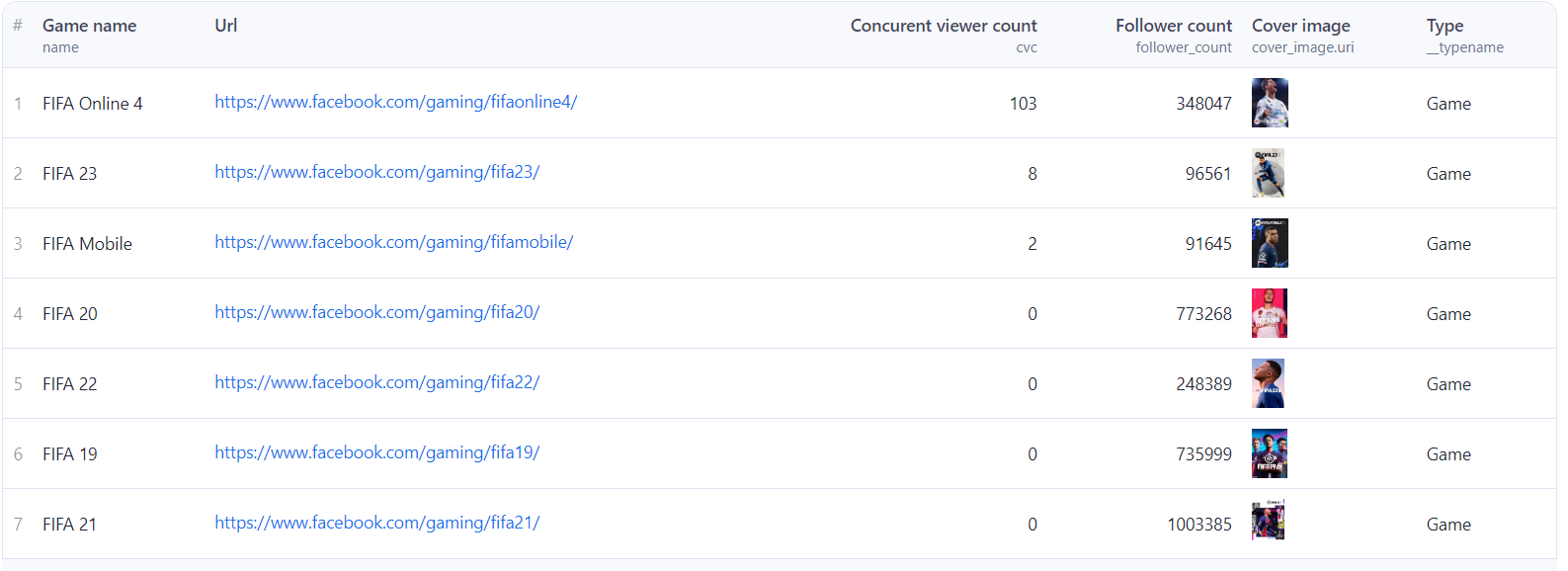
The results will be wrapped into a dataset which you can find in the **Storage** tab. Here's an excerpt from the dataset you'd get if you apply the input parameters above:
![Scrape Facebook games and streams](https://raw.githubusercontent.com/apify-projects/actor-readme-images/440ba5d0fe0a2d730240917d80bdec277fb2e2e0/Facebook_games_final.png)
And here is the same data but in JSON. You can choose in which format to download your Facebook games data: JSON, JSONL, Excel spreadsheet, HTML table, CSV, or XML.

```json
[
    {
        "facebookUrl": "https://www.facebook.com/gaming",
        "id": "418624150298799",
        "can_viewer_follow": false,
        "cover_image": {
            "uri": "https://scontent.fric1-1.fna.fbcdn.net/m1/v/t0.53032-6/An8It-RqtYa9NXtJ5xs1-Jv03xcKSlBBRcmfihZ8m2_LNlV_DL3MvIUcf5jjKO_KMwhvSoXfn0MfUXA4KIVKb_yJ30KHh2swW01z3fGQoDI?ccb=10-5&oh=00_AYBCQA-DVpz9QsW4fGRikiktKRz9QY0q2bbOrcg3Y37dkA&oe=6672AAA0&_nc_sid=cae86a"
        },
        "cvc": 3,
        "follower_count": 95849,
        "game_social_context": {
            "actors": {
                "nodes": []
            }
        },
        "name": "FIFA 23",
        "vanity": "fifa23",
        "url": "https://www.facebook.com/gaming/fifa23/",
        "does_viewer_follow": false,
        "__typename": "Game"
    }
]
```

### Do I need proxies to scrape Facebook Pages?

If you run the scraper on the Apify platform, for successful Facebook scraping you will need [residential proxies](https://apify.com/proxy?pricing=residential-ip#pricing) which are included in Apify's monthly Starter plan **($49)**.

For more details about how our pricing works, platform credits, proxies and usage, see the [platform pricing page](https://apify.com/pricing/actors) or this video guide on ▷ [how to choose the right subscription plan](https://www.youtube.com/watch?v=s_89WpOsKRI).

### What is the best Facebook scraper?

You can use any of the dedicated scrapers below if you want to scrape specific Facebook data. Each of them is built particularly for the relevant Facebook scraping case be it a group, reviews, comments or ads. Feel free to browse them:

<table>
<tr>
<td>🕵️‍♀️ <a href="https://apify.com/apify/facebook-search-scraper">Facebook Search Scraper</a></td>
<td>🗓 <a href="https://apify.com/apify/facebook-events-scraper">Facebook Events Scraper</a></td>
</tr>
<tr>
<td>🌟 <a href="https://apify.com/apify/facebook-reviews-scraper">Facebook Reviews Scraper</a></td>
<td>📝 <a href="https://apify.com/apify/facebook-posts-scraper">Facebook Posts Scraper</a></td>
</tr>
<tr>
<td>💬 <a href="https://apify.com/apify/facebook-comments-scraper">Facebook Comments Scraper</a></td>
<td>👍 <a href="https://apify.com/apify/facebook-likes-scraper">Facebook Likes and Reactions Scraper</a></td>
</tr>
<tr>
<td>👥 <a href="https://apify.com/apify/facebook-groups-scraper">Facebook Groups Scraper</a></td>
<td>🏞 <a href="https://apify.com/apify/facebook-photos-scraper">Facebook Photos Scraper</a></td>
</tr>
<tr>
<td>📢 <a href="https://apify.com/apify/facebook-ads-scraper">Facebook Ads Library Scraper</a></td>
<td>📱 <a href="https://apify.com/apify/facebook-page-contact-information">Facebook Pages Info Scraper</a></td>
</tr>
<tr>
<td>🔮 <a href="https://apify.com/apify/brand-collaboration-scraper">Brand Collaboration Scraper</a></td>
</tr>
</table>

### ❓FAQ

#### Can I integrate Facebook Games Scraper with other apps?

Yes. This Facebook Games Scraper can be connected with almost any cloud service or web app thanks to integrations on the Apify platform. You can **integrate your Facebook Games data with Zapier, Slack, Make, Airbyte, GitHub, Google Sheets, Asana, LangChain** <a  href="https://docs.apify.com/integrations" target="_blank">and more</a>.

You can also use <a  href="https://docs.apify.com/integrations/webhooks"  target="_blank">webhooks</a> to carry out an action whenever an event occurs, e.g., get a notification whenever Facebook Games Scraper successfully finishes a run.

#### Can I use Facebook Games Scraper as its own API?

Yes, you can use the Apify API to access Facebook Games Scraper programmatically. The API allows you to manage, schedule, and run Apify Actors, access datasets, monitor performance, get results, create and update Actor versions, and more.

To access the API using Node.js, you can use the `apify-client` [NPM package](https://apify.com/apify/facebook-games-scraper/api/client/nodejs). To access the API using Python, you can use the `apify-client` [PyPI package](https://apify.com/apify/facebook-games-scraper/api/client/python).

For detailed information and code examples, see the [API tab](https://apify.com/apify/facebook-games-scraper/api) or refer to the [Apify API documentation](https://docs.apify.com/api/v2).

#### Can I use this Facebook Games API in Python?

Yes, you can use the Apify API with Python. To access the Facebook Games [API with Python](https://apify.com/apify/facebook-games-scraper/api/client/python), use the `apify-client` PyPI package. You can find more details about the client in our [Python Client documentation](https://docs.apify.com/api/client/python/).

#### Is it legal to scrape Facebook Games data?

Our [Facebook scrapers](https://apify.com/store?search=facebook) are ethical and **do not extract any private user data**. They only extract what the user has chosen to share publicly. However, you should be aware that your results could contain personal data. You should not scrape personal data unless you have a legitimate reason to do so.

If you're unsure whether your reason is legitimate, consult your lawyers. You can also read our blog post on the [legality of web scraping](https://blog.apify.com/is-web-scraping-legal/) and [ethical scraping](https://blog.apify.com/what-is-ethical-web-scraping-and-how-do-you-do-it/).

#### Not your cup of tea? Build your own games scraper.

Facebook Gaming scraper doesn’t exactly do what you need? You can always build your own! We have various [web scraping templates](https://apify.com/templates) in Python, JavaScript, and TypeScript to get you started. Alternatively, you can write it from scratch using our [open-source library Crawlee](https://crawlee.dev/). You can keep the scraper to yourself or make it public by adding it to Apify Store (and [find users](https://apify.com/partners/actor-developers) for it to make money).

#### Your feedback

We’re always working on improving the performance of our Actors. So if you’ve got any technical feedback for Facebook Games Scraper or simply found a bug, please create an issue on the Actor’s [Issues tab](https://apify.com/apify/facebook-games-scraper/issues).

# Actor input Schema

## `dataType` (type: `string`):

Select section to scrape from

## `resultsLimit` (type: `integer`):

Select the number of games you want to scrape.

## `searchTerm` (type: `string`):

The scraper will extract games data found by this keyword

## Actor input object example

```json
{
  "dataType": "games",
  "resultsLimit": 20
}
```

# Actor output Schema

## `dataset` (type: `string`):

Dataset containing all scraped data

# API

You can run this Actor programmatically using our API. Below are code examples in JavaScript, Python, and CLI, as well as the OpenAPI specification and MCP server setup.

## JavaScript example

```javascript
import { ApifyClient } from 'apify-client';

// Initialize the ApifyClient with your Apify API token
// Replace the '<YOUR_API_TOKEN>' with your token
const client = new ApifyClient({
    token: '<YOUR_API_TOKEN>',
});

// Prepare Actor input
const input = {
    "dataType": "games",
    "resultsLimit": 20
};

// Run the Actor and wait for it to finish
const run = await client.actor("apify/facebook-games-scraper").call(input);

// Fetch and print Actor results from the run's dataset (if any)
console.log('Results from dataset');
console.log(`💾 Check your data here: https://console.apify.com/storage/datasets/${run.defaultDatasetId}`);
const { items } = await client.dataset(run.defaultDatasetId).listItems();
items.forEach((item) => {
    console.dir(item);
});

// 📚 Want to learn more 📖? Go to → https://docs.apify.com/api/client/js/docs

```

## Python example

```python
from apify_client import ApifyClient

# Initialize the ApifyClient with your Apify API token
# Replace '<YOUR_API_TOKEN>' with your token.
client = ApifyClient("<YOUR_API_TOKEN>")

# Prepare the Actor input
run_input = {
    "dataType": "games",
    "resultsLimit": 20,
}

# Run the Actor and wait for it to finish
run = client.actor("apify/facebook-games-scraper").call(run_input=run_input)

# Fetch and print Actor results from the run's dataset (if there are any)
print("💾 Check your data here: https://console.apify.com/storage/datasets/" + run["defaultDatasetId"])
for item in client.dataset(run["defaultDatasetId"]).iterate_items():
    print(item)

# 📚 Want to learn more 📖? Go to → https://docs.apify.com/api/client/python/docs/quick-start

```

## CLI example

```bash
echo '{
  "dataType": "games",
  "resultsLimit": 20
}' |
apify call apify/facebook-games-scraper --silent --output-dataset

```

## MCP server setup

```json
{
    "mcpServers": {
        "apify": {
            "command": "npx",
            "args": [
                "mcp-remote",
                "https://mcp.apify.com/?tools=apify/facebook-games-scraper",
                "--header",
                "Authorization: Bearer <YOUR_API_TOKEN>"
            ]
        }
    }
}

```

## OpenAPI specification

```json
{
    "openapi": "3.0.1",
    "info": {
        "title": "Facebook Games Scraper",
        "description": "Scrape and download Facebook Games names and live streams; followers count, concurrent viewer count, URL, and more. Get data from Facebook Games simply using one search query. Export scraped data, run the scraper via API, schedule and monitor runs, or integrate with other tools.",
        "version": "0.0",
        "x-build-id": "ihmO0QXLXseOEOdcS"
    },
    "servers": [
        {
            "url": "https://api.apify.com/v2"
        }
    ],
    "paths": {
        "/acts/apify~facebook-games-scraper/run-sync-get-dataset-items": {
            "post": {
                "operationId": "run-sync-get-dataset-items-apify-facebook-games-scraper",
                "x-openai-isConsequential": false,
                "summary": "Executes an Actor, waits for its completion, and returns Actor's dataset items in response.",
                "tags": [
                    "Run Actor"
                ],
                "requestBody": {
                    "required": true,
                    "content": {
                        "application/json": {
                            "schema": {
                                "$ref": "#/components/schemas/inputSchema"
                            }
                        }
                    }
                },
                "parameters": [
                    {
                        "name": "token",
                        "in": "query",
                        "required": true,
                        "schema": {
                            "type": "string"
                        },
                        "description": "Enter your Apify token here"
                    }
                ],
                "responses": {
                    "200": {
                        "description": "OK"
                    }
                }
            }
        },
        "/acts/apify~facebook-games-scraper/runs": {
            "post": {
                "operationId": "runs-sync-apify-facebook-games-scraper",
                "x-openai-isConsequential": false,
                "summary": "Executes an Actor and returns information about the initiated run in response.",
                "tags": [
                    "Run Actor"
                ],
                "requestBody": {
                    "required": true,
                    "content": {
                        "application/json": {
                            "schema": {
                                "$ref": "#/components/schemas/inputSchema"
                            }
                        }
                    }
                },
                "parameters": [
                    {
                        "name": "token",
                        "in": "query",
                        "required": true,
                        "schema": {
                            "type": "string"
                        },
                        "description": "Enter your Apify token here"
                    }
                ],
                "responses": {
                    "200": {
                        "description": "OK",
                        "content": {
                            "application/json": {
                                "schema": {
                                    "$ref": "#/components/schemas/runsResponseSchema"
                                }
                            }
                        }
                    }
                }
            }
        },
        "/acts/apify~facebook-games-scraper/run-sync": {
            "post": {
                "operationId": "run-sync-apify-facebook-games-scraper",
                "x-openai-isConsequential": false,
                "summary": "Executes an Actor, waits for completion, and returns the OUTPUT from Key-value store in response.",
                "tags": [
                    "Run Actor"
                ],
                "requestBody": {
                    "required": true,
                    "content": {
                        "application/json": {
                            "schema": {
                                "$ref": "#/components/schemas/inputSchema"
                            }
                        }
                    }
                },
                "parameters": [
                    {
                        "name": "token",
                        "in": "query",
                        "required": true,
                        "schema": {
                            "type": "string"
                        },
                        "description": "Enter your Apify token here"
                    }
                ],
                "responses": {
                    "200": {
                        "description": "OK"
                    }
                }
            }
        }
    },
    "components": {
        "schemas": {
            "inputSchema": {
                "type": "object",
                "properties": {
                    "dataType": {
                        "title": "📜 Gaming section",
                        "enum": [
                            "games",
                            "livestreams"
                        ],
                        "type": "string",
                        "description": "Select section to scrape from",
                        "default": "games"
                    },
                    "resultsLimit": {
                        "title": "✍️ Number of games or live streams",
                        "minimum": 1,
                        "type": "integer",
                        "description": "Select the number of games you want to scrape."
                    },
                    "searchTerm": {
                        "title": "GAMES Search query",
                        "type": "string",
                        "description": "The scraper will extract games data found by this keyword"
                    }
                }
            },
            "runsResponseSchema": {
                "type": "object",
                "properties": {
                    "data": {
                        "type": "object",
                        "properties": {
                            "id": {
                                "type": "string"
                            },
                            "actId": {
                                "type": "string"
                            },
                            "userId": {
                                "type": "string"
                            },
                            "startedAt": {
                                "type": "string",
                                "format": "date-time",
                                "example": "2025-01-08T00:00:00.000Z"
                            },
                            "finishedAt": {
                                "type": "string",
                                "format": "date-time",
                                "example": "2025-01-08T00:00:00.000Z"
                            },
                            "status": {
                                "type": "string",
                                "example": "READY"
                            },
                            "meta": {
                                "type": "object",
                                "properties": {
                                    "origin": {
                                        "type": "string",
                                        "example": "API"
                                    },
                                    "userAgent": {
                                        "type": "string"
                                    }
                                }
                            },
                            "stats": {
                                "type": "object",
                                "properties": {
                                    "inputBodyLen": {
                                        "type": "integer",
                                        "example": 2000
                                    },
                                    "rebootCount": {
                                        "type": "integer",
                                        "example": 0
                                    },
                                    "restartCount": {
                                        "type": "integer",
                                        "example": 0
                                    },
                                    "resurrectCount": {
                                        "type": "integer",
                                        "example": 0
                                    },
                                    "computeUnits": {
                                        "type": "integer",
                                        "example": 0
                                    }
                                }
                            },
                            "options": {
                                "type": "object",
                                "properties": {
                                    "build": {
                                        "type": "string",
                                        "example": "latest"
                                    },
                                    "timeoutSecs": {
                                        "type": "integer",
                                        "example": 300
                                    },
                                    "memoryMbytes": {
                                        "type": "integer",
                                        "example": 1024
                                    },
                                    "diskMbytes": {
                                        "type": "integer",
                                        "example": 2048
                                    }
                                }
                            },
                            "buildId": {
                                "type": "string"
                            },
                            "defaultKeyValueStoreId": {
                                "type": "string"
                            },
                            "defaultDatasetId": {
                                "type": "string"
                            },
                            "defaultRequestQueueId": {
                                "type": "string"
                            },
                            "buildNumber": {
                                "type": "string",
                                "example": "1.0.0"
                            },
                            "containerUrl": {
                                "type": "string"
                            },
                            "usage": {
                                "type": "object",
                                "properties": {
                                    "ACTOR_COMPUTE_UNITS": {
                                        "type": "integer",
                                        "example": 0
                                    },
                                    "DATASET_READS": {
                                        "type": "integer",
                                        "example": 0
                                    },
                                    "DATASET_WRITES": {
                                        "type": "integer",
                                        "example": 0
                                    },
                                    "KEY_VALUE_STORE_READS": {
                                        "type": "integer",
                                        "example": 0
                                    },
                                    "KEY_VALUE_STORE_WRITES": {
                                        "type": "integer",
                                        "example": 1
                                    },
                                    "KEY_VALUE_STORE_LISTS": {
                                        "type": "integer",
                                        "example": 0
                                    },
                                    "REQUEST_QUEUE_READS": {
                                        "type": "integer",
                                        "example": 0
                                    },
                                    "REQUEST_QUEUE_WRITES": {
                                        "type": "integer",
                                        "example": 0
                                    },
                                    "DATA_TRANSFER_INTERNAL_GBYTES": {
                                        "type": "integer",
                                        "example": 0
                                    },
                                    "DATA_TRANSFER_EXTERNAL_GBYTES": {
                                        "type": "integer",
                                        "example": 0
                                    },
                                    "PROXY_RESIDENTIAL_TRANSFER_GBYTES": {
                                        "type": "integer",
                                        "example": 0
                                    },
                                    "PROXY_SERPS": {
                                        "type": "integer",
                                        "example": 0
                                    }
                                }
                            },
                            "usageTotalUsd": {
                                "type": "number",
                                "example": 0.00005
                            },
                            "usageUsd": {
                                "type": "object",
                                "properties": {
                                    "ACTOR_COMPUTE_UNITS": {
                                        "type": "integer",
                                        "example": 0
                                    },
                                    "DATASET_READS": {
                                        "type": "integer",
                                        "example": 0
                                    },
                                    "DATASET_WRITES": {
                                        "type": "integer",
                                        "example": 0
                                    },
                                    "KEY_VALUE_STORE_READS": {
                                        "type": "integer",
                                        "example": 0
                                    },
                                    "KEY_VALUE_STORE_WRITES": {
                                        "type": "number",
                                        "example": 0.00005
                                    },
                                    "KEY_VALUE_STORE_LISTS": {
                                        "type": "integer",
                                        "example": 0
                                    },
                                    "REQUEST_QUEUE_READS": {
                                        "type": "integer",
                                        "example": 0
                                    },
                                    "REQUEST_QUEUE_WRITES": {
                                        "type": "integer",
                                        "example": 0
                                    },
                                    "DATA_TRANSFER_INTERNAL_GBYTES": {
                                        "type": "integer",
                                        "example": 0
                                    },
                                    "DATA_TRANSFER_EXTERNAL_GBYTES": {
                                        "type": "integer",
                                        "example": 0
                                    },
                                    "PROXY_RESIDENTIAL_TRANSFER_GBYTES": {
                                        "type": "integer",
                                        "example": 0
                                    },
                                    "PROXY_SERPS": {
                                        "type": "integer",
                                        "example": 0
                                    }
                                }
                            }
                        }
                    }
                }
            }
        }
    }
}
```
