# Bluesky Profile Scraper (`bytepulselabs/bluesky-profile-scraper`) Actor
Scrape all Bluesky profile info. Add one or more Bluesky handles and extract the number of followers, follows, posts, name, description, and avatar. Export scraped data, run the scraper via API, schedule and monitor runs, or integrate with other tools.
- **URL**: https://apify.com/bytepulselabs/bluesky-profile-scraper.md
- **Developed by:** [BytePulse Labs](https://apify.com/bytepulselabs) (community)
- **Categories:** Social media, Lead generation
- **Stats:** 39 total users, 2 monthly users, 0.0% runs succeeded, 8 bookmarks
- **User rating**: 4.38 out of 5 stars
## Pricing
from $1.40 / 1,000 profiles
This Actor is paid per event. You are not charged for the Apify platform usage, but only a fixed price for specific events.
Since this Actor supports Apify Store discounts, the price gets lower the higher subscription plan you have.
Learn more: https://docs.apify.com/platform/actors/running/actors-in-store#pay-per-event
## What's an Apify Actor?
Actors are a software tools running on the Apify platform, for all kinds of web data extraction and automation use cases.
In Batch mode, an Actor accepts a well-defined JSON input, performs an action which can take anything from a few seconds to a few hours,
and optionally produces a well-defined JSON output, datasets with results, or files in key-value store.
In Standby mode, an Actor provides a web server which can be used as a website, API, or an MCP server.
Actors are written with capital "A".
## How to integrate an Actor?
If asked about integration, you help developers integrate Actors into their projects.
You adapt to their stack and deliver integrations that are safe, well-documented, and production-ready.
The best way to integrate Actors is as follows.
In JavaScript/TypeScript projects, use official [JavaScript/TypeScript client](https://docs.apify.com/api/client/js.md):
```bash
npm install apify-client
```
In Python projects, use official [Python client library](https://docs.apify.com/api/client/python.md):
```bash
pip install apify-client
```
In shell scripts, use [Apify CLI](https://docs.apify.com/cli/docs.md):
````bash
# MacOS / Linux
curl -fsSL https://apify.com/install-cli.sh | bash
# Windows
irm https://apify.com/install-cli.ps1 | iex
```bash
In AI frameworks, you might use the [Apify MCP server](https://docs.apify.com/platform/integrations/mcp.md).
If your project is in a different language, use the [REST API](https://docs.apify.com/api/v2.md).
For usage examples, see the [API](#api) section below.
For more details, see Apify documentation as [Markdown index](https://docs.apify.com/llms.txt) and [Markdown full-text](https://docs.apify.com/llms-full.txt).
# README
### What is Bluesky Profile Scraper?
Bluesky Profile Scraper automates the **extraction of profile data from Bluesky**. Just add one or more Bluesky handles to get all the publicly available profile data you need.
### Why scrape Bluesky profiles?
Bluesky profile data can give you valuable information about popular users anywhere in the world, help you predict trends, track brand awareness, learn how to improve your Bluesky performance, or keep an eye on competing influencers.
### How to scrape Bluesky profiles
Bluesky Profile Scraper is designed to be fast and easy to use so there aren't too many parameters or settings. Just follow the steps below:
1. Create a free Apify account.
2. Open [Bluesky Profile Scraper](https://apify.com/bytepulselabs/bluesky-profile-scraper?fpr=k8fqp).
3. Add one or more Bluesky handles to scrape.
4. Click "Save & Start" and wait for the datasets to be extracted.
5. Download your data in JSON, XML, CSV, Excel, or HTML.
### Input example
The input for Bluesky Profile Scraper should be a **Bluesky user handle**. You can add one or multiple user handles.
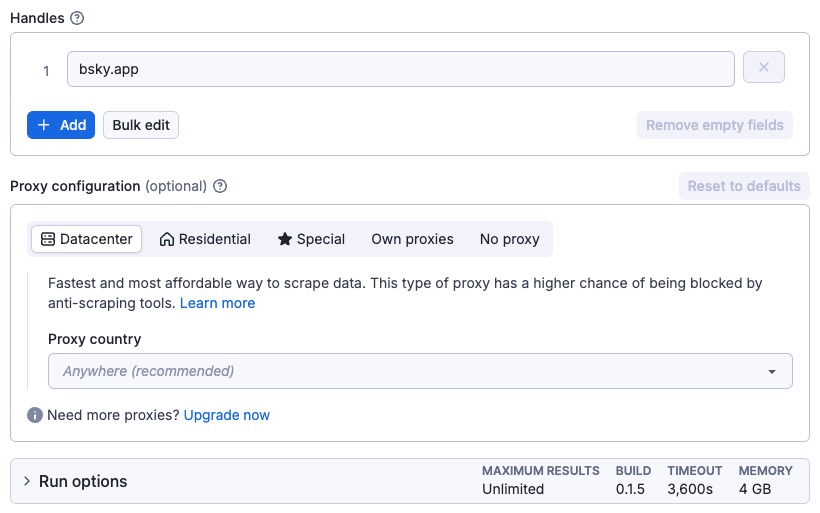
Here’s a sample of scraping the official Bluesky profile.
In JSON it looks like this:
```json
{
"identifiers": ["bsky.app"],
"proxy": {
"useApifyProxy": true
}
}
````
### Output example
The results will be wrapped into a dataset which you can always find in the **Storage** tab. Here's an excerpt from the data you'd get:
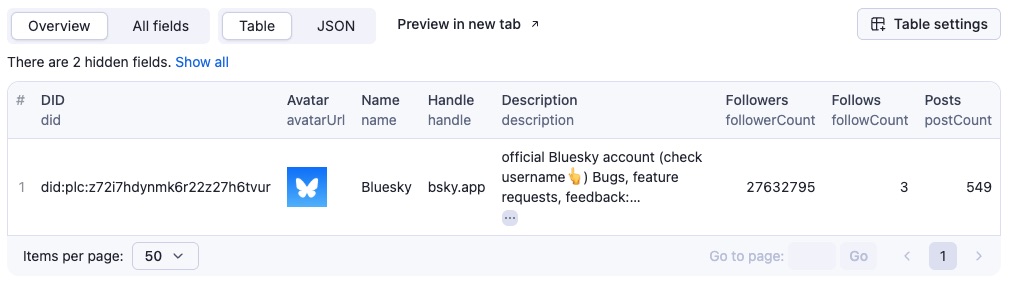
Here is the same data but in JSON. You can download the dataset extracted by Bluesky Profile Scraper in various formats such as JSON, HTML, CSV, or Excel.
```json
{
"did": "did:plc:z72i7hdynmk6r22z27h6tvur",
"name": "Bluesky",
"handle": "bsky.app",
"description": "official Bluesky account (check username👆)\n\nBugs, feature requests, feedback: support@bsky.app",
"followerCount": 27565998,
"followCount": 3,
"postCount": 549,
"avatarUrl": "https://cdn.bsky.app/img/avatar/plain/did:plc:z72i7hdynmk6r22z27h6tvur/bafkreihagr2cmvl2jt4mgx3sppwe2it3fwolkrbtjrhcnwjk4jdijhsoze@jpeg",
"bannerUrl": "https://cdn.bsky.app/img/banner/plain/did:plc:z72i7hdynmk6r22z27h6tvur/bafkreichzyovokfzmymz36p5jibbjrhsur6n7hjnzxrpbt5jaydp2szvna@jpeg",
"createdAt": "2023-04-12T04:53:57.057Z"
}
```
### Integrate Bluesky Profile Scraper and automate your workflow
Last but not least, Bluesky Profile Scraper can be connected with almost any cloud service or web app thanks to [integrations](https://apify.com/integrations?fpr=k8fqp) on the Apify platform.
These include:
- [Make](https://docs.apify.com/platform/integrations/make?fpr=k8fqp)
- [Zapier](https://docs.apify.com/platform/integrations/zapier?fpr=k8fqp)
- [Slack](https://docs.apify.com/platform/integrations/slack?fpr=k8fqp)
- [Airbyte](https://docs.apify.com/platform/integrations/airbyte?fpr=k8fqp)
- [GitHub](https://docs.apify.com/platform/integrations/github?fpr=k8fqp)
- [Google Drive](https://docs.apify.com/platform/integrations/drive?fpr=k8fqp)
- and [much more](https://docs.apify.com/platform/integrations?fpr=k8fqp).
Alternatively, you can use [webhooks](https://docs.apify.com/platform/integrations/webhooks?fpr=k8fqp) to carry out an action whenever an event occurs. For example, you can get a notification whenever Bluesky Profile Scraper successfully finishes a run.
### Want to scrape Bluesky posts, profiles, or followers?
You can use the other dedicated scrapers below if you want to scrape specific Bluesky data. You'll have fewer settings to change and faster results. Just enter one or more Bluesky handles or URLs and click to scrape.
### Your feedback
We’re always working on improving our Actors' performance. If you have any technical feedback for Bluesky Profile Scraper or simply found a bug, please create an issue on the Actor’s [Issues tab](https://apify.com/bytepulselabs/bluesky-profile-scraper/issues?fpr=k8fqp) in Apify Console.
### FAQ
#### How can I use Bluesky Profile Scraper with the Apify API?
The Apify API gives you programmatic access to the Apify platform. [The API](https://apify.com/bytepulselabs/bluesky-profile-scraper/api?fpr=k8fqp) is organized around RESTful HTTP endpoints that enable you to manage, schedule, and run Apify actors. The API also lets you access any datasets, monitor actor performance, fetch results, create and update versions, and more.
To access the API using Node.js, use the `apify-client` NPM package. To access the API using Python, use the `apify-client` PyPI package.
Check out the [Apify API reference](https://docs.apify.com/api/v2?fpr=k8fqp) docs for full details or click on the [Bluesky Profile Scraper API tab](https://apify.com/bytepulselabs/bluesky-profile-scraper/api?fpr=k8fqp) for code examples.
#### How much does it cost to use Bluesky Profile Scraper?
Bluesky Profile Scraper uses the **Pay-per-result** pricing model, so your costs can be easily calculated: it will cost you **$2.5 to scrape 1,000 results**, so $0.0025 per item.
Given that with the [Apify Free plan](https://apify.com/pricing?fpr=k8fqp), you get **$5 in credits monthly for free**, this tool might be your best free YouTube video downloader of all.
# Actor input Schema
## `identifiers` (type: `array`):
Bluesky handles you want to scrape data from.
## `proxy` (type: `object`):
Select proxies to be used by your scraper.
## Actor input object example
```json
{
"identifiers": [
"calabro.io"
],
"proxy": {
"useApifyProxy": true
}
}
```
# Actor output Schema
## `profiles` (type: `string`):
No description
# API
You can run this Actor programmatically using our API. Below are code examples in JavaScript, Python, and CLI, as well as the OpenAPI specification and MCP server setup.
## JavaScript example
```javascript
import { ApifyClient } from 'apify-client';
// Initialize the ApifyClient with your Apify API token
// Replace the '' with your token
const client = new ApifyClient({
token: '',
});
// Prepare Actor input
const input = {
"identifiers": [
"calabro.io"
],
"proxy": {
"useApifyProxy": true
}
};
// Run the Actor and wait for it to finish
const run = await client.actor("bytepulselabs/bluesky-profile-scraper").call(input);
// Fetch and print Actor results from the run's dataset (if any)
console.log('Results from dataset');
console.log(`💾 Check your data here: https://console.apify.com/storage/datasets/${run.defaultDatasetId}`);
const { items } = await client.dataset(run.defaultDatasetId).listItems();
items.forEach((item) => {
console.dir(item);
});
// 📚 Want to learn more 📖? Go to → https://docs.apify.com/api/client/js/docs
```
## Python example
```python
from apify_client import ApifyClient
# Initialize the ApifyClient with your Apify API token
# Replace '' with your token.
client = ApifyClient("")
# Prepare the Actor input
run_input = {
"identifiers": ["calabro.io"],
"proxy": { "useApifyProxy": True },
}
# Run the Actor and wait for it to finish
run = client.actor("bytepulselabs/bluesky-profile-scraper").call(run_input=run_input)
# Fetch and print Actor results from the run's dataset (if there are any)
print("💾 Check your data here: https://console.apify.com/storage/datasets/" + run["defaultDatasetId"])
for item in client.dataset(run["defaultDatasetId"]).iterate_items():
print(item)
# 📚 Want to learn more 📖? Go to → https://docs.apify.com/api/client/python/docs/quick-start
```
## CLI example
```bash
echo '{
"identifiers": [
"calabro.io"
],
"proxy": {
"useApifyProxy": true
}
}' |
apify call bytepulselabs/bluesky-profile-scraper --silent --output-dataset
```
## MCP server setup
```json
{
"mcpServers": {
"apify": {
"command": "npx",
"args": [
"mcp-remote",
"https://mcp.apify.com/?tools=bytepulselabs/bluesky-profile-scraper",
"--header",
"Authorization: Bearer "
]
}
}
}
```
## OpenAPI specification
```json
{
"openapi": "3.0.1",
"info": {
"title": "Bluesky Profile Scraper",
"description": "Scrape all Bluesky profile info. Add one or more Bluesky handles and extract the number of followers, follows, posts, name, description, and avatar. Export scraped data, run the scraper via API, schedule and monitor runs, or integrate with other tools.",
"version": "0.1",
"x-build-id": "MXN410JvfIiePO27E"
},
"servers": [
{
"url": "https://api.apify.com/v2"
}
],
"paths": {
"/acts/bytepulselabs~bluesky-profile-scraper/run-sync-get-dataset-items": {
"post": {
"operationId": "run-sync-get-dataset-items-bytepulselabs-bluesky-profile-scraper",
"x-openai-isConsequential": false,
"summary": "Executes an Actor, waits for its completion, and returns Actor's dataset items in response.",
"tags": [
"Run Actor"
],
"requestBody": {
"required": true,
"content": {
"application/json": {
"schema": {
"$ref": "#/components/schemas/inputSchema"
}
}
}
},
"parameters": [
{
"name": "token",
"in": "query",
"required": true,
"schema": {
"type": "string"
},
"description": "Enter your Apify token here"
}
],
"responses": {
"200": {
"description": "OK"
}
}
}
},
"/acts/bytepulselabs~bluesky-profile-scraper/runs": {
"post": {
"operationId": "runs-sync-bytepulselabs-bluesky-profile-scraper",
"x-openai-isConsequential": false,
"summary": "Executes an Actor and returns information about the initiated run in response.",
"tags": [
"Run Actor"
],
"requestBody": {
"required": true,
"content": {
"application/json": {
"schema": {
"$ref": "#/components/schemas/inputSchema"
}
}
}
},
"parameters": [
{
"name": "token",
"in": "query",
"required": true,
"schema": {
"type": "string"
},
"description": "Enter your Apify token here"
}
],
"responses": {
"200": {
"description": "OK",
"content": {
"application/json": {
"schema": {
"$ref": "#/components/schemas/runsResponseSchema"
}
}
}
}
}
}
},
"/acts/bytepulselabs~bluesky-profile-scraper/run-sync": {
"post": {
"operationId": "run-sync-bytepulselabs-bluesky-profile-scraper",
"x-openai-isConsequential": false,
"summary": "Executes an Actor, waits for completion, and returns the OUTPUT from Key-value store in response.",
"tags": [
"Run Actor"
],
"requestBody": {
"required": true,
"content": {
"application/json": {
"schema": {
"$ref": "#/components/schemas/inputSchema"
}
}
}
},
"parameters": [
{
"name": "token",
"in": "query",
"required": true,
"schema": {
"type": "string"
},
"description": "Enter your Apify token here"
}
],
"responses": {
"200": {
"description": "OK"
}
}
}
}
},
"components": {
"schemas": {
"inputSchema": {
"type": "object",
"required": [
"identifiers"
],
"properties": {
"identifiers": {
"title": "Handles",
"type": "array",
"description": "Bluesky handles you want to scrape data from.",
"items": {
"type": "string"
}
},
"proxy": {
"title": "Proxy configuration",
"type": "object",
"description": "Select proxies to be used by your scraper."
}
}
},
"runsResponseSchema": {
"type": "object",
"properties": {
"data": {
"type": "object",
"properties": {
"id": {
"type": "string"
},
"actId": {
"type": "string"
},
"userId": {
"type": "string"
},
"startedAt": {
"type": "string",
"format": "date-time",
"example": "2025-01-08T00:00:00.000Z"
},
"finishedAt": {
"type": "string",
"format": "date-time",
"example": "2025-01-08T00:00:00.000Z"
},
"status": {
"type": "string",
"example": "READY"
},
"meta": {
"type": "object",
"properties": {
"origin": {
"type": "string",
"example": "API"
},
"userAgent": {
"type": "string"
}
}
},
"stats": {
"type": "object",
"properties": {
"inputBodyLen": {
"type": "integer",
"example": 2000
},
"rebootCount": {
"type": "integer",
"example": 0
},
"restartCount": {
"type": "integer",
"example": 0
},
"resurrectCount": {
"type": "integer",
"example": 0
},
"computeUnits": {
"type": "integer",
"example": 0
}
}
},
"options": {
"type": "object",
"properties": {
"build": {
"type": "string",
"example": "latest"
},
"timeoutSecs": {
"type": "integer",
"example": 300
},
"memoryMbytes": {
"type": "integer",
"example": 1024
},
"diskMbytes": {
"type": "integer",
"example": 2048
}
}
},
"buildId": {
"type": "string"
},
"defaultKeyValueStoreId": {
"type": "string"
},
"defaultDatasetId": {
"type": "string"
},
"defaultRequestQueueId": {
"type": "string"
},
"buildNumber": {
"type": "string",
"example": "1.0.0"
},
"containerUrl": {
"type": "string"
},
"usage": {
"type": "object",
"properties": {
"ACTOR_COMPUTE_UNITS": {
"type": "integer",
"example": 0
},
"DATASET_READS": {
"type": "integer",
"example": 0
},
"DATASET_WRITES": {
"type": "integer",
"example": 0
},
"KEY_VALUE_STORE_READS": {
"type": "integer",
"example": 0
},
"KEY_VALUE_STORE_WRITES": {
"type": "integer",
"example": 1
},
"KEY_VALUE_STORE_LISTS": {
"type": "integer",
"example": 0
},
"REQUEST_QUEUE_READS": {
"type": "integer",
"example": 0
},
"REQUEST_QUEUE_WRITES": {
"type": "integer",
"example": 0
},
"DATA_TRANSFER_INTERNAL_GBYTES": {
"type": "integer",
"example": 0
},
"DATA_TRANSFER_EXTERNAL_GBYTES": {
"type": "integer",
"example": 0
},
"PROXY_RESIDENTIAL_TRANSFER_GBYTES": {
"type": "integer",
"example": 0
},
"PROXY_SERPS": {
"type": "integer",
"example": 0
}
}
},
"usageTotalUsd": {
"type": "number",
"example": 0.00005
},
"usageUsd": {
"type": "object",
"properties": {
"ACTOR_COMPUTE_UNITS": {
"type": "integer",
"example": 0
},
"DATASET_READS": {
"type": "integer",
"example": 0
},
"DATASET_WRITES": {
"type": "integer",
"example": 0
},
"KEY_VALUE_STORE_READS": {
"type": "integer",
"example": 0
},
"KEY_VALUE_STORE_WRITES": {
"type": "number",
"example": 0.00005
},
"KEY_VALUE_STORE_LISTS": {
"type": "integer",
"example": 0
},
"REQUEST_QUEUE_READS": {
"type": "integer",
"example": 0
},
"REQUEST_QUEUE_WRITES": {
"type": "integer",
"example": 0
},
"DATA_TRANSFER_INTERNAL_GBYTES": {
"type": "integer",
"example": 0
},
"DATA_TRANSFER_EXTERNAL_GBYTES": {
"type": "integer",
"example": 0
},
"PROXY_RESIDENTIAL_TRANSFER_GBYTES": {
"type": "integer",
"example": 0
},
"PROXY_SERPS": {
"type": "integer",
"example": 0
}
}
}
}
}
}
}
}
}
}
```
 Bluesky Post Scraper
 Bluesky Profile Scraper
 Bluesky Follow Scraper
 Bluesky Follower Scraper
 Bluesky Video Downloader