# Image to 3D Model Generator (Photo to 3D Object) (`danitn11/image-to-3d`) Actor
Turn any image into a high-quality, fully textured 3D object in under a minute, from $0.15/model. Ready for Blender, Unity, Unreal, three.js, AR/VR & 3D printing. No GPU or subscription — fast, cheap, pay-as-you-go.
- **URL**: https://apify.com/danitn11/image-to-3d.md
- **Developed by:** [daniel tr](https://apify.com/danitn11) (community)
- **Categories:** Automation, Developer tools, AI
- **Stats:** 3 total users, 2 monthly users, 66.7% runs succeeded, 0 bookmarks
- **User rating**: No ratings yet
## Pricing
from $150.00 / 1,000 3d model generateds
This Actor is paid per event and usage. You are charged both the fixed price for specific events and for Apify platform usage.
Since this Actor supports Apify Store discounts, the price gets lower the higher subscription plan you have.
Learn more: https://docs.apify.com/platform/actors/running/actors-in-store#pay-per-event
## What's an Apify Actor?
Actors are a software tools running on the Apify platform, for all kinds of web data extraction and automation use cases.
In Batch mode, an Actor accepts a well-defined JSON input, performs an action which can take anything from a few seconds to a few hours,
and optionally produces a well-defined JSON output, datasets with results, or files in key-value store.
In Standby mode, an Actor provides a web server which can be used as a website, API, or an MCP server.
Actors are written with capital "A".
## How to integrate an Actor?
If asked about integration, you help developers integrate Actors into their projects.
You adapt to their stack and deliver integrations that are safe, well-documented, and production-ready.
The best way to integrate Actors is as follows.
In JavaScript/TypeScript projects, use official [JavaScript/TypeScript client](https://docs.apify.com/api/client/js.md):
```bash
npm install apify-client
```
In Python projects, use official [Python client library](https://docs.apify.com/api/client/python.md):
```bash
pip install apify-client
```
In shell scripts, use [Apify CLI](https://docs.apify.com/cli/docs.md):
````bash
# MacOS / Linux
curl -fsSL https://apify.com/install-cli.sh | bash
# Windows
irm https://apify.com/install-cli.ps1 | iex
```bash
In AI frameworks, you might use the [Apify MCP server](https://docs.apify.com/platform/integrations/mcp.md).
If your project is in a different language, use the [REST API](https://docs.apify.com/api/v2.md).
For usage examples, see the [API](#api) section below.
For more details, see Apify documentation as [Markdown index](https://docs.apify.com/llms.txt) and [Markdown full-text](https://docs.apify.com/llms-full.txt).
# README
## Image to 3D Model Generator — Photo to 3D Object 🧊
**Turn any image into a high-quality 3D object in under a minute** — for just cents per model. Drop in a single photo and get back a clean, **fully textured 3D model**. No GPU, no subscription, no monthly fees — you pay a small fixed price, and only for models you keep.
- 🎯 **Quality** — detailed, fully textured meshes reconstructed from one ordinary photo.
- 💸 **Cheap** — from **$0.15 per model**, pay-as-you-go — a fraction of subscription tools.
- ⚡ **Fast** — a usable 3D object in about a minute, no render farm and no waiting hours.
Ready for **Blender, Unity, Unreal Engine, Godot, three.js / web, AR/VR, and 3D printing** — perfect for game assets, e-commerce 3D product views, prototyping, and automated **n8n / Make / Zapier** workflows and AI agents.
### Demo
| Source image | Generated 3D model |
| --- | --- |
|  |
| 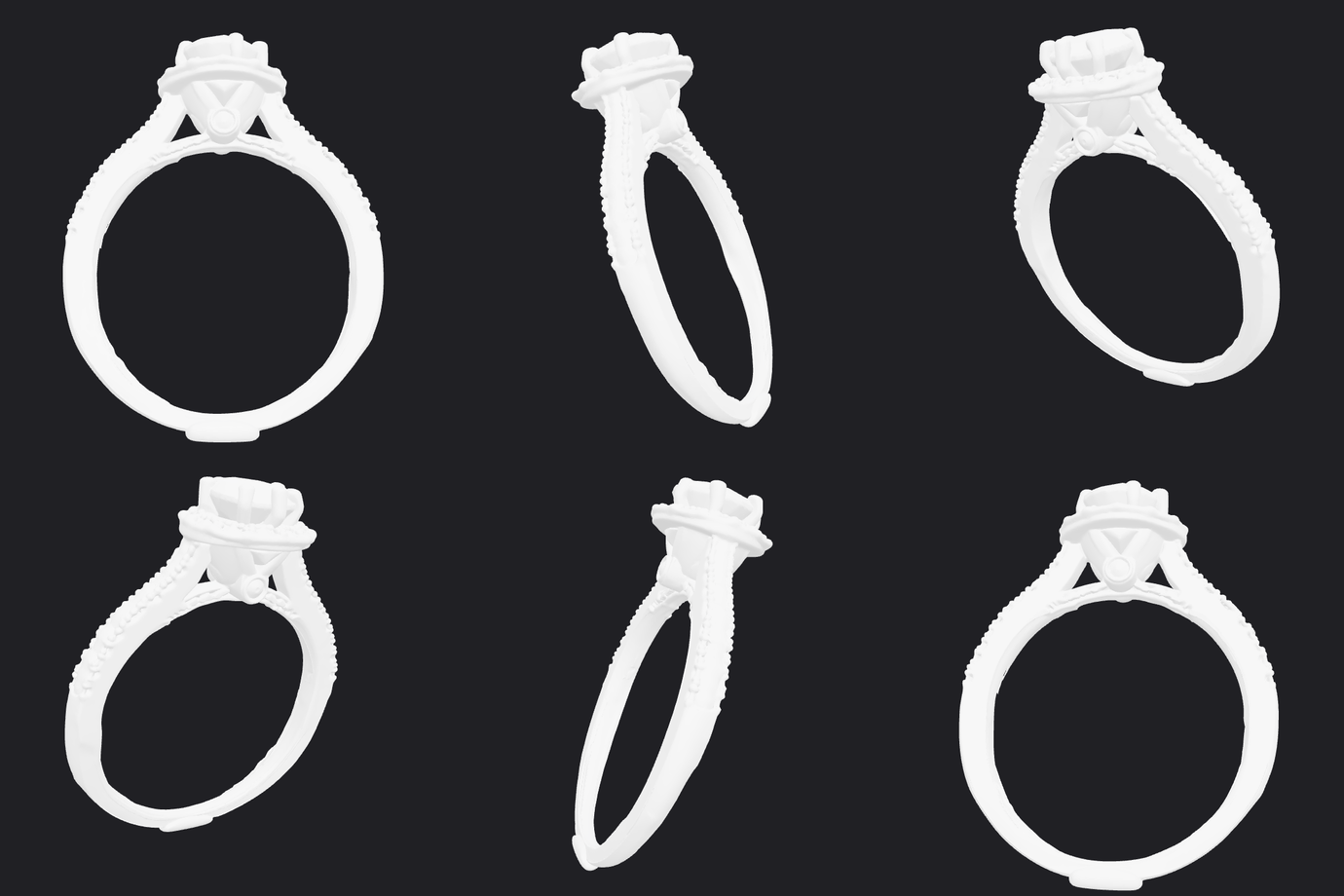 |
*One photo in, a `.glb` 3D model out in ~55 seconds — ~200K triangles, fully rotatable. The turntable above is a render of the actual generated file.*
👉 **[Open the generated `.glb` in an interactive 3D viewer](https://3dviewer.net/#model=https://api.apify.com/v2/key-value-stores/CvnFr129xhdGVH4NY/records/ring.glb?signature=dVHvyWXV0Y48XIOmd4Fh)** (drag to orbit) — or [download the `.glb`](https://api.apify.com/v2/key-value-stores/CvnFr129xhdGVH4NY/records/ring.glb?signature=dVHvyWXV0Y48XIOmd4Fh) and drop it into Blender, Unity, or Unreal.
> **Note:** the Apify Store and GitHub render this README as static Markdown, so an interactive 3D canvas can't be embedded directly — the animated turntable is the inline preview, and the link above opens the live, rotatable model.
### How it works
1. Provide a public **image URL** — ideally a clear photo of a single object on a plain background.
2. The model reconstructs the object as a textured 3D mesh.
3. The Actor stores the result as a **`.glb`** file in the run's dataset and key-value store.
4. Download the model from the output, or pipe the URL into the next step of your workflow (Blender, a game engine, a web viewer, a slicer).
### Why this Actor?
- ⚡ **Fast** — get a usable 3D model in about a minute, no local GPU required (most desktop photogrammetry or manual modeling takes hours).
- 💸 **Cheap** — from **$0.15 per model**. Pay only for successful models; failed runs are never charged.
- 🧊 **Standard format** — outputs **GLB** (glTF binary), the universal 3D format that imports cleanly into Blender, Unity, Unreal, Godot, three.js, and AR/VR tools.
- 🖼️ **Single-image input** — no turntable, no multi-angle capture; one good photo is enough.
- 🔌 **Automation-ready** — call it from the Apify API, n8n, Make, Zapier, LangChain, or any AI agent via MCP.
### How it compares
| | This Actor | Meshy / Tripo / Rodin |
| --- | --- | --- |
| Pricing model | Pay per model (from $0.15) | Monthly subscription / credits |
| Commitment | None — pay only for what you run | Recurring plan, credits expire |
| Failed runs | Never charged | Often consume credits |
| Input | A single image URL | Image or text, varies |
| Output | GLB (glTF binary) | Varies / export-gated tiers |
| API & automation | Native Apify API, n8n, Make, Zapier, MCP | Varies / limited |
Great when you want **image-to-3D on demand** without a subscription — ideal for occasional use, automated asset pipelines, and pay-as-you-go scaling.
### Input example
```json
{
"imageUrl": "https://cdn.doggi-dev.net/ofai/plan_plan-cf945bca478a4ad5ac3e48a93130da47/output.jpg"
}
````
### Output example
```json
{
"modelUrl": "https://api.apify.com/v2/key-value-stores/.../records/model.glb?signature=...",
"glbUrl": "https://cdn.doggi-dev.net/media-gen-gateway/model_req-abc123.glb",
"sourceImageUrl": "https://cdn.doggi-dev.net/ofai/plan_plan-cf945bca478a4ad5ac3e48a93130da47/output.jpg",
"fileSizeBytes": 2483712,
"requestId": "req-...",
"contentType": "model/gltf-binary"
}
```
The `model.glb` file is also saved in the run's key-value store, so you always get a stable, signed download URL.
### What's in the output file
Each run produces a single **GLB** (glTF 2.0 binary) with geometry, textures, and materials in one self-contained file:
| Property | Detail |
| --- | --- |
| **Format** | GLB / glTF 2.0 binary — one self-contained file, nothing to unpack |
| **Geometry** | ~190K triangles (typically 185K–200K), with vertex **normals** and **UV coordinates** |
| **Materials** | PBR **metallic-roughness** — base-color map + metallic-roughness map |
| **Textures** | Embedded, **2048×2048**, JPEG for opaque maps and PNG where transparency is present |
| **Compatibility** | **No required glTF extensions** — loads as-is in Blender, Unity, Unreal, Godot, three.js, and web/online viewers |
| **File size** | Typically ~8–20 MB |
> **No real-world scale:** the model is reconstructed from a single image, so it has no inherent units or dimensions — scale it to taste in your tool. Textures are standard JPEG/PNG (not WebP), so the file imports cleanly into engines and viewers that don't support the `EXT_texture_webp` extension.
### Pricing
You are charged **per generated 3D model** at a price that drops with your Apify plan.
| Apify plan | Price per model |
| --- | --- |
| Free | $0.20 |
| Bronze | $0.18 |
| Silver | $0.17 |
| Gold / Platinum / Diamond | $0.15 |
**Failed generations are never charged** — you only pay for models you actually receive. (Apify also applies its standard tiny platform fees for the Actor start and each dataset record.)
### Tips for great results
- **One object, plain background** — a single, well-lit subject on a clean background reconstructs far better than a busy scene.
- **Fill the frame** — the object should be the clear focus of the image, not lost in the distance.
- **Avoid heavy occlusion** — parts hidden behind other objects can't be reconstructed.
- **Even lighting** — soft, even light avoids baked-in harsh shadows on the texture.
### Working with the GLB
`.glb` is **glTF binary** — geometry, textures, and materials in one self-contained file. It opens directly in:
- **Blender** — *File → Import → glTF 2.0 (.glb)*.
- **Unity** — via glTFast / UnityGLTF.
- **Unreal Engine** — *Import* (glTF runtime or the built-in importer).
- **Godot** — drag the `.glb` straight into the project.
- **three.js / web** — `GLTFLoader`, or preview in any online glTF viewer.
- **AR/VR & 3D printing** — convert to USDZ for iOS AR, or to STL/3MF for slicing.
### Use it from the API
**Run and get the model back in one call** (waits for the run to finish, then returns the dataset items including `modelUrl`):
```bash
curl -X POST "https://api.apify.com/v2/acts/danitn11~image-to-3d/run-sync-get-dataset-items?token=YOUR_TOKEN" \
-H "Content-Type: application/json" \
-d '{ "imageUrl": "https://cdn.doggi-dev.net/ofai/plan_plan-cf945bca478a4ad5ac3e48a93130da47/output.jpg" }'
```
Prefer to start a run and poll asynchronously? Use the standard run endpoint instead, then fetch the dataset when it finishes:
```bash
curl -X POST "https://api.apify.com/v2/acts/danitn11~image-to-3d/runs?token=YOUR_TOKEN" \
-H "Content-Type: application/json" \
-d '{ "imageUrl": "https://cdn.doggi-dev.net/ofai/plan_plan-cf945bca478a4ad5ac3e48a93130da47/output.jpg" }'
```
Works the same from the [Apify n8n node](https://apify.com/integrations), Make, Zapier, LangChain, or the Apify MCP server for AI agents.
For the full request/response shape (run-sync, async, polling, downloading the model), see the OpenAPI spec at [`openapi.yaml`](./openapi.yaml) — import it into Postman, Insomnia, or any OpenAPI client.
### Templates & integrations
Drop this Actor into a no-code workflow to automate 3D asset creation end to end. In each tool, search for the **Apify** connector, authenticate with your [Apify API token](https://console.apify.com/account/integrations), and select **`danitn11/image-to-3d`** with the action **Run Actor** (or **Run Actor and get dataset items** to receive the model URL back).
- **n8n** — add the **Apify** node → *Run Actor*, map `imageUrl` from a previous step (e.g. a new row in a Sheet or an uploaded product photo), then push the resulting `modelUrl` to your storage or 3D-viewer node.
- **Make.com** — use the **Apify › Run an Actor** module, then a *Watch / Get dataset items* module to read back `modelUrl`. Chain into Google Drive, an asset store, or a product page.
- **Zapier** — trigger (new row, form submission, etc.) → **Apify: Run Actor** → action (save to Drive, attach to a listing, notify a channel).
**Common pattern — automated 3D asset pipeline:**
```
New product photo (Sheet / form / webhook)
→ Run this Actor (imageUrl)
→ Get modelUrl (.glb)
→ Save to asset store / attach to listing / load in a 3D viewer
```
### Use with AI agents (MCP server)
This Actor works as a tool for any MCP-compatible AI agent (Claude, Cursor, VS Code Copilot, custom agents) through [Apify's hosted MCP server](https://mcp.apify.com). Your agent can turn an image into a 3D model as part of a larger task — "build a 3D asset from this photo" — with billing through your Apify account.
**Server URL** (with this Actor preselected as a tool):
```
https://mcp.apify.com?tools=danitn11/image-to-3d
```
Authenticate with OAuth (you'll be redirected on first connect) or an `Authorization: Bearer ` header.
**Claude Code**
```bash
claude mcp add --transport http apify "https://mcp.apify.com?tools=danitn11/image-to-3d" -H "Authorization: Bearer "
```
**Claude Desktop / claude.ai** — add a custom connector with the server URL above (OAuth flow handles auth).
**Cursor / VS Code** — add to `.cursor/mcp.json` (or "MCP: Open User Configuration" in VS Code):
```json
{
"mcpServers": {
"apify": {
"url": "https://mcp.apify.com?tools=danitn11/image-to-3d",
"headers": { "Authorization": "Bearer " }
}
}
}
```
**Local stdio (npx)**
```json
{
"mcpServers": {
"apify": {
"command": "npx",
"args": ["-y", "@apify/actors-mcp-server", "--tools", "danitn11/image-to-3d"],
"env": { "APIFY_TOKEN": "" }
}
}
}
```
Then just ask your agent: *"Turn this product photo into a 3D model."* The agent calls the Actor, waits for the result, and gets back the model URL from the output schema.
### FAQ
**How long does it take to generate a 3D model?**
Usually under a minute or two on dedicated GPUs, depending on the image.
**What output format do I get?**
A single **GLB** (`.glb`, glTF binary) file containing the mesh and textures — the universal 3D format supported by Blender, Unity, Unreal, Godot, three.js, and AR/VR tools.
**What image formats can I use as input?**
JPG, PNG, and WebP via a publicly accessible, directly downloadable URL.
**What kind of image works best?**
A clear, well-lit photo of a **single object on a plain background**, filling most of the frame. Busy scenes, heavy occlusion, and tiny subjects reduce quality.
**Can I generate more than one model per run?**
Each run produces one model from one image. To process many images, start one run per image (easy to fan out from n8n, Make, Zapier, or the API).
**What model is used?**
A state-of-the-art image-to-3D reconstruction model, served on dedicated GPUs. You don't need to manage models or infrastructure — just send an image URL and get a `.glb` back.
# Actor input Schema
## `imageUrl` (type: `string`):
Publicly accessible URL of the image to turn into a 3D model (JPG, PNG, or WebP). A clear photo of a single object on a plain, uncluttered background gives the best result. Must be directly downloadable — no Google Drive share links, localhost, or auth-gated URLs. Example: https://cdn.doggi-dev.net/ofai/plan\_plan-cf945bca478a4ad5ac3e48a93130da47/output.jpg
## Actor input object example
```json
{
"imageUrl": "https://cdn.doggi-dev.net/ofai/plan_plan-cf945bca478a4ad5ac3e48a93130da47/output.jpg"
}
```
# Actor output Schema
## `model3d` (type: `string`):
The generated GLB 3D model stored in the run's key-value store, ready to download or import.
## `results` (type: `string`):
Dataset records with the model URL, source image, file size, and request ID.
# API
You can run this Actor programmatically using our API. Below are code examples in JavaScript, Python, and CLI, as well as the OpenAPI specification and MCP server setup.
## JavaScript example
```javascript
import { ApifyClient } from 'apify-client';
// Initialize the ApifyClient with your Apify API token
// Replace the '' with your token
const client = new ApifyClient({
token: '',
});
// Prepare Actor input
const input = {
"imageUrl": "https://cdn.doggi-dev.net/ofai/plan_plan-cf945bca478a4ad5ac3e48a93130da47/output.jpg"
};
// Run the Actor and wait for it to finish
const run = await client.actor("danitn11/image-to-3d").call(input);
// Fetch and print Actor results from the run's dataset (if any)
console.log('Results from dataset');
console.log(`💾 Check your data here: https://console.apify.com/storage/datasets/${run.defaultDatasetId}`);
const { items } = await client.dataset(run.defaultDatasetId).listItems();
items.forEach((item) => {
console.dir(item);
});
// 📚 Want to learn more 📖? Go to → https://docs.apify.com/api/client/js/docs
```
## Python example
```python
from apify_client import ApifyClient
# Initialize the ApifyClient with your Apify API token
# Replace '' with your token.
client = ApifyClient("")
# Prepare the Actor input
run_input = { "imageUrl": "https://cdn.doggi-dev.net/ofai/plan_plan-cf945bca478a4ad5ac3e48a93130da47/output.jpg" }
# Run the Actor and wait for it to finish
run = client.actor("danitn11/image-to-3d").call(run_input=run_input)
# Fetch and print Actor results from the run's dataset (if there are any)
print("💾 Check your data here: https://console.apify.com/storage/datasets/" + run["defaultDatasetId"])
for item in client.dataset(run["defaultDatasetId"]).iterate_items():
print(item)
# 📚 Want to learn more 📖? Go to → https://docs.apify.com/api/client/python/docs/quick-start
```
## CLI example
```bash
echo '{
"imageUrl": "https://cdn.doggi-dev.net/ofai/plan_plan-cf945bca478a4ad5ac3e48a93130da47/output.jpg"
}' |
apify call danitn11/image-to-3d --silent --output-dataset
```
## MCP server setup
```json
{
"mcpServers": {
"apify": {
"command": "npx",
"args": [
"mcp-remote",
"https://mcp.apify.com/?tools=danitn11/image-to-3d",
"--header",
"Authorization: Bearer "
]
}
}
}
```
## OpenAPI specification
```json
{
"openapi": "3.0.1",
"info": {
"title": "Image to 3D Model Generator (Photo to 3D Object)",
"description": "Turn any image into a high-quality, fully textured 3D object in under a minute, from $0.15/model. Ready for Blender, Unity, Unreal, three.js, AR/VR & 3D printing. No GPU or subscription — fast, cheap, pay-as-you-go.",
"version": "0.1",
"x-build-id": "OlvKousysgH1mAl3O"
},
"servers": [
{
"url": "https://api.apify.com/v2"
}
],
"paths": {
"/acts/danitn11~image-to-3d/run-sync-get-dataset-items": {
"post": {
"operationId": "run-sync-get-dataset-items-danitn11-image-to-3d",
"x-openai-isConsequential": false,
"summary": "Executes an Actor, waits for its completion, and returns Actor's dataset items in response.",
"tags": [
"Run Actor"
],
"requestBody": {
"required": true,
"content": {
"application/json": {
"schema": {
"$ref": "#/components/schemas/inputSchema"
}
}
}
},
"parameters": [
{
"name": "token",
"in": "query",
"required": true,
"schema": {
"type": "string"
},
"description": "Enter your Apify token here"
}
],
"responses": {
"200": {
"description": "OK"
}
}
}
},
"/acts/danitn11~image-to-3d/runs": {
"post": {
"operationId": "runs-sync-danitn11-image-to-3d",
"x-openai-isConsequential": false,
"summary": "Executes an Actor and returns information about the initiated run in response.",
"tags": [
"Run Actor"
],
"requestBody": {
"required": true,
"content": {
"application/json": {
"schema": {
"$ref": "#/components/schemas/inputSchema"
}
}
}
},
"parameters": [
{
"name": "token",
"in": "query",
"required": true,
"schema": {
"type": "string"
},
"description": "Enter your Apify token here"
}
],
"responses": {
"200": {
"description": "OK",
"content": {
"application/json": {
"schema": {
"$ref": "#/components/schemas/runsResponseSchema"
}
}
}
}
}
}
},
"/acts/danitn11~image-to-3d/run-sync": {
"post": {
"operationId": "run-sync-danitn11-image-to-3d",
"x-openai-isConsequential": false,
"summary": "Executes an Actor, waits for completion, and returns the OUTPUT from Key-value store in response.",
"tags": [
"Run Actor"
],
"requestBody": {
"required": true,
"content": {
"application/json": {
"schema": {
"$ref": "#/components/schemas/inputSchema"
}
}
}
},
"parameters": [
{
"name": "token",
"in": "query",
"required": true,
"schema": {
"type": "string"
},
"description": "Enter your Apify token here"
}
],
"responses": {
"200": {
"description": "OK"
}
}
}
}
},
"components": {
"schemas": {
"inputSchema": {
"type": "object",
"required": [
"imageUrl"
],
"properties": {
"imageUrl": {
"title": "Image URL",
"type": "string",
"description": "Publicly accessible URL of the image to turn into a 3D model (JPG, PNG, or WebP). A clear photo of a single object on a plain, uncluttered background gives the best result. Must be directly downloadable — no Google Drive share links, localhost, or auth-gated URLs. Example: https://cdn.doggi-dev.net/ofai/plan_plan-cf945bca478a4ad5ac3e48a93130da47/output.jpg"
}
}
},
"runsResponseSchema": {
"type": "object",
"properties": {
"data": {
"type": "object",
"properties": {
"id": {
"type": "string"
},
"actId": {
"type": "string"
},
"userId": {
"type": "string"
},
"startedAt": {
"type": "string",
"format": "date-time",
"example": "2025-01-08T00:00:00.000Z"
},
"finishedAt": {
"type": "string",
"format": "date-time",
"example": "2025-01-08T00:00:00.000Z"
},
"status": {
"type": "string",
"example": "READY"
},
"meta": {
"type": "object",
"properties": {
"origin": {
"type": "string",
"example": "API"
},
"userAgent": {
"type": "string"
}
}
},
"stats": {
"type": "object",
"properties": {
"inputBodyLen": {
"type": "integer",
"example": 2000
},
"rebootCount": {
"type": "integer",
"example": 0
},
"restartCount": {
"type": "integer",
"example": 0
},
"resurrectCount": {
"type": "integer",
"example": 0
},
"computeUnits": {
"type": "integer",
"example": 0
}
}
},
"options": {
"type": "object",
"properties": {
"build": {
"type": "string",
"example": "latest"
},
"timeoutSecs": {
"type": "integer",
"example": 300
},
"memoryMbytes": {
"type": "integer",
"example": 1024
},
"diskMbytes": {
"type": "integer",
"example": 2048
}
}
},
"buildId": {
"type": "string"
},
"defaultKeyValueStoreId": {
"type": "string"
},
"defaultDatasetId": {
"type": "string"
},
"defaultRequestQueueId": {
"type": "string"
},
"buildNumber": {
"type": "string",
"example": "1.0.0"
},
"containerUrl": {
"type": "string"
},
"usage": {
"type": "object",
"properties": {
"ACTOR_COMPUTE_UNITS": {
"type": "integer",
"example": 0
},
"DATASET_READS": {
"type": "integer",
"example": 0
},
"DATASET_WRITES": {
"type": "integer",
"example": 0
},
"KEY_VALUE_STORE_READS": {
"type": "integer",
"example": 0
},
"KEY_VALUE_STORE_WRITES": {
"type": "integer",
"example": 1
},
"KEY_VALUE_STORE_LISTS": {
"type": "integer",
"example": 0
},
"REQUEST_QUEUE_READS": {
"type": "integer",
"example": 0
},
"REQUEST_QUEUE_WRITES": {
"type": "integer",
"example": 0
},
"DATA_TRANSFER_INTERNAL_GBYTES": {
"type": "integer",
"example": 0
},
"DATA_TRANSFER_EXTERNAL_GBYTES": {
"type": "integer",
"example": 0
},
"PROXY_RESIDENTIAL_TRANSFER_GBYTES": {
"type": "integer",
"example": 0
},
"PROXY_SERPS": {
"type": "integer",
"example": 0
}
}
},
"usageTotalUsd": {
"type": "number",
"example": 0.00005
},
"usageUsd": {
"type": "object",
"properties": {
"ACTOR_COMPUTE_UNITS": {
"type": "integer",
"example": 0
},
"DATASET_READS": {
"type": "integer",
"example": 0
},
"DATASET_WRITES": {
"type": "integer",
"example": 0
},
"KEY_VALUE_STORE_READS": {
"type": "integer",
"example": 0
},
"KEY_VALUE_STORE_WRITES": {
"type": "number",
"example": 0.00005
},
"KEY_VALUE_STORE_LISTS": {
"type": "integer",
"example": 0
},
"REQUEST_QUEUE_READS": {
"type": "integer",
"example": 0
},
"REQUEST_QUEUE_WRITES": {
"type": "integer",
"example": 0
},
"DATA_TRANSFER_INTERNAL_GBYTES": {
"type": "integer",
"example": 0
},
"DATA_TRANSFER_EXTERNAL_GBYTES": {
"type": "integer",
"example": 0
},
"PROXY_RESIDENTIAL_TRANSFER_GBYTES": {
"type": "integer",
"example": 0
},
"PROXY_SERPS": {
"type": "integer",
"example": 0
}
}
}
}
}
}
}
}
}
}
```
|
*One photo in, a `.glb` 3D model out in ~55 seconds — ~200K triangles, fully rotatable. The turntable above is a render of the actual generated file.*
👉 **[Open the generated `.glb` in an interactive 3D viewer](https://3dviewer.net/#model=https://api.apify.com/v2/key-value-stores/CvnFr129xhdGVH4NY/records/ring.glb?signature=dVHvyWXV0Y48XIOmd4Fh)** (drag to orbit) — or [download the `.glb`](https://api.apify.com/v2/key-value-stores/CvnFr129xhdGVH4NY/records/ring.glb?signature=dVHvyWXV0Y48XIOmd4Fh) and drop it into Blender, Unity, or Unreal.
> **Note:** the Apify Store and GitHub render this README as static Markdown, so an interactive 3D canvas can't be embedded directly — the animated turntable is the inline preview, and the link above opens the live, rotatable model.
### How it works
1. Provide a public **image URL** — ideally a clear photo of a single object on a plain background.
2. The model reconstructs the object as a textured 3D mesh.
3. The Actor stores the result as a **`.glb`** file in the run's dataset and key-value store.
4. Download the model from the output, or pipe the URL into the next step of your workflow (Blender, a game engine, a web viewer, a slicer).
### Why this Actor?
- ⚡ **Fast** — get a usable 3D model in about a minute, no local GPU required (most desktop photogrammetry or manual modeling takes hours).
- 💸 **Cheap** — from **$0.15 per model**. Pay only for successful models; failed runs are never charged.
- 🧊 **Standard format** — outputs **GLB** (glTF binary), the universal 3D format that imports cleanly into Blender, Unity, Unreal, Godot, three.js, and AR/VR tools.
- 🖼️ **Single-image input** — no turntable, no multi-angle capture; one good photo is enough.
- 🔌 **Automation-ready** — call it from the Apify API, n8n, Make, Zapier, LangChain, or any AI agent via MCP.
### How it compares
| | This Actor | Meshy / Tripo / Rodin |
| --- | --- | --- |
| Pricing model | Pay per model (from $0.15) | Monthly subscription / credits |
| Commitment | None — pay only for what you run | Recurring plan, credits expire |
| Failed runs | Never charged | Often consume credits |
| Input | A single image URL | Image or text, varies |
| Output | GLB (glTF binary) | Varies / export-gated tiers |
| API & automation | Native Apify API, n8n, Make, Zapier, MCP | Varies / limited |
Great when you want **image-to-3D on demand** without a subscription — ideal for occasional use, automated asset pipelines, and pay-as-you-go scaling.
### Input example
```json
{
"imageUrl": "https://cdn.doggi-dev.net/ofai/plan_plan-cf945bca478a4ad5ac3e48a93130da47/output.jpg"
}
````
### Output example
```json
{
"modelUrl": "https://api.apify.com/v2/key-value-stores/.../records/model.glb?signature=...",
"glbUrl": "https://cdn.doggi-dev.net/media-gen-gateway/model_req-abc123.glb",
"sourceImageUrl": "https://cdn.doggi-dev.net/ofai/plan_plan-cf945bca478a4ad5ac3e48a93130da47/output.jpg",
"fileSizeBytes": 2483712,
"requestId": "req-...",
"contentType": "model/gltf-binary"
}
```
The `model.glb` file is also saved in the run's key-value store, so you always get a stable, signed download URL.
### What's in the output file
Each run produces a single **GLB** (glTF 2.0 binary) with geometry, textures, and materials in one self-contained file:
| Property | Detail |
| --- | --- |
| **Format** | GLB / glTF 2.0 binary — one self-contained file, nothing to unpack |
| **Geometry** | ~190K triangles (typically 185K–200K), with vertex **normals** and **UV coordinates** |
| **Materials** | PBR **metallic-roughness** — base-color map + metallic-roughness map |
| **Textures** | Embedded, **2048×2048**, JPEG for opaque maps and PNG where transparency is present |
| **Compatibility** | **No required glTF extensions** — loads as-is in Blender, Unity, Unreal, Godot, three.js, and web/online viewers |
| **File size** | Typically ~8–20 MB |
> **No real-world scale:** the model is reconstructed from a single image, so it has no inherent units or dimensions — scale it to taste in your tool. Textures are standard JPEG/PNG (not WebP), so the file imports cleanly into engines and viewers that don't support the `EXT_texture_webp` extension.
### Pricing
You are charged **per generated 3D model** at a price that drops with your Apify plan.
| Apify plan | Price per model |
| --- | --- |
| Free | $0.20 |
| Bronze | $0.18 |
| Silver | $0.17 |
| Gold / Platinum / Diamond | $0.15 |
**Failed generations are never charged** — you only pay for models you actually receive. (Apify also applies its standard tiny platform fees for the Actor start and each dataset record.)
### Tips for great results
- **One object, plain background** — a single, well-lit subject on a clean background reconstructs far better than a busy scene.
- **Fill the frame** — the object should be the clear focus of the image, not lost in the distance.
- **Avoid heavy occlusion** — parts hidden behind other objects can't be reconstructed.
- **Even lighting** — soft, even light avoids baked-in harsh shadows on the texture.
### Working with the GLB
`.glb` is **glTF binary** — geometry, textures, and materials in one self-contained file. It opens directly in:
- **Blender** — *File → Import → glTF 2.0 (.glb)*.
- **Unity** — via glTFast / UnityGLTF.
- **Unreal Engine** — *Import* (glTF runtime or the built-in importer).
- **Godot** — drag the `.glb` straight into the project.
- **three.js / web** — `GLTFLoader`, or preview in any online glTF viewer.
- **AR/VR & 3D printing** — convert to USDZ for iOS AR, or to STL/3MF for slicing.
### Use it from the API
**Run and get the model back in one call** (waits for the run to finish, then returns the dataset items including `modelUrl`):
```bash
curl -X POST "https://api.apify.com/v2/acts/danitn11~image-to-3d/run-sync-get-dataset-items?token=YOUR_TOKEN" \
-H "Content-Type: application/json" \
-d '{ "imageUrl": "https://cdn.doggi-dev.net/ofai/plan_plan-cf945bca478a4ad5ac3e48a93130da47/output.jpg" }'
```
Prefer to start a run and poll asynchronously? Use the standard run endpoint instead, then fetch the dataset when it finishes:
```bash
curl -X POST "https://api.apify.com/v2/acts/danitn11~image-to-3d/runs?token=YOUR_TOKEN" \
-H "Content-Type: application/json" \
-d '{ "imageUrl": "https://cdn.doggi-dev.net/ofai/plan_plan-cf945bca478a4ad5ac3e48a93130da47/output.jpg" }'
```
Works the same from the [Apify n8n node](https://apify.com/integrations), Make, Zapier, LangChain, or the Apify MCP server for AI agents.
For the full request/response shape (run-sync, async, polling, downloading the model), see the OpenAPI spec at [`openapi.yaml`](./openapi.yaml) — import it into Postman, Insomnia, or any OpenAPI client.
### Templates & integrations
Drop this Actor into a no-code workflow to automate 3D asset creation end to end. In each tool, search for the **Apify** connector, authenticate with your [Apify API token](https://console.apify.com/account/integrations), and select **`danitn11/image-to-3d`** with the action **Run Actor** (or **Run Actor and get dataset items** to receive the model URL back).
- **n8n** — add the **Apify** node → *Run Actor*, map `imageUrl` from a previous step (e.g. a new row in a Sheet or an uploaded product photo), then push the resulting `modelUrl` to your storage or 3D-viewer node.
- **Make.com** — use the **Apify › Run an Actor** module, then a *Watch / Get dataset items* module to read back `modelUrl`. Chain into Google Drive, an asset store, or a product page.
- **Zapier** — trigger (new row, form submission, etc.) → **Apify: Run Actor** → action (save to Drive, attach to a listing, notify a channel).
**Common pattern — automated 3D asset pipeline:**
```
New product photo (Sheet / form / webhook)
→ Run this Actor (imageUrl)
→ Get modelUrl (.glb)
→ Save to asset store / attach to listing / load in a 3D viewer
```
### Use with AI agents (MCP server)
This Actor works as a tool for any MCP-compatible AI agent (Claude, Cursor, VS Code Copilot, custom agents) through [Apify's hosted MCP server](https://mcp.apify.com). Your agent can turn an image into a 3D model as part of a larger task — "build a 3D asset from this photo" — with billing through your Apify account.
**Server URL** (with this Actor preselected as a tool):
```
https://mcp.apify.com?tools=danitn11/image-to-3d
```
Authenticate with OAuth (you'll be redirected on first connect) or an `Authorization: Bearer ` header.
**Claude Code**
```bash
claude mcp add --transport http apify "https://mcp.apify.com?tools=danitn11/image-to-3d" -H "Authorization: Bearer "
```
**Claude Desktop / claude.ai** — add a custom connector with the server URL above (OAuth flow handles auth).
**Cursor / VS Code** — add to `.cursor/mcp.json` (or "MCP: Open User Configuration" in VS Code):
```json
{
"mcpServers": {
"apify": {
"url": "https://mcp.apify.com?tools=danitn11/image-to-3d",
"headers": { "Authorization": "Bearer " }
}
}
}
```
**Local stdio (npx)**
```json
{
"mcpServers": {
"apify": {
"command": "npx",
"args": ["-y", "@apify/actors-mcp-server", "--tools", "danitn11/image-to-3d"],
"env": { "APIFY_TOKEN": "" }
}
}
}
```
Then just ask your agent: *"Turn this product photo into a 3D model."* The agent calls the Actor, waits for the result, and gets back the model URL from the output schema.
### FAQ
**How long does it take to generate a 3D model?**
Usually under a minute or two on dedicated GPUs, depending on the image.
**What output format do I get?**
A single **GLB** (`.glb`, glTF binary) file containing the mesh and textures — the universal 3D format supported by Blender, Unity, Unreal, Godot, three.js, and AR/VR tools.
**What image formats can I use as input?**
JPG, PNG, and WebP via a publicly accessible, directly downloadable URL.
**What kind of image works best?**
A clear, well-lit photo of a **single object on a plain background**, filling most of the frame. Busy scenes, heavy occlusion, and tiny subjects reduce quality.
**Can I generate more than one model per run?**
Each run produces one model from one image. To process many images, start one run per image (easy to fan out from n8n, Make, Zapier, or the API).
**What model is used?**
A state-of-the-art image-to-3D reconstruction model, served on dedicated GPUs. You don't need to manage models or infrastructure — just send an image URL and get a `.glb` back.
# Actor input Schema
## `imageUrl` (type: `string`):
Publicly accessible URL of the image to turn into a 3D model (JPG, PNG, or WebP). A clear photo of a single object on a plain, uncluttered background gives the best result. Must be directly downloadable — no Google Drive share links, localhost, or auth-gated URLs. Example: https://cdn.doggi-dev.net/ofai/plan\_plan-cf945bca478a4ad5ac3e48a93130da47/output.jpg
## Actor input object example
```json
{
"imageUrl": "https://cdn.doggi-dev.net/ofai/plan_plan-cf945bca478a4ad5ac3e48a93130da47/output.jpg"
}
```
# Actor output Schema
## `model3d` (type: `string`):
The generated GLB 3D model stored in the run's key-value store, ready to download or import.
## `results` (type: `string`):
Dataset records with the model URL, source image, file size, and request ID.
# API
You can run this Actor programmatically using our API. Below are code examples in JavaScript, Python, and CLI, as well as the OpenAPI specification and MCP server setup.
## JavaScript example
```javascript
import { ApifyClient } from 'apify-client';
// Initialize the ApifyClient with your Apify API token
// Replace the '' with your token
const client = new ApifyClient({
token: '',
});
// Prepare Actor input
const input = {
"imageUrl": "https://cdn.doggi-dev.net/ofai/plan_plan-cf945bca478a4ad5ac3e48a93130da47/output.jpg"
};
// Run the Actor and wait for it to finish
const run = await client.actor("danitn11/image-to-3d").call(input);
// Fetch and print Actor results from the run's dataset (if any)
console.log('Results from dataset');
console.log(`💾 Check your data here: https://console.apify.com/storage/datasets/${run.defaultDatasetId}`);
const { items } = await client.dataset(run.defaultDatasetId).listItems();
items.forEach((item) => {
console.dir(item);
});
// 📚 Want to learn more 📖? Go to → https://docs.apify.com/api/client/js/docs
```
## Python example
```python
from apify_client import ApifyClient
# Initialize the ApifyClient with your Apify API token
# Replace '' with your token.
client = ApifyClient("")
# Prepare the Actor input
run_input = { "imageUrl": "https://cdn.doggi-dev.net/ofai/plan_plan-cf945bca478a4ad5ac3e48a93130da47/output.jpg" }
# Run the Actor and wait for it to finish
run = client.actor("danitn11/image-to-3d").call(run_input=run_input)
# Fetch and print Actor results from the run's dataset (if there are any)
print("💾 Check your data here: https://console.apify.com/storage/datasets/" + run["defaultDatasetId"])
for item in client.dataset(run["defaultDatasetId"]).iterate_items():
print(item)
# 📚 Want to learn more 📖? Go to → https://docs.apify.com/api/client/python/docs/quick-start
```
## CLI example
```bash
echo '{
"imageUrl": "https://cdn.doggi-dev.net/ofai/plan_plan-cf945bca478a4ad5ac3e48a93130da47/output.jpg"
}' |
apify call danitn11/image-to-3d --silent --output-dataset
```
## MCP server setup
```json
{
"mcpServers": {
"apify": {
"command": "npx",
"args": [
"mcp-remote",
"https://mcp.apify.com/?tools=danitn11/image-to-3d",
"--header",
"Authorization: Bearer "
]
}
}
}
```
## OpenAPI specification
```json
{
"openapi": "3.0.1",
"info": {
"title": "Image to 3D Model Generator (Photo to 3D Object)",
"description": "Turn any image into a high-quality, fully textured 3D object in under a minute, from $0.15/model. Ready for Blender, Unity, Unreal, three.js, AR/VR & 3D printing. No GPU or subscription — fast, cheap, pay-as-you-go.",
"version": "0.1",
"x-build-id": "OlvKousysgH1mAl3O"
},
"servers": [
{
"url": "https://api.apify.com/v2"
}
],
"paths": {
"/acts/danitn11~image-to-3d/run-sync-get-dataset-items": {
"post": {
"operationId": "run-sync-get-dataset-items-danitn11-image-to-3d",
"x-openai-isConsequential": false,
"summary": "Executes an Actor, waits for its completion, and returns Actor's dataset items in response.",
"tags": [
"Run Actor"
],
"requestBody": {
"required": true,
"content": {
"application/json": {
"schema": {
"$ref": "#/components/schemas/inputSchema"
}
}
}
},
"parameters": [
{
"name": "token",
"in": "query",
"required": true,
"schema": {
"type": "string"
},
"description": "Enter your Apify token here"
}
],
"responses": {
"200": {
"description": "OK"
}
}
}
},
"/acts/danitn11~image-to-3d/runs": {
"post": {
"operationId": "runs-sync-danitn11-image-to-3d",
"x-openai-isConsequential": false,
"summary": "Executes an Actor and returns information about the initiated run in response.",
"tags": [
"Run Actor"
],
"requestBody": {
"required": true,
"content": {
"application/json": {
"schema": {
"$ref": "#/components/schemas/inputSchema"
}
}
}
},
"parameters": [
{
"name": "token",
"in": "query",
"required": true,
"schema": {
"type": "string"
},
"description": "Enter your Apify token here"
}
],
"responses": {
"200": {
"description": "OK",
"content": {
"application/json": {
"schema": {
"$ref": "#/components/schemas/runsResponseSchema"
}
}
}
}
}
}
},
"/acts/danitn11~image-to-3d/run-sync": {
"post": {
"operationId": "run-sync-danitn11-image-to-3d",
"x-openai-isConsequential": false,
"summary": "Executes an Actor, waits for completion, and returns the OUTPUT from Key-value store in response.",
"tags": [
"Run Actor"
],
"requestBody": {
"required": true,
"content": {
"application/json": {
"schema": {
"$ref": "#/components/schemas/inputSchema"
}
}
}
},
"parameters": [
{
"name": "token",
"in": "query",
"required": true,
"schema": {
"type": "string"
},
"description": "Enter your Apify token here"
}
],
"responses": {
"200": {
"description": "OK"
}
}
}
}
},
"components": {
"schemas": {
"inputSchema": {
"type": "object",
"required": [
"imageUrl"
],
"properties": {
"imageUrl": {
"title": "Image URL",
"type": "string",
"description": "Publicly accessible URL of the image to turn into a 3D model (JPG, PNG, or WebP). A clear photo of a single object on a plain, uncluttered background gives the best result. Must be directly downloadable — no Google Drive share links, localhost, or auth-gated URLs. Example: https://cdn.doggi-dev.net/ofai/plan_plan-cf945bca478a4ad5ac3e48a93130da47/output.jpg"
}
}
},
"runsResponseSchema": {
"type": "object",
"properties": {
"data": {
"type": "object",
"properties": {
"id": {
"type": "string"
},
"actId": {
"type": "string"
},
"userId": {
"type": "string"
},
"startedAt": {
"type": "string",
"format": "date-time",
"example": "2025-01-08T00:00:00.000Z"
},
"finishedAt": {
"type": "string",
"format": "date-time",
"example": "2025-01-08T00:00:00.000Z"
},
"status": {
"type": "string",
"example": "READY"
},
"meta": {
"type": "object",
"properties": {
"origin": {
"type": "string",
"example": "API"
},
"userAgent": {
"type": "string"
}
}
},
"stats": {
"type": "object",
"properties": {
"inputBodyLen": {
"type": "integer",
"example": 2000
},
"rebootCount": {
"type": "integer",
"example": 0
},
"restartCount": {
"type": "integer",
"example": 0
},
"resurrectCount": {
"type": "integer",
"example": 0
},
"computeUnits": {
"type": "integer",
"example": 0
}
}
},
"options": {
"type": "object",
"properties": {
"build": {
"type": "string",
"example": "latest"
},
"timeoutSecs": {
"type": "integer",
"example": 300
},
"memoryMbytes": {
"type": "integer",
"example": 1024
},
"diskMbytes": {
"type": "integer",
"example": 2048
}
}
},
"buildId": {
"type": "string"
},
"defaultKeyValueStoreId": {
"type": "string"
},
"defaultDatasetId": {
"type": "string"
},
"defaultRequestQueueId": {
"type": "string"
},
"buildNumber": {
"type": "string",
"example": "1.0.0"
},
"containerUrl": {
"type": "string"
},
"usage": {
"type": "object",
"properties": {
"ACTOR_COMPUTE_UNITS": {
"type": "integer",
"example": 0
},
"DATASET_READS": {
"type": "integer",
"example": 0
},
"DATASET_WRITES": {
"type": "integer",
"example": 0
},
"KEY_VALUE_STORE_READS": {
"type": "integer",
"example": 0
},
"KEY_VALUE_STORE_WRITES": {
"type": "integer",
"example": 1
},
"KEY_VALUE_STORE_LISTS": {
"type": "integer",
"example": 0
},
"REQUEST_QUEUE_READS": {
"type": "integer",
"example": 0
},
"REQUEST_QUEUE_WRITES": {
"type": "integer",
"example": 0
},
"DATA_TRANSFER_INTERNAL_GBYTES": {
"type": "integer",
"example": 0
},
"DATA_TRANSFER_EXTERNAL_GBYTES": {
"type": "integer",
"example": 0
},
"PROXY_RESIDENTIAL_TRANSFER_GBYTES": {
"type": "integer",
"example": 0
},
"PROXY_SERPS": {
"type": "integer",
"example": 0
}
}
},
"usageTotalUsd": {
"type": "number",
"example": 0.00005
},
"usageUsd": {
"type": "object",
"properties": {
"ACTOR_COMPUTE_UNITS": {
"type": "integer",
"example": 0
},
"DATASET_READS": {
"type": "integer",
"example": 0
},
"DATASET_WRITES": {
"type": "integer",
"example": 0
},
"KEY_VALUE_STORE_READS": {
"type": "integer",
"example": 0
},
"KEY_VALUE_STORE_WRITES": {
"type": "number",
"example": 0.00005
},
"KEY_VALUE_STORE_LISTS": {
"type": "integer",
"example": 0
},
"REQUEST_QUEUE_READS": {
"type": "integer",
"example": 0
},
"REQUEST_QUEUE_WRITES": {
"type": "integer",
"example": 0
},
"DATA_TRANSFER_INTERNAL_GBYTES": {
"type": "integer",
"example": 0
},
"DATA_TRANSFER_EXTERNAL_GBYTES": {
"type": "integer",
"example": 0
},
"PROXY_RESIDENTIAL_TRANSFER_GBYTES": {
"type": "integer",
"example": 0
},
"PROXY_SERPS": {
"type": "integer",
"example": 0
}
}
}
}
}
}
}
}
}
}
```