# Walmart Data Extractor (`epctex/walmart-scraper`) Actor
Access a vast array of product data from Walmart with our Walmart Scraper. Extract images, brand details, prices, variations, and more. Customize your search with filters, categories, and lists to gather the information you need.
- **URL**: https://apify.com/epctex/walmart-scraper.md
- **Developed by:** [epctex](https://apify.com/epctex) (community)
- **Categories:** E-commerce
- **Stats:** 1,156 total users, 19 monthly users, 75.2% runs succeeded, 35 bookmarks
- **User rating**: 5.00 out of 5 stars
## Pricing
$30.00/month + usage
To use this Actor, you pay a monthly rental fee to the developer. The rent is subtracted from your prepaid usage every month after the free trial period.You also pay for the Apify platform usage, which gets cheaper the higher Apify subscription plan you have.
Learn more: https://docs.apify.com/platform/actors/running/actors-in-store#rental-actors
## What's an Apify Actor?
Actors are a software tools running on the Apify platform, for all kinds of web data extraction and automation use cases.
In Batch mode, an Actor accepts a well-defined JSON input, performs an action which can take anything from a few seconds to a few hours,
and optionally produces a well-defined JSON output, datasets with results, or files in key-value store.
In Standby mode, an Actor provides a web server which can be used as a website, API, or an MCP server.
Actors are written with capital "A".
## How to integrate an Actor?
If asked about integration, you help developers integrate Actors into their projects.
You adapt to their stack and deliver integrations that are safe, well-documented, and production-ready.
The best way to integrate Actors is as follows.
In JavaScript/TypeScript projects, use official [JavaScript/TypeScript client](https://docs.apify.com/api/client/js.md):
```bash
npm install apify-client
```
In Python projects, use official [Python client library](https://docs.apify.com/api/client/python.md):
```bash
pip install apify-client
```
In shell scripts, use [Apify CLI](https://docs.apify.com/cli/docs.md):
````bash
# MacOS / Linux
curl -fsSL https://apify.com/install-cli.sh | bash
# Windows
irm https://apify.com/install-cli.ps1 | iex
```bash
In AI frameworks, you might use the [Apify MCP server](https://docs.apify.com/platform/integrations/mcp.md).
If your project is in a different language, use the [REST API](https://docs.apify.com/api/v2.md).
For usage examples, see the [API](#api) section below.
For more details, see Apify documentation as [Markdown index](https://docs.apify.com/llms.txt) and [Markdown full-text](https://docs.apify.com/llms-full.txt).
# README
## Actor - Walmart Scraper
### Walmart scraper
Since Walmart doesn't provide an API, this actor should help you to retrieve data from it.
**Now with location support!**
The Walmart data scraper supports the following features:
- Scrape product details - You can scrape attributes like images, seller information, photos, brands, variants, ID of the product, and many more. You can find details below.
- Get product reviews! - Now you can gather up all the reviews that has been submitted for a product. Blazing fast with no limitation!
- Scrape search results - You can scrape for a specific search result by keyword.
- Scrape using location - You can use a US postal code to set the location.
- Scrape and filter any categories - You can provide any category with any kind of filter that you want.
- Scrape a parent category and get all the items in its subcategory - You can provide any parent(big) category and let the actor to scrape its sub-categories
- Define the maximum number of pages that needs to be scraped - If you only want to scrape the first 3 pages, there is an option for that.
##### Walmart specific
Don't worry when you get a little bit different products than you saw on the browser page. Walmart is ordering products differently for each user.
### Need to find product pairs between Walmart and another online shop?
Use the [AI Product Matcher](https://apify.com/equidem/ai-product-matcher?fpr=yhdrb)🔗. This AI model allows you to compare items from different web stores, identifying exact matches and comparing real-time data obtained via web scraping.
With the AI Product Matcher, you can use scraped product data to monitor product matches across the industry, implement dynamic pricing for your website, replace or complement manual mapping, and obtain realistic estimates against your competition for upcoming promo campaigns. Most importantly, it is relatively easy to get started with (just follow [this guide](https://blog.apify.com/product-matching-ai-pricing-intelligence-web-scraping/)) and can **match thousands of product pairs**.
### Bugs, fixes, updates, and changelog
This scraper is under active development. If you have any feature requests you can create an issue from [here](https://github.com/epctex-support/walmart-scraper/issues).
#### Incoming Changes
- Fetching product reviews
- Fetch Questions and Answers
- Performance upgrades
### Setup & Usage
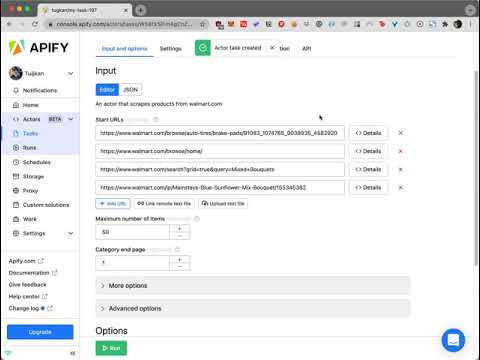
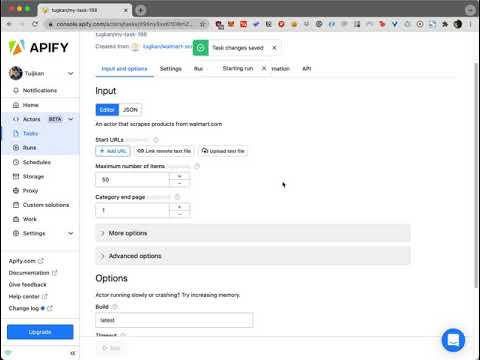
You can see how this actor works in this video:
#### Start URLs
[](https://www.youtube.com/watch?v=F6vEx29zPsI)
You can check the output of this video [here](https://api.apify.com/v2/datasets/7L16ONL5ezWnZntlB/items?clean=true&format=json).
#### Search
[](https://www.youtube.com/watch?v=Qnz6CNdJP1c)
You can check the output of this video [here](https://api.apify.com/v2/datasets/5zXILe6UpYc0GdCSB/items?clean=true&format=json).
### Input Parameters
The input of this scraper should be JSON containing the list of pages on Walmart that should be visited. Possible fields are:
- `search`: (Optional) (String) Keyword that can be searched in Walmart search engine.
- `postalCode`: (Optional) (Number) The US postal code used to set the location. This field will be depreciated soon. Please use `zipCode`.
- `zipCode`: (Optional) (Number) The US postal code used to set the location.
- `startUrls`: (Optional) (Array) List of Walmart URLs. You should only provide category detail, product detail, or search URLs.
- `endPage`: (Optional) (Number) Final number of page that you want to scrape. The default is `Infinite`. This applies to all `search` requests and `startUrls` individually.
- `maxItems`: (Optional) (Number) You can limit scraped items. This should be useful when you search through the big lists or search results.
- `includeReviews`: (Optional) (Boolean) This option allows you to include all product reviews in the scraped data.
- `onlyReviews`: (Optional) (Boolean) Discards the product data and only retrieves the reviews when `includeReviews` is true.
- `proxy`: (Required) (Proxy Object) Proxy configuration.
- `extendOutputFunction`: (Optional) (String) Function that takes a JQuery handle ($) as an argument and returns an object with data.
- `outputFilterFunction`: (Optional) (String) Function that takes an output item as an argument and returns the mapped data.
This solution requires the use of **Proxy servers**, either your own proxy servers or you can use Apify Proxy.
#### Tip
Please keep in mind that for the sake of not losing any of the data, the actor returns all the possible output. That's it's suggested to use `outputFilterFunction` all the time.
When you want to have filtering over a category URL; go to Walmart, create filters over the category, and copy and paste the link as one of the **startUrl**.
If you would like to scrape only the first page of a search list or category list, then put the link for the page and have the `endPage` as 1.
With the last approach that is explained above you can also fetch any interval of pages. If you provide the 5th page of a category and define the `endPage` parameter as 6 then you'll have the 5th and 6th pages only.
#### Output Filter Function
This function is used for mapping the output data that the actor scrapes from the target. It has the following implementation:
````
data = eval(outputFilterFunction)(data);
```
So you can use this function to retrieve only the attributes you'd like to have. The following example is for retrieving only `id` and `name` attributes:
```
(object) => ({
id: object.id,
name: object.name
})
````
#### Compute Unit Consumption
The actor is optimized to run blazing fast and scrape many products as possible. Therefore, it forefronts all product detail requests. If the actor doesn't block very often it'll scrape 50 products in 2 minutes with ~0.3-0.5 compute units.
#### Walmart Scraper Input example
```json
{
"startUrls": [
{
"url": "https://www.walmart.com/browse/auto-tires/brake-pads/91083_1074765_9038935_4582920"
},
{
"url": "https://www.walmart.com/browse/home/"
},
{
"url": "https://www.walmart.com/search?grid=true&query=Mixed+Bouquets"
},
{
"url": "https://www.walmart.com/ip/Mainstays-Blue-Sunflower-Mix-Bouquet/155345382"
}
],
"search": "apples",
"endPage": 6,
"maxItems": 100,
"postalCode": 10100,
"includeReviews": true,
"onlyReviews": false,
"outputFilterFunction": "(object) => ({...object})"
}
````
### During the Run
During the run, the actor will output messages letting you know what is going on. Each message always contains a short label specifying which page from the provided list is currently specified.
When items are loaded from the page, you should see a message about this event with a loaded item count and total item count for each page.
If you provide incorrect input to the actor, it will immediately stop with a failure state and output an explanation of what is wrong.
### Walmart Export
During the run, the actor stores results into a dataset. Each item is a separate item in the dataset.
You can manage the results in any language (Python, PHP, Node JS/NPM). See the FAQ or our API reference to learn more about getting results from this Walmart actor.
### Scraped Walmart Products
The structure of each item in Walmart products can be checked from here: https://api.apify.com/v2/datasets/3Nk7RZP8vheqazCtb/items?clean=true\&format=json
### Contact
Please visit us through [epctex.com](https://epctex.com) to see all the products that are available for you. If you are looking for any custom integration or so, please reach out to us through the chat box in [epctex.com](https://epctex.com). In need of support? is at your service.
# Actor input Schema
## `startUrls` (type: `array`):
URLs to start with. It should be a list, category or product detail URLs
## `maxItems` (type: `integer`):
Maximum number of items that you want to scrape
## `endPage` (type: `integer`):
The page number that you want to end with. By default there is no end page.
## `search` (type: `string`):
Keyword that you want to search on the platform
## `postalCode` (type: `integer`):
The US postal code used to set the location.
## `zipCode` (type: `string`):
The US postal code used to set the location.
## `includeReviews` (type: `boolean`):
Include reviews into each of the retrieved products
## `onlyReviews` (type: `boolean`):
Discard the product data and only retrieve the reviews
## `extendOutputFunction` (type: `string`):
A function which result will get merged with the default result
## `outputFilterFunction` (type: `string`):
A function which helps you to map the output data by your preferences.
## `proxy` (type: `object`):
Select proxies to be used by your crawler.
## Actor input object example
```json
{
"startUrls": [
{
"url": "https://www.walmart.com/browse/auto-tires/brake-pads/91083_1074765_9038935_4582920"
},
{
"url": "https://www.walmart.com/browse/home/"
},
{
"url": "https://www.walmart.com/search?grid=true&query=Mixed+Bouquets"
},
{
"url": "https://www.walmart.com/ip/Mainstays-Blue-Sunflower-Mix-Bouquet/155345382"
}
],
"maxItems": 50,
"endPage": 1,
"includeReviews": false,
"onlyReviews": false,
"extendOutputFunction": "($) => {\n const result = {};\n // Uncomment to add a title to the output\n // result.title = $('title').text().trim();\n\n return result;\n}",
"outputFilterFunction": "(object) => ({...object})",
"proxy": {
"useApifyProxy": true
}
}
```
# API
You can run this Actor programmatically using our API. Below are code examples in JavaScript, Python, and CLI, as well as the OpenAPI specification and MCP server setup.
## JavaScript example
```javascript
import { ApifyClient } from 'apify-client';
// Initialize the ApifyClient with your Apify API token
// Replace the '' with your token
const client = new ApifyClient({
token: '',
});
// Prepare Actor input
const input = {
"startUrls": [
{
"url": "https://www.walmart.com/browse/auto-tires/brake-pads/91083_1074765_9038935_4582920"
},
{
"url": "https://www.walmart.com/browse/home/"
},
{
"url": "https://www.walmart.com/search?grid=true&query=Mixed+Bouquets"
},
{
"url": "https://www.walmart.com/ip/Mainstays-Blue-Sunflower-Mix-Bouquet/155345382"
}
],
"maxItems": 50,
"endPage": 1,
"extendOutputFunction": ($) => {
const result = {};
// Uncomment to add a title to the output
// result.title = $('title').text().trim();
return result;
},
"outputFilterFunction": (object) => ({...object}),
"proxy": {
"useApifyProxy": true
}
};
// Run the Actor and wait for it to finish
const run = await client.actor("epctex/walmart-scraper").call(input);
// Fetch and print Actor results from the run's dataset (if any)
console.log('Results from dataset');
console.log(`💾 Check your data here: https://console.apify.com/storage/datasets/${run.defaultDatasetId}`);
const { items } = await client.dataset(run.defaultDatasetId).listItems();
items.forEach((item) => {
console.dir(item);
});
// 📚 Want to learn more 📖? Go to → https://docs.apify.com/api/client/js/docs
```
## Python example
```python
from apify_client import ApifyClient
# Initialize the ApifyClient with your Apify API token
# Replace '' with your token.
client = ApifyClient("")
# Prepare the Actor input
run_input = {
"startUrls": [
{ "url": "https://www.walmart.com/browse/auto-tires/brake-pads/91083_1074765_9038935_4582920" },
{ "url": "https://www.walmart.com/browse/home/" },
{ "url": "https://www.walmart.com/search?grid=true&query=Mixed+Bouquets" },
{ "url": "https://www.walmart.com/ip/Mainstays-Blue-Sunflower-Mix-Bouquet/155345382" },
],
"maxItems": 50,
"endPage": 1,
"extendOutputFunction": """($) => {
const result = {};
// Uncomment to add a title to the output
// result.title = $('title').text().trim();
return result;
}""",
"outputFilterFunction": "(object) => ({...object})",
"proxy": { "useApifyProxy": True },
}
# Run the Actor and wait for it to finish
run = client.actor("epctex/walmart-scraper").call(run_input=run_input)
# Fetch and print Actor results from the run's dataset (if there are any)
print("💾 Check your data here: https://console.apify.com/storage/datasets/" + run["defaultDatasetId"])
for item in client.dataset(run["defaultDatasetId"]).iterate_items():
print(item)
# 📚 Want to learn more 📖? Go to → https://docs.apify.com/api/client/python/docs/quick-start
```
## CLI example
```bash
echo '{
"startUrls": [
{
"url": "https://www.walmart.com/browse/auto-tires/brake-pads/91083_1074765_9038935_4582920"
},
{
"url": "https://www.walmart.com/browse/home/"
},
{
"url": "https://www.walmart.com/search?grid=true&query=Mixed+Bouquets"
},
{
"url": "https://www.walmart.com/ip/Mainstays-Blue-Sunflower-Mix-Bouquet/155345382"
}
],
"maxItems": 50,
"endPage": 1,
"extendOutputFunction": "($) => {\\n const result = {};\\n // Uncomment to add a title to the output\\n // result.title = $('\''title'\'').text().trim();\\n\\n return result;\\n}",
"outputFilterFunction": "(object) => ({...object})",
"proxy": {
"useApifyProxy": true
}
}' |
apify call epctex/walmart-scraper --silent --output-dataset
```
## MCP server setup
```json
{
"mcpServers": {
"apify": {
"command": "npx",
"args": [
"mcp-remote",
"https://mcp.apify.com/?tools=epctex/walmart-scraper",
"--header",
"Authorization: Bearer "
]
}
}
}
```
## OpenAPI specification
```json
{
"openapi": "3.0.1",
"info": {
"title": "Walmart Data Extractor",
"description": "Access a vast array of product data from Walmart with our Walmart Scraper. Extract images, brand details, prices, variations, and more. Customize your search with filters, categories, and lists to gather the information you need.",
"version": "0.0",
"x-build-id": "yxefnlIPOd3vaCqiw"
},
"servers": [
{
"url": "https://api.apify.com/v2"
}
],
"paths": {
"/acts/epctex~walmart-scraper/run-sync-get-dataset-items": {
"post": {
"operationId": "run-sync-get-dataset-items-epctex-walmart-scraper",
"x-openai-isConsequential": false,
"summary": "Executes an Actor, waits for its completion, and returns Actor's dataset items in response.",
"tags": [
"Run Actor"
],
"requestBody": {
"required": true,
"content": {
"application/json": {
"schema": {
"$ref": "#/components/schemas/inputSchema"
}
}
}
},
"parameters": [
{
"name": "token",
"in": "query",
"required": true,
"schema": {
"type": "string"
},
"description": "Enter your Apify token here"
}
],
"responses": {
"200": {
"description": "OK"
}
}
}
},
"/acts/epctex~walmart-scraper/runs": {
"post": {
"operationId": "runs-sync-epctex-walmart-scraper",
"x-openai-isConsequential": false,
"summary": "Executes an Actor and returns information about the initiated run in response.",
"tags": [
"Run Actor"
],
"requestBody": {
"required": true,
"content": {
"application/json": {
"schema": {
"$ref": "#/components/schemas/inputSchema"
}
}
}
},
"parameters": [
{
"name": "token",
"in": "query",
"required": true,
"schema": {
"type": "string"
},
"description": "Enter your Apify token here"
}
],
"responses": {
"200": {
"description": "OK",
"content": {
"application/json": {
"schema": {
"$ref": "#/components/schemas/runsResponseSchema"
}
}
}
}
}
}
},
"/acts/epctex~walmart-scraper/run-sync": {
"post": {
"operationId": "run-sync-epctex-walmart-scraper",
"x-openai-isConsequential": false,
"summary": "Executes an Actor, waits for completion, and returns the OUTPUT from Key-value store in response.",
"tags": [
"Run Actor"
],
"requestBody": {
"required": true,
"content": {
"application/json": {
"schema": {
"$ref": "#/components/schemas/inputSchema"
}
}
}
},
"parameters": [
{
"name": "token",
"in": "query",
"required": true,
"schema": {
"type": "string"
},
"description": "Enter your Apify token here"
}
],
"responses": {
"200": {
"description": "OK"
}
}
}
}
},
"components": {
"schemas": {
"inputSchema": {
"type": "object",
"required": [
"proxy"
],
"properties": {
"startUrls": {
"title": "Start URLs",
"type": "array",
"description": "URLs to start with. It should be a list, category or product detail URLs",
"items": {
"type": "object",
"required": [
"url"
],
"properties": {
"url": {
"type": "string",
"title": "URL of a web page",
"format": "uri"
}
}
}
},
"maxItems": {
"title": "Maximum number of Items",
"type": "integer",
"description": "Maximum number of items that you want to scrape"
},
"endPage": {
"title": "Category end page",
"type": "integer",
"description": "The page number that you want to end with. By default there is no end page."
},
"search": {
"title": "Search keyword",
"type": "string",
"description": "Keyword that you want to search on the platform"
},
"postalCode": {
"title": "Postal code (Soon will be depreciated. Please use zipCode instead)",
"type": "integer",
"description": "The US postal code used to set the location."
},
"zipCode": {
"title": "ZIP code",
"type": "string",
"description": "The US postal code used to set the location."
},
"includeReviews": {
"title": "Include reviews",
"type": "boolean",
"description": "Include reviews into each of the retrieved products",
"default": false
},
"onlyReviews": {
"title": "Only reviews",
"type": "boolean",
"description": "Discard the product data and only retrieve the reviews",
"default": false
},
"extendOutputFunction": {
"title": "Extend output function",
"type": "string",
"description": "A function which result will get merged with the default result"
},
"outputFilterFunction": {
"title": "Output filter function",
"type": "string",
"description": "A function which helps you to map the output data by your preferences."
},
"proxy": {
"title": "Proxy configuration",
"type": "object",
"description": "Select proxies to be used by your crawler."
}
}
},
"runsResponseSchema": {
"type": "object",
"properties": {
"data": {
"type": "object",
"properties": {
"id": {
"type": "string"
},
"actId": {
"type": "string"
},
"userId": {
"type": "string"
},
"startedAt": {
"type": "string",
"format": "date-time",
"example": "2025-01-08T00:00:00.000Z"
},
"finishedAt": {
"type": "string",
"format": "date-time",
"example": "2025-01-08T00:00:00.000Z"
},
"status": {
"type": "string",
"example": "READY"
},
"meta": {
"type": "object",
"properties": {
"origin": {
"type": "string",
"example": "API"
},
"userAgent": {
"type": "string"
}
}
},
"stats": {
"type": "object",
"properties": {
"inputBodyLen": {
"type": "integer",
"example": 2000
},
"rebootCount": {
"type": "integer",
"example": 0
},
"restartCount": {
"type": "integer",
"example": 0
},
"resurrectCount": {
"type": "integer",
"example": 0
},
"computeUnits": {
"type": "integer",
"example": 0
}
}
},
"options": {
"type": "object",
"properties": {
"build": {
"type": "string",
"example": "latest"
},
"timeoutSecs": {
"type": "integer",
"example": 300
},
"memoryMbytes": {
"type": "integer",
"example": 1024
},
"diskMbytes": {
"type": "integer",
"example": 2048
}
}
},
"buildId": {
"type": "string"
},
"defaultKeyValueStoreId": {
"type": "string"
},
"defaultDatasetId": {
"type": "string"
},
"defaultRequestQueueId": {
"type": "string"
},
"buildNumber": {
"type": "string",
"example": "1.0.0"
},
"containerUrl": {
"type": "string"
},
"usage": {
"type": "object",
"properties": {
"ACTOR_COMPUTE_UNITS": {
"type": "integer",
"example": 0
},
"DATASET_READS": {
"type": "integer",
"example": 0
},
"DATASET_WRITES": {
"type": "integer",
"example": 0
},
"KEY_VALUE_STORE_READS": {
"type": "integer",
"example": 0
},
"KEY_VALUE_STORE_WRITES": {
"type": "integer",
"example": 1
},
"KEY_VALUE_STORE_LISTS": {
"type": "integer",
"example": 0
},
"REQUEST_QUEUE_READS": {
"type": "integer",
"example": 0
},
"REQUEST_QUEUE_WRITES": {
"type": "integer",
"example": 0
},
"DATA_TRANSFER_INTERNAL_GBYTES": {
"type": "integer",
"example": 0
},
"DATA_TRANSFER_EXTERNAL_GBYTES": {
"type": "integer",
"example": 0
},
"PROXY_RESIDENTIAL_TRANSFER_GBYTES": {
"type": "integer",
"example": 0
},
"PROXY_SERPS": {
"type": "integer",
"example": 0
}
}
},
"usageTotalUsd": {
"type": "number",
"example": 0.00005
},
"usageUsd": {
"type": "object",
"properties": {
"ACTOR_COMPUTE_UNITS": {
"type": "integer",
"example": 0
},
"DATASET_READS": {
"type": "integer",
"example": 0
},
"DATASET_WRITES": {
"type": "integer",
"example": 0
},
"KEY_VALUE_STORE_READS": {
"type": "integer",
"example": 0
},
"KEY_VALUE_STORE_WRITES": {
"type": "number",
"example": 0.00005
},
"KEY_VALUE_STORE_LISTS": {
"type": "integer",
"example": 0
},
"REQUEST_QUEUE_READS": {
"type": "integer",
"example": 0
},
"REQUEST_QUEUE_WRITES": {
"type": "integer",
"example": 0
},
"DATA_TRANSFER_INTERNAL_GBYTES": {
"type": "integer",
"example": 0
},
"DATA_TRANSFER_EXTERNAL_GBYTES": {
"type": "integer",
"example": 0
},
"PROXY_RESIDENTIAL_TRANSFER_GBYTES": {
"type": "integer",
"example": 0
},
"PROXY_SERPS": {
"type": "integer",
"example": 0
}
}
}
}
}
}
}
}
}
}
```