# Crexi Scraper for Commercial Real Estate (`kazkn/crexi-search-actor`) Actor
Scrape public Crexi commercial real estate listings for sale or lease by market or official URL. Filter by asset class, price, cap rate, and size, then optionally enrich with public listing and broker details. No Crexi cookies or connected session required.
- **URL**: https://apify.com/kazkn/crexi-search-actor.md
- **Developed by:** [KazKN](https://apify.com/kazkn) (community)
- **Categories:** Real estate
- **Stats:** 2 total users, 1 monthly users, 100.0% runs succeeded, 1 bookmarks
- **User rating**: No ratings yet
## Pricing
from $3.00 / 1,000 validated crexi listings
This Actor is paid per event. You are not charged for the Apify platform usage, but only a fixed price for specific events.
Learn more: https://docs.apify.com/platform/actors/running/actors-in-store#pay-per-event
## What's an Apify Actor?
Actors are web data automations that power AI and operations. They run on the Apify platform to scrape websites, process data, connect APIs, and automate workflows.
In Batch mode, an Actor accepts a well-defined JSON input, performs an action which can take anything from a few seconds to a few hours,
and optionally produces a well-defined JSON output, datasets with results, or files in key-value store.
In Standby mode, an Actor provides a web server which can be used as a website, API, or an MCP server.
Actors are written with capital "A".
## How to integrate an Actor?
If asked about integration, you help developers integrate Actors into their projects.
You adapt to their stack and deliver integrations that are safe, well-documented, and production-ready.
The best way to integrate Actors is as follows.
- **AI agents and MCP clients** — the [Apify MCP server](https://docs.apify.com/integrations/mcp.md) at `https://mcp.apify.com` (remote, streamable HTTP, OAuth on first use).
- **Agentic workflows and local Actor development** — [Agent Skills](https://apify.com/.well-known/agent-skills/index.json) with the [Apify CLI](https://docs.apify.com/cli/docs.md): `npm install -g apify-cli`, then `apify login`.
- **JavaScript/TypeScript projects** — the official [JS/TS client](https://docs.apify.com/api/client/js/docs.md): `npm install apify-client`.
- **Python projects** — the official [Python client](https://docs.apify.com/api/client/python/docs.md): `pip install apify-client`.
- **Any other language** — the [REST API](https://docs.apify.com/api/v2.md).
For usage examples, see the [API](#api) section below.
For more details, see Apify documentation as [Markdown index](https://docs.apify.com/llms.txt) and [Markdown full-text](https://docs.apify.com/llms-full.txt).
# README
## Crexi Scraper for Commercial Real Estate
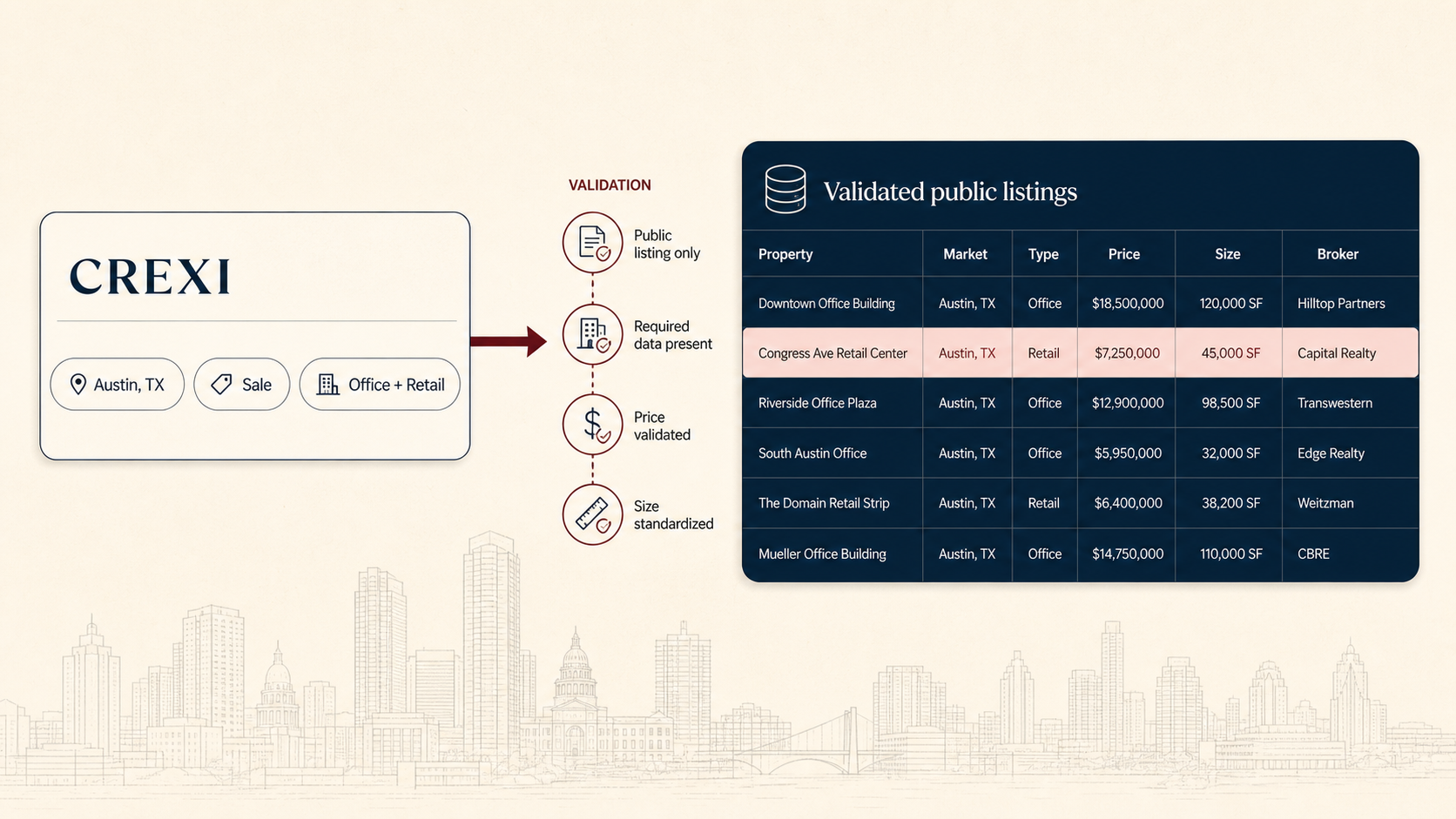 The **Crexi Scraper for Commercial Real Estate Listings** collects public [Crexi](https://www.crexi.com) sale and lease listings and turns them into a clean, structured Apify Dataset. Search a US market manually or paste an official Crexi URL, apply asset-class, price, cap-rate, and size filters, then optionally enrich each row with public property and broker details.
This is an **unofficial Crexi scraper**, not an official Crexi API. This unofficial Actor is not affiliated with, sponsored by, or endorsed by Crexi. It works without Crexi cookies, a connected Crexi session, a Crexi API key, or user-supplied scraping credentials.
[](https://apify.com/kazkn/crexi-search-actor)
[](https://apify.com/kazkn/crexi-search-actor/pricing)
[](https://www.crexi.com)
[](https://apify.com/kazkn/crexi-search-actor)
**Best for:** commercial real estate market research, CRE deal sourcing, acquisition lists, broker lead review, cap-rate analysis, public listing exports, Google Sheets/CSV/Excel workflows, CRM enrichment, and data pipelines.
**Explore the Actor:** [Run Actor](https://apify.com/kazkn/crexi-search-actor) · [Input](https://apify.com/kazkn/crexi-search-actor/input-schema) · [Output](https://apify.com/kazkn/crexi-search-actor/output-schema) · [Pricing](https://apify.com/kazkn/crexi-search-actor/pricing) · [API](https://apify.com/kazkn/crexi-search-actor/api) · [Examples](https://apify.com/kazkn/crexi-search-actor/examples) · [Support](https://apify.com/kazkn/crexi-search-actor/issues/open)
> 🔁 **Need LoopNet and Crexi together?** Use [Commercial Real Estate Brokerage Intelligence — LoopNet + Crexi](https://apify.com/kazkn/commercial-real-estate-brokerage-intel) to scrape both platforms in one workflow, normalize the records, and export one broker-ready market file. Choose this Actor when you want a Crexi-only run.
The **Crexi Scraper for Commercial Real Estate Listings** collects public [Crexi](https://www.crexi.com) sale and lease listings and turns them into a clean, structured Apify Dataset. Search a US market manually or paste an official Crexi URL, apply asset-class, price, cap-rate, and size filters, then optionally enrich each row with public property and broker details.
This is an **unofficial Crexi scraper**, not an official Crexi API. This unofficial Actor is not affiliated with, sponsored by, or endorsed by Crexi. It works without Crexi cookies, a connected Crexi session, a Crexi API key, or user-supplied scraping credentials.
[](https://apify.com/kazkn/crexi-search-actor)
[](https://apify.com/kazkn/crexi-search-actor/pricing)
[](https://www.crexi.com)
[](https://apify.com/kazkn/crexi-search-actor)
**Best for:** commercial real estate market research, CRE deal sourcing, acquisition lists, broker lead review, cap-rate analysis, public listing exports, Google Sheets/CSV/Excel workflows, CRM enrichment, and data pipelines.
**Explore the Actor:** [Run Actor](https://apify.com/kazkn/crexi-search-actor) · [Input](https://apify.com/kazkn/crexi-search-actor/input-schema) · [Output](https://apify.com/kazkn/crexi-search-actor/output-schema) · [Pricing](https://apify.com/kazkn/crexi-search-actor/pricing) · [API](https://apify.com/kazkn/crexi-search-actor/api) · [Examples](https://apify.com/kazkn/crexi-search-actor/examples) · [Support](https://apify.com/kazkn/crexi-search-actor/issues/open)
> 🔁 **Need LoopNet and Crexi together?** Use [Commercial Real Estate Brokerage Intelligence — LoopNet + Crexi](https://apify.com/kazkn/commercial-real-estate-brokerage-intel) to scrape both platforms in one workflow, normalize the records, and export one broker-ready market file. Choose this Actor when you want a Crexi-only run.
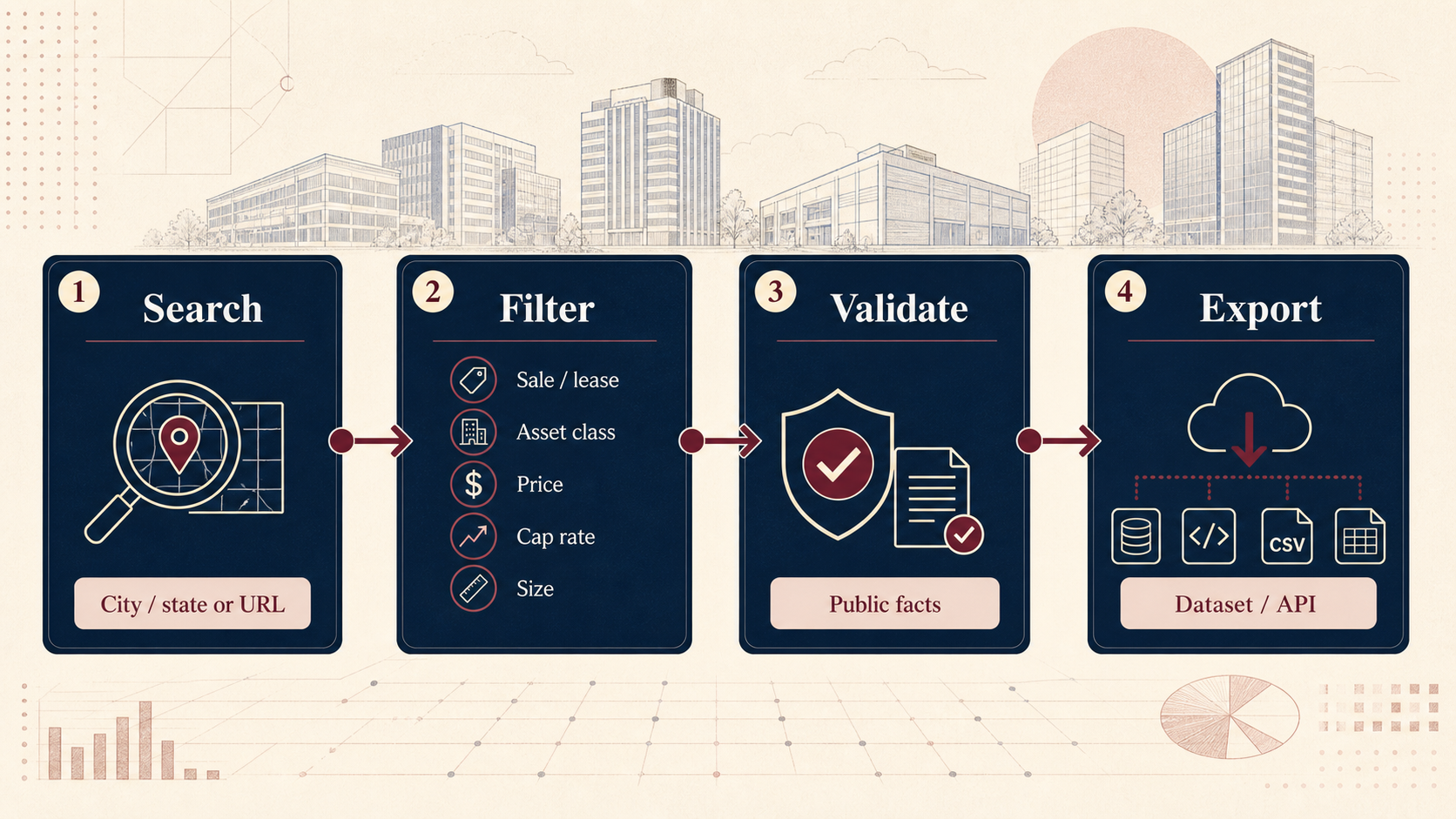 > These are original conceptual illustrations generated for this Actor, not Crexi screenshots. They explain the public-data workflow and do not imply Crexi endorsement.
**Workflow at a glance:** 🌐 public Crexi search or URL → 🎯 transaction, asset, price, cap-rate, and size filters → ✅ validation and deduplication → 📊 Dataset, API, Google Sheets, CSV, or Excel.
### What can this Crexi scraper do?
| Need | What you get |
|---|---|
| Crexi scraper | Public Crexi commercial real estate listings in a flat, normalized dataset |
| Commercial real estate API | Structured rows accessible through Apify API, integrations, exports, and webhooks |
| Commercial real estate listings scraper | Search by state, city or county, asset class, price, cap rate, size, and transaction type |
| Sale listings scraper | Public for-sale listings with asking price, property, financial, and source fields when available |
| Lease listings scraper | Public for-lease spaces with comparable annual rent and property fields when available |
| Broker data workflow | Public broker name, company, profile, phone, email, and license fields only when sufficiently proven |
| Cap-rate data | Source-listed cap rate or a comparable rate calculated from source-declared NOI and asking price |
| Spreadsheet-ready export | Download JSON, CSV, Excel, XML, RSS, or connect the Dataset to a workflow |
### Why use this Crexi commercial real estate scraper?
Commercial real estate teams often repeat the same manual process: open a market, copy listing details, clean the rows, check the asking price, and review broker information. This Actor turns that public Crexi workflow into one repeatable Apify run.
1. 🔎 Search a market such as Austin, Dallas, Phoenix, Miami, Chicago, Los Angeles, or New York.
2. 💼 Choose for-sale listings, for-lease spaces, or both.
3. 🎯 Add only the filters that matter: asset class, price or rent, cap rate, and building size.
4. 📋 Keep public listing and broker enrichment optional so broad exports stay fast.
5. ✅ Receive validated rows plus a sanitized `RUN_SUMMARY` that explains completion or shortage.
6. 📤 Export the Dataset to a spreadsheet, CRM, warehouse, BI tool, or your own API.
Apify adds the operational layer around the scraper: a point-and-click Input tab, API access, Dataset exports, scheduling, integrations, retries, run history, and spend controls. The Crexi V1 itself intentionally does not claim authenticated data, closed-sale verification, private ownership data, monitoring, or transaction tracking.
#### A public Crexi API alternative for market research
If you need structured public Crexi listings without building a browser workflow yourself, this Actor provides a point-and-click and API-accessible alternative for market research, acquisition screening, broker review, and spreadsheet exports. For broader workflow examples and a combined market-file use case, see the [LoopNet + Crexi Listings API resource hub](https://github.com/Boo-n/loopnet-crexi-listings-api).
### How to scrape Crexi listings
1. Open the [Input tab](https://apify.com/kazkn/crexi-search-actor/input-schema).
2. Choose **manual search** or **URL mode**.
3. For manual mode, enter a US state and optionally a city or county.
4. Select sale, lease, or both, then add the filters you need.
5. For URL mode, paste one or more complete public Crexi search or direct listing URLs.
6. Start with a small `maxResults` value and keep public detail enrichment disabled for the first connectivity check.
7. Run the Actor and inspect both the Dataset and the `RUN_SUMMARY` record.
8. Download the output or consume it through the [Apify API](https://apify.com/kazkn/crexi-search-actor/api).
#### Run the Crexi scraper through the Apify API
##### JavaScript
```javascript
import { ApifyClient } from 'apify-client';
const client = new ApifyClient({
token: process.env.APIFY_TOKEN,
});
const run = await client
.actor('kazkn/crexi-search-actor')
.call({
state: 'TX',
city: 'Austin',
transactionTypes: ['sale'],
assetClasses: ['office'],
maxResults: 10,
includeListingDetails: false,
});
console.log('Dataset ID: ' + run.defaultDatasetId);
```
##### Python
```python
import os
from apify_client import ApifyClient
client = ApifyClient(os.environ["APIFY_TOKEN"])
run = client.actor("kazkn/crexi-search-actor").call(run_input={
"state": "TX",
"city": "Austin",
"transactionTypes": ["sale"],
"assetClasses": ["office"],
"maxResults": 10,
"includeListingDetails": False,
})
print(run["defaultDatasetId"])
```
##### cURL
```bash
curl -X POST \
"https://api.apify.com/v2/acts/kazkn~crexi-search-actor/runs?token=$APIFY_TOKEN" \
-H "Content-Type: application/json" \
-d '{
"state": "TX",
"city": "Austin",
"transactionTypes": ["sale"],
"assetClasses": ["office"],
"maxResults": 10,
"includeListingDetails": false
}'
```
### Input
The [Input tab](https://apify.com/kazkn/crexi-search-actor/input-schema) contains the complete schema, tooltips, accepted values, and friendly Console labels. Use the table below as a quick reference.
| Input field | Purpose | Default or rule |
|---|---|---|
| `state` | US state code or English state name for manual mode | Required for manual searches |
| `city` | Optional city or county inside the selected state | Empty means statewide search |
| `assetClasses` | Filter office, retail, industrial, multifamily, land, hotel, mixed-use, or specialty | Empty includes supported classes |
| `transactionTypes` | Select `sale`, `lease`, or both | `sale` |
| `maxResults` | Global target for valid rows | `200`; it is not an inventory guarantee |
| `includeListingDetails` | Fetch additional public listing and broker fields | `false` |
| `startUrls` | Official public Crexi search or direct listing URLs | Empty; URL mode takes priority |
| `priceMin`, `priceMax` | Sale price or comparable annual lease-rent bounds in USD | Optional, inclusive |
| `capRateMin`, `capRateMax` | Normalized cap-rate bounds expressed as percentages | Optional, inclusive |
| `buildingSizeMin`, `buildingSizeMax` | Building or available-space bounds in square feet | Optional, inclusive |
| `outputSortBy` | Order rows by source order, size, asking amount, or days on market | `source_default` |
Unknown fields and contradictory ranges are rejected before collection starts. The Console prefills are interface helpers; API callers should provide the values they need explicitly.
### Manual mode
#### How to scrape Crexi manually
Manual mode creates a bounded public search for the selected state, optional city or county, transaction types, asset classes, numeric filters, and result target. Sale and lease rows remain distinguishable through `transaction_type`.
##### City and state example
```json
{
"state": "TX",
"city": "Austin",
"transactionTypes": ["sale", "lease"],
"assetClasses": ["office", "industrial"],
"priceMin": 1000000,
"buildingSizeMin": 5000,
"maxResults": 100,
"includeListingDetails": false
}
```
##### State-only example
```json
{
"state": "Nevada",
"transactionTypes": ["sale"],
"maxResults": 50,
"outputSortBy": "asking_amount_asc"
}
```
### Authoritative URL mode
When `startUrls` contains a recognized official Crexi URL, URL mode is authoritative. Manual location, transaction, asset-class, and numeric fields cannot broaden or rewrite that URL's contract.
The Actor accepts public Crexi search URLs and direct listing URLs. Each URL keeps its own immutable search contract. Duplicate listing IDs and canonical URLs are removed before output.
```json
{
"startUrls": [
{
"url": "https://www.crexi.com/properties/123456/example-office"
}
],
"maxResults": 25,
"includeListingDetails": true
}
```
URL mode is capped at 200 rows per run. Malformed, contradictory, unsafe, redirected, or unresolved URLs fail closed. If an advanced URL criterion cannot be represented exactly, supported criteria are preserved and the run is marked `partial` rather than silently claiming an exact match.
For an official URL that contains a criterion the V1 contract cannot represent exactly, the Actor uses a bounded **best-effort** interpretation: supported constraints remain enforced, unsupported constraints are reported, and the run status makes the limitation visible.
| Input supplied | Behavior |
|---|---|
| Official Crexi search URL | Scrapes the supplied public search and preserves supported URL criteria |
| Direct Crexi listing URL | Scrapes the supplied listing and returns its canonical public record |
| Crexi URL plus manual fields | The URL remains authoritative; manual fields do not broaden it |
| No URL | Uses manual state/city, transaction, asset, numeric, and sort inputs |
| Multiple URLs | Keeps each URL's contract and deduplicates repeated listing IDs or canonical URLs |
### Key features
- **Manual market search**: state-wide, city, or county searches using public Crexi inventory.
- **URL-first scraping**: paste the exact public Crexi search or listing URL you already configured.
- **Sale and lease support**: request either transaction type or both in one run.
- **Commercial asset filters**: office, retail, industrial, multifamily, land, hotel, mixed-use, and specialty.
- **Numeric filters**: price or annual lease rent, cap rate, and building or available-space size.
- **Output sorting**: order final rows by source order, building size, asking amount, or days on market.
- **Public enrichment**: request additional listing and broker facts without making private-data claims.
- **Validated dataset**: flat scalar rows with explicit `not public` values when the source does not expose a fact.
- **Run transparency**: `complete`, `partial`, and `technical_failure` statuses in `RUN_SUMMARY`.
- **Apify workflow support**: API access, Dataset exports, schedules, integrations, run history, and spend limits.
### Output
Results are written to the run's default Apify Dataset. Use the [Output tab](https://apify.com/kazkn/crexi-search-actor/output-schema) to inspect the schema, then download the Dataset as JSON, CSV, Excel, XML, or RSS, or access it through the Apify API and integrations.
#### What data can this Crexi scraper extract?
| Data group | Representative fields |
|---|---|
| Identity | `source`, `source_listing_id`, `listing_url`, `scraped_at` |
| Location | `address`, `city`, `state`, `zip`, `country`, `market` |
| Transaction | `transaction_type`, `status`, `asking_price_or_rent`, `currency` |
| Financials | `asking_amount_usd`, `price_per_sqft`, `price_per_unit`, `rent_per_sqft_per_year`, `estimated_annual_rent`, `estimated_monthly_rent`, `noi`, `cap_rate` |
| Property | `asset_class`, `sub_type`, `building_size_sqft`, `total_available_sqft`, `lot_size_sqft`, `lot_size_acres`, `units`, `year_built`, `days_on_market` |
| Public brokerage data | `broker_name`, `broker_company`, `broker_company_website`, `broker_phone`, `broker_email`, `broker_profile_url`, `broker_license_numbers` |
| Quality and enrichment | `enrichment_status`, `data_quality_notes` |
If Crexi does not expose a fact publicly, the value remains `not public`. The Actor does not invent a value merely to fill a column.
#### Output example
```json
{
"source": "crexi",
"source_listing_id": "123456",
"listing_url": "https://www.crexi.com/properties/123456/example-office",
"transaction_type": "sale",
"asset_class": "office",
"status": "active",
"address": "100 Congress Ave, Austin, TX 78701",
"city": "Austin",
"state": "TX",
"asking_price_or_rent": "$1,500,000",
"currency": "USD",
"asking_amount_usd": 1500000,
"building_size_sqft": 10000,
"cap_rate": "6%",
"broker_name": "not public",
"broker_company": "not public",
"enrichment_status": "search_only",
"scraped_at": "2026-01-01T00:00:00.000Z"
}
```
The example is illustrative. Field availability depends on the public listing, the transaction type, the selected filters, and whether public detail enrichment is enabled.
#### Output field reference
Each row is a flat scalar record designed for spreadsheets, APIs, CRM imports, and BI tools.
```typescript
{
source: "crexi",
source_listing_id: string,
listing_url: string,
scraped_at: string,
address: string,
city: string,
state: string,
zip: string,
country: string,
market: string,
transaction_type: "sale" | "lease",
asset_class: string,
sub_type: string,
status: string,
asking_price_or_rent: string,
currency: string,
asking_amount_usd: number | string,
price_per_sqft: string,
price_per_unit: string,
rent_per_sqft_per_year: string,
estimated_annual_rent: string,
estimated_monthly_rent: string,
noi: string,
cap_rate: string,
building_size_sqft: number | string,
total_available_sqft: number | string,
lot_size_sqft: number | string,
lot_size_acres: number | string,
units: number | string,
year_built: number | string,
days_on_market: number | string,
broker_name: string,
broker_company: string,
broker_company_website: string,
broker_phone: string,
broker_email: string,
broker_profile_url: string,
broker_license_numbers: string,
enrichment_status: string,
data_quality_notes: string
}
```
### Public enrichment
#### Public listing and broker enrichment
Set `includeListingDetails` to `true` to request additional public detail pages and endpoints. Enrichment is bounded by the run deadline and may add property, company, broker, phone, email, profile, or license fields only when the public evidence is sufficiently matched.
Missing or weakly matched facts remain `not public`. The V1 does not access authenticated contact data, gated account data, or private datasets. Keep enrichment disabled for the fastest broad market export.
### Completion and failures
#### Completion, partial runs, and failures
The `RUN_SUMMARY` key-value record contains a sanitized status, row counts, and bounded task outcomes:
- `complete`: the requested target was reached, or a natural inventory shortage was proven.
- `partial`: compliant rows were preserved, but a deadline, technical limit, or representable-URL limitation prevents a complete claim.
- `technical_failure`: no usable row survived a total collection incident.
The Actor never pads results with off-filter listings. A platform `SUCCEEDED` status is not a data-quality guarantee; inspect the stored input, logs, Dataset, filters, uniqueness, and `RUN_SUMMARY` together.
### Who is this Crexi scraper for?
| Persona | Use case |
|---|---|
| CRE brokers | Review public inventory, asking terms, and broker identity by market |
| Investment sales teams | Build sale and lease market scans with repeatable filters |
| Acquisition teams | Export property rows into underwriting and diligence workflows |
| REITs and family offices | Compare public inventory without rebuilding the same spreadsheet |
| Lenders and appraisers | Review asking-price, size, cap-rate, and market signals |
| Data teams | Use the Dataset as a commercial real estate API source |
| Lead-generation teams | Review public broker fields where the source exposes them |
### Try the Crexi scraper with a small run
For a first validation, use a narrow city search with `maxResults: 10` and `includeListingDetails: false`. This confirms connectivity, filters, output shape, and cost before you scale to a larger market.
Apify account credits and any plan-specific discounts are shown in the live Store interface. Always check the [Pricing tab](https://apify.com/kazkn/crexi-search-actor/pricing) before starting a large export.
### Pricing
This Actor uses Apify's pay-per-event model. The current Store configuration is intentionally simple:
| Event | Current price | When |
|---|---:|---|
| Actor start | $0.00005 per run | Once when the scraping run starts |
| Validated Crexi listing | $0.003 per listing | Each validated row written to the default Dataset |
| Public enrichment | Included in the listing event | No separate V1 contact-unlock event |
| Platform usage pass-through | Disabled | The Store does not add a separate platform-usage charge in the current configuration |
Approximate event cost:
| Validated listings | Listing charges |
|---:|---:|
| 10 | $0.03 |
| 100 | $0.30 |
| 1,000 | $3.00 |
The exact customer price can vary with Apify plan discounts. The live [Pricing tab](https://apify.com/kazkn/crexi-search-actor/pricing) is authoritative. Do not confuse a requested `maxResults` target with a guaranteed number of billable rows: only validated rows written to the Dataset trigger the result event.
### Tips for reliable runs
- Start with `maxResults: 10` for a quick public-data check.
- Use one state and one city or county for a focused manual search.
- Keep `includeListingDetails` disabled for the fastest bulk export.
- Use a complete official URL when you already configured a precise Crexi search.
- Keep the URL query parameters intact; URL mode is authoritative.
- Use `outputSortBy` when a spreadsheet or review workflow needs predictable ordering.
- Split very broad markets into smaller runs instead of requesting an unnecessarily large target.
- Treat fewer rows as a possible natural shortage or strict filter result; consult `RUN_SUMMARY` before changing the query.
- Review the Dataset and sanitized summary together rather than relying only on the platform run badge.
### Is scraping Crexi legal?
This Actor is an unofficial tool for public data. It does not bypass a login, request cookies, or collect private account data. You are responsible for choosing a lawful purpose, respecting Crexi's terms, handling personal data appropriately, and complying with applicable privacy, copyright, and data-protection rules.
Public broker fields can still contain personal data. Use only information you have a legitimate reason to process, protect exported data, and consult qualified legal counsel when your use case is uncertain. This section is general information, not legal advice.
### Security
The Actor uses public Crexi pages and endpoints without cookies or a connected session. It does not request user-supplied scraping credentials. Public URLs and outbound targets are validated, and diagnostics exclude query strings, raw response bodies, and secrets.
The Actor never claims that an unavailable public value is known. Unsupported or unsafe URL inputs fail closed instead of being silently redirected into a broader search.
### Limits
#### Known boundaries
- 🧭 Manual searches require a US state; city and county matching depends on public Crexi inventory.
- 🔗 URL mode returns at most 200 rows per run.
- 🔢 `maxResults` is a target, not a promise that enough matching public listings exist.
- 📋 Public broker contacts are optional and never guaranteed.
- 🕒 Enrichment and very broad searches can take longer than a small filtered run.
- 🧾 Sold, closed, off-market, authenticated, and private datasets are outside V1.
- 🗓️ Monitoring and transaction tracking are outside V1 and reserved for a future version.
- 🔄 Crexi can change its public pages or endpoints; future changes may reduce fields or require maintenance.
### FAQ
#### What does the Crexi scraper do?
It searches public Crexi commercial real estate listings by market or official URL, filters sale and lease results, normalizes the rows, and writes them to an Apify Dataset.
#### How do I scrape Crexi listings?
Open the [Input tab](https://apify.com/kazkn/crexi-search-actor/input-schema), choose manual mode or URL mode, provide a state or public Crexi URL, select the filters you need, and run the Actor. The numbered tutorial above shows the recommended first run.
#### Do I need a Crexi login, cookies, or an API key?
No. The Actor uses public Crexi pages and endpoints without a connected Crexi session, Crexi cookies, or a user-supplied Crexi API key. You still need an Apify account to run an Apify Actor.
#### Is this an official Crexi API?
No. This is an unofficial public-data scraper. Crexi's official API offerings and commercial agreements are separate from this Actor. Do not represent this Actor as affiliated with or endorsed by Crexi.
#### Can I scrape both sale and lease listings?
Yes. Select `sale`, `lease`, or both. Each row keeps a normalized `transaction_type` so sale and lease records remain distinguishable.
#### Can I paste a Crexi URL?
Yes. Paste a public search or direct listing URL in `startUrls`. URL mode is authoritative and preserves the supported filters represented by each URL.
#### How much does it cost to scrape Crexi?
The current price is $0.00005 per run start plus $0.003 per validated listing. For example, 100 validated listings cost approximately $0.30 in result events, before any plan-specific Store discount. Check the live [Pricing tab](https://apify.com/kazkn/crexi-search-actor/pricing) for the price shown to your account.
#### Is the Crexi scraper free?
You can test it with a small run and the credits available on your Apify account. The Store shows the applicable allowance, event price, and any plan discount before you scale up.
#### Why did I receive fewer rows than `maxResults`?
`maxResults` is a target. Restrictive filters, a naturally small market, missing public values required by a numeric filter, an access challenge, or a deadline can produce fewer valid rows. `RUN_SUMMARY` explains whether the result is `complete` or `partial`.
#### Does it include broker phone numbers and emails?
Only when the source or a public detail page exposes them and the value can be matched confidently to the listing. If a contact is gated, missing, or ambiguous, the Dataset keeps the field explicit instead of inventing a value.
#### Can I use the Actor for monitoring or transaction tracking?
Not in V1. You can schedule ordinary runs and compare Datasets yourself, but dedicated monitoring and transaction-tracking features are reserved for a future version.
#### Can I export the results to CSV or Excel?
Yes. Apify lets you download the default Dataset as JSON, CSV, Excel, XML, or RSS, and connect it to APIs, webhooks, integrations, Google Sheets, warehouses, spreadsheets, and CRMs.
#### Can I scrape LoopNet and Crexi together?
Not with this Crexi-only Actor. Use [Commercial Real Estate Brokerage Intelligence — LoopNet + Crexi](https://apify.com/kazkn/commercial-real-estate-brokerage-intel) when you want both platforms scraped, normalized, and exported together. This Actor remains focused on the standalone Crexi workflow.
#### Where can I report a problem?
Open an [Apify issue](https://apify.com/kazkn/crexi-search-actor/issues/open) with the run ID, a redacted input, the `RUN_SUMMARY` status, and the expected result. Never send credentials, cookies, tokens, private contact data, or copied remote response bodies.
### Other commercial real estate Actors
> These are original conceptual illustrations generated for this Actor, not Crexi screenshots. They explain the public-data workflow and do not imply Crexi endorsement.
**Workflow at a glance:** 🌐 public Crexi search or URL → 🎯 transaction, asset, price, cap-rate, and size filters → ✅ validation and deduplication → 📊 Dataset, API, Google Sheets, CSV, or Excel.
### What can this Crexi scraper do?
| Need | What you get |
|---|---|
| Crexi scraper | Public Crexi commercial real estate listings in a flat, normalized dataset |
| Commercial real estate API | Structured rows accessible through Apify API, integrations, exports, and webhooks |
| Commercial real estate listings scraper | Search by state, city or county, asset class, price, cap rate, size, and transaction type |
| Sale listings scraper | Public for-sale listings with asking price, property, financial, and source fields when available |
| Lease listings scraper | Public for-lease spaces with comparable annual rent and property fields when available |
| Broker data workflow | Public broker name, company, profile, phone, email, and license fields only when sufficiently proven |
| Cap-rate data | Source-listed cap rate or a comparable rate calculated from source-declared NOI and asking price |
| Spreadsheet-ready export | Download JSON, CSV, Excel, XML, RSS, or connect the Dataset to a workflow |
### Why use this Crexi commercial real estate scraper?
Commercial real estate teams often repeat the same manual process: open a market, copy listing details, clean the rows, check the asking price, and review broker information. This Actor turns that public Crexi workflow into one repeatable Apify run.
1. 🔎 Search a market such as Austin, Dallas, Phoenix, Miami, Chicago, Los Angeles, or New York.
2. 💼 Choose for-sale listings, for-lease spaces, or both.
3. 🎯 Add only the filters that matter: asset class, price or rent, cap rate, and building size.
4. 📋 Keep public listing and broker enrichment optional so broad exports stay fast.
5. ✅ Receive validated rows plus a sanitized `RUN_SUMMARY` that explains completion or shortage.
6. 📤 Export the Dataset to a spreadsheet, CRM, warehouse, BI tool, or your own API.
Apify adds the operational layer around the scraper: a point-and-click Input tab, API access, Dataset exports, scheduling, integrations, retries, run history, and spend controls. The Crexi V1 itself intentionally does not claim authenticated data, closed-sale verification, private ownership data, monitoring, or transaction tracking.
#### A public Crexi API alternative for market research
If you need structured public Crexi listings without building a browser workflow yourself, this Actor provides a point-and-click and API-accessible alternative for market research, acquisition screening, broker review, and spreadsheet exports. For broader workflow examples and a combined market-file use case, see the [LoopNet + Crexi Listings API resource hub](https://github.com/Boo-n/loopnet-crexi-listings-api).
### How to scrape Crexi listings
1. Open the [Input tab](https://apify.com/kazkn/crexi-search-actor/input-schema).
2. Choose **manual search** or **URL mode**.
3. For manual mode, enter a US state and optionally a city or county.
4. Select sale, lease, or both, then add the filters you need.
5. For URL mode, paste one or more complete public Crexi search or direct listing URLs.
6. Start with a small `maxResults` value and keep public detail enrichment disabled for the first connectivity check.
7. Run the Actor and inspect both the Dataset and the `RUN_SUMMARY` record.
8. Download the output or consume it through the [Apify API](https://apify.com/kazkn/crexi-search-actor/api).
#### Run the Crexi scraper through the Apify API
##### JavaScript
```javascript
import { ApifyClient } from 'apify-client';
const client = new ApifyClient({
token: process.env.APIFY_TOKEN,
});
const run = await client
.actor('kazkn/crexi-search-actor')
.call({
state: 'TX',
city: 'Austin',
transactionTypes: ['sale'],
assetClasses: ['office'],
maxResults: 10,
includeListingDetails: false,
});
console.log('Dataset ID: ' + run.defaultDatasetId);
```
##### Python
```python
import os
from apify_client import ApifyClient
client = ApifyClient(os.environ["APIFY_TOKEN"])
run = client.actor("kazkn/crexi-search-actor").call(run_input={
"state": "TX",
"city": "Austin",
"transactionTypes": ["sale"],
"assetClasses": ["office"],
"maxResults": 10,
"includeListingDetails": False,
})
print(run["defaultDatasetId"])
```
##### cURL
```bash
curl -X POST \
"https://api.apify.com/v2/acts/kazkn~crexi-search-actor/runs?token=$APIFY_TOKEN" \
-H "Content-Type: application/json" \
-d '{
"state": "TX",
"city": "Austin",
"transactionTypes": ["sale"],
"assetClasses": ["office"],
"maxResults": 10,
"includeListingDetails": false
}'
```
### Input
The [Input tab](https://apify.com/kazkn/crexi-search-actor/input-schema) contains the complete schema, tooltips, accepted values, and friendly Console labels. Use the table below as a quick reference.
| Input field | Purpose | Default or rule |
|---|---|---|
| `state` | US state code or English state name for manual mode | Required for manual searches |
| `city` | Optional city or county inside the selected state | Empty means statewide search |
| `assetClasses` | Filter office, retail, industrial, multifamily, land, hotel, mixed-use, or specialty | Empty includes supported classes |
| `transactionTypes` | Select `sale`, `lease`, or both | `sale` |
| `maxResults` | Global target for valid rows | `200`; it is not an inventory guarantee |
| `includeListingDetails` | Fetch additional public listing and broker fields | `false` |
| `startUrls` | Official public Crexi search or direct listing URLs | Empty; URL mode takes priority |
| `priceMin`, `priceMax` | Sale price or comparable annual lease-rent bounds in USD | Optional, inclusive |
| `capRateMin`, `capRateMax` | Normalized cap-rate bounds expressed as percentages | Optional, inclusive |
| `buildingSizeMin`, `buildingSizeMax` | Building or available-space bounds in square feet | Optional, inclusive |
| `outputSortBy` | Order rows by source order, size, asking amount, or days on market | `source_default` |
Unknown fields and contradictory ranges are rejected before collection starts. The Console prefills are interface helpers; API callers should provide the values they need explicitly.
### Manual mode
#### How to scrape Crexi manually
Manual mode creates a bounded public search for the selected state, optional city or county, transaction types, asset classes, numeric filters, and result target. Sale and lease rows remain distinguishable through `transaction_type`.
##### City and state example
```json
{
"state": "TX",
"city": "Austin",
"transactionTypes": ["sale", "lease"],
"assetClasses": ["office", "industrial"],
"priceMin": 1000000,
"buildingSizeMin": 5000,
"maxResults": 100,
"includeListingDetails": false
}
```
##### State-only example
```json
{
"state": "Nevada",
"transactionTypes": ["sale"],
"maxResults": 50,
"outputSortBy": "asking_amount_asc"
}
```
### Authoritative URL mode
When `startUrls` contains a recognized official Crexi URL, URL mode is authoritative. Manual location, transaction, asset-class, and numeric fields cannot broaden or rewrite that URL's contract.
The Actor accepts public Crexi search URLs and direct listing URLs. Each URL keeps its own immutable search contract. Duplicate listing IDs and canonical URLs are removed before output.
```json
{
"startUrls": [
{
"url": "https://www.crexi.com/properties/123456/example-office"
}
],
"maxResults": 25,
"includeListingDetails": true
}
```
URL mode is capped at 200 rows per run. Malformed, contradictory, unsafe, redirected, or unresolved URLs fail closed. If an advanced URL criterion cannot be represented exactly, supported criteria are preserved and the run is marked `partial` rather than silently claiming an exact match.
For an official URL that contains a criterion the V1 contract cannot represent exactly, the Actor uses a bounded **best-effort** interpretation: supported constraints remain enforced, unsupported constraints are reported, and the run status makes the limitation visible.
| Input supplied | Behavior |
|---|---|
| Official Crexi search URL | Scrapes the supplied public search and preserves supported URL criteria |
| Direct Crexi listing URL | Scrapes the supplied listing and returns its canonical public record |
| Crexi URL plus manual fields | The URL remains authoritative; manual fields do not broaden it |
| No URL | Uses manual state/city, transaction, asset, numeric, and sort inputs |
| Multiple URLs | Keeps each URL's contract and deduplicates repeated listing IDs or canonical URLs |
### Key features
- **Manual market search**: state-wide, city, or county searches using public Crexi inventory.
- **URL-first scraping**: paste the exact public Crexi search or listing URL you already configured.
- **Sale and lease support**: request either transaction type or both in one run.
- **Commercial asset filters**: office, retail, industrial, multifamily, land, hotel, mixed-use, and specialty.
- **Numeric filters**: price or annual lease rent, cap rate, and building or available-space size.
- **Output sorting**: order final rows by source order, building size, asking amount, or days on market.
- **Public enrichment**: request additional listing and broker facts without making private-data claims.
- **Validated dataset**: flat scalar rows with explicit `not public` values when the source does not expose a fact.
- **Run transparency**: `complete`, `partial`, and `technical_failure` statuses in `RUN_SUMMARY`.
- **Apify workflow support**: API access, Dataset exports, schedules, integrations, run history, and spend limits.
### Output
Results are written to the run's default Apify Dataset. Use the [Output tab](https://apify.com/kazkn/crexi-search-actor/output-schema) to inspect the schema, then download the Dataset as JSON, CSV, Excel, XML, or RSS, or access it through the Apify API and integrations.
#### What data can this Crexi scraper extract?
| Data group | Representative fields |
|---|---|
| Identity | `source`, `source_listing_id`, `listing_url`, `scraped_at` |
| Location | `address`, `city`, `state`, `zip`, `country`, `market` |
| Transaction | `transaction_type`, `status`, `asking_price_or_rent`, `currency` |
| Financials | `asking_amount_usd`, `price_per_sqft`, `price_per_unit`, `rent_per_sqft_per_year`, `estimated_annual_rent`, `estimated_monthly_rent`, `noi`, `cap_rate` |
| Property | `asset_class`, `sub_type`, `building_size_sqft`, `total_available_sqft`, `lot_size_sqft`, `lot_size_acres`, `units`, `year_built`, `days_on_market` |
| Public brokerage data | `broker_name`, `broker_company`, `broker_company_website`, `broker_phone`, `broker_email`, `broker_profile_url`, `broker_license_numbers` |
| Quality and enrichment | `enrichment_status`, `data_quality_notes` |
If Crexi does not expose a fact publicly, the value remains `not public`. The Actor does not invent a value merely to fill a column.
#### Output example
```json
{
"source": "crexi",
"source_listing_id": "123456",
"listing_url": "https://www.crexi.com/properties/123456/example-office",
"transaction_type": "sale",
"asset_class": "office",
"status": "active",
"address": "100 Congress Ave, Austin, TX 78701",
"city": "Austin",
"state": "TX",
"asking_price_or_rent": "$1,500,000",
"currency": "USD",
"asking_amount_usd": 1500000,
"building_size_sqft": 10000,
"cap_rate": "6%",
"broker_name": "not public",
"broker_company": "not public",
"enrichment_status": "search_only",
"scraped_at": "2026-01-01T00:00:00.000Z"
}
```
The example is illustrative. Field availability depends on the public listing, the transaction type, the selected filters, and whether public detail enrichment is enabled.
#### Output field reference
Each row is a flat scalar record designed for spreadsheets, APIs, CRM imports, and BI tools.
```typescript
{
source: "crexi",
source_listing_id: string,
listing_url: string,
scraped_at: string,
address: string,
city: string,
state: string,
zip: string,
country: string,
market: string,
transaction_type: "sale" | "lease",
asset_class: string,
sub_type: string,
status: string,
asking_price_or_rent: string,
currency: string,
asking_amount_usd: number | string,
price_per_sqft: string,
price_per_unit: string,
rent_per_sqft_per_year: string,
estimated_annual_rent: string,
estimated_monthly_rent: string,
noi: string,
cap_rate: string,
building_size_sqft: number | string,
total_available_sqft: number | string,
lot_size_sqft: number | string,
lot_size_acres: number | string,
units: number | string,
year_built: number | string,
days_on_market: number | string,
broker_name: string,
broker_company: string,
broker_company_website: string,
broker_phone: string,
broker_email: string,
broker_profile_url: string,
broker_license_numbers: string,
enrichment_status: string,
data_quality_notes: string
}
```
### Public enrichment
#### Public listing and broker enrichment
Set `includeListingDetails` to `true` to request additional public detail pages and endpoints. Enrichment is bounded by the run deadline and may add property, company, broker, phone, email, profile, or license fields only when the public evidence is sufficiently matched.
Missing or weakly matched facts remain `not public`. The V1 does not access authenticated contact data, gated account data, or private datasets. Keep enrichment disabled for the fastest broad market export.
### Completion and failures
#### Completion, partial runs, and failures
The `RUN_SUMMARY` key-value record contains a sanitized status, row counts, and bounded task outcomes:
- `complete`: the requested target was reached, or a natural inventory shortage was proven.
- `partial`: compliant rows were preserved, but a deadline, technical limit, or representable-URL limitation prevents a complete claim.
- `technical_failure`: no usable row survived a total collection incident.
The Actor never pads results with off-filter listings. A platform `SUCCEEDED` status is not a data-quality guarantee; inspect the stored input, logs, Dataset, filters, uniqueness, and `RUN_SUMMARY` together.
### Who is this Crexi scraper for?
| Persona | Use case |
|---|---|
| CRE brokers | Review public inventory, asking terms, and broker identity by market |
| Investment sales teams | Build sale and lease market scans with repeatable filters |
| Acquisition teams | Export property rows into underwriting and diligence workflows |
| REITs and family offices | Compare public inventory without rebuilding the same spreadsheet |
| Lenders and appraisers | Review asking-price, size, cap-rate, and market signals |
| Data teams | Use the Dataset as a commercial real estate API source |
| Lead-generation teams | Review public broker fields where the source exposes them |
### Try the Crexi scraper with a small run
For a first validation, use a narrow city search with `maxResults: 10` and `includeListingDetails: false`. This confirms connectivity, filters, output shape, and cost before you scale to a larger market.
Apify account credits and any plan-specific discounts are shown in the live Store interface. Always check the [Pricing tab](https://apify.com/kazkn/crexi-search-actor/pricing) before starting a large export.
### Pricing
This Actor uses Apify's pay-per-event model. The current Store configuration is intentionally simple:
| Event | Current price | When |
|---|---:|---|
| Actor start | $0.00005 per run | Once when the scraping run starts |
| Validated Crexi listing | $0.003 per listing | Each validated row written to the default Dataset |
| Public enrichment | Included in the listing event | No separate V1 contact-unlock event |
| Platform usage pass-through | Disabled | The Store does not add a separate platform-usage charge in the current configuration |
Approximate event cost:
| Validated listings | Listing charges |
|---:|---:|
| 10 | $0.03 |
| 100 | $0.30 |
| 1,000 | $3.00 |
The exact customer price can vary with Apify plan discounts. The live [Pricing tab](https://apify.com/kazkn/crexi-search-actor/pricing) is authoritative. Do not confuse a requested `maxResults` target with a guaranteed number of billable rows: only validated rows written to the Dataset trigger the result event.
### Tips for reliable runs
- Start with `maxResults: 10` for a quick public-data check.
- Use one state and one city or county for a focused manual search.
- Keep `includeListingDetails` disabled for the fastest bulk export.
- Use a complete official URL when you already configured a precise Crexi search.
- Keep the URL query parameters intact; URL mode is authoritative.
- Use `outputSortBy` when a spreadsheet or review workflow needs predictable ordering.
- Split very broad markets into smaller runs instead of requesting an unnecessarily large target.
- Treat fewer rows as a possible natural shortage or strict filter result; consult `RUN_SUMMARY` before changing the query.
- Review the Dataset and sanitized summary together rather than relying only on the platform run badge.
### Is scraping Crexi legal?
This Actor is an unofficial tool for public data. It does not bypass a login, request cookies, or collect private account data. You are responsible for choosing a lawful purpose, respecting Crexi's terms, handling personal data appropriately, and complying with applicable privacy, copyright, and data-protection rules.
Public broker fields can still contain personal data. Use only information you have a legitimate reason to process, protect exported data, and consult qualified legal counsel when your use case is uncertain. This section is general information, not legal advice.
### Security
The Actor uses public Crexi pages and endpoints without cookies or a connected session. It does not request user-supplied scraping credentials. Public URLs and outbound targets are validated, and diagnostics exclude query strings, raw response bodies, and secrets.
The Actor never claims that an unavailable public value is known. Unsupported or unsafe URL inputs fail closed instead of being silently redirected into a broader search.
### Limits
#### Known boundaries
- 🧭 Manual searches require a US state; city and county matching depends on public Crexi inventory.
- 🔗 URL mode returns at most 200 rows per run.
- 🔢 `maxResults` is a target, not a promise that enough matching public listings exist.
- 📋 Public broker contacts are optional and never guaranteed.
- 🕒 Enrichment and very broad searches can take longer than a small filtered run.
- 🧾 Sold, closed, off-market, authenticated, and private datasets are outside V1.
- 🗓️ Monitoring and transaction tracking are outside V1 and reserved for a future version.
- 🔄 Crexi can change its public pages or endpoints; future changes may reduce fields or require maintenance.
### FAQ
#### What does the Crexi scraper do?
It searches public Crexi commercial real estate listings by market or official URL, filters sale and lease results, normalizes the rows, and writes them to an Apify Dataset.
#### How do I scrape Crexi listings?
Open the [Input tab](https://apify.com/kazkn/crexi-search-actor/input-schema), choose manual mode or URL mode, provide a state or public Crexi URL, select the filters you need, and run the Actor. The numbered tutorial above shows the recommended first run.
#### Do I need a Crexi login, cookies, or an API key?
No. The Actor uses public Crexi pages and endpoints without a connected Crexi session, Crexi cookies, or a user-supplied Crexi API key. You still need an Apify account to run an Apify Actor.
#### Is this an official Crexi API?
No. This is an unofficial public-data scraper. Crexi's official API offerings and commercial agreements are separate from this Actor. Do not represent this Actor as affiliated with or endorsed by Crexi.
#### Can I scrape both sale and lease listings?
Yes. Select `sale`, `lease`, or both. Each row keeps a normalized `transaction_type` so sale and lease records remain distinguishable.
#### Can I paste a Crexi URL?
Yes. Paste a public search or direct listing URL in `startUrls`. URL mode is authoritative and preserves the supported filters represented by each URL.
#### How much does it cost to scrape Crexi?
The current price is $0.00005 per run start plus $0.003 per validated listing. For example, 100 validated listings cost approximately $0.30 in result events, before any plan-specific Store discount. Check the live [Pricing tab](https://apify.com/kazkn/crexi-search-actor/pricing) for the price shown to your account.
#### Is the Crexi scraper free?
You can test it with a small run and the credits available on your Apify account. The Store shows the applicable allowance, event price, and any plan discount before you scale up.
#### Why did I receive fewer rows than `maxResults`?
`maxResults` is a target. Restrictive filters, a naturally small market, missing public values required by a numeric filter, an access challenge, or a deadline can produce fewer valid rows. `RUN_SUMMARY` explains whether the result is `complete` or `partial`.
#### Does it include broker phone numbers and emails?
Only when the source or a public detail page exposes them and the value can be matched confidently to the listing. If a contact is gated, missing, or ambiguous, the Dataset keeps the field explicit instead of inventing a value.
#### Can I use the Actor for monitoring or transaction tracking?
Not in V1. You can schedule ordinary runs and compare Datasets yourself, but dedicated monitoring and transaction-tracking features are reserved for a future version.
#### Can I export the results to CSV or Excel?
Yes. Apify lets you download the default Dataset as JSON, CSV, Excel, XML, or RSS, and connect it to APIs, webhooks, integrations, Google Sheets, warehouses, spreadsheets, and CRMs.
#### Can I scrape LoopNet and Crexi together?
Not with this Crexi-only Actor. Use [Commercial Real Estate Brokerage Intelligence — LoopNet + Crexi](https://apify.com/kazkn/commercial-real-estate-brokerage-intel) when you want both platforms scraped, normalized, and exported together. This Actor remains focused on the standalone Crexi workflow.
#### Where can I report a problem?
Open an [Apify issue](https://apify.com/kazkn/crexi-search-actor/issues/open) with the run ID, a redacted input, the `RUN_SUMMARY` status, and the expected result. Never send credentials, cookies, tokens, private contact data, or copied remote response bodies.
### Other commercial real estate Actors
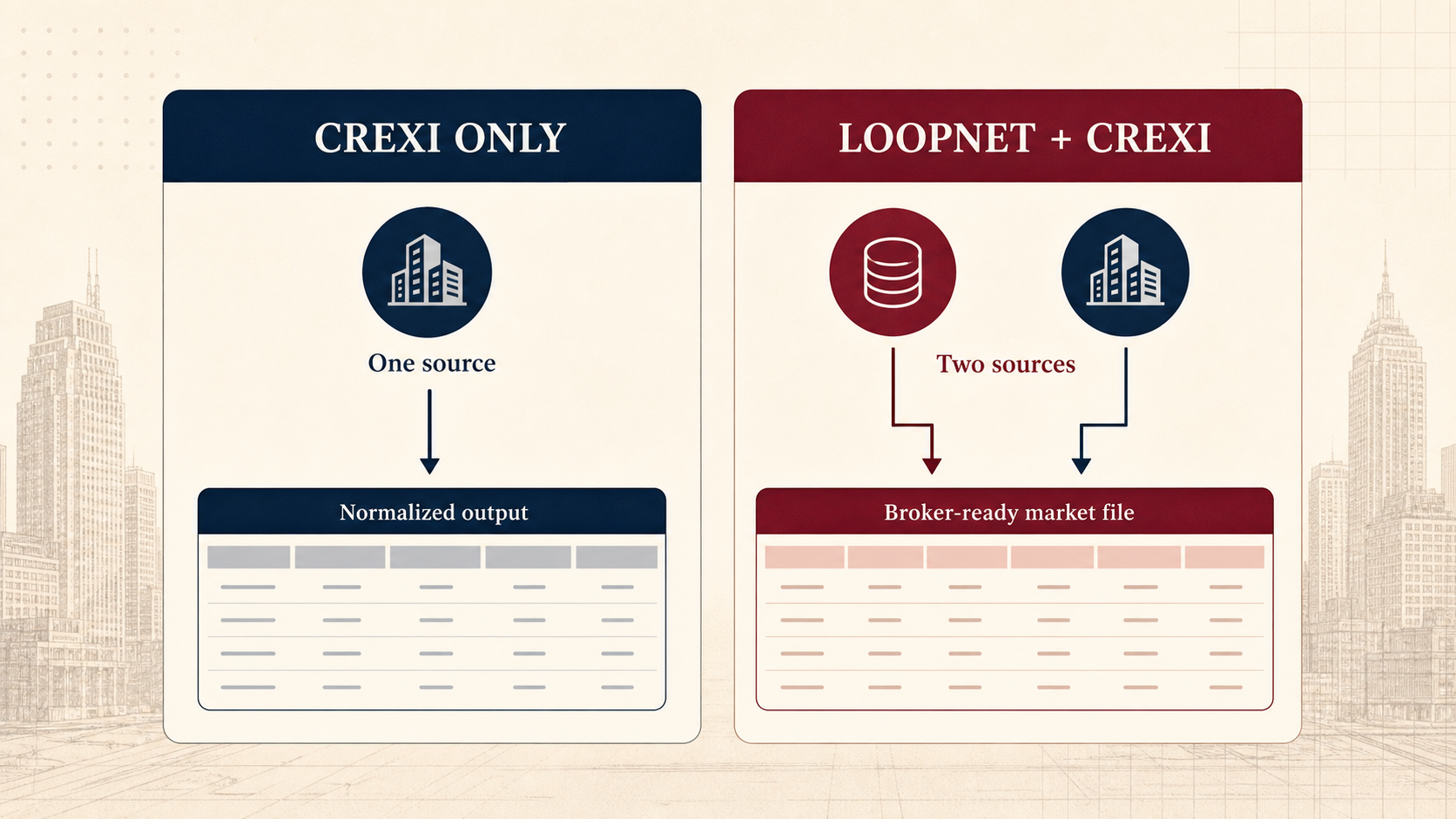 > This original comparison illustration makes the difference between Crexi-only scraping and simultaneous LoopNet + Crexi scraping immediately clear.
| Actor | When to choose it |
|---|---|
| [Crexi Scraper](https://apify.com/kazkn/crexi-search-actor) | Crexi-only public listing search, filtering, and optional enrichment |
| [Commercial Real Estate Brokerage Intelligence — LoopNet + Crexi](https://apify.com/kazkn/commercial-real-estate-brokerage-intel) | Scrape LoopNet and Crexi together, normalize the records, and export a broker-ready market file |
Use the Crexi-only Actor when source isolation, a simple input form, and transparent per-listing pricing are the priority.
For a visual overview of the combined workflow, watch the [short LoopNet + Crexi demo](https://youtu.be/TVAcUSzaS7w) on the broader Actor page.
### Technical notes
- Stack: Apify SDK, Crawlee, TypeScript, and Node.js.
- Source: public Crexi listing pages and public endpoints.
- Output: Apify Dataset plus a sanitized `RUN_SUMMARY` key-value record.
- Input: manual state/city search or authoritative official URL mode.
- Enrichment: bounded public listing and broker enrichment only.
- API: standard Apify Actor API, Dataset API, exports, schedules, and integrations.
### Support
Open an [issue on Apify](https://apify.com/kazkn/crexi-search-actor/issues/open) for bugs, feature requests, additional fields, custom exports, or market-specific improvements.
If this Actor helps your workflow, an honest Apify review helps other commercial real estate teams evaluate it and helps prioritize maintenance.
Built for teams that want cleaner public Crexi data without rebuilding the same commercial real estate spreadsheet every morning.
# Actor input Schema
## `city` (type: `string`):
Optional city or county within the selected state. Leave empty to search the entire state.
## `state` (type: `string`):
US state code or name, for example TX or California. Required for manual searches.
## `assetClasses` (type: `array`):
Restrict the search to specific commercial property types. Leave empty to include all supported classes.
## `transactionTypes` (type: `array`):
Choose for-sale listings, for-lease spaces, or both. Selecting both returns separate rows for each public transaction type.
## `maxResults` (type: `integer`):
Maximum number of valid Crexi listings to target. Actual output depends on the available inventory and your filters.
## `includeListingDetails` (type: `boolean`):
Fetch public Crexi detail pages and endpoints for additional listing and broker fields. Keep disabled for the fastest bulk export.
## `proxyConfiguration` (type: `object`):
Uses Apify's residential proxy pool in the United States. Keep the default unchanged for reliable runs.
## `startUrls` (type: `array`):
Paste one or more complete public Crexi search or direct listing URLs. Supported filters remain enforced; an unsupported advanced filter may broaden results and produce a partial run summary.
## `priceMin` (type: `number`):
Lower bound. For sale listings, enter the total asking price. For lease listings, enter comparable annual rent.
## `priceMax` (type: `number`):
Upper bound. For sale listings, enter the total asking price. For lease listings, enter comparable annual rent.
## `capRateMin` (type: `number`):
Lower bound on the normalized cap rate, expressed as a percentage.
## `capRateMax` (type: `number`):
Upper bound on the normalized cap rate, expressed as a percentage.
## `buildingSizeMin` (type: `number`):
Lower bound on building or available size in square feet.
## `buildingSizeMax` (type: `number`):
Upper bound on building or available size in square feet.
## `outputSortBy` (type: `string`):
Choose the ordering of valid Crexi rows in the output dataset.
## Actor input object example
```json
{
"city": "Austin",
"state": "TX",
"assetClasses": [],
"transactionTypes": [
"sale"
],
"maxResults": 200,
"includeListingDetails": false,
"proxyConfiguration": {
"useApifyProxy": true,
"apifyProxyGroups": [
"RESIDENTIAL"
],
"apifyProxyCountry": "US"
},
"startUrls": [],
"outputSortBy": "source_default"
}
```
# Actor output Schema
## `results` (type: `string`):
Flat public sale and lease listing rows that passed the requested Crexi filters.
## `runSummary` (type: `string`):
The complete, partial, or technical\_failure status with row counts and controlled per-task outcomes.
# API
You can run this Actor programmatically using our API. Below are code examples in JavaScript, Python, and CLI, as well as the OpenAPI specification and MCP server setup.
## JavaScript example
```javascript
import { ApifyClient } from 'apify-client';
// Initialize the ApifyClient with your Apify API token
// Replace the '' with your token
const client = new ApifyClient({
token: '',
});
// Prepare Actor input
const input = {
"city": "Austin",
"state": "TX"
};
// Run the Actor and wait for it to finish
const run = await client.actor("kazkn/crexi-search-actor").call(input);
// Fetch and print Actor results from the run's dataset (if any)
console.log('Results from dataset');
console.log(`💾 Check your data here: https://console.apify.com/storage/datasets/${run.defaultDatasetId}`);
const { items } = await client.dataset(run.defaultDatasetId).listItems();
items.forEach((item) => {
console.dir(item);
});
// 📚 Want to learn more 📖? Go to → https://docs.apify.com/api/client/js/docs
```
## Python example
```python
from apify_client import ApifyClient
# Initialize the ApifyClient with your Apify API token
# Replace '' with your token.
client = ApifyClient("")
# Prepare the Actor input
run_input = {
"city": "Austin",
"state": "TX",
}
# Run the Actor and wait for it to finish
run = client.actor("kazkn/crexi-search-actor").call(run_input=run_input)
# Fetch and print Actor results from the run's dataset (if there are any)
print("💾 Check your data here: https://console.apify.com/storage/datasets/" + run["defaultDatasetId"])
for item in client.dataset(run["defaultDatasetId"]).iterate_items():
print(item)
# 📚 Want to learn more 📖? Go to → https://docs.apify.com/api/client/python/docs/quick-start
```
## CLI example
```bash
echo '{
"city": "Austin",
"state": "TX"
}' |
apify call kazkn/crexi-search-actor --silent --output-dataset
```
## MCP server setup
```json
{
"mcpServers": {
"apify": {
"command": "npx",
"args": [
"mcp-remote",
"https://mcp.apify.com/?tools=kazkn/crexi-search-actor",
"--header",
"Authorization: Bearer "
]
}
}
}
```
## OpenAPI specification
Download the OpenAPI definition: https://api.apify.com/v2/actors/OkQ64Eh2mcGjYVOSn/builds/9CwbdDOHf5nonzMOI/openapi.json
> This original comparison illustration makes the difference between Crexi-only scraping and simultaneous LoopNet + Crexi scraping immediately clear.
| Actor | When to choose it |
|---|---|
| [Crexi Scraper](https://apify.com/kazkn/crexi-search-actor) | Crexi-only public listing search, filtering, and optional enrichment |
| [Commercial Real Estate Brokerage Intelligence — LoopNet + Crexi](https://apify.com/kazkn/commercial-real-estate-brokerage-intel) | Scrape LoopNet and Crexi together, normalize the records, and export a broker-ready market file |
Use the Crexi-only Actor when source isolation, a simple input form, and transparent per-listing pricing are the priority.
For a visual overview of the combined workflow, watch the [short LoopNet + Crexi demo](https://youtu.be/TVAcUSzaS7w) on the broader Actor page.
### Technical notes
- Stack: Apify SDK, Crawlee, TypeScript, and Node.js.
- Source: public Crexi listing pages and public endpoints.
- Output: Apify Dataset plus a sanitized `RUN_SUMMARY` key-value record.
- Input: manual state/city search or authoritative official URL mode.
- Enrichment: bounded public listing and broker enrichment only.
- API: standard Apify Actor API, Dataset API, exports, schedules, and integrations.
### Support
Open an [issue on Apify](https://apify.com/kazkn/crexi-search-actor/issues/open) for bugs, feature requests, additional fields, custom exports, or market-specific improvements.
If this Actor helps your workflow, an honest Apify review helps other commercial real estate teams evaluate it and helps prioritize maintenance.
Built for teams that want cleaner public Crexi data without rebuilding the same commercial real estate spreadsheet every morning.
# Actor input Schema
## `city` (type: `string`):
Optional city or county within the selected state. Leave empty to search the entire state.
## `state` (type: `string`):
US state code or name, for example TX or California. Required for manual searches.
## `assetClasses` (type: `array`):
Restrict the search to specific commercial property types. Leave empty to include all supported classes.
## `transactionTypes` (type: `array`):
Choose for-sale listings, for-lease spaces, or both. Selecting both returns separate rows for each public transaction type.
## `maxResults` (type: `integer`):
Maximum number of valid Crexi listings to target. Actual output depends on the available inventory and your filters.
## `includeListingDetails` (type: `boolean`):
Fetch public Crexi detail pages and endpoints for additional listing and broker fields. Keep disabled for the fastest bulk export.
## `proxyConfiguration` (type: `object`):
Uses Apify's residential proxy pool in the United States. Keep the default unchanged for reliable runs.
## `startUrls` (type: `array`):
Paste one or more complete public Crexi search or direct listing URLs. Supported filters remain enforced; an unsupported advanced filter may broaden results and produce a partial run summary.
## `priceMin` (type: `number`):
Lower bound. For sale listings, enter the total asking price. For lease listings, enter comparable annual rent.
## `priceMax` (type: `number`):
Upper bound. For sale listings, enter the total asking price. For lease listings, enter comparable annual rent.
## `capRateMin` (type: `number`):
Lower bound on the normalized cap rate, expressed as a percentage.
## `capRateMax` (type: `number`):
Upper bound on the normalized cap rate, expressed as a percentage.
## `buildingSizeMin` (type: `number`):
Lower bound on building or available size in square feet.
## `buildingSizeMax` (type: `number`):
Upper bound on building or available size in square feet.
## `outputSortBy` (type: `string`):
Choose the ordering of valid Crexi rows in the output dataset.
## Actor input object example
```json
{
"city": "Austin",
"state": "TX",
"assetClasses": [],
"transactionTypes": [
"sale"
],
"maxResults": 200,
"includeListingDetails": false,
"proxyConfiguration": {
"useApifyProxy": true,
"apifyProxyGroups": [
"RESIDENTIAL"
],
"apifyProxyCountry": "US"
},
"startUrls": [],
"outputSortBy": "source_default"
}
```
# Actor output Schema
## `results` (type: `string`):
Flat public sale and lease listing rows that passed the requested Crexi filters.
## `runSummary` (type: `string`):
The complete, partial, or technical\_failure status with row counts and controlled per-task outcomes.
# API
You can run this Actor programmatically using our API. Below are code examples in JavaScript, Python, and CLI, as well as the OpenAPI specification and MCP server setup.
## JavaScript example
```javascript
import { ApifyClient } from 'apify-client';
// Initialize the ApifyClient with your Apify API token
// Replace the '' with your token
const client = new ApifyClient({
token: '',
});
// Prepare Actor input
const input = {
"city": "Austin",
"state": "TX"
};
// Run the Actor and wait for it to finish
const run = await client.actor("kazkn/crexi-search-actor").call(input);
// Fetch and print Actor results from the run's dataset (if any)
console.log('Results from dataset');
console.log(`💾 Check your data here: https://console.apify.com/storage/datasets/${run.defaultDatasetId}`);
const { items } = await client.dataset(run.defaultDatasetId).listItems();
items.forEach((item) => {
console.dir(item);
});
// 📚 Want to learn more 📖? Go to → https://docs.apify.com/api/client/js/docs
```
## Python example
```python
from apify_client import ApifyClient
# Initialize the ApifyClient with your Apify API token
# Replace '' with your token.
client = ApifyClient("")
# Prepare the Actor input
run_input = {
"city": "Austin",
"state": "TX",
}
# Run the Actor and wait for it to finish
run = client.actor("kazkn/crexi-search-actor").call(run_input=run_input)
# Fetch and print Actor results from the run's dataset (if there are any)
print("💾 Check your data here: https://console.apify.com/storage/datasets/" + run["defaultDatasetId"])
for item in client.dataset(run["defaultDatasetId"]).iterate_items():
print(item)
# 📚 Want to learn more 📖? Go to → https://docs.apify.com/api/client/python/docs/quick-start
```
## CLI example
```bash
echo '{
"city": "Austin",
"state": "TX"
}' |
apify call kazkn/crexi-search-actor --silent --output-dataset
```
## MCP server setup
```json
{
"mcpServers": {
"apify": {
"command": "npx",
"args": [
"mcp-remote",
"https://mcp.apify.com/?tools=kazkn/crexi-search-actor",
"--header",
"Authorization: Bearer "
]
}
}
}
```
## OpenAPI specification
Download the OpenAPI definition: https://api.apify.com/v2/actors/OkQ64Eh2mcGjYVOSn/builds/9CwbdDOHf5nonzMOI/openapi.json