# Dexscreener Scraper (`memo23/dexscreener-scraper`) Actor
Dexscreener scraper — search any keyword, token or pair, paste a Dexscreener URL, or pull live boost/profile feeds, and get clean per-pair rows: price, liquidity, FDV, market cap, 24h/6h/1h volume and change, buy/sell counts. Every chain, from Dexscreener's public API. No proxy. JSON or CSV out.
- **URL**: https://apify.com/memo23/dexscreener-scraper.md
- **Developed by:** [Muhamed Didovic](https://apify.com/memo23) (community)
- **Categories:** Automation, AI, Agents
- **Stats:** 15 total users, 15 monthly users, 100.0% runs succeeded, 0 bookmarks
- **User rating**: 5.00 out of 5 stars
## Pricing
from $5.00 / 1,000 results
This Actor is paid per event. You are not charged for the Apify platform usage, but only a fixed price for specific events.
Learn more: https://docs.apify.com/platform/actors/running/actors-in-store#pay-per-event
## What's an Apify Actor?
Actors are web data automations that power AI and operations. They run on the Apify platform to scrape websites, process data, connect APIs, and automate workflows.
In Batch mode, an Actor accepts a well-defined JSON input, performs an action which can take anything from a few seconds to a few hours,
and optionally produces a well-defined JSON output, datasets with results, or files in key-value store.
In Standby mode, an Actor provides a web server which can be used as a website, API, or an MCP server.
Actors are written with capital "A".
## How to integrate an Actor?
If asked about integration, you help developers integrate Actors into their projects.
You adapt to their stack and deliver integrations that are safe, well-documented, and production-ready.
The best way to integrate Actors is as follows.
- **AI agents and MCP clients** — the [Apify MCP server](https://docs.apify.com/integrations/mcp.md) at `https://mcp.apify.com` (remote, streamable HTTP, OAuth on first use).
- **Agentic workflows and local Actor development** — [Agent Skills](https://apify.com/.well-known/agent-skills/index.json) with the [Apify CLI](https://docs.apify.com/cli/docs.md): `npm install -g apify-cli`, then `apify login`.
- **JavaScript/TypeScript projects** — the official [JS/TS client](https://docs.apify.com/api/client/js/docs.md): `npm install apify-client`.
- **Python projects** — the official [Python client](https://docs.apify.com/api/client/python/docs.md): `pip install apify-client`.
- **Any other language** — the [REST API](https://docs.apify.com/api/v2.md).
For usage examples, see the [API](#api) section below.
For more details, see Apify documentation as [Markdown index](https://docs.apify.com/llms.txt) and [Markdown full-text](https://docs.apify.com/llms-full.txt).
# README
Dexscreener Scraper

All-in-one **Dexscreener** scraper — search a keyword, drop a token or pair address, paste a Dexscreener URL, or pull a live discovery feed, and get clean per-pair rows: price, liquidity, volume, FDV, market cap, transaction counts and price changes across every chain.
| Input you give it | Rows you get back |
|---|---|
| Search keyword (`SOL`, `PEPE`, `USDC/SOL`) | Every matching pair |
| Token contract address | Every pool trading that token |
| Pair URL / `chain/pairAddress` | That exact pair |
| Discovery feed (latest profiles / boosts) | Pairs behind the trending tokens |
> Pure HTTP on Dexscreener's own public API. No browser, no CAPTCHA solver, no proxy required.
### Why Use This Scraper?
- **Four entry points in one actor** — keyword search, token/pair/URL lookup, and three discovery feeds. Mix them in one run.
- **Every chain** — Solana, Ethereum, Base, BSC, and any chain Dexscreener indexes. Optional single-chain filter.
- **Discovery built in** — pull the latest token profiles, the latest boosted tokens, or the most-boosted tokens right now, then resolve each to its live pairs.
- **Complete market snapshot per pair** — price (USD + native), liquidity, FDV, market cap, 24h/6h/1h volume and price change, buy/sell counts.
- **Cheap and fast** — Dexscreener's public API is generous; no proxy or anti-bot spend. De-duplicated by chain + pair address.
### Overview
This actor turns Dexscreener into structured, analysis-ready data for token research, market monitoring, screening bots, and portfolio dashboards. Every row is one trading pair, flattened into stable top-level fields, with the complete raw Dexscreener object preserved under `raw` for anything you need that isn't surfaced.
### Supported Inputs
| Input | Example | Notes |
|---|---|---|
| Search queries | `SOL`, `bonk`, `USDC/SOL` | Full-text search of Dexscreener's index |
| Token addresses | `So1111…1112` | Returns every pool trading that token, any chain |
| Pair URLs | `https://dexscreener.com/solana/` | That single pair |
| `chain/pairAddress` | `solana/HcKh…pump` | Bare form of a pair lookup |
| Discovery mode | `latestProfiles` / `latestBoosts` / `topBoosts` | Live feeds, resolved to pairs |
**Not supported:** private/authenticated endpoints, historical OHLCV candles, or wallet-level holdings (those need a different data source).
### Use Cases
| Who | What they pull |
|---|---|
| Traders & screeners | Live price/liquidity/volume snapshots for a token list |
| Bot builders | A cheap, no-proxy feed of new & boosted pairs |
| Analysts | Cross-chain liquidity and volume distribution for a token |
| Researchers | The latest token profiles and boost activity as a discovery signal |
### How It Works
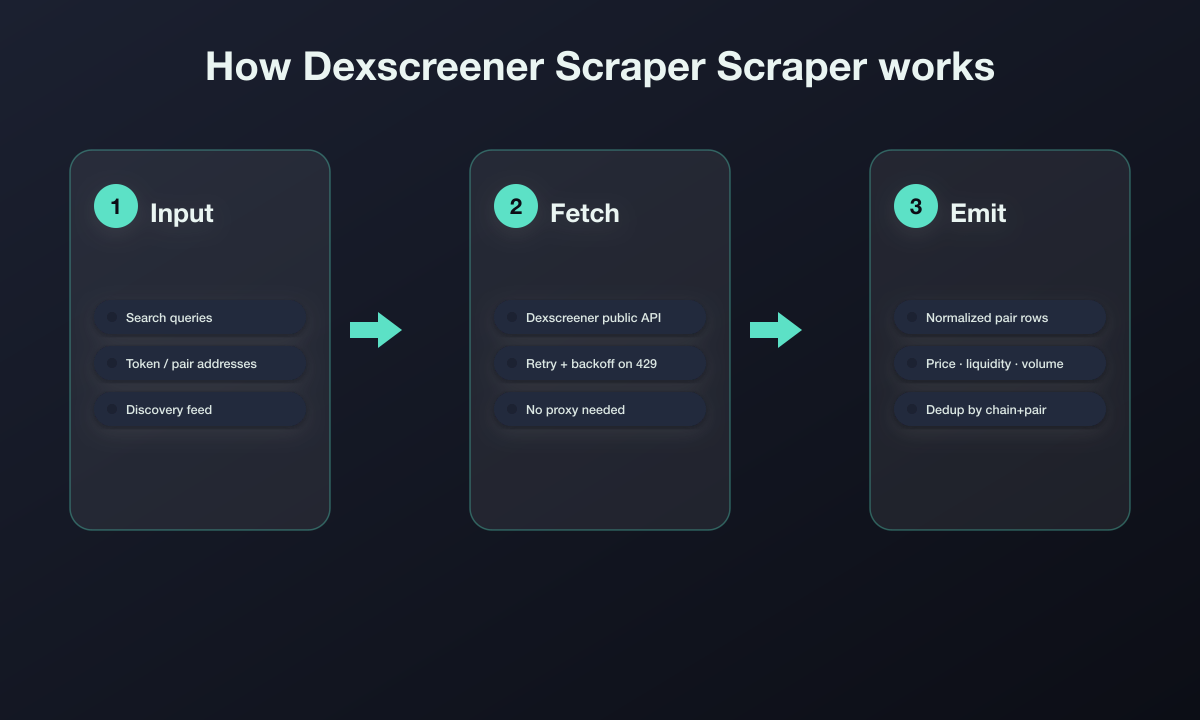
1. **Point it at Dexscreener** — any mix of search queries, addresses/URLs, and a discovery feed.
2. **Fetch** — each input hits Dexscreener's public API with retry + backoff on rate limits. No proxy needed.
3. **Emit** — pairs are normalized into flat rows, de-duplicated by chain + pair address, and bounded by `maxItems`.
### Input Configuration
| Field | Type | Notes |
|---|---|---|
| `searchQueries` | string\[] | Keywords / symbols to search |
| `urlsOrAddresses` | string\[] | Pair URLs, `chain/pairAddress`, or token contract addresses |
| `discoveryMode` | enum | `none` (default), `latestProfiles`, `latestBoosts`, `topBoosts` |
| `chainFilter` | string | Keep only pairs on this chain (e.g. `solana`). Empty = all chains |
| `maxItems` | integer | Cap on total pairs returned |
| `proxy` | object | Optional — the public API rarely needs one |
#### Example input
```json
{
"searchQueries": ["SOL", "PEPE"],
"urlsOrAddresses": ["https://dexscreener.com/solana/HcKhfddNF2dqMxxtL51AzgWU26MBNkUkEzGAHtqkpump"],
"discoveryMode": "topBoosts",
"chainFilter": "solana",
"maxItems": 200
}
```
### Output Overview
One row per pair. Numeric market fields are surfaced at the top level; the untouched Dexscreener pair object is kept under `raw`.
### Output Sample
```jsonc
{
"chainId": "base",
"dexId": "aerodrome",
"url": "https://dexscreener.com/base/0x1131db5977242a03ebead1acd18f80a9a29e5922",
"pairAddress": "0x1131DB5977242a03eBeaD1aCD18F80A9A29e5922",
"baseTokenSymbol": "SOL",
"quoteTokenSymbol": "USDC",
"priceUsd": "75.97",
"liquidityUsd": 353379.36,
"fdv": 15507499,
"marketCap": 15507499,
"volume24h": 4054031.2,
"priceChange24h": 1.49,
"txns24h": { "buys": 4034, "sells": 4033 },
"scrapedAt": "2026-07-19T10:28:33.734Z"
}
```
### Key Output Fields
- **Identity:** `chainId`, `dexId`, `url`, `pairAddress`, `baseTokenSymbol` / `baseTokenAddress`, `quoteTokenSymbol` / `quoteTokenAddress`
- **Price:** `priceUsd`, `priceNative`
- **Depth & size:** `liquidityUsd`, `fdv`, `marketCap`
- **Activity:** `volume24h` / `volume6h` / `volume1h`, `priceChange24h` / `priceChange6h` / `priceChange1h`, `txns24h`
- **Meta:** `pairCreatedAt`, `scrapedAt`, `raw` (full Dexscreener pair object)
### FAQ
**Do I need a proxy?** No. Dexscreener's public API is generous; the actor only backs off on the rare 429.
**Can I get every pool for a token?** Yes — pass the token contract address in `urlsOrAddresses`.
**Which chains are supported?** All chains Dexscreener indexes. Use `chainFilter` to restrict to one.
**What is discovery mode?** A live feed of trending/new tokens (profiles or boosts), each resolved to its pairs — handy as a screening signal.
**Historical candles?** Not included — this actor returns the current-state snapshot per pair.
### Support
Found a bug or need a field added? Open an issue on the actor's Issues tab, or email **muhamed.dido@gmail.com**.
### Explore More Scrapers
Browse the full catalog of production scrapers at [muhamed-didovic.github.io](https://muhamed-didovic.github.io/).
### ⚠️ Disclaimer
This Actor accesses publicly available market data on Dexscreener for legitimate research, market-intelligence, and analysis purposes. Use of this Actor must comply with Dexscreener's Terms of Service and all applicable laws. This is not financial advice — always verify token contracts independently before trading. The Actor's authors are not responsible for any misuse. We do not store any scraped data; the Actor returns it directly to your Apify dataset for your authorized use.
### SEO Keywords
dexscreener scraper, dexscreener api, dex screener data extraction, crypto pair scraper, token price scraper, solana token scraper, ethereum pair data, liquidity and volume scraper, dexscreener bulk export, on-chain market data, defi data api, token discovery feed, boosted tokens scraper, crypto market research, dexscreener json export, dexscreener csv export, memecoin scraper, dex pair monitor
# Actor input Schema
## `searchQueries` (type: `array`):
Keywords, symbols or names to search (e.g. SOL, PEPE, USDC/SOL). Each query returns its matching pairs.
## `urlsOrAddresses` (type: `array`):
Dexscreener pair URLs (e.g. https://dexscreener.com/solana/\), bare chain/pairAddress, or token contract addresses. Token addresses return every pool trading that token.
## `discoveryMode` (type: `string`):
Instead of (or in addition to) queries, pull a live discovery feed: the latest token profiles, the latest boosted tokens, or the most-boosted tokens right now.
## `chainFilter` (type: `string`):
Optional. Keep only pairs on this chain (e.g. solana, ethereum, base, bsc). Leave empty for all chains.
## `maxItems` (type: `integer`):
Maximum number of pairs to return across all inputs.
## `proxy` (type: `object`):
Optional. Dexscreener's public API is generous and usually needs no proxy; set this only if you hit rate limits.
## Actor input object example
```json
{
"searchQueries": [
"SOL"
],
"discoveryMode": "none",
"maxItems": 100
}
```
# API
You can run this Actor programmatically using our API. Below are code examples in JavaScript, Python, and CLI, as well as the OpenAPI specification and MCP server setup.
## JavaScript example
```javascript
import { ApifyClient } from 'apify-client';
// Initialize the ApifyClient with your Apify API token
// Replace the '' with your token
const client = new ApifyClient({
token: '',
});
// Prepare Actor input
const input = {
"searchQueries": [
"SOL"
],
"maxItems": 100
};
// Run the Actor and wait for it to finish
const run = await client.actor("memo23/dexscreener-scraper").call(input);
// Fetch and print Actor results from the run's dataset (if any)
console.log('Results from dataset');
console.log(`💾 Check your data here: https://console.apify.com/storage/datasets/${run.defaultDatasetId}`);
const { items } = await client.dataset(run.defaultDatasetId).listItems();
items.forEach((item) => {
console.dir(item);
});
// 📚 Want to learn more 📖? Go to → https://docs.apify.com/api/client/js/docs
```
## Python example
```python
from apify_client import ApifyClient
# Initialize the ApifyClient with your Apify API token
# Replace '' with your token.
client = ApifyClient("")
# Prepare the Actor input
run_input = {
"searchQueries": ["SOL"],
"maxItems": 100,
}
# Run the Actor and wait for it to finish
run = client.actor("memo23/dexscreener-scraper").call(run_input=run_input)
# Fetch and print Actor results from the run's dataset (if there are any)
print("💾 Check your data here: https://console.apify.com/storage/datasets/" + run["defaultDatasetId"])
for item in client.dataset(run["defaultDatasetId"]).iterate_items():
print(item)
# 📚 Want to learn more 📖? Go to → https://docs.apify.com/api/client/python/docs/quick-start
```
## CLI example
```bash
echo '{
"searchQueries": [
"SOL"
],
"maxItems": 100
}' |
apify call memo23/dexscreener-scraper --silent --output-dataset
```
## MCP server setup
```json
{
"mcpServers": {
"apify": {
"command": "npx",
"args": [
"mcp-remote",
"https://mcp.apify.com/?tools=memo23/dexscreener-scraper",
"--header",
"Authorization: Bearer "
]
}
}
}
```
## OpenAPI specification
Download the OpenAPI definition: https://api.apify.com/v2/actors/CFYfqC2LEGghKiWfn/builds/EergMa62b30VZZt4L/openapi.json