# Shopee Scraper \[From $0.28] Search, Ratings, Sales & Shops (`memo23/shopee-scraper`) Actor
Shopee scraper from $0.28 per 1,000 products: keywords, shops, categories and product URLs in all 11 Shopee markets, sorted by top sales, newest or price, up to 100 per keyword. Price, discount, rating, brand and seller details in one flat row. No login, no cookies. JSON, CSV or Excel.
- **URL**: https://apify.com/memo23/shopee-scraper.md
- **Developed by:** [Muhamed Didovic](https://apify.com/memo23) (community)
- **Categories:** E-commerce, Automation, Lead generation
- **Stats:** 231 total users, 118 monthly users, 97.5% runs succeeded, 0 bookmarks
- **User rating**: No ratings yet
## Pricing
from $0.28 / 1,000 product cards
This Actor is paid per event. You are not charged for the Apify platform usage, but only a fixed price for specific events.
Since this Actor supports Apify Store discounts, the price gets lower the higher subscription plan you have.
Learn more: https://docs.apify.com/actors/running/actors-in-store.md#pay-per-event
## What's an Apify Actor?
An Actor is a serverless cloud program that runs on the Apify platform. It has two run modes.
In Batch mode, an Actor accepts a well-defined JSON input, performs an action which can take anything from a few seconds to a few hours,
and optionally produces a well-defined JSON output, datasets with results, or files in key-value store.
In Standby mode, an Actor provides a web server which can be used as a website, API, or an MCP server.
Apify vocabulary and the platform model are defined once, in the agent quickstart at https://apify.com/agents.md.
## How to integrate an Actor?
If asked about integration, you help developers integrate Actors into their projects.
You adapt to their stack and deliver integrations that are safe, well-documented, and production-ready.
Do not guess an integration path. Every one of them is in the agent quickstart at https://apify.com/agents.md: the Apify MCP server, Agent Skills with the Apify CLI, the JavaScript and Python clients, the REST API, and the account-free path for an agent with no human to sign in. It also carries the rule on stating cost before the first paid run.
For examples already wired to this Actor's own input schema, see the [API](#api) section below.
Each client library has reference documentation the quickstart does not restate: [JavaScript/TypeScript](https://docs.apify.com/api/client/js/docs.md) (`npm install apify-client`) and [Python](https://docs.apify.com/api/client/python/docs.md) (`pip install apify-client`).
# README
## Shopee Scraper \[From $0.28] Search, Ratings, Sales & Shops

Turn Shopee search terms or URLs into product rows — title, price, currency, seller ids, and image — across Indonesia, Singapore, Malaysia, Philippines, Thailand, Vietnam, Taiwan, Brazil, Mexico, Colombia and Chile. No login, no cookies.
Optional product details add description, brand, gallery, price range and seller fields.
From **$0.28 per 1,000 products** ($0.36 on the Bronze tier). Error rows are free.
| Input | Row(s) emitted |
|---|---|
| Keyword (`searchTerms`) | Product cards from `/list/{term}` |
| Search / list / category URL | Product cards from that page |
| Shop URL | The first page of the shop's product grid (about 40 items) plus its featured items |
| Product URL (`-i.shop.item` or `/product/shop/item`) | One product, completed from the product data source (up to 20 lookups per run on Apify's free plan) |
***
### Why Use This Scraper?
- From $0.28 per 1,000 products ($0.36 on Bronze); product details from $2.50 per 1,000
- Eleven Shopee marketplaces in one actor
- Keyword search, category, shop, or a mixed list of URLs
- Up to 100 products per keyword in one request, sorted by Shopee itself: top sales, newest or price
- Rating and original price on keyword results; rating, discount and seller location on category and shop cards
- Price, rating and discounted-only filters
- Product URLs come back with title, brand, description, gallery and the shop's rating, followers and response rate, and the price when the data source has it
- Optional product-detail pass for gallery, brand, description and seller
- One flat row per product for JSON, CSV or Excel
- No browser, no cookies, no Shopee account
***
### Overview
Built for price monitors, marketplace researchers, and sourcing teams who need public Shopee listings as a table.
Every successful row is a **product**. A shop URL does not emit a shop-profile row — it emits that shop's products, up to about 50 per shop, because Shopee renders only the first page of a shop's grid as crawler HTML. If Shopee refuses the shop page, a paid run reads the shop through the product data source instead (about 30 products).
A keyword returns up to about 100 products. Shopee's own pages stop adding new products after a few pages, and the data source answers one page per keyword, so `maxItems` above that does not bring more for one keyword: split the search into several keywords instead. Colombia and Chile do not serve search HTML; keyword-only runs there return an `unavailable` error row. Paste a product or shop URL instead.
Keyword searches are read with Shopee's own sorting and come back with rating; category and shop URLs are read from Shopee's public pages, whose cards show rating and discount. A product URL is completed from the product's data: title, brand, description, gallery and the shop's rating, followers and response rate, and the price when the data source has it.
***
### Supported Inputs
| Kind | Example |
|---|---|
| Keyword | `iphone` in `searchTerms`, `country: "ID"` |
| List / search URL | `https://shopee.sg/list/iphone` or `https://shopee.sg/search?keyword=iphone` |
| Category | `https://shopee.co.id/Komputer-Aksesoris-cat.11044261` |
| Shop | `https://shopee.co.id/shop/196846900` or `https://shopee.co.id/rasyidjaya_computer` |
| Product | `https://shopee.sg/Name-i.855002939.28095542543` or `https://shopee.co.id/product/196846900/11083699432` |
#### Unsupported
- Cart, checkout, buyer messages, or anything behind login
- Lazada
- Colombia / Chile **keyword search** (product and shop URLs still work)
- Server-side `sales` / `latest` sort (those values stay in page order)
***
### Use Cases
| Audience | What they use it for |
|---|---|
| Price monitors | Track a SKU or keyword across SEA and LATAM Shopee hosts |
| Sourcing | Shortlist sellers by price, title and shop id |
| Catalog teams | Enrich a list of Shopee URLs with title and image |
| Researchers | Compare listing density for a term across countries |
***
### How It Works
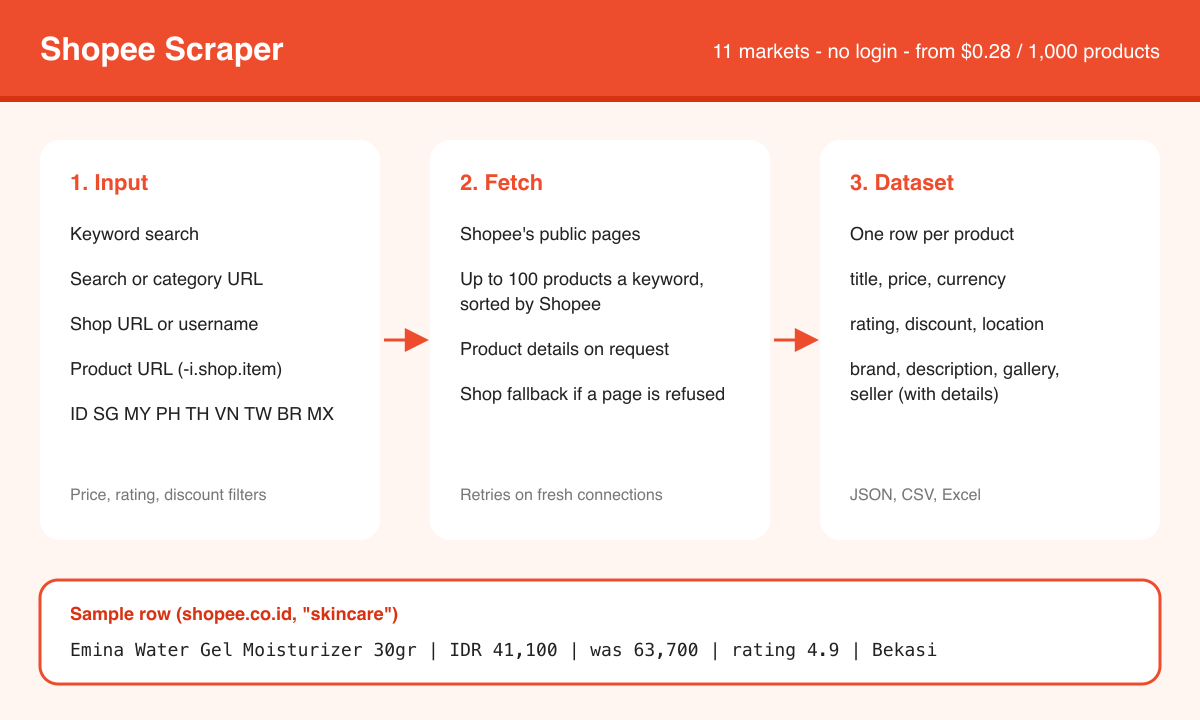
1. Each input is classified as a keyword, search, category, shop or product URL, in the marketplace of its own host.
2. Keywords are searched with Shopee's own sorting, up to about 100 products each. Category and shop URLs are read from Shopee's public pages; a shop returns its product grid plus its featured items, and a shop page Shopee refuses is read through the product data source instead (paid plan).
3. Each product card gives title, image, price, crossed-out price, rating, discount and, in Thailand, the seller's province. The price shown on the card is the one you get.
4. Filters (`minPrice`, `maxPrice`, `minRating`, `discountedOnly`) drop cards before billing. `price_asc` / `price_desc` reorder in memory.
5. If `enrichProducts` is on, each kept product is looked up in the product data source, which adds description, brand, the image gallery, price range and seller details. A product without a price is filled from the same lookup.
***
### Input Configuration
In the order of the input form:
| Field | Type | Default | Description |
|---|---|---|---|
| `startUrls` | array | — | Product, search, category or shop links; each keeps its own marketplace. `url`, `urls`, `productUrls`, `shopUrls`, `categoryUrls`, `shopId` (with or without `itemId`) and `shop` are read too. |
| `searchTerms` | array | — | Keywords, one per line. `keyword`, `keywords` and `query` are read too. |
| `country` | string | `ID` | Marketplace the keywords are searched on. |
| `mode` | string | `auto` | `auto`, `product`, `shop` or `search`. Links are always read as the page they are; `product` or `shop` skips keywords when links are given, and `product` adds full details to product links. |
| `discountedOnly` | boolean | `false` | Only products shown with a discount. |
| `minRating` | number | — | Lowest rating; products without one are kept. |
| `minPrice` / `maxPrice` | integer | — | In the marketplace's own money; products without a price are dropped. |
| `sortBy` | string | `relevancy` | `relevancy`, `latest`, `sales`, `price_asc` or `price_desc`, for keyword results. |
| `enrichProducts` | boolean | `false` | Full product and seller details, billed as `product-detail`. Product links get them anyway. Free plan: 20 lookups per run. |
| `maxItems` | integer | `40` | Products in the whole run. |
| `maxConcurrency` | integer | `3` | Products read at once, 1–8. |
| `proxyConfiguration` | object | residential | Optional; runs also work with it off. |
#### Example — keyword search
```json
{
"country": "ID",
"searchTerms": ["iphone"],
"maxItems": 40
}
```
#### Example — product URLs plus detail
```json
{
"mode": "product",
"startUrls": ["https://shopee.co.id/product/1732890112/26795239857"],
"enrichProducts": true
}
```
#### Example — one shop
```json
{
"mode": "shop",
"startUrls": ["https://shopee.co.id/shop/196846900"],
"maxItems": 20
}
```
***
### Pricing
Pay per event: you pay for the products you get, plus Apify's actor start.
| Event | Free | Bronze | Silver | Gold and above |
|---|---|---|---|---|
| Product card, per 1,000 | $0.40 | $0.36 | $0.32 | $0.28 |
| Product detail, per 1,000 | $3.50 | $3.00 | $2.80 | $2.50 |
| Actor start, per GB of run memory | $0.005 | $0.005 | $0.005 | $0.005 |
A product detail is charged for each product URL and, with `enrichProducts` on, for each result, and only when the details came back. Error rows, and rows that came back with no product data, are free.
What typical runs cost on Bronze, with the default 512 MB of memory:
| Run | Cost |
|---|---|
| 1,000 products from 10 keywords | $0.37 |
| One shop, 40 products | $0.02 |
| 100 product URLs, with details | $0.34 |
| 1,000 keyword results with `enrichProducts` | $3.37 |
***
### Output Overview
One dataset row per product. Search cards include `title`, `price`, `currency`, `url`, `itemId`, `shopId`, `imageUrl`, and `rating`, `discountPct` and `location` when the card shows them. Error rows carry `error`, `errorKind` (`unavailable` for a dead marketplace, a bad URL, or filters that matched nothing; `failed` for a page that could not be read) and `message` — those are not charged.
With `enrichProducts`, the same row also gets `description`, `brand`, `images`, `priceMin`, `priceMax`, `rating`, `shopName`, `shopUsername`, `shopRating`, `shopFollowers`, `shopItemCount`, `shopResponseRate` and `isOfficialShop`. Variants, category path and attributes are not available.
***
### Output Samples
Real rows from 2026-10-22, shortened (empty fields and long URLs trimmed).
Keyword search, `country: "ID"`, `searchTerms: ["skincare"]`:
```json
{
"type": "product",
"country": "ID",
"currency": "IDR",
"title": "Emina Water Gel Moisturizer 30gr - Skin Flooding Mechanism™",
"price": 41100,
"originalPrice": 63700,
"rating": 4.9,
"location": "Bekasi",
"itemId": "26173096824",
"shopId": "8077122",
"position": 4,
"searchTerm": "skincare",
"imageUrl": "https://down-id.img.susercontent.com/file/id-11134207-81ztc-mtnmt9i1jpcaf2"
}
```
Shop URL, `startUrls: ["https://shopee.co.th/bissiq"]`:
```json
{
"type": "product",
"country": "TH",
"currency": "THB",
"title": "[ซื้อ 3 ฟรี 1 ผ้าพันคอ] bissiq Intense Revive Soft Skin Pudding Moist มอยส์พุดดิ้ง สำหรับผิวแห้ง แพ้ง่าย ผิวแข็งแรง",
"price": 899,
"rating": 5,
"discountPct": 57,
"location": "จังหวัดนครปฐม",
"itemId": "45803528804",
"shopId": "1503126523",
"position": 2,
"sourceUrl": "https://shopee.co.th/bissiq",
"imageUrl": "https://down-th.img.susercontent.com/file/th-11134207-81zte-mtshofirubcx54"
}
```
***
### Key Output Fields
| Group | Fields |
|---|---|
| Identity | `country`, `itemId`, `shopId`, `url` |
| Offer | `title`, `price`, `currency`, `originalPrice`, `discountPct`, `imageUrl`, `rating`, `location` |
| Provenance | `searchTerm`, `sourceUrl`, `position`, `page`, `scrapedAt` |
| Detail (opt-in) | `description`, `brand`, `images`, `priceMin`, `priceMax`, `rating`, `shopName`, `shopUsername`, `shopRating`, `shopFollowers`, `shopItemCount`, `shopResponseRate`, `isOfficialShop` |
***
### FAQ
**Does it need Shopee cookies?**
No. The JSON API does (`/api/v4` returns 403 without their token). This actor reads the public crawler HTML instead.
**Why is `price` null on a product URL?**
Shopee's product page shows only the product's title and main image. The rest comes from the product data source, which often has no price (since 2026-10-22); a keyword, shop or category search gives the card price. When the data source has nothing for a product, or does not answer before the run's timeout, the row keeps the page's title and image, `price` stays empty, and only the product is billed. On the free plan a run can complete up to 20 products from the data source; after that product URLs get the page's title and image only.
**How long should a run with product URLs or product details get?**
At least 2 minutes. Each product lookup takes 25-60 seconds, and the run stops starting lookups shortly before its timeout so it can deliver what it has. Products it did not reach come back with the title and image from Shopee's product page, without details, and are not billed for details.
**What changes on Apify's free plan?**
Each run may make up to 20 product data lookups: one per keyword search, product URL or product detail. After that, keywords are searched on Shopee's public pages, where sorting by sales or latest is not available, product URLs return only their title and image, and `enrichProducts` adds nothing (and charges nothing). A paid Apify plan has no limit.
**Which countries work for search?**
ID, SG, MY, PH, TH, VN, BR, TW, MX. CO and CL need a product or shop URL.
**What does it cost?**
Apify's per-GB actor start ($0.005), then $0.36 per 1,000 product cards (Bronze; $0.28 on Gold and above). Product details cost $3.00 per 1,000 (Bronze; $2.50 on Gold and above), charged for each product URL and for each result when `enrichProducts` is on, and only when the details came back. Error rows are free. The **Pricing** section has every tier and example runs.
***
### Support
Found a bug or need a field that is not there? Open an issue on the actor's **Issues** tab.
Email: muhamed.didovic@gmail.com
***
### Additional Services
Need a custom scraper, a tailored export, or an integration into your own pipeline? Custom builds are available — muhamed.didovic@gmail.com.
***
### Explore More Scrapers
- [**Shopee Reviews Scraper**](https://apify.com/memo23/shopee-reviews-scraper) — the reviews of any Shopee product
- [**Lazada Scraper**](https://apify.com/memo23/lazada-scraper) — products, prices, ratings and sellers in six SEA markets
- [**Tokopedia Scraper**](https://apify.com/memo23/tokopedia-scraper) — products, shops and reviews in Indonesia
- [**TikTok Shop Scraper**](https://apify.com/memo23/tiktok-shop-scraper) — products, best sellers and reviews
- [**AliExpress Scraper**](https://apify.com/memo23/aliexpress-scraper) — products, prices and reviews
Browse the full collection at [apify.com/memo23](https://apify.com/memo23).
***
### 🤖 For AI Agents & LLM Apps
Compact reference for AI agents calling this actor via the [Apify MCP server](https://mcp.apify.com) or the Apify API (actor: `memo23/shopee-scraper`).
**Purpose:** Public Shopee product cards from keywords or URLs across 11 country hosts. No login.
**Minimal input:**
```json
{ "country": "ID", "searchTerms": ["iphone"], "maxItems": 5 }
```
**Output:** one dataset row per product — type, country, currency, title, price, url, itemId, shopId, imageUrl, searchTerm, sourceUrl. Failed targets return `{error, errorKind, message}`.
**Behaviors an agent should know:**
- Always set `maxItems`.
- A URL's host wins over `country`.
- A URL runs as what it is, whatever `mode` says. `mode: "product"` / `"shop"` skips `searchTerms` when URLs are given too.
- About 100 products per keyword at most; use several keywords for more.
- CO/CL keyword search returns `errorKind: "unavailable"` — pass a product or shop URL.
- Billing (Bronze): `product` $0.00036 per delivered card; `product-detail` $0.003 per product URL and per result with `enrichProducts`, only when details came back; $0.005 actor start. Error rows are free.
- On Apify's free plan a run has 20 product data lookups (keyword search, product URL, product detail); past them product URLs return only title and image. Prefer keyword search when price is required.
- No cookies and no `/api/v4` — do not send session tokens.
***
### ⚠️ Disclaimer
This Actor is an independent tool and is not affiliated with, endorsed by, or sponsored by Shopee Pte. Ltd., Sea Limited, or any of their subsidiaries. All trademarks mentioned are the property of their respective owners.
The scraper accesses only publicly available Shopee listing and product pages — no authenticated endpoints, paid features, or content behind the Shopee login wall. Users are responsible for ensuring their use complies with Shopee's Terms of Service, applicable data-protection law (GDPR, CCPA, etc.), and any contractual obligations of their own organization.
***
### SEO Keywords
Shopee scraper, scrape Shopee, Shopee API, Shopee product scraper, Shopee search scraper, Shopee shop scraper, Apify Shopee, Indonesia Shopee scraper, Shopee price monitoring, Shopee marketplace data, SEA ecommerce scraper, Shopee catalog export, Shopee seller intelligence, shopee.co.id scraper, Shopee no login
# Actor input Schema
## `startUrls` (type: `array`):
Product, search, category or shop pages from any Shopee marketplace, one per line, e.g. https://shopee.co.id/Name-i.196846900.11083699432, https://shopee.sg/search?keyword=iphone, https://shopee.co.id/Komputer-Aksesoris-cat.11044261 or https://shopee.co.th/bissiq. Each link stays on its own marketplace.
## `searchTerms` (type: `array`):
What to search for, one per line, e.g. iphone 15 or skincare. Each keyword returns about 100 products at most, so add keywords for more. Not needed when links are given.
## `country` (type: `string`):
The Shopee site the keywords are searched on; links keep their own. Colombia and Chile have no keyword search, so use product or shop links there.
## `mode` (type: `string`):
Every link is read as the kind of page it is, whatever you pick here. Product pages or shop pages: keywords are skipped when links are also given. Product pages: product links also get the full product details.
## `discountedOnly` (type: `boolean`):
On: only products shown with a discount badge or a crossed-out price.
## `minRating` (type: `number`):
0 to 5, e.g. 4.5. Products with no rating yet are kept. Empty: no limit.
## `minPrice` (type: `integer`):
In the marketplace's own money, e.g. 50000 for IDR 50,000. Products without a price are dropped. Empty: no limit.
## `maxPrice` (type: `integer`):
In the marketplace's own money, e.g. 200 for MYR 200. Products without a price are dropped. Empty: no limit.
## `sortBy` (type: `string`):
Order of keyword results, best match by default. Category and shop links keep the page's own order; the two price orders sort the products that were read.
## `enrichProducts` (type: `boolean`):
Off (default): what the search results show. On: adds the description, brand, all images, the price range and the seller's rating, followers, response rate and official-shop status, billed as product-detail for each product that gets them. Product links always get these details. On the free Apify plan, a run has 20 product lookups in total, counting searches, product links and details.
## `maxItems` (type: `integer`):
The run stops after this many products, default 40.
## `maxConcurrency` (type: `integer`):
1 to 8, default 3. Higher finishes product links and full details sooner.
## `proxyConfiguration` (type: `object`):
Apify residential by default; a residential proxy in the marketplace's country holds up best. Runs also work with the proxy off.
## Actor input object example
```json
{
"searchTerms": [
"iphone"
],
"country": "ID",
"mode": "auto",
"discountedOnly": false,
"sortBy": "relevancy",
"enrichProducts": false,
"maxItems": 40,
"maxConcurrency": 3,
"proxyConfiguration": {
"useApifyProxy": true,
"apifyProxyGroups": [
"RESIDENTIAL"
]
}
}
```
# Actor output Schema
## `products` (type: `string`):
Product cards from search, shop or URL — title, price, ids, image, and optional detail fields.
# API
You can run this Actor programmatically using our API. Below are code examples in JavaScript, Python, and CLI, as well as the OpenAPI specification and MCP server setup.
## JavaScript example
```javascript
import { ApifyClient } from 'apify-client';
// Initialize the ApifyClient with your Apify API token
// Replace the '' with your token
const client = new ApifyClient({
token: '',
});
// Prepare Actor input
const input = {
"searchTerms": [
"iphone"
]
};
// Run the Actor and wait for it to finish
const run = await client.actor("memo23/shopee-scraper").call(input);
// Fetch and print Actor results from the run's dataset (if any)
console.log('Results from dataset');
console.log(`💾 Check your data here: https://console.apify.com/storage/datasets/${run.defaultDatasetId}`);
const { items } = await client.dataset(run.defaultDatasetId).listItems();
items.forEach((item) => {
console.dir(item);
});
// 📚 Want to learn more 📖? Go to → https://docs.apify.com/api/client/js/docs
```
## Python example
```python
from apify_client import ApifyClient
# Initialize the ApifyClient with your Apify API token
# Replace '' with your token.
client = ApifyClient("")
# Prepare the Actor input
run_input = { "searchTerms": ["iphone"] }
# Run the Actor and wait for it to finish
run = client.actor("memo23/shopee-scraper").call(run_input=run_input)
# Fetch and print Actor results from the run's dataset (if there are any)
print(f"💾 Check your data here: https://console.apify.com/storage/datasets/{run.default_dataset_id}")
for item in client.dataset(run.default_dataset_id).iterate_items():
print(item)
# 📚 Want to learn more 📖? Go to → https://docs.apify.com/api/client/python/docs/quick-start
```
## CLI example
```bash
echo '{
"searchTerms": [
"iphone"
]
}' |
apify call memo23/shopee-scraper --silent --output-dataset
```
## MCP server setup
```json
{
"mcpServers": {
"apify": {
"type": "http",
"url": "https://mcp.apify.com/?tools=fetch-actor-details,memo23/shopee-scraper"
}
}
}
```
The hosted server signs you in with OAuth on first connect, so no API token belongs in this config. Clients without OAuth support can send an `Authorization: Bearer ` header instead, using a token from API & Integrations in Apify Console (https://console.apify.com/settings/integrations).
## OpenAPI specification
Download the OpenAPI definition: https://api.apify.com/v2/actors/y8kbfKunUvTjHaxlj/builds/9dOeah3zicYatOIM7/openapi.json