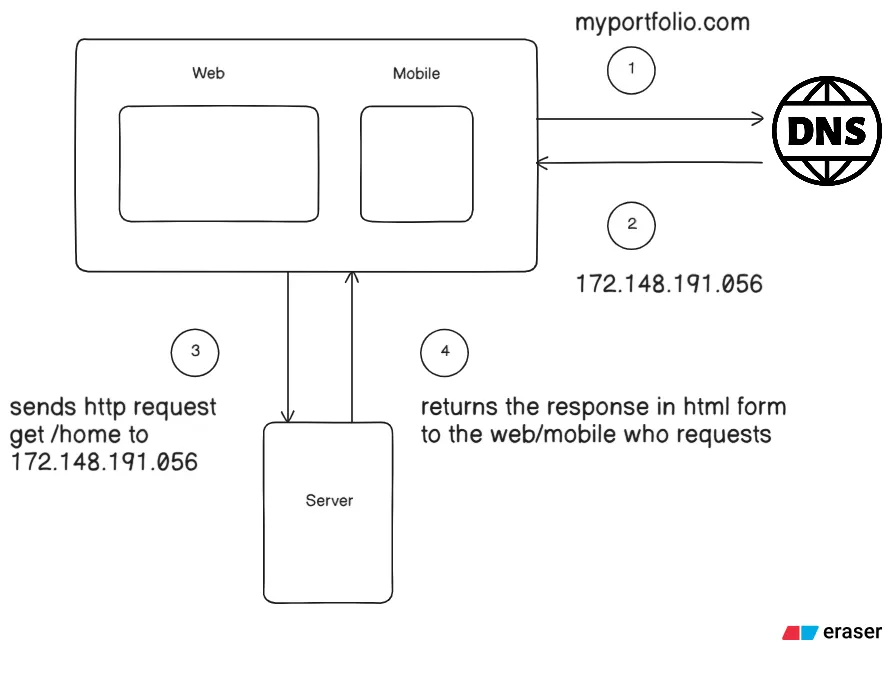
Networking Diary Page 1/30- What Really Happens as we type URL into our browser?

Hi, I am an aspiring backend engineer and as I go forward, I am trying to learn by reverse engineering. This is my first page related to Networking, belonging to a diary I look forward to compiling.
We often misunderstand the importance of the most basic things e.g. we quite often write APIs, type URL into browsers, access database but we most often skip learning about what is really happening deep inside most of the basic processes.
This later on catches up to us as we often struggle a lot understanding advanced problems, even though it is just a lot of basic problems all twisted together- making untying the knot quite a daunting task.
What is URL
Full form of URL is Uniform Resource Locator- it is basically the link that we often write down in the address bar of our browser:
http://daraz.com.bd/electronics/smartphones/SamsungS25Now, this is not an actual URL, but it illustrates the basic components of a URL that we are interested in for now: the protocol, domain name, port, path, and resource.
The protocol- First of all what really is a protocol, why do we even need them? See, you can think of protocol as a language- we often use languages so that we can communicate with the other person. Let’s say in Bangladesh our national language is Bangla so to talk with my country’s people I use Bangla. If I let’s say go to my neighbor country, India, I will definitely use the language which they communicate in- Hindi? Similarly, each server application has a way of communicating with our browser- the protocol!
In our case that is HTTP- Hypertext Transfer Protocol. This protocol has the request options- GET, POST, PUT, DELETE etc. Now this is a topic for another page since we should stick within our topic.
Then comes the domain name, which acts as a human-readable identifier for a website. Even a slight difference in a letter or number can point us to an entirely different domain. We often buy our own website’s domain names from companies (domain registrars) like Hostinger, Namecheap, Cloudflare etc. These are accredited by a non-profit organization that manages all the domain names- ICANN- Internet Corporation for Assigned Names and Numbers. We will look into details for these topics too in later pages.
Get Ishmaam’s stories in your inbox
Join Medium for free to get updates from this writer.
Our Internet runs on addresses called IP Addresses (Internet Protocol) which are plain numbers e.g.
125.131.179.190Now memorizing these types of addresses are not possible for us normal humans, that’s where the need of Domain names comes in play- suppose daraz.com.bd runs on the actual address 125.131.179.190- basically a translation.
Now let’s move on to the next part- electronics/smartphones is the address part where our resource is located in the server and SamsungS25 is the actual resource we were looking for. Since HTTP uses port 80 by default, our server will most likely be listening on port 80.
How does the browser know how to translate the URL into IP Address
That’s where an important term “DNS Resolve” comes into play. DNS means Domain Name System and it is an important address book or dictionary containing both Domain Name (key) and the actual IP Addresses (value).
The browser first checks its cache to see whether the IP address has already been resolved before. If it isn’t present, it checks the Operating System’s DNS cache. If the IP address still isn’t found, the query goes to the configured DNS resolver. Here our domain name is the key and the corresponding value- the IP Address is retrieved and sent as a response back to our browser.
What happens now that we resolved the IP Address?
The browser tries to establish a connection with our URL’s server using TCP connection (or it may as well try UDP Connection depending on the HTTP Version). If the HTTP version is 1.1 or 2 then TCP and with HTTP/3 it is QUIC over UDP. TCP connection requires Three way handshake:

Just for the basic understanding, the browser first sends a SYN or synchronization flag saying “I want to synchronize with you” to the server. If the server receives properly and wants to establish a connection too, it also sends a SYN as well as ACK or acknowledgement flag saying “I acknowledge and want to synchronize with you too”. Lastly our broswer sends back an ACK flag too. We will delve into TCP later.
Now the browser checks the protocol of our requested URL- in our case this is HTTP- so the browser knows how to communicate with our server via HTTP. It sends a GET request to our server- requesting the address and resource stated in our URL.
Now here there are many system designing decisions that come a lot into play- load balancing, reverse proxy, database etc. These are some of the advanced topics we will explore with networking later on- this was just a heads up!
And when the server is done with processing our GET request it sends a response back to our browser following the same protocol our browser used- HTTP.