Masonic vs. react-masonry-virtualized: The Definitive Guide to High-Performance React Grids


Building a masonry layout is easy. Building one that stays fast and stable at scale is a different problem entirely.
CSS Grid and Flexbox break down with “Pinterest-style” layouts — items have dynamic heights, and neither has a good answer for that. So you reach for a specialized library. The two serious options right now are Masonic and react-masonry-virtualized, and they make very different tradeoffs.
The masonry problem
A standard list tracks one dimension: height. A masonry grid tracks multiple columns, each with different heights that shift as content loads.
Virtualization — rendering only what’s visible on screen — makes this harder. You now have to answer: how do you know where an item belongs if the items above it haven’t rendered yet?
This architectural choice — estimating positions versus calculating them, integrated scroll handling versus manual wiring — defines your development experience and runtime behavior.

Masonic
Masonic exposes granular control over scroll containers, render cycles, and spatial queries through its hooks-first architecture. It’s built for cases where you need to own the scroll container, tune rendering behavior, or integrate with a complex existing setup.
The core of it is an Interval Tree data structure for spatial queries — instead of estimating item positions, it calculates them. This holds up well even with very large datasets; the library has a solid track record with 100k+ items without memory issues.
The architecture is hooks-first. useMasonry decouples layout logic from the UI entirely, so you can build a custom grid without touching the library's default components at all.
import { Masonry } from 'masonic';const MyGrid = ({ items }) => (
<Masonry
items={items}
columnGutter={16}
columnWidth={300}
render={({ data }) => (
<div className="card">
<img src={data.image} alt={data.title} />
<h3>{data.title}</h3>
</div>
)}
/>
);Clean to set up — but everything beyond the grid itself, you wire yourself.
react-masonry-virtualized
react-masonry-virtualized takes the opposite approach. Infinite scroll, loading states, and scroll position persistence are built in, not bolted on.
Get Kedar Deshmukh’s stories in your inbox
Join Medium for free to get updates from this writer.
The onEndReached callback handles loading more data without a separate intersection observer library. The library maintains scroll position state internally — when users navigate away and return, the viewport restores to the exact vertical offset without recalculating column heights or triggering reflows.. Compared to setting up the same behavior manually with Masonic, it cuts boilerplate by around 40–60%.
import { MasonryVirtualized } from 'react-masonry-virtualized';const MyFeed = ({ fetchItems }) => (
<MasonryVirtualized
minimumColumnWidth={300}
columnGutter={16}
onEndReached={fetchItems}
items={items}
renderItem={(item) => <Card data={item} />}
/>
);Less flexibility, but a lot less setup.

Architecture: Masonic is decoupled and modular — you own the pieces. react-masonry-virtualized is integrated and opinionated — less to configure, less to control.
Infinite scroll: Masonic requires useInfiniteLoader. react-masonry-virtualized has onEndReached built in.
SSR: Masonic handles it well via masonic/ssr. react-masonry-virtualized is client-side only.
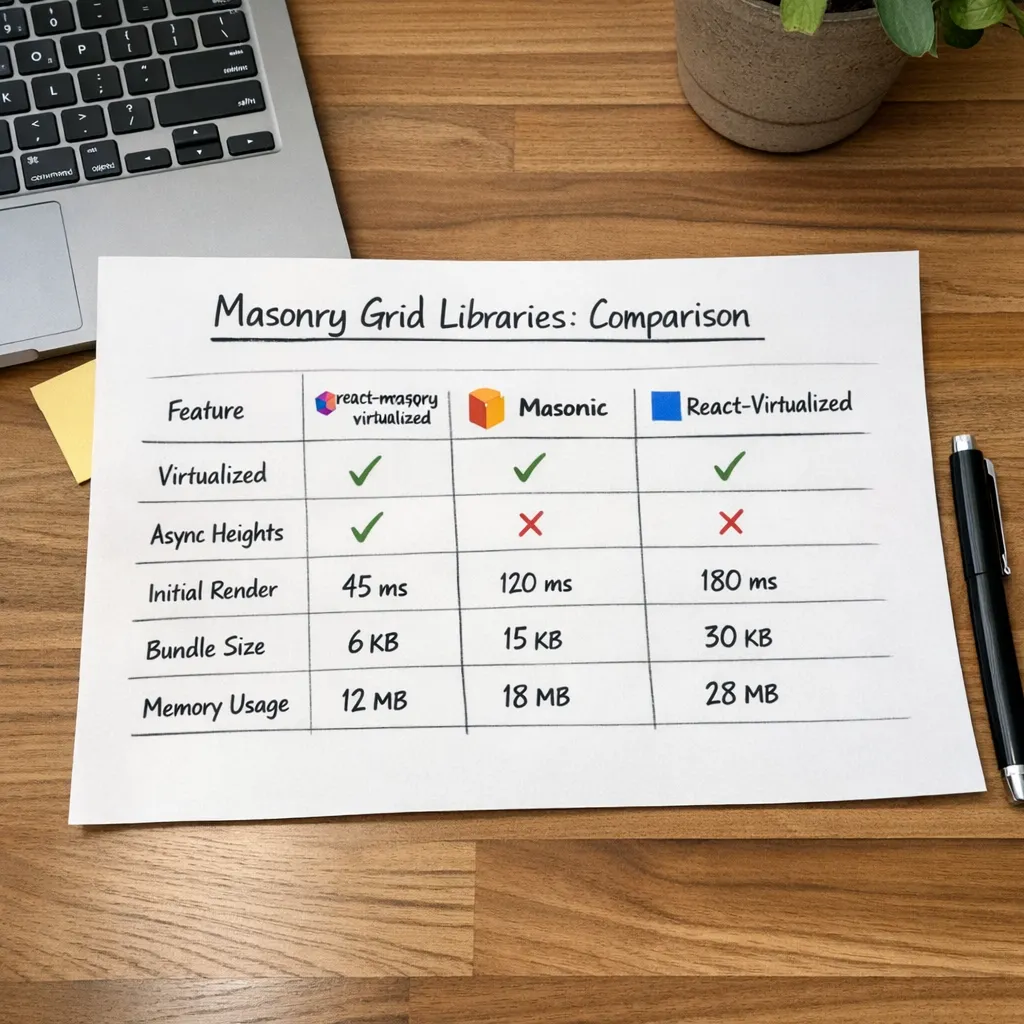
Bundle size: Masonic is ~5kb gzipped. react-masonry-virtualized is ~7kb.
Maintenance: Masonic is mature and actively maintained. react-masonry-virtualized has a more modern focus with active development.
The image height problem
The biggest performance killer in masonry grids isn’t the library you pick — it’s images loading and pushing content down. Neither library handles this automatically.
The fix is straightforward: reserve space before the image loads using aspect-ratio.
.card-image {
  width: 100%;
  aspect-ratio: 16 / 9;
  background: #f0f0f0;
}
This prevents layout shifts and makes the grid feel stable from first render.
Which one should you ship?
Ship Masonic if you need SSR, fine-grained scroll control, or you’re building something like a photo editor or data dashboard where the rendering pipeline needs to be yours.
Ship react-masonry-virtualized when building content feeds, portfolio galleries, or product catalogs where onEndReached, scroll restoration, and loading states need to work immediately without additional integration code.
Either way, stop rendering 500 DOM nodes at once. Your users are on phones with throttled CPUs — virtualization isn’t optional anymore, it’s just expected.
One thing most people skip: test on mobile before you ship. A grid that looks clean on a large monitor can feel overwhelming on a small screen. Tightening
columnGutteron smaller breakpoints usually fixes it.