Primitive Data Types in JAVA.


I started learning Java programming language for OCAJP( 1Z0–808) examination. While i was reading about it, suddenly my mind asked me why don’t you share whatever you are learning. And here i am! My purpose of writing this blog is to introduce the concept of various primitive data types available in java. And how we can perform various operations over these primitive data types.
What is a Data Type?
When we write program our motive is to take input, process it and produce some output. So whatever data we are going to provide to our program as input, needs to be certain. A data type is an attribute of data which tells the compiler or interpreter how the programmer intends to use the data. That is the compiler should know what the data is, its range and many other aspects like what are the various operations that can be performed on this data.
Java is strongly typed language-
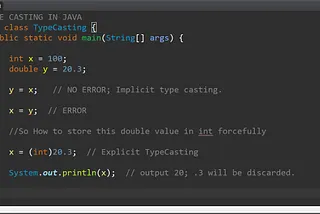
Java is strongly typed language. What does this means? Strongly typed means we can not assign each and every kind of values to a single variable. One variable will be responsible for storing its type of data only. You must declare a variable and define its type before assigning a value to it. Some scripting languages like JavaScript is loosely typed language in which we don’t need to define the type of variable before we use it, the compiler takes care of it.
Following is a Java example to understand the strictness of Java for its Data Types-
Classification of Data Type in Java:
In almost every strongly typed language there is always some data types which are predefined and known as Primitive-Data Type and the one which are not predefined are known as Non-Primitive Data Type. So in java as well we have two categories of data type:
- Primitive-Data Type
- Non-Primitive Data Type.
In this post we are focusing on Primitive Data Types only.
Primitive-Data Type
Primitive, as the name says, are such data types which are already present or defined in any programming language(here java). It is of different types to satisfy the requirement of storing/processing different types of data. Each data type can store different range as well as different kind of data. In java, primitive data types are classified as following-

So from the above discussion we can understand that java has eight primitive datatypes which are —
Get Luqman’s stories in your inbox
Join Medium for free to get updates from this writer.
byte, short, int, long, float, double, char and boolean.
The eight primitive data types of Java
Every data type have some parameters associated with it, like its size, range, minimum value and maximum value that can be stored in it etc. So lets start understanding these primitive data types on the basis of these parameters.
Byte: Byte is used to store very small values. Byte data type is suitable if we are handling data in terms of streams either from the file or from the network.
Size: 1byte (8bits)
MaxValue: +127
MinValue: -128
Range: -128 to 127
Type: Signed integrals in Two’s complement form.
Default Value: 0
Lets see an example of it-
And the output is:
100
-128
Short : Short is larger than byte but still a smaller capacity data type which are rarely used these days. It was very much used for programming on 16 bit microprocessors like Intel’s 8086.
Size: 2 bytes (16 bits)
MaxValue: +32767
MinValue: -32768
Range: -32768 to 32767 ( -2¹⁵ to 2¹⁵-1 )
Type: Signed Integrals in Two’s complement form
Default Value: 0
lets see an example of it-
And the output is-
1234
-32768
Int : Int data type is one of the most commonly used signed integer data type.
Size: 4 bytes (32 bits)
MinValue: -2147483648
MaxValue: 2147483647
Range:-2147483648 to 2147483647 ( -2³¹ to 2³¹-1)
Default Value: 0
Lets see how we can assign values to Int by following examples-
And the output is -
2147483640
-2147483644
Lets play more with int type-
int x = 10.0;  //INVALID -Compile time error- 10.0 is of double type
int x = '10';  //INVALID -Compile time error
int x = 'a';   //INVALID -Compile time error
Long: Whenever int is not enough to hold big values then we should go for long data type.
For an example: To hold the distance traveled by light in 1000 days , int may not enough, so we should go for long data type.
long l = 186000*60*24*1000 milesSize: 8 bytes
Range: -2⁶³ to 2⁶³-1
Default Value: 0
We are required to write L at the end of the literal if the value is greater than the maximum size of int type, to show that this value is of long type.
So a good practice is to always write L at the end of the literal no matter what long/int value you are providing to it.Example: if we take l to be the max size if int type -long l = 2147483647; // its fine we don't need to put L But if we write even one more than this we must write L at the end of the literal. long l = 2147483648L;
Lets see an example of it-
And the output is:
0
10
214748364
“All the above data types (byte, short, int and long) can be used to represent whole numbers. If we want to represent real numbers then we should go for floating point data types.”
Float: Floating point data types are used to represent numbers with a fractional part. Sufficient for storing 6 to 7 decimal digits.
Size: 4 bytes (32 bits)
MinValue: 3.4e−038
MaxValue: 3.4e+038
Default Value: 0.0
e stands for exponential; 3.4e23F = 3.4 x 10²³.
Lets take an example-
And the output is:
0.0
10.5656
2.3
0.0
3.4E23Double: Double type is also used to represent numbers with a fractional part. Sufficient for storing 15 decimal digits.
Size: 8bytes (64 bits)
MinValue: 1.7e−038
MaxValue: 1.7e+038
Default Value: 0.0
Lets take an example-
And the output is:
0.0
10.565555572509766
2.299999952316284
0.0
3.40000010473073E23
For double we may use ‘D/d’ at the end of the literal, similarly for float we use ‘F/f’ at the end.
Char: char is used to store character constants in the memory. It consumes a size of 2 bytes, but basically it can hold only a single character because char stores unicode character sets. It has a minimum value of ‘u0000’ (or 0) and a maximum value of ‘uffff’ (or 65,535, inclusive).
The character assigned must be in single quotes. (‘ ’)
Size: 2bytes (16 bits)
MinValue: 0 or u0000
MaxValue: 65535 or uffff
Default Value:
Lets take an example-
And the output is -
   //default value is nothing
a
b
}
A
Boolean: A boolean data type is declared with the
booleankeyword and can only take the valuestrueorfalse.
Default Value: false
Size: Not applicable (virtual machine dependent). Generally 1 bit.
Range: Not applicable but allowed values are true or false.
Lets take an example showing the working of Boolean-
So the output is -
Default value of boolean is :false
true
All the above discussion can be summarized in tabular format as following-

Thank you for utilizing your valuable time to add value to your knowledge. Hope you liked it. Did this article help you out? If it did, I hope you consider sharing it and writing something below to make me correct if wrong.
Thank you so much!