40 Apache Kafka Interview Questions Every Experienced Java Developer Must Know in 2026


Interviewers are no longer asking textbook definitions. They want to know how you’ve fought Kafka in production.
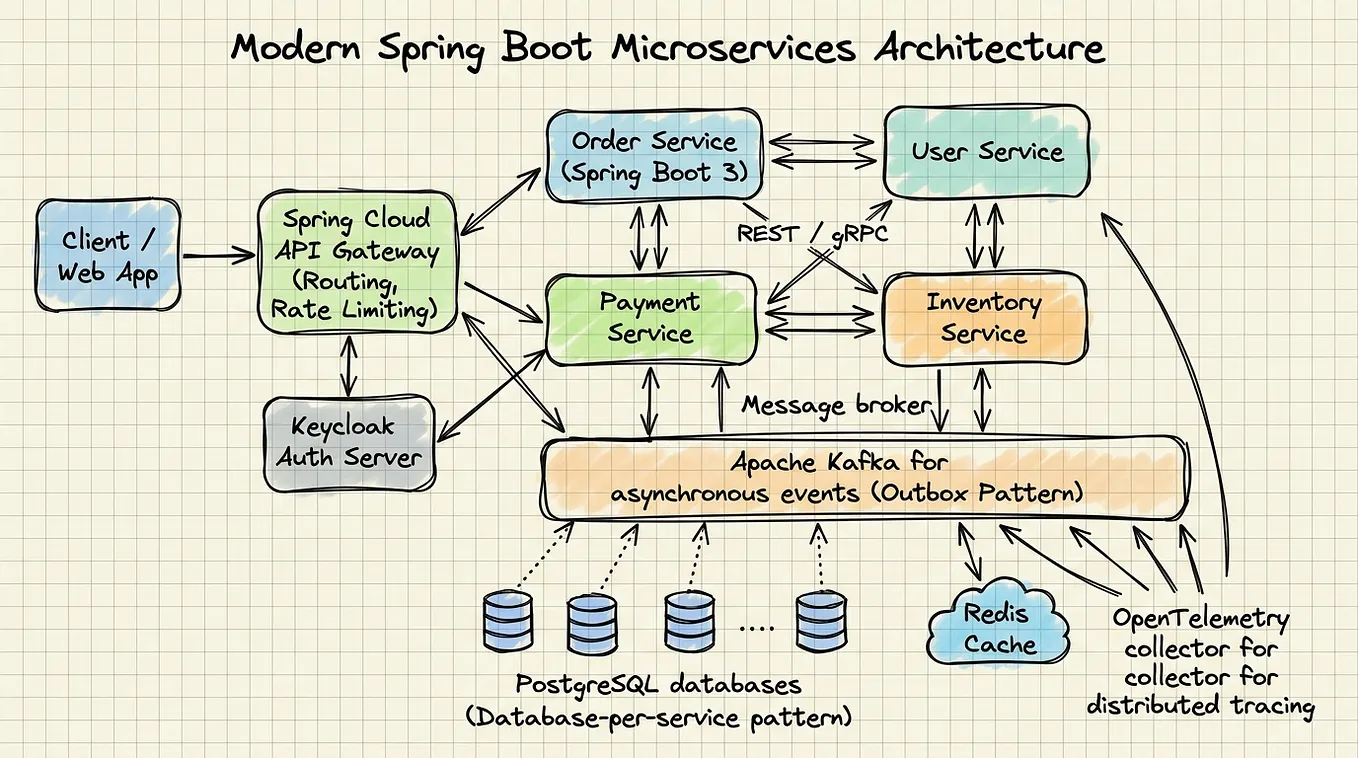
If you’re a Java developer with a few years under your belt, chances are you’ve touched Kafka somewhere — a Spring Boot microservice publishing events, a consumer reading orders, a DLQ swallowing your retry nightmares. But interviews have evolved. The days of “Kafka is a distributed messaging system” getting you through are long gone.
This guide covers all 40 frequently asked Kafka interview questions with deep, production-aware answers — the kind that make interviewers nod slowly and reach for the “strong hire” checkbox.
🧱 Section 1: Kafka Fundamentals
1. What is Apache Kafka?
Apache Kafka is a distributed, fault-tolerant, high-throughput event streaming platform. Originally built at LinkedIn, it’s designed to handle real-time data pipelines and streaming workloads at massive scale.
Think of it as a commit log that never forgets — producers append events, consumers read them at their own pace, and Kafka retains everything for a configurable duration. It decouples your services beautifully.
2. Why is Kafka used in Microservices Architecture?
In microservices, services must communicate without tight coupling. Kafka enables:
- Asynchronous communication — producers don’t wait for consumers
- Event-driven architecture — services react to events rather than polling
- Resilience — if a consumer is down, messages wait; nothing is lost
- Scalability — consumers can be scaled independently
- Audit trail — every event is persisted and replayable
REST calls create temporal coupling (both services must be up). Kafka eliminates that entirely.
3. What are Topics and Partitions in Kafka?
A Topic is a named feed or category to which records are published — like a table in a database, but append-only.
A Partition is how a topic is split for parallelism. Each partition is an ordered, immutable sequence of records. Key properties:
- A topic with 6 partitions can be consumed by up to 6 consumers in parallel (within a group)
- Messages with the same key always go to the same partition (ordering guarantee per key)
- Partitions are distributed across brokers for load balancing
Topic: orders
├── Partition 0 → Broker 1
├── Partition 1 → Broker 2
└── Partition 2 → Broker 3
4. What is an Offset in Kafka?
An offset is a unique, sequential integer assigned to each message within a partition. It’s Kafka’s way of tracking position.
- Offsets are per partition, not global
- Consumers commit their offset to track what they’ve processed
- You can replay messages by resetting offsets to an earlier position
This is what makes Kafka fundamentally different from traditional queues — messages aren’t deleted on consumption; the consumer’s position is just a pointer.
5. What is a Consumer Group?
A Consumer Group is a set of consumers that jointly consume a topic. Kafka distributes partitions among group members:
- Each partition is assigned to exactly one consumer within a group
- Multiple groups can independently consume the same topic (fan-out pattern)
- If you have more consumers than partitions, some consumers sit idle
Topic (4 partitions) + Consumer Group (2 consumers):
Consumer A → Partition 0, Partition 1
Consumer B → Partition 2, Partition 3
This is the core scalability primitive in Kafka.
⚙️ Section 2: Internals — Where Interviews Get Serious
6. How Does Kafka Maintain Message Ordering?
Kafka guarantees ordering within a partition, not across partitions.
- Use a message key to route related messages to the same partition (e.g.,
customerIdas key) - All messages with the same key land on the same partition in the same order
- If ordering across all messages matters, use a single partition (sacrifices throughput)
In practice, business ordering is usually scoped to an entity (e.g., all events for order #123), and using the entity ID as key solves it cleanly.
7. What is Replication Factor?
Replication Factor defines how many copies of each partition exist across brokers. A replication factor of 3 means:
- 1 Leader replica (handles all reads/writes)
- 2 Follower replicas (passively replicate from leader)
Rule of thumb: replication factor ≥ 3 in production. It survives broker failures without data loss.
8. Difference Between Leader and Follower Replicas?
Leader Follower Handles producer writes ✅ Yes ❌ No Handles consumer reads ✅ Yes ❌ No Replicates data N/A (source) ✅ From leader Becomes active on failure Already active Elected as new leader
All traffic goes through the leader. Followers exist purely for fault tolerance.
9. What is ISR (In-Sync Replica)?
ISR (In-Sync Replicas) is the set of replicas that are fully caught up with the leader. A replica falls out of ISR if it falls too far behind (controlled by replica.lag.time.max.ms).
Why it matters:
acks=allwaits for all ISR replicas to acknowledge — this is your durability guarantee- If ISR shrinks to 1 (only the leader), you’re effectively unprotected
- Monitor ISR shrinkage in production — it’s an early warning of broker stress
10. What Happens if a Kafka Broker Goes Down?
- Controller broker detects the failure via ZooKeeper/KRaft heartbeat timeout
- For each partition where the failed broker was leader, a new leader is elected from the ISR
- Producers and consumers automatically reconnect and route to the new leader
- The failed broker’s partitions are reassigned
If min.insync.replicas is set (e.g., 2) and ISR drops below that, producers with acks=all will get a NotEnoughReplicasException — by design, to prevent data loss.
📤 Section 3: Producer Deep Dive
11. What is Producer Acknowledgement (acks)?
acks controls how many broker acknowledgements the producer requires before considering a write successful. It's the durability vs. latency tradeoff knob.
12. Difference Between acks=0, acks=1, and acks=all?
acks Behavior Risk Use Case 0 Fire and forget, no wait Data loss possible Metrics, logs (loss acceptable) 1 Leader acknowledges, followers may not have it Data loss if leader crashes before replication Moderate durability needs all (or -1) All ISR replicas must acknowledge Highest latency, no data loss Financial transactions, critical events
In production, acks=all + min.insync.replicas=2 is the gold standard for durability.
13. What is an Idempotent Producer?
An Idempotent Producer ensures that even if a message is sent multiple times (due to retries on network failures), Kafka deduplicates it — the broker stores exactly one copy.
Enable it with:
props.put(ProducerConfig.ENABLE_IDEMPOTENCE_CONFIG, true);Kafka assigns each producer a PID (Producer ID) and a sequence number per partition. If a duplicate arrives, the broker discards it silently. This is prerequisite for Exactly Once Semantics.
14. How Does Kafka Handle Duplicate Messages?
Three layers of defense:
- Idempotent Producer — deduplicates at the broker level during retries
- Transactional API — atomic writes across multiple partitions/topics
- Idempotent Consumer logic — deduplicate by tracking processed message IDs (e.g., in Redis or DB) for cross-system safety
Always assume your consumer might see duplicates and design it to be idempotent (processing the same message twice produces the same result).
📥 Section 4: Consumer Mechanics
15. What is Consumer Rebalancing?
Rebalancing is the process of redistributing partitions among consumers in a group. It’s triggered when:
- A consumer joins or leaves
- A consumer crashes or stops sending heartbeats
- Topic partitions are added
During rebalancing, all consumption stops — this is called a “stop the world” event. It can cause significant lag spikes in production.
Mitigation: Use static group membership (group.instance.id) to avoid rebalances for temporary consumer restarts.
16. What Happens When a New Consumer Joins a Consumer Group?
- New consumer sends a
JoinGrouprequest to the group coordinator broker - Coordinator triggers a rebalance
- One consumer is elected group leader
- Group leader assigns partitions to all members (using an assignor strategy — RangeAssignor, RoundRobinAssignor, StickyAssignor)
- Assignment is sent back via
SyncGroupresponse - Consumption resumes
StickyAssignor is preferred in production — it minimizes partition movement during rebalances, reducing lag spikes.
17. What is Auto Offset Reset?
auto.offset.reset determines where a consumer starts reading when there's no committed offset (new consumer group, or offsets expired):
earliest— start from the very beginning of the topiclatest— start from new messages only (skip history)none— throw an exception if no offset found
18. Difference Between earliest and latest Offset Reset?
Topic messages: [msg1, msg2, msg3, msg4] ← msg5 arrives nowearliest → Consumer starts at msg1 (reads all history)
latest → Consumer starts at msg5 (only future messages)Use earliest for event sourcing or replay scenarios. Use latest for real-time feeds where historical data is irrelevant.
🔁 Section 5: Failure Handling & Retry Mechanisms
19. What is a Dead Letter Queue (DLQ)?
A Dead Letter Queue is a separate Kafka topic where messages that repeatedly fail processing are routed. Instead of blocking the main consumer or silently dropping failures, DLQ gives you:
- Visibility into what failed and why (store the exception with the message)
- Non-blocking processing — bad messages don’t halt healthy ones
- Reprocessing capability — fix the bug, replay from DLQ
orders-topic → Consumer → ❌ Fails 3 times → orders-topic.DLQIn Spring Kafka, @KafkaListener with DeadLetterPublishingRecoverer handles this out of the box.
20. How Do You Retry Failed Kafka Messages?
Spring Kafka retry strategy:
@Bean
public DefaultErrorHandler errorHandler(KafkaTemplate<?, ?> template) {
    var recoverer = new DeadLetterPublishingRecoverer(template);
    var backoff = new ExponentialBackOffWithMaxRetries(3);
    backoff.setInitialInterval(1000L);
    backoff.setMultiplier(2.0);
    return new DefaultErrorHandler(recoverer, backoff);
}
Retry patterns:
- Immediate retry — for transient errors (brief network blip)
- Exponential backoff — for downstream service issues
- Retry topic pattern — route to
orders-retry-1,orders-retry-2topics with delays - DLQ — after all retries exhausted
Never retry indefinitely — always set a max retry count and route to DLQ.
21. How Do You Improve Kafka Consumer Performance?
Lever Config Impact Fetch size fetch.min.bytes, fetch.max.wait.ms Batches more messages per poll Concurrency concurrency in @KafkaListener Multiple threads per consumer Partition count More partitions = more parallel consumers Linear throughput scaling Processing Use async/reactive processing Don't block poll loop Commit strategy Manual batch commits Reduce broker round trips
@KafkaListener(topics = "orders", concurrency = "4")
public void consume(ConsumerRecord<String, Order> record) { ... }
22. What is Consumer Lag?
Consumer Lag is the difference between the latest offset (end of partition) and the consumer’s committed offset. It tells you how far behind a consumer is.
Latest Offset: 10,000
Consumer Offset: 9,500
Lag: 500 messages
High lag means your consumer can’t keep up with the producer rate — a production alert you should always have configured.
23. How Do You Debug Kafka Lag Issues?
Step-by-step approach:
- Measure lag —
kafka-consumer-groups.sh --describeor Grafana/Prometheus - Identify the slow partition — lag is usually uneven across partitions
- Check consumer logs — long GC pauses? Slow DB calls inside
onMessage? - Check
max.poll.records— if set too high, processing takes too long → triggers rebalance - Scale consumers — add instances up to partition count
- Profile the processing logic — is there an N+1 query or blocking HTTP call inside the listener?
🗄️ Section 6: Storage & Retention
24. What is Kafka Retention Policy?
Kafka retains messages based on your configuration — not based on consumption. Options:
log.retention.hours— time-based (default: 7 days)log.retention.bytes— size-based per partition- Both — whichever limit is hit first
This enables message replay — a subscriber can re-read historical events simply by resetting their offset.
25. Difference Between Log Compaction and Retention?
Time/Size Retention Log Compaction Deletes based on Age or size Duplicate keys Keeps Last N days of all messages Latest value per key (tombstones for deletes) Use case Event logs, audit trails Current state per entity (like a changelog) Analogy Rolling log file Key-value store
Get Meet2sudhakar’s stories in your inbox
Join Medium for free to get updates from this writer.
Log Compaction is ideal for event sourcing or CDC (Change Data Capture) topics where you care about the latest state of each entity.
🔒 Section 7: Reliability & Guarantees
26. How Does Kafka Achieve Fault Tolerance?
- Replication — every partition has N replicas across brokers
- Leader election — automatic failover when a broker dies
- ISR tracking — only caught-up replicas can become leaders
- Durable storage — messages written to disk (not just memory)
- Producer retries + idempotence — no message loss on transient failures
- Consumer offset management — consumers can resume from last committed offset after restart
Kafka is designed such that a single broker failure is transparent to producers and consumers with proper configuration.
27. How Does Partitioning Improve Scalability?
Partitioning is Kafka’s horizontal scaling mechanism:
- Write parallelism — multiple producers write to different partitions simultaneously
- Read parallelism — each partition is consumed by one consumer thread (within a group)
- Distribution — partitions spread across brokers, no single bottleneck
Throughput formula (roughly):
Effective throughput = Single partition throughput × Number of partitionsA topic with 12 partitions, each handling 50MB/s, gives you ~600MB/s aggregate throughput.
31. What is Exactly Once Semantics in Kafka?
Exactly Once Semantics (EOS) guarantees that each message is processed exactly one time — no duplicates, no losses. Achieved by combining:
- Idempotent Producer (dedup at broker)
- Kafka Transactions (atomic multi-partition writes)
- read-process-write in a single transaction (consumer offset + output committed atomically)
producer.initTransactions();
producer.beginTransaction();
producer.send(new ProducerRecord<>("output-topic", result));
producer.sendOffsetsToTransaction(offsets, consumerGroupMetadata);
producer.commitTransaction();
EOS adds ~10–20% latency overhead. Use only where it’s truly required (financial systems, billing).
32. At Most Once vs At Least Once vs Exactly Once
Semantic How Risk Use Case At Most Once Commit offset before processing Message loss on crash Metrics, telemetry At Least Once Commit offset after processing Duplicate processing possible Most business events (with idempotent consumers) Exactly Once Transactional API Performance cost Payments, inventory, billing
In practice, 90% of systems use At Least Once with idempotent consumer logic — it’s simpler and fast enough.
🌊 Section 8: Kafka Streams
33. What is Kafka Streams?
Kafka Streams is a client-side Java library for building stream processing applications. No separate cluster needed — it runs inside your application.
StreamsBuilder builder = new StreamsBuilder();
builder.stream("orders")
       .filter((key, order) -> order.getAmount() > 1000)
       .to("high-value-orders");
Features: stateful operations, windowing, joins, aggregations, fault-tolerant state stores (backed by Kafka topics).
34. Difference Between Kafka Streams and Spark Streaming?
Kafka Streams Spark Streaming Processing model Record-by-record (true streaming) Micro-batch Deployment Embedded in your app Separate cluster Latency Milliseconds Seconds (micro-batch) Complexity Low (just a library) High (cluster management) State management Local RocksDB + Kafka Spark RDD/DataFrame Best for Lightweight per-service processing Heavy analytics, ML pipelines
Use Kafka Streams when you want stream processing without the overhead of a separate cluster.
🏭 Section 9: Spring Boot Integration
28. What is KafkaTemplate in Spring Boot?
KafkaTemplate is Spring Kafka's high-level producer abstraction. It wraps the native KafkaProducer and integrates with Spring's transaction support.
@Autowired
private KafkaTemplate<String, OrderEvent> kafkaTemplate;
public void publishOrder(Order order) {
kafkaTemplate.send("orders", order.getId(), new OrderEvent(order))
.whenComplete((result, ex) -> {
if (ex != null) log.error("Failed to send", ex);
else log.info("Sent to partition {}", result.getRecordMetadata().partition());
});
}29. What is @KafkaListener?
@KafkaListener is the consumer-side annotation that registers a method as a Kafka message handler:
@KafkaListener(
    topics = "orders",
    groupId = "order-service",
    containerFactory = "kafkaListenerContainerFactory"
)
public void handleOrder(ConsumerRecord<String, OrderEvent> record) {
    log.info("Processing order {} from partition {}",
             record.key(), record.partition());
    orderService.process(record.value());
}
It supports batch listening, manual offset acknowledgment, and error handling through the container factory configuration.
30. How Do You Handle Kafka Consumer Exceptions in Spring Boot?
@Bean
public ConcurrentKafkaListenerContainerFactory<String, Object> factory(
        ConsumerFactory<String, Object> cf,
        KafkaTemplate<String, Object> template) {
var factory = new ConcurrentKafkaListenerContainerFactory<String, Object>();
factory.setConsumerFactory(cf); // DLQ recoverer: failed messages → topic.DLQ
var recoverer = new DeadLetterPublishingRecoverer(template); // Retry 3 times with exponential backoff, then send to DLQ
var backoff = new ExponentialBackOffWithMaxRetries(3);
backoff.setInitialInterval(500L);
backoff.setMultiplier(2.0); factory.setCommonErrorHandler(new DefaultErrorHandler(recoverer, backoff));
return factory;
}
Key decisions:
- Distinguish retriable errors (network, DB timeout) from non-retriable (deserialization failure, validation error)
- Never retry non-retriable errors — they’ll always fail; send straight to DLQ
- Always include exception metadata in DLQ message headers for observability
🚨 Section 10: Production Scenarios
35. Common Production Issues in Kafka
Issue Root Cause Fix High consumer lag Slow processing, under-partitioned Add consumers, optimize processing Frequent rebalances Short session.timeout.ms, slow processing Tune timeouts, use static membership NotEnoughReplicasException ISR < min.insync.replicas Fix unhealthy brokers Out-of-memory on broker Retention too high, heap misconfigured Tune retention, increase broker memory Message deserialization errors Schema mismatch, producer/consumer schema drift Use Schema Registry (Avro/Protobuf) Uneven partition load Poor key selection (hot partition) Redistribute keys or use custom partitioner
36. How Do You Monitor Kafka in Production?
Essential metrics:
Consumer metrics:
- records-lag-max (per partition)
- records-consumed-rate
- commit-rate
Producer metrics:
- record-error-rate
- request-latency-avgBroker metrics:
- UnderReplicatedPartitions (must be 0)
- ISR shrink/expand rate
- BytesIn/BytesOut rate
- ActiveControllerCount (must be 1)
Stack: JMX → Prometheus JMX Exporter → Grafana dashboards
Managed options: Confluent Control Center, Datadog Kafka integration, AWS MSK metrics
Non-negotiable alerts:
UnderReplicatedPartitions > 0- Consumer lag > threshold for N minutes
ActiveControllerCount != 1
37. What Happens If Partition Count is Increased Later?
Increasing partitions is a one-way, irreversible operation in Kafka.
What changes:
- New messages are distributed across more partitions
- Message ordering by key breaks — the same key may now go to a different partition
- Existing consumers rebalance to cover new partitions
- Historical messages in old partitions remain there
Best practice: Design for the right partition count upfront. If you must scale, use a migration strategy — create a new topic with the correct partition count and migrate producers/consumers.
38. Can Kafka Guarantee Message Ordering Across Partitions?
No. Kafka only guarantees ordering within a single partition.
If your business logic requires strict global ordering:
- Use a single partition (no parallelism — serious throughput trade-off)
- Or use an application-level ordering layer (e.g., sequence numbers + reordering buffer)
- Or rethink your design — true global ordering needs are rare; usually per-entity ordering suffices
39. What is the Ideal Partition Strategy?
Key guidelines:
- Partition count —
max(target throughput / per-partition throughput, expected consumer count). Start with 3× the expected broker count. - Key selection — high-cardinality keys that distribute evenly (avoid using boolean fields or low-cardinality enums as keys)
- Replication factor — minimum 3 in production
- Over-partition slightly — easier to scale consumers; can’t reduce partitions later
- Avoid too many partitions — each partition has a file handle and memory overhead; 10,000+ partitions per broker causes GC pressure
40. How Does Kafka Work Internally?
The full picture:
Producer
  └─→ Serializes message
  └─→ Determines partition (key hash / round-robin / custom)
  └─→ Batches messages in RecordAccumulator
  └─→ Sender thread flushes to Leader Broker
Broker (Leader)
└─→ Writes to partition log (segment files on disk)
└─→ Follower brokers pull and replicate
└─→ Returns ack to producer (based on acks config)Consumer
└─→ Polls broker (fetch request with offset)
└─→ Broker returns batch of records
└─→ Consumer processes records
└─→ Commits offset (auto or manual)
Storage internals:
- Each partition is a series of segment files (1GB default)
- Messages are appended sequentially — O(1) write performance
- Zero-copy transfer (Linux
sendfile) for reads — data goes directly from disk to network buffer - Index files map offsets to file positions for O(log n) random access
This sequential I/O design is why Kafka can sustain millions of messages per second on commodity hardware.
🎯 Interview Preparation Summary
Category Must-Know Concepts Internals ISR, leader election, segment files, zero-copy Reliability acks settings, idempotent producer, EOS transactions Failure Handling DLQ, retry patterns, rebalance mitigation Spring Boot KafkaTemplate, @KafkaListener, DefaultErrorHandler Production Monitoring metrics, lag debugging, partition strategy Scaling Partition design, consumer concurrency, throughput math
Final Thought
The engineers who stand out in Kafka interviews aren’t the ones who memorize definitions — they’re the ones who can say:
“We had 50k messages piling up in production. I checked the consumer group lag, found one partition was 10x slower than others, traced it to a hot key causing uneven distribution, and fixed it by switching to a composite key.”
Build that vocabulary. Run Kafka locally. Break things intentionally. Read the server.properties docs. That's what separates a Kafka user from a Kafka engineer.
Found this helpful? Follow me for more Java & distributed systems deep dives. Drop a comment with the Kafka question that stumped you most — I’ll answer it.
Tags: #kafka #java #microservices #systemdesign #interviewprep #springboot #distributedsystems #backend