SQL UDFs in Spark 4: Functions the Optimizer Can Actually Read
Spark 4.0 lets you write a user-defined function in plain SQL with CREATE FUNCTION … RETURN. I compared its plan with a Python UDF, built a table function, and found one config quirk worth knowing.


Most teams I’ve seen have the same small helpers copied into every notebook. Strip tax from an amount. Mask an email. Turn a city name into a filter. In PySpark the reflex is to wrap that in @udf, and then every query that uses it ships rows out to a Python worker and back.
Spark 4.0 added another option. The release notes list “SQL user-defined functions” among the new SQL features, tracked as SPARK-46057 “Support SQL user-defined functions”. You write the body in SQL, and Spark treats it like any other expression.
Everything below ran on PySpark 4.1.1 with JDK 21 in local mode. The outputs are copied from those runs.
Some data to work with
Four orders, written to Parquet so the scan has something to push filters into.
import shutil
from pyspark.sql import SparkSession, functions as F
spark = (SparkSession.builder.master("local[2]")
         .config("spark.sql.shuffle.partitions", "2").getOrCreate())
path = "/tmp/sqludf-demo/orders"
shutil.rmtree("/tmp/sqludf-demo", ignore_errors=True)
rows = [("o1", "Hyderabad", 118.0, "2026-11-01 09:15:00"),
        ("o2", "Pune", 59.0, "2026-11-01 10:40:00"),
        ("o3", "Hyderabad", 236.0, "2026-11-02 08:05:00"),
        ("o4", "Chennai", 354.0, "2026-11-02 11:30:00")]
(spark.createDataFrame(rows, "order_id STRING, city STRING, gross DOUBLE, ts STRING")
      .withColumn("ts", F.to_timestamp("ts")).write.parquet(path))
spark.read.parquet(path).createOrReplaceTempView("orders")
spark.sql("SELECT * FROM orders ORDER BY order_id").show()
+--------+---------+-----+-------------------+
|order_id| city|gross| ts|
+--------+---------+-----+-------------------+
| o1|Hyderabad|118.0|2026-11-01 09:15:00|
| o2| Pune| 59.0|2026-11-01 10:40:00|
| o3|Hyderabad|236.0|2026-11-02 08:05:00|
| o4| Chennai|354.0|2026-11-02 11:30:00|
+--------+---------+-----+-------------------+A scalar function with a default
The syntax is CREATE [OR REPLACE] [TEMPORARY] FUNCTION name(params) RETURNS type RETURN expression. Parameters can have a DEFAULT, and the docs say once one parameter has a default, all the ones after it need one too.
spark.sql("""
CREATE TEMPORARY FUNCTION net_amount(gross DOUBLE, tax_rate DOUBLE DEFAULT 0.18)
RETURNS DOUBLE
COMMENT 'Strip GST from a gross amount'
RETURN round(gross / (1 + tax_rate), 2)
""")
spark.sql("""
SELECT net_amount(118.0)                         AS default_rate,
       net_amount(105.0, 0.05)                   AS positional,
       net_amount(tax_rate => 0.12, gross => 112.0) AS named
""").show()
+------------+----------+-----+
|default_rate|positional|named|
+------------+----------+-----+
| 100.0| 100.0|100.0|
+------------+----------+-----+All three come out at 100.0, which is the point of the example. The first call uses the default 18%, the second passes 5% positionally, and the third uses named arguments in the wrong order on purpose. Named arguments were the part I didn’t expect to work this cleanly.
What the plan looks like
This is the bit that made me care. I ran a query that uses the function in both the SELECT and the WHERE, then printed the physical plan. My little show_plan helper only trims the long Location and ReadSchema parts of the scan line.
import io, re, contextlib
def show_plan(df):
    buf = io.StringIO()
    with contextlib.redirect_stdout(buf):
        df.explain()
    for line in buf.getvalue().splitlines():
        line = re.sub(r", Location: .*?(?=, PartitionFilters)", "", line)
        line = re.sub(r", ReadSchema: .*", "", line)
        if line.strip() and not line.startswith("=="):
            print(line)
show_plan(spark.sql("""
SELECT order_id, net_amount(gross) AS net FROM orders WHERE net_amount(gross) > 100
"""))
*(1) Project [order_id#5, round((gross#7 / 1.18), 2) AS net#47]
+- *(1) Filter (round((gross#7 / 1.18), 2) > 100.0)
+- *(1) ColumnarToRow
+- FileScan parquet [order_id#5,gross#7] Batched: true, DataFilters: [(round((gross#7 / 1.18), 2) > 100.0)], Format: Parquet, PartitionFilters: [], PushedFilters: []There’s no function call left in that plan. The analyzer replaced net_amount(gross) with its body, and the optimizer folded 1 + 0.18 into 1.18. The filter also shows up as a DataFilter on the Parquet scan.
Get Pandraju Isaac’s stories in your inbox
Join Medium for free to get updates from this writer.
Here’s the same logic as a regular Python UDF:
from pyspark.sql.functions import udf
@udf("double")
def net_amount_py(gross):
    return round(gross / 1.18, 2)
spark.udf.register("net_amount_py", net_amount_py)
show_plan(spark.sql("""
SELECT order_id, net_amount_py(gross) AS net FROM orders WHERE net_amount_py(gross) > 100
"""))
*(3) Project [order_id#5, pythonUDF0#58 AS net#54]
+- BatchEvalPython [net_amount_py(gross#7)#56], [pythonUDF0#58]
+- *(2) Project [order_id#5, gross#7]
+- *(2) Filter (pythonUDF0#57 > 100.0)
+- BatchEvalPython [net_amount_py(gross#7)#55], [pythonUDF0#57]
+- *(1) ColumnarToRow
+- FileScan parquet [order_id#5,gross#7] Batched: true, DataFilters: [], Format: Parquet, PartitionFilters: [], PushedFilters: []Two BatchEvalPython nodes. Spark evaluated the UDF once for the filter and once more for the projection, and the scan has empty DataFilters. On four rows that costs nothing. On a few hundred million rows I'd want the first plan.

Filters that reach the file scan
Inlining matters most in WHERE clauses. A boolean SQL function becomes a plain predicate, and Parquet gets to see it.
spark.sql("""
CREATE TEMPORARY FUNCTION is_hyd(c STRING) RETURNS BOOLEAN RETURN c = 'Hyderabad'
""")
spark.udf.register("is_hyd_py", lambda c: c == "Hyderabad", "boolean")
for q in ["SELECT * FROM orders WHERE is_hyd(city)",
          "SELECT * FROM orders WHERE is_hyd_py(city)"]:
    buf = io.StringIO()
    with contextlib.redirect_stdout(buf):
        spark.sql(q).explain()
    print(q.split("WHERE ")[1], "->", re.search(r"PushedFilters: \[.*?\]", buf.getvalue()).group(0))
is_hyd(city) -> PushedFilters: [IsNotNull(city), EqualTo(city,Hyderabad)]
is_hyd_py(city) -> PushedFilters: []The SQL version turned into EqualTo(city,Hyderabad) in PushedFilters. The Python lambda pushed nothing, because Spark can't look inside it. With partitioned tables or files that have row-group stats, that difference decides how much data you read.
Calling it from the DataFrame API
You don’t need to switch to spark.sql to use these. F.call_function (added in PySpark 3.5) looks the function up by name, and F.expr works too, named arguments included.
(spark.table("orders")
      .select("order_id",
              F.call_function("net_amount", F.col("gross")).alias("net"),
              F.expr("net_amount(gross, tax_rate => 0.05)").alias("net_at_5pct"))
      .orderBy("order_id").show())
+--------+-----+-----------+
|order_id| net|net_at_5pct|
+--------+-----+-----------+
| o1|100.0| 112.38|
| o2| 50.0| 56.19|
| o3|200.0| 224.76|
| o4|300.0| 337.14|
+--------+-----+-----------+Table functions
Add RETURNS TABLE (...) and the body becomes a query that can return any number of rows. Inside the body you refer to parameters as function_name.param, which keeps them from clashing with column names.
spark.sql("""
CREATE TEMPORARY FUNCTION city_orders(target STRING, min_net DOUBLE DEFAULT 0)
RETURNS TABLE (order_id STRING, net DOUBLE, ts TIMESTAMP)
RETURN SELECT order_id, net_amount(gross), ts
       FROM orders
       WHERE city = city_orders.target
         AND net_amount(gross) >= city_orders.min_net
""")
spark.sql("SELECT * FROM city_orders('Hyderabad', min_net => 150)").show()
spark.sql("""
SELECT c.city, o.order_id, o.net
FROM VALUES ('Hyderabad'), ('Chennai'), ('Delhi') AS c(city),
     LATERAL city_orders(c.city) AS o
ORDER BY o.order_id
""").show()
+--------+-----+-------------------+
|order_id| net| ts|
+--------+-----+-------------------+
| o3|200.0|2026-11-02 08:05:00|
+--------+-----+-------------------+
+---------+--------+-----+
| city|order_id| net|
+---------+--------+-----+
|Hyderabad| o1|100.0|
|Hyderabad| o3|200.0|
| Chennai| o4|300.0|
+---------+--------+-----+The second query is the one I keep coming back to. LATERAL calls the function once per row on the left, so each city gets its own result set. Delhi has no orders and simply produces no rows. Notice the table function also calls net_amount inside its body, so functions compose.

The config quirk
This one cost me some confusion. I created the same function twice, once with ANSI mode on and once with it off, then switched ANSI back on and called both. DESCRIBE FUNCTION EXTENDED shows what each one stored.
import json
spark.conf.set("spark.sql.ansi.enabled", "true")
spark.sql("CREATE TEMPORARY FUNCTION to_int_strict(s STRING) RETURNS INT RETURN CAST(s AS INT)")
spark.conf.set("spark.sql.ansi.enabled", "false")
spark.sql("CREATE TEMPORARY FUNCTION to_int_loose(s STRING) RETURNS INT RETURN CAST(s AS INT)")
spark.conf.set("spark.sql.ansi.enabled", "true")
for fn in ["to_int_strict", "to_int_loose"]:
    usage = [r[0] for r in spark.sql(f"DESCRIBE FUNCTION EXTENDED {fn}").collect()
             if r[0].startswith("Usage: ")][0]
    meta = json.loads(usage[len("Usage: "):])
    try:
        val = spark.sql(f"SELECT {fn}('abc') AS v").first().v
    except Exception as e:
        val = str(e).split("]")[0] + "]"
    print(fn, "| captured ansi:", meta["sqlConfig.spark.sql.ansi.enabled"], "| result:", val)
to_int_strict | captured ansi: true | result: [CAST_INVALID_INPUT]
to_int_loose | captured ansi: false | result: NoneBoth functions run in the same session with ANSI on, and they behave differently. In the metadata, each function carries sqlConfig.* keys from the moment it was created, including spark.sql.ansi.enabled and the session time zone. The function keeps those settings. The session's current value doesn't override them.
I couldn’t find this spelled out on the CREATE FUNCTION page, so treat it as observed behaviour on 4.1.1 rather than a documented contract. Still, the practical takeaway is simple. Create shared functions with the same ANSI setting your jobs run with. Spark 4.0 made ANSI the default, so a function created by an old script that turns it off will quietly return NULLs where everything else raises errors.
What it refuses
A few rules are enforced at creation time. I ran three DDLs in a loop to see them.
for ddl in ["CREATE TEMPORARY FUNCTION total(x DOUBLE) RETURNS DOUBLE RETURN sum(x)",
            "CREATE FUNCTION perm_net(g DOUBLE) RETURNS DOUBLE RETURN net_amount(g)",
            "CREATE FUNCTION mask_email(e STRING) RETURNS STRING "
            "RETURN concat(left(e, 1), '***@', split_part(e, '@', 2))"]:
    try:
        spark.sql(ddl)
        print("OK   ", ddl.split("(")[0])
    except Exception as e:
        print("ERROR", ddl.split("(")[0], "->", str(e).split("]")[0] + "]")
spark.sql("SELECT mask_email('isaac@example.com') AS masked").show()
spark.sql("SHOW USER FUNCTIONS").show(truncate=False)
ERROR CREATE TEMPORARY FUNCTION total -> [USER_DEFINED_FUNCTIONS.CANNOT_CONTAIN_COMPLEX_FUNCTIONS]
ERROR CREATE FUNCTION perm_net -> [INVALID_TEMP_OBJ_REFERENCE]
OK CREATE FUNCTION mask_email
+----------------+
| masked|
+----------------+
|i***@example.com|
+----------------+
+--------------------------------+
|function |
+--------------------------------+
|city_orders |
|is_hyd |
|is_hyd_py |
|net_amount |
|net_amount_py |
|spark_catalog.default.mask_email|
|to_int_loose |
|to_int_strict |
+--------------------------------+Scalar bodies can’t hold aggregates, window functions or generators like explode, and the docs list exactly those. A permanent function can't depend on a temporary one, the same rule views follow. And the permanent mask_email shows up with its full spark_catalog.default name, while temporary functions show a bare name.
One caveat on “permanent”. In this local session there’s no Hive metastore, so the catalog lives in memory and the function disappears when the app stops. On a real metastore or Unity Catalog it persists.
One more thing that isn’t in the loop above. In a separate test, CREATE TEMPORARY FUNCTION wrong() RETURNS INT RETURN 'abc' was accepted without complaint. Only SELECT wrong() failed, with CAST_INVALID_INPUT. The declared return type is applied as a cast when the function runs, so a bad body can sit there until someone calls it.

Where SQL UDFs fit (and where they don’t)
I’ve started moving the boring helpers first. Anything that’s a single expression over columns (rounding, masking, date bucketing, status mapping) is a good candidate. It reads the same in SQL and PySpark, the plan stays clean, and filters still push down.
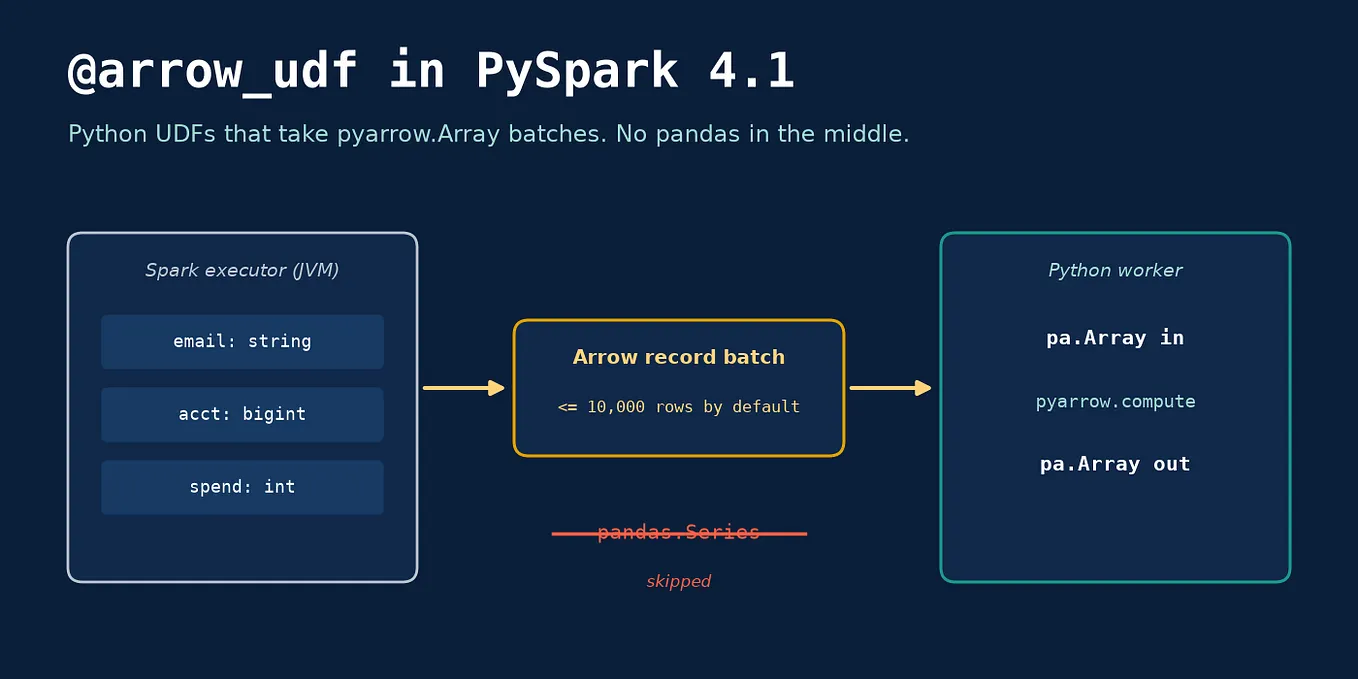
I keep Python UDFs for things SQL can’t express well: calling a library, parsing a weird format, anything with real branching logic. For those, Arrow-based UDFs are the better default anyway.
Databricks has had SQL functions for a while. There they live in a Unity Catalog schema, and creating one needs USE CATALOG, USE SCHEMA and the CREATE FUNCTION privilege, so they get shared and governed like tables. Open-source Spark 4.x now has the same language feature against whatever catalog your session uses.
My rule of thumb now: if a helper fits in one SQL expression, it doesn’t need a Python worker.
Sources I checked while writing this: CREATE FUNCTION (SQL) in the Spark 4.1.1 SQL reference (https://spark.apache.org/docs/4.1.1/sql-ref-syntax-ddl-create-sql-function.html), Apache Spark 4.0.0 release notes (https://spark.apache.org/releases/spark-release-4-0-0.html), SPARK-46057 on the ASF Jira (https://issues.apache.org/jira/browse/SPARK-46057), PySpark call_function API reference (https://spark.apache.org/docs/4.1.1/api/python/reference/pyspark.sql/api/pyspark.sql.functions.call_function.html), and Databricks CREATE FUNCTION (SQL, Python, Scala, and Java) (https://docs.databricks.com/aws/en/sql/language-manual/sql-ref-syntax-ddl-create-sql-function). All code in this post was run on PySpark 4.1.1 locally with JDK 21 and Python 3.13.