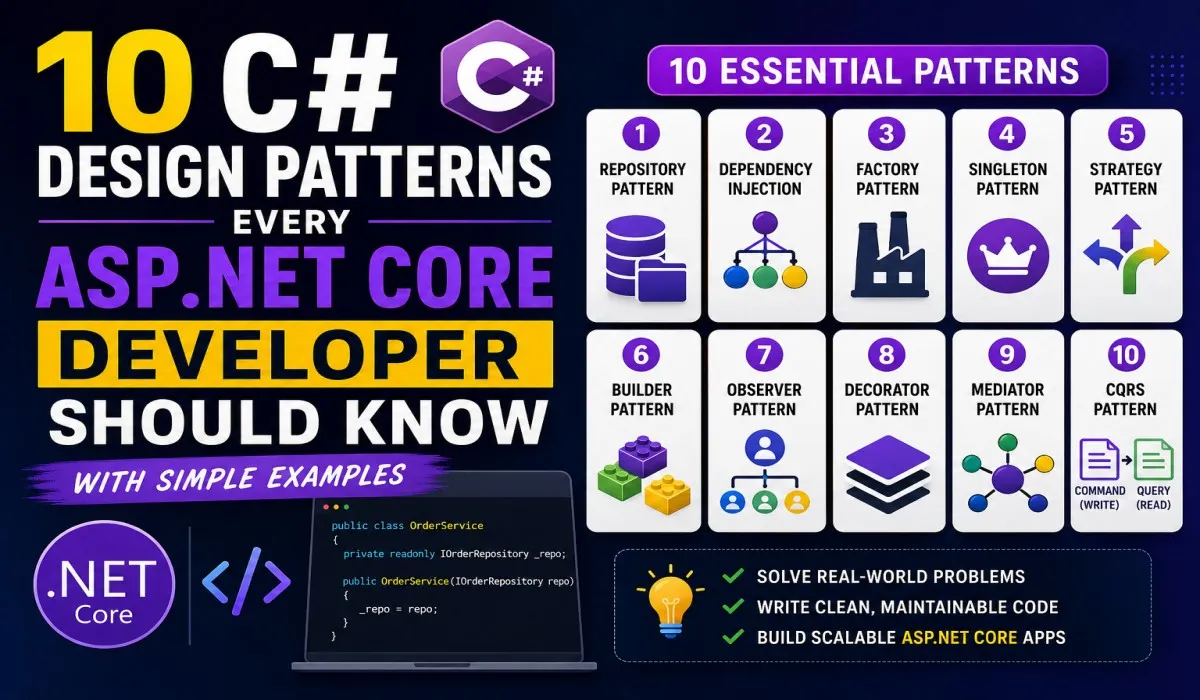
10 Backend Design Patterns Every Developer Should Know Before 2027


Build cleaner APIs, reduce code complexity, and design backend systems that are easier to test, scale, and maintain.
Modern backend development is about much more than creating APIs and connecting databases. As applications grow, developers must deal with changing business requirements, external services, increasing traffic, and complex workflows.
A simple application might start with a few controllers, some database queries, and a handful of service classes. But as new features arrive, the code can become tightly coupled. A small change may affect several unrelated modules, testing becomes harder, and debugging production issues takes longer.
The solution isn’t necessarily to introduce more code or adopt a complicated architecture. It’s to structure the code intelligently.
Design patterns are reusable approaches to common software design problems. They help developers decide where responsibilities belong, how components communicate, and how new functionality can be introduced without creating unnecessary dependencies.
In this guide, we’ll explore ten useful backend design patterns, with examples relevant to C#, ASP.NET Core, APIs, databases, and distributed systems.

1. Repository Pattern — Separate Data Access from Business Logic
Imagine an ASP.NET Core controller that directly executes Entity Framework Core queries, validates business rules, calculates prices, and prepares HTTP responses.
Initially, this might seem convenient. However, as the application grows, the controller becomes responsible for too many things.
The Repository Pattern introduces a dedicated component for accessing and querying data. Application services can request the data they need without embedding database-specific operations throughout the application.
Example:
public interface IProductRepository
{
    Task<Product?> GetByIdAsync(
        int id,
        CancellationToken cancellationToken);
}
public sealed class ProductRepository : IProductRepository
{
private readonly AppDbContext _db; public ProductRepository(AppDbContext db)
{
_db = db;
} public Task<Product?> GetByIdAsync(
int id,
CancellationToken cancellationToken)
{
return _db.Products
.FirstOrDefaultAsync(
p => p.Id == id,
cancellationToken);
}
}
A service can depend on IProductRepository rather than directly constructing database access logic.
Why use it?
- Keeps persistence concerns separate from business logic.
- Creates a clear boundary around data access.
- Can simplify testing when the abstraction provides useful isolation.
- Makes database operations easier to organize.
Important: Entity Framework Core’s DbContext already provides repository-like and unit-of-work behavior. A custom repository isn't automatically necessary for every application; use one when it adds meaningful value.
2. Factory Pattern — Centralize Object Creation
What happens when your application supports multiple payment providers?
Today, you might use Stripe. Tomorrow, the business may introduce Razorpay or PayPal.
If every service creates payment implementations directly, adding a new provider can spread conditional logic throughout the codebase.
The Factory Pattern centralizes the decision about which implementation to create or select.
Example:
public interface IPaymentProcessor
{
    Task ProcessAsync(
        decimal amount,
        CancellationToken cancellationToken);
}
public sealed class CardPaymentProcessor
: IPaymentProcessor
{
public Task ProcessAsync(
decimal amount,
CancellationToken cancellationToken)
{
// Integrate with the card payment provider.
return Task.CompletedTask;
}
}A factory can select an implementation based on validated configuration or a payment method.
In ASP.NET Core, you can also use dependency injection registrations and keyed services where appropriate instead of manually building a factory class.
Why use it?
- Centralizes creation or selection logic.
- Reduces direct dependencies on concrete classes.
- Makes it easier to introduce new implementations.
- Keeps business services focused on their actual responsibilities.
Real-world uses: Payment providers, notification channels, export formats, document generators, and storage implementations.
3. Singleton Pattern — Share Application-Wide Services Carefully
Some services should have one shared instance within a particular application process.
Examples include immutable configuration providers, certain caches, and thread-safe utility services.
The Singleton Pattern ensures that a particular class has only one instance within its defined scope.
In ASP.NET Core, the dependency injection container can manage this lifecycle:
builder.Services.AddSingleton<IAppMetadata, AppMetadata>();The container creates and shares an instance of AppMetadata for the application's lifetime.
However, a singleton is not the same as a single instance across every server in a distributed system. Each application process normally has its own singleton instance.
Also, singleton services should be thread-safe and must not directly capture scoped services such as a typical DbContext.
Why use it?
- Avoids repeatedly creating suitable shared objects.
- Provides a consistent application-level instance.
- Works naturally with ASP.NET Core dependency injection.
Common mistake: Making every service a singleton. That can introduce shared mutable state, concurrency bugs, and lifetime-related errors.
4. Strategy Pattern — Replace Growing Conditional Logic
Consider an e-commerce application with different discount policies.
Regular customers receive one discount, premium customers receive another, and promotional campaigns introduce additional pricing rules.
A large if-else block can become difficult to understand as the number of rules grows.
The Strategy Pattern places each algorithm behind a common interface so the application can select the appropriate behavior.
Example:
public interface IDiscountStrategy
{
    decimal Apply(decimal total);
}
public sealed class RegularDiscount : IDiscountStrategy
{
public decimal Apply(decimal total)
=> total * 0.95m;
}public sealed class PremiumDiscount : IDiscountStrategy
{
public decimal Apply(decimal total)
=> total * 0.85m;
}
A pricing service can use the selected strategy without needing to know the details of every discount calculation.
In production, register the strategies with dependency injection and select them using validated business rules.
Why use it?
- Separates algorithms from the code that uses them.
- Makes new business rules easier to introduce.
- Improves testability.
- Reduces complex conditional logic.
Real-world uses: Pricing engines, tax calculations, authentication policies, shipping costs, and payment processing.
5. Observer Pattern — React to Events Without Tight Coupling
Placing an order can trigger several actions: updating inventory, sending a confirmation email, recording analytics, and notifying a warehouse.
If the order service directly manages every action, it gradually becomes responsible for too many unrelated operations.
The Observer Pattern allows interested components to react when something happens.
For example, an application can publish an OrderPlaced event. Separate handlers can respond by updating inventory or requesting an email notification.
public sealed record OrderPlaced(
    Guid OrderId,
    string CustomerEmail);
The event represents something that has already happened. Handlers can then perform the relevant work.
In a single application, this can be implemented with application events or in-process messaging. In distributed systems, a message broker such as RabbitMQ, Azure Service Bus, or Kafka may be appropriate.
Why use it?
- Reduces direct dependencies between features.
- Makes it easier to add new event handlers.
- Supports event-driven workflows.
- Helps separate the main operation from secondary tasks.
Production consideration: An in-memory event can be lost if the process stops unexpectedly. For reliable integration events, consider durable messaging, idempotent consumers, retries, and the transactional outbox pattern.
6. Builder Pattern — Construct Complex Objects Readably
Some objects require many optional settings. Passing every value through a long constructor can make code difficult to read and maintain.
The Builder Pattern lets developers assemble an object step by step.
For example, an export request might contain a file format, date range, selected columns, sorting rules, and pagination settings.
A builder can make its construction explicit:
var request = new ExportRequestBuilder()
    .WithFormat("CSV")
    .WithDateRange(startDate, endDate)
    .IncludeColumn("OrderId")
    .IncludeColumn("Total")
    .Build();
This example assumes you implement the corresponding builder and validation logic.
Get Sachin Ghadi’s stories in your inbox
Join Medium for free to get updates from this writer.
Why use it?
- Makes object construction easier to understand.
- Handles optional parameters more clearly.
- Can enforce required settings before creating an object.
- Reduces reliance on constructors with many parameters.
Real-world uses: Complex API requests, report generation, document creation, and SDK configuration.
For simple objects with only a few properties, an object initializer or record may be sufficient.
7. Adapter Pattern — Integrate External Systems Cleanly
Backend applications frequently communicate with third-party APIs, payment gateways, shipping providers, and legacy systems.
Each provider may have different request formats, response models, authentication requirements, and error-handling conventions.
The Adapter Pattern creates a boundary between your application’s expected interface and an external system’s interface.
For example, your application might define:
public interface IShippingProvider
{
    Task<string> CreateShipmentAsync(
        ShipmentRequest request,
        CancellationToken cancellationToken);
}
One adapter can implement this interface for a shipping provider, while another can integrate with a different provider.
The rest of your application depends on IShippingProvider, rather than understanding every external API's details.
Why use it?
- Keeps vendor-specific code isolated.
- Simplifies integration testing.
- Makes provider changes easier to manage.
- Creates a consistent interface for multiple systems.
Real-world uses: Payment gateways, shipping APIs, banking integrations, cloud storage, and legacy enterprise applications.
8. Decorator Pattern — Add Behavior Without Changing the Core
Suppose a service retrieves product information. Later, you want to add caching, metrics, logging, or other cross-cutting behavior.
One option is to place all these responsibilities inside the service itself. Over time, that makes the original logic harder to maintain.
The Decorator Pattern wraps an existing implementation with another implementation of the same interface, adding behavior before or after the original operation.
Conceptually, the call might pass through:
Metrics → Logging → Cache → Product Service
The exact order depends on how the decorators are composed.
In ASP.NET Core, middleware provides a related wrapping model for HTTP requests and responses. Dependency injection can also be used to compose decorated services.
Why use it?
- Adds behavior without changing the original class.
- Encourages small, focused components.
- Allows different combinations of functionality.
- Keeps cross-cutting concerns separate from core business logic.
Real-world uses: Caching, telemetry, request logging, performance measurement, and selected authorization-related behaviors.
Note that middleware, decorators, and interceptors are related concepts, but they aren’t identical implementations of the same pattern.
9. CQRS — Separate Commands from Queries
In many applications, reading information and changing information have different requirements.
A reporting dashboard might need complex queries across millions of records, while an order-processing workflow must validate and safely persist transactional changes.
Command Query Responsibility Segregation, or CQRS, separates operations that change state from operations that retrieve information.
- Commands express an intention to change data, such as
PlaceOrder. - Queries retrieve information, such as
GetOrderDetails.
These operations can have different handlers and models, even when they share the same database.
In larger systems, the read and write sides may use different storage technologies or independently scaled infrastructure.
Why use it?
- Clarifies the responsibilities of read and write operations.
- Allows independent optimization of complex queries.
- Can support different scaling requirements.
- Helps organize complex business workflows.
Important: CQRS does not automatically require two databases or microservices. For many applications, separate handlers over one database are sufficient.
Start with a simpler architecture and introduce more separation only when the business and performance requirements justify it.
10. Circuit Breaker Pattern — Prevent Cascading Failures
Your API calls a third-party payment service. Suddenly, that service becomes slow or unavailable.
If your application continues making requests that repeatedly time out, it can exhaust connection pools, occupy resources, and affect otherwise healthy endpoints.
The Circuit Breaker Pattern temporarily stops calls to a dependency after a configured failure threshold is reached.
It generally has three states:
- Closed: Requests are allowed through.
- Open: Requests are blocked or fail fast for a period.
- Half-open: A limited number of requests test whether the dependency has recovered.
If the dependency recovers, the circuit closes. If failures continue, it opens again.
In .NET, Polly provides resilience strategies that can be composed with HTTP clients and other operations. Modern .NET applications can also use the resilience integration available through Microsoft.Extensions.Http.Resilience.
Why use it?
- Avoids repeatedly waiting on an unhealthy dependency.
- Helps protect application resources.
- Can reduce cascading failures.
- Improves resilience when combined with appropriate timeouts and retry policies.
Important: A circuit breaker doesn’t fix the underlying failure. Configure it with sensible timeouts, limited retries, observability, and appropriate fallback behavior. Retries should be used carefully, particularly for operations that aren’t safe to repeat.
How These Patterns Work Together in a Real Application
Consider an online shopping platform built with ASP.NET Core.
A customer places an order. A pricing service uses the Strategy Pattern to calculate discounts. A payment integration selects the correct provider, while an Adapter translates the provider’s API into the application’s internal interface.
The Repository Pattern handles the required persistence operations. After the order is successfully committed, an event can notify separate handlers to update inventory and send notifications.
The Circuit Breaker Pattern protects calls to an unhealthy external dependency. Decorators can add caching or metrics where appropriate, while CQRS can separate complex reporting queries from transactional operations.
These patterns solve different problems. They work together because the architecture assigns each responsibility to the component best suited to handle it.
The result isn’t simply more classes or interfaces. The real goal is to make the application’s dependencies, behavior, and failure boundaries easier to understand.
Common Design Pattern Mistakes to Avoid
Knowing the names of design patterns isn’t enough. Applying them at the wrong time can make a codebase more complicated rather than less.
1. Adding abstractions without a real need
A simple CRUD service may not benefit from a custom repository, factory, and several additional interfaces. Start with the simplest design that meets your requirements.
2. Treating every pattern as a mandatory rule
Design patterns are tools, not a checklist. Use them when they address an identifiable problem.
3. Ignoring testing and operational behavior
An event-driven design still needs reliable event handling. A circuit breaker still needs monitoring. A repository still needs correct query behavior.
4. Confusing scalability with the number of patterns
Adding CQRS or microservices doesn’t automatically make an application scalable. Performance also depends on database queries, caching, concurrency, infrastructure, and actual workload.
5. Ignoring the capabilities of your framework
ASP.NET Core already provides dependency injection, middleware, configuration, HTTP client integration, and many other building blocks. Understand what the framework offers before implementing a custom solution.
Final Thoughts
Building production-ready backend software isn’t about using the largest number of design patterns. It’s about understanding the problems your system faces and choosing an appropriate solution.
Start with Repository and Strategy when you need clear boundaries around data access and business rules. Explore Factory and Adapter when object creation or external integrations become difficult to manage. Use events when independent components need to react to changes, and consider CQRS or Circuit Breaker when the complexity of your workload or dependencies warrants them.
For .NET developers, the next step is practical: choose one pattern, implement it in a small ASP.NET Core project, write tests, and observe how it changes the design.
The best backend architecture isn’t the most complicated one. It’s the one your team can understand, test, operate, and evolve with confidence.
Your Turn
Which design pattern has helped you the most in a real-world project?
Have you found CQRS valuable, or do you prefer keeping applications simple with conventional services and repositories?
Share your experience in the comments.
#DotNet #CSharp #BackendDevelopment #SoftwareArchitecture #DesignPatterns #ASPNetCore #CleanCode #SoftwareEngineering