Explained Simply #10

The request body and content types

So far we’ve covered the address, the method and the headers. But when you book a trip, you need to send information: where you’re going, when you’re leaving, how many passengers. That information travels in the body.
The body is the part of a request or response that holds the actual data. Headers describe the body, and the body holds the contents. Not every request has one. Many requests just ask for something and send nothing extra.
A worked example
Our running example is the travel app. A user books a trip to Paris. The app sends a POST request to /trips, and the body contains the trip details:
{
  "city": "Paris",
  "date": "2026-10-30",
  "passengers": 2
}
The server reads this body, creates the booking, and sends back a response, usually with a body of its own that includes the new booking’s ID.
Everyday comparison: Think of mailing a letter. The envelope’s labels tell the post office how to handle the letter, and the letter inside holds the message. If the label says “this is a form” but the letter is a handwritten poem, the receiver will struggle to read it. The label and the contents need to agree.
The Content-Type header
The Content-Type header tells the server what format the body is in. It’s the label that says how to read the letter.
When the two disagree, things go wrong. If the app says the body is JSON but sends plain text, the server may refuse the request with a 415 Unsupported Media Type status, or misread the data. If the JSON itself is broken, for example a missing comma, the server may reply with 400 Bad Request.

The three formats you’ll meet most
JSON (application/json) is the most common format in APIs today. It stores data as keys and values, and it handles nested information well. A trip with a list of passengers, each with a name and age, is easy to express in JSON. If you’re new to APIs and unsure which format to use, JSON is usually the right choice.
Get ThinkTaught’s stories in your inbox
Join Medium for free to get updates from this writer.
Form data (application/x-www-form-urlencoded) is the format a basic HTML form sends. Each field becomes a name and value, joined by equals signs and ampersands, like city = Paris & date = 2026-10-30. You’ll see it in older systems and login forms. It’s simple, but it struggles with nested data.
Multipart (multipart/form-data) is used when you upload files, such as a passport photo or a receipt. It splits the body into separate parts, each with its own headers, so a text field and a file can travel together. You don’t write the boundaries yourself. Your library usually builds them.
Which methods carry a body?
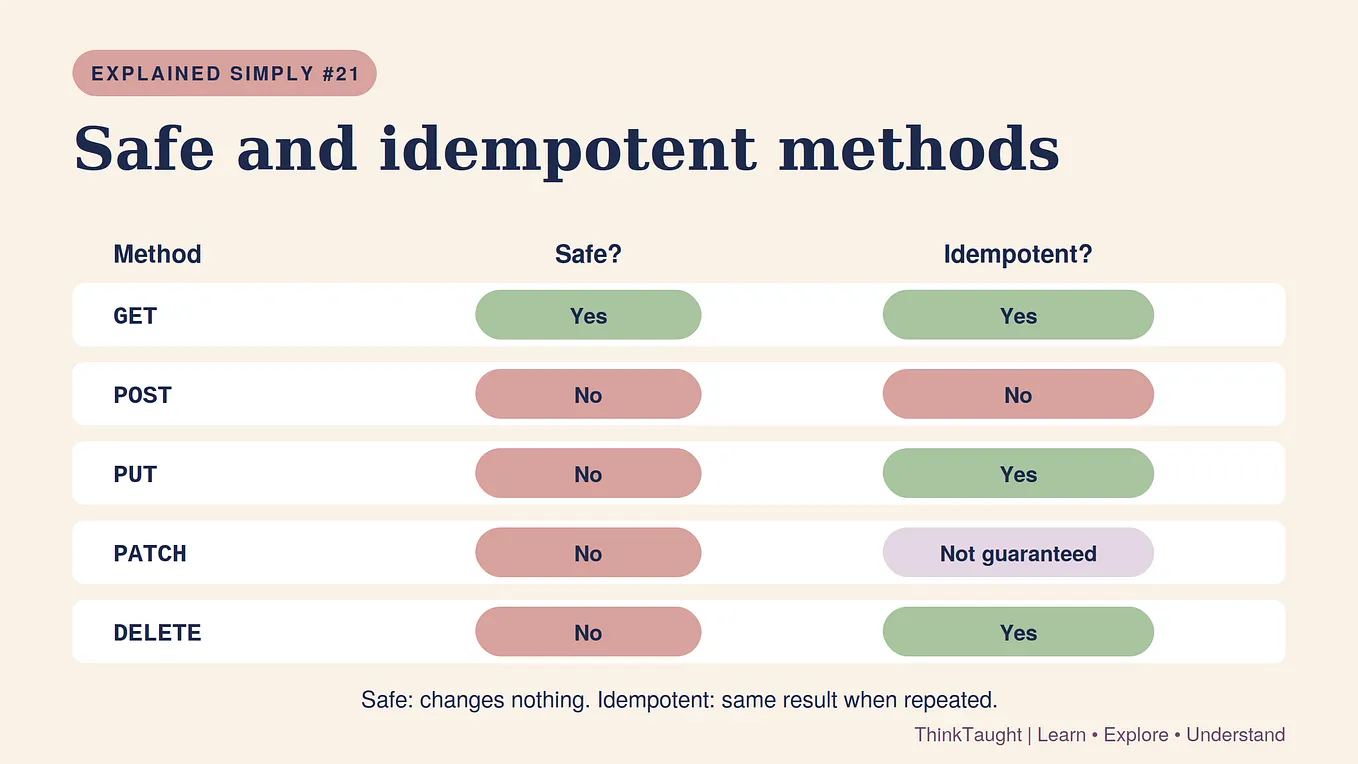
POST, PUT and PATCH usually send a body, because they change data. POST creates a booking, PUT replaces it, and PATCH updates some of its fields.
GET and DELETE usually don’t. GET is for reading, so it asks for information through the path and query instead. DELETE names the item in the path, so it doesn’t need a body.

These are conventions, not strict laws. Some APIs accept a body with GET, but many caches and proxies ignore it or drop it, so most APIs avoid it.
Quick recap
- The body holds the data a request sends or a response returns.
- The Content-Type header must match the body’s format.
- JSON is the most common format, form data suits simple forms, and multipart handles files.
- POST, PUT and PATCH usually send a body. GET and DELETE usually don’t.
- A mismatch between header and body usually produces a 400 or 415 error.
One question to take with you
We’ve sent our data. Now the server replies, and the reply comes with a status code that says how it went. But what do the codes mean, and which ones should you actually worry about?
That’s what the next episode answers: Status codes.
Follow ThinkTaught so you don’t miss it. If something here is unclear, tell me in the comments. We’re learning this together.