Building Space Donuts with Angular 22 — Part 1: From a Blank Project to a Cosmic Storefront

Learning modern Angular by building a fictional donut shop — one feature at a time.
Why Space Donuts?
The best way to learn a framework is to build something with it.
Instead of creating yet another to-do list, I decided to build something a little more ambitious: Space Donuts, a fictional donut shop serving customers across the galaxy.
The idea is to turn this into a real learning project. I’ll start with the storefront and gradually explore Angular’s features while adding functionality along the way.
The project will use Angular 22, TypeScript, and SCSS.
My goals are to:
- Build a visually appealing storefront.
- Learn modern Angular features through practical examples.
- Keep the code clean and easy to extend.
- Document the development process, including the decisions and challenges along the way.
Let’s start at the beginning.
1. Creating a New Angular 22 Project
Before writing any application code, we need a project.
I’m using the Angular CLI to generate the initial workspace. The CLI creates the application structure, installs the required dependencies, and prepares everything for development.
First, make sure you have a compatible Node.js version and the Angular CLI installed.
npm install -g @angular/cliThen create the project:
ng new space-donutsThe Angular CLI asks a few questions about the project configuration. For this project, I chose SCSS for styling, disabled server-side rendering, selected Vitest for unit testing, and skipped AI-tool configuration.
Once the setup is complete, navigate to the project directory and start the development server:
cd space-donuts
ng serve --open
Angular starts a local development server and opens the application in the browser.
At this point, we have a working Angular application — but it still looks like a fresh project.

That is our starting point.
2. Defining the Visual Direction
Before changing the code, I wanted to establish what the finished storefront should look like.
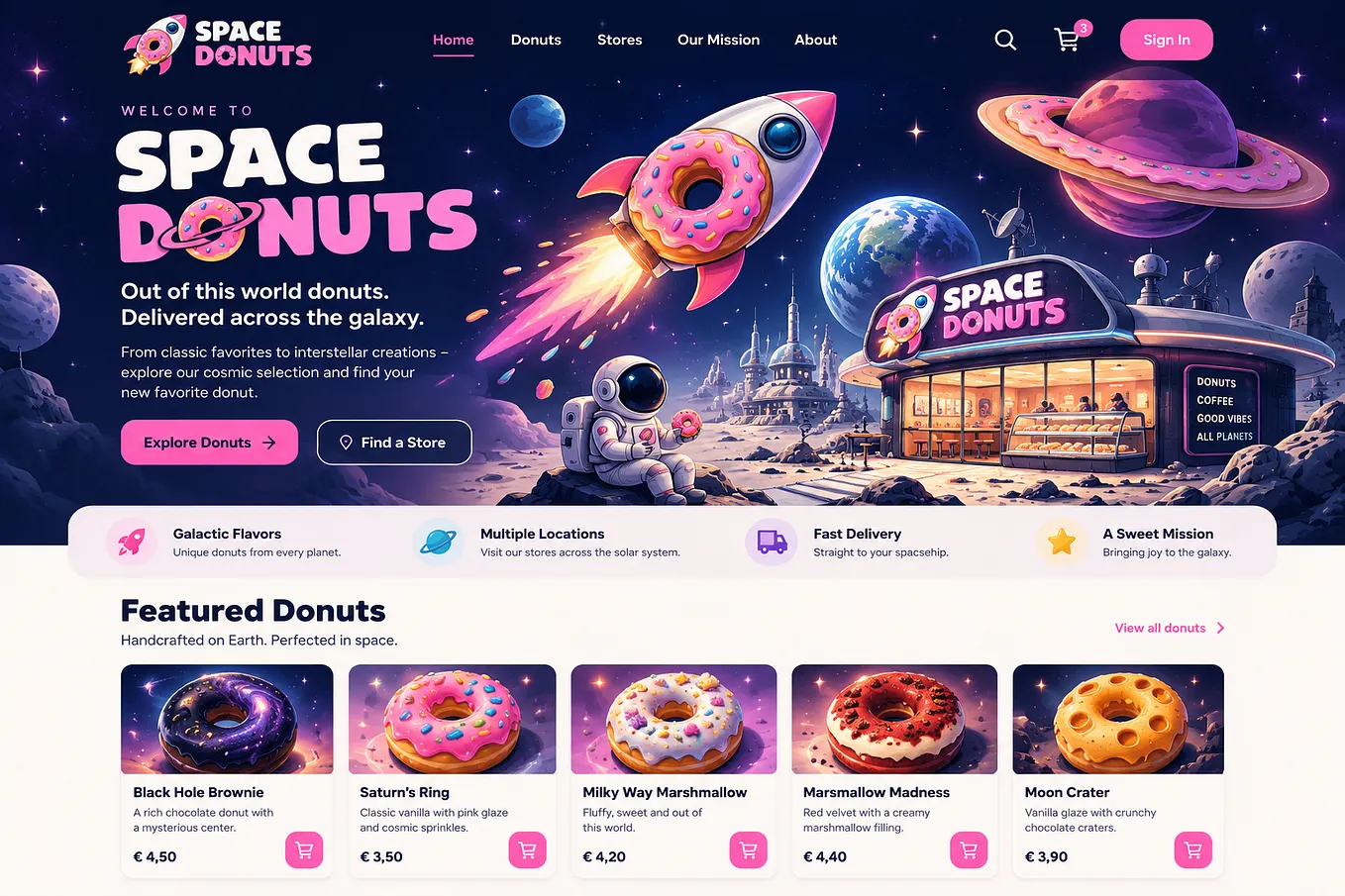
Space Donuts should feel like a modern online shop with a cosmic twist, rather than a generic e-commerce template.
The design direction includes:
- A space-inspired background.
- A prominent logo on the left.
- Centered navigation links.
- Search, shopping cart, and sign-in actions on the right.
- A large headline and a clear call-to-action.
- A donut selection section directly below the hero area.

With this direction in mind, I started replacing the default Angular screen with the first version of the storefront.
3. Building the Navigation
The navigation is one of the first parts of the page visitors will see.
I wanted three clearly separated areas: the logo, the main navigation, and the shopping actions. CSS Grid makes this layout straightforward because each area can occupy its own column.
The HTML template
Angular 22 uses the concise file naming convention by default. In this project, the root component’s template lives in src/app/app.html.
Get Torben Gabriel’s stories in your inbox
Join Medium for free to get updates from this writer.
Here is a simplified version of the navigation:
<header class="navbar">
  <!-- Brand logo -->
  <a class="logo" href="/" aria-label="Space Donuts Home">
    <img src="/images/space-donuts-logo.png" alt="Space Donuts" />
  </a>

  <!-- Main navigation -->
  <nav class="navigation" aria-label="Main navigation">
    <a href="/" class="nav-link active">Home</a>
    <a href="#donuts" class="nav-link">Donuts</a>
    <a href="#stores" class="nav-link">Stores</a>
    <a href="#mission" class="nav-link">Our Mission</a>
    <a href="#about" class="nav-link">About</a>
  </nav>

  <!-- Shopping actions -->
  <div class="nav-actions">
    <button class="icon-button" type="button" aria-label="Search">
      Search
    </button>

    <a href="#cart" class="cart-link" aria-label="Shopping cart">
      Cart <span class="cart-count">0</span>
    </a>

    <a href="#signin" class="sign-in-button">Sign In</a>
  </div>
</header>
The template is deliberately simple. It separates the logo, navigation links, and shopping actions into distinct elements.
The navigation links currently use regular anchor elements. Links such as #donuts point to sections on the same page; they are not Angular Router navigation yet. The search button and shopping cart are visual placeholders at this stage.
Styling the navigation with SCSS
The styling lives in src/app/app.scss.
Rather than including the entire stylesheet here, I’ll keep the article focused on the structure and key decisions behind the implementation.
The navigation styling uses SCSS to create a balanced three-column layout, highlight the active link, and add subtle hover transitions. The logo, navigation links, and shopping actions each have their own dedicated area.
You can find the complete implementation, including the HTML template and SCSS styles, in the project repository:
View the Space Donuts source code on GitHub
The code will evolve as the project grows, so the repository is also the best place to follow the latest implementation.
4. From the Default Screen to the First Result
With the navigation in place, I continued styling the hero area.
The background provides the cosmic atmosphere, while the headline and call-to-action make the purpose of the page immediately clear.
The hero content introduces the shop:
Donuts That Are Out of This World.
The goal was to make the hero visually prominent without letting it occupy the entire screen. Visitors should be able to see that there is more to explore below it.
I also added the beginnings of a donut selection section, which will eventually contain the products.

The first result is not a finished online shop. It is the visual foundation on which the rest of the application can grow.
5. Keeping the Foundation Maintainable
Even a small project benefits from a clear separation of responsibilities.
For now, the root component contains the page structure, while SCSS handles the presentation. As the application grows, I plan to split the interface into smaller, reusable components.
Potential components include:
NavbarComponentfor navigation and shopping actions.HeroComponentfor the introductory section.DonutListComponentfor displaying products.DonutCardComponentfor individual donuts.ShoppingCartComponentfor cart functionality.
I don’t want to introduce unnecessary abstractions too early. Instead, I’ll extract components when they have a clear responsibility and make the application easier to maintain.
What’s Next?
The storefront is taking shape, but the interesting work is still ahead.
In the next parts of this series, I plan to explore:
- Building reusable Angular components.
- Loading and displaying product data.
- Passing data between parent and child components.
- Using signals to manage reactive state.
- Implementing quantities and shopping cart functionality.
- Making the storefront responsive and accessible.
- add NgRx and other stuff
I’ll also document the problems I encounter and the solutions that work — because learning a framework is as much about understanding the trade-offs as it is about writing code.
Space Donuts is open for development. The journey starts here.