Database Connection Pool


Table of content;
- ProxySQL
- PgBouncer
- Connection multiplexing
Maintain a pool of reusable database connections shared among incoming requests (http-requests, CLI, tasks-queue…)
In this article, we’ll explain examples with, PostgreSQL, mongoDB, MySQL.
- Control connection count: Limit the number of simultaneous connections to database, preventing connection exhaustion.
- Improve scalability: Handle more concurrent application requests by reusing a smaller number of database connections.
- Connection reuse: Reuses already-open connections instead of establishing new TCP/database connections for every request.
- Lower latency: Reduces connection establishment overhead (TCP handshake, TLS handshake, authentication).
- Resource efficiency: Reduces CPU and memory overhead on the database server.
- Example: PgBouncer, ProxySQL.
- Scope: Multiple clients borrow and return connections.

- Active Connection: A live socket/session currently checked out by a Node.js request executing a MongoDB operation.
- Idle Connection: A pre-established connection sitting in the pool, waiting to be borrowed.
- Max Pool Size (N): The hard ceiling limit of concurrent active connections allowed to MongoDB.
- Min Pool Size: The minimum number of connections MongoDB keeps open and ready, even when no requests are using them, even when idle.

~$npm install mongodb

// src/config/database.js
const { MongoClient } = require('mongodb');

const { MongoClient } = require('mongodb');

const client = new MongoClient(
  process.env.MONGODB_URI,
  {
    maxPoolSize: 10,
    minPoolSize: 2,
    maxConnecting: 2,
    maxIdleTimeMS: 60000, // 60s
    waitQueueTimeoutMS: 5000, // 5s
  }
);

async function connectDB() {
  await client.connect();

  console.log('MongoDB connected');

  return client.db(process.env.MONGODB_DATABASE);
}

module.exports = { client, connectDB };- maxPoolSize: 10 // Maximum 10 pooled connections per server
- minPoolSize: 2 // Maintain at least 2 connections
- maxConnecting: 2 // Maximum concurrent connection establishments
- maxIdleTimeMS // Maximum time a connection can remain idle in the pool before being closed.
- waitQueueTimeoutMS // Maximum time a request waits to acquire an available connection.
reusing a smaller number of database connections, means;
limited set of already-open database connections instead of each request creating its own connection.
Example:
- 100 incoming HTTP requests.
- Without pooling: potentially 100 database connections.
- With pooling: 10 reusable database connections.
Pool manager
- Native Driver: Embedded inside the application process (e.g., Node.js/Java drivers).
- Proxy Layer: External standalone middleware acting as the pool manager (e.g., ProxySQL).
ProxySQL

ProxySQL architecture;
1. MySQL Clients
- DBA Admin: Database administrators managing ProxySQL.
- Application 1: Node.js application.
- …
2. ProxySQL Cluster
ProxySQL Nodes:Multiple ProxySQL instances for high availability.- Admin Interface (`
6032`): Configure and manage ProxySQL. Connection Pooling:Reuses backend MySQL connections.Connection Multiplexing:Shares backend connections across client sessions when safe.- Query Routing: Routes queries to appropriate MySQL servers.
- Read/Write Splitting: Separates SELECT queries from write queries.
- Synchronizes configuration between ProxySQL nodes.
Requests
   ↓
Connection Pool
 ├── DB Conn 1
 ├── DB Conn 2
 ├── DB Conn 3
 └── DB Conn N
        ↓
      MySQL // pgsql ...
3. MySQL Host Groups
- HG 10 — Master: Primary MySQL server (Read/Write).
- HG 20 — Replicas: Secondary MySQL servers (Read-Only).
PgBouncer

Laravel Limitation: Laravel and PDO do not support built-in programmatic min/max pool sizing (like Node.js or Java drivers),
Get Soulaimane YAHYA’s stories in your inbox
Join Medium for free to get updates from this writer.
Max/Min Configuration via PgBouncer (`etc/pgbouncer/pgbouncer.ini`):
[databases]
my_laravel_db = host=127.0.0.1 port=5432 dbname=app_db

[pgbouncer]
pool_mode = transaction
max_client_conn = 1000
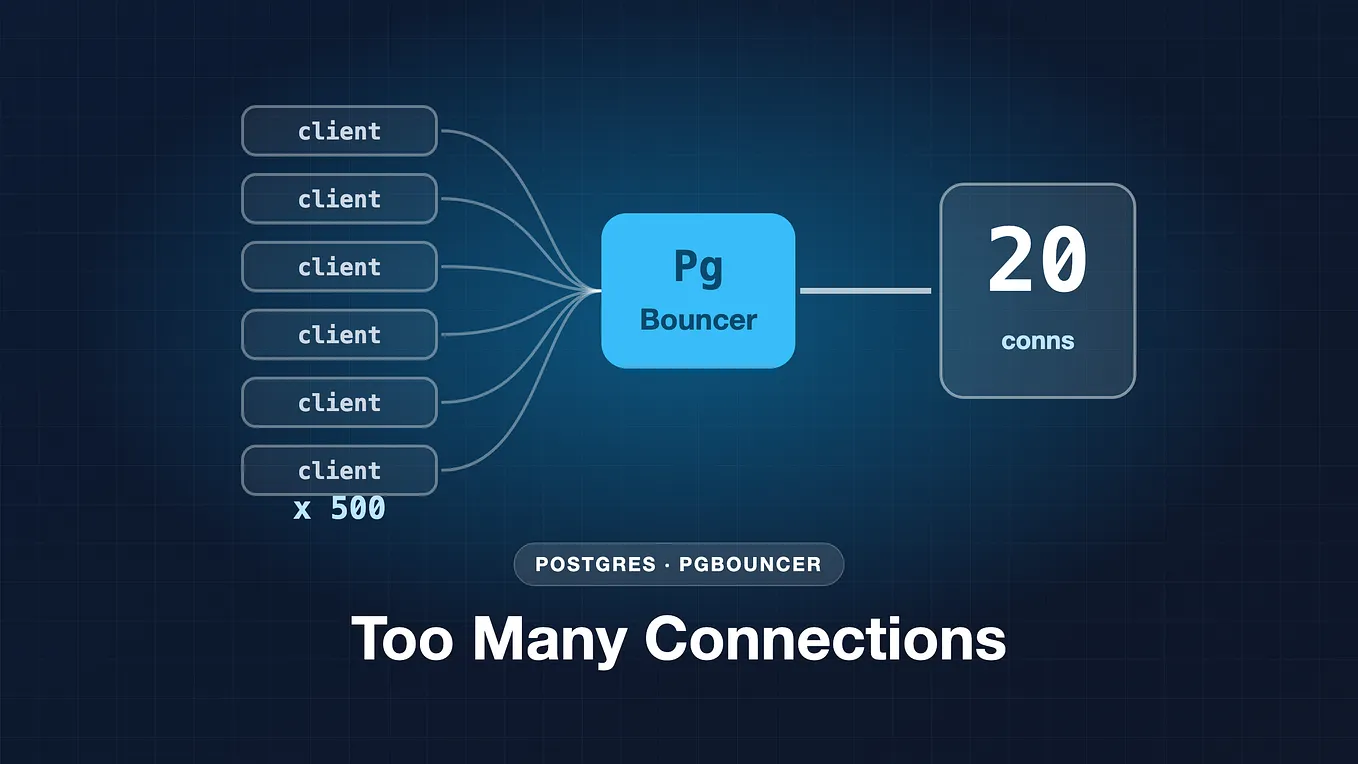
default_pool_size = 20  # Max active connections per user/db pool
min_pool_size = 5     # Minimum idle connections maintained
Laravel Connection Setup (`config/database.php`): Connect Laravel to PgBouncer’s port (typically 6432) instead of PostgreSQL directly:
'pgsql' => [
    'driver' => 'pgsql',
    'host' => env('DB_HOST', '127.0.0.1'),
    'port' => env('DB_PORT', '6432'), // Point to PgBouncer proxy port
    'database' => env('DB_DATABASE', 'my_laravel_db'), // PgBouncer exposed database name
    'username' => env('DB_USERNAME', 'forge'),
    'password' => env('DB_PASSWORD', ''),
],
pool_mode = transaction;
Reuses server connections per SQL transaction (explicit or automatic SQL transactions).
max_client_conn = 1000;
ceiling for concurrent incoming client (Laravel/PHP-FPM) connections accepted by PgBouncer,
Protects the proxy from running out of file-descriptors under massive traffic spikes.
default_pool_size = 20;
Role: The maximum number of backend server connections allowed per user/database pool.
Connection: Protects PostgreSQL from resource exhaustion (max_connections limit) by hard-capping total database sockets.
min_pool_size = 5;
Idle sockets pre-warmed for quick access.
Eliminates connection latency for sudden initial requests by keeping pre-warmed sockets ready.
my_laravel_db;
is the logical database name exposed by PgBouncer to your Laravel application.
// the same for ProxySQL
In simple analogy
1. Client Session = Guest’s Hotel Stay
Each guest gets their own check-in record (client session).
2. Backend DB Connection = Hotel Room
The hotel has a limited number of physical rooms.
- MySQL Primary → Hotel Building A
- MySQL Replica → Hotel Building B
- Backend DB Connection → Physical hotel room
ProxySQL manages these rooms and assigns them when needed.
3. Connection Pooling = Reusing Hotel Rooms
Instead of building a new room whenever a guest arrives:
Result: Reuse existing backend connections instead of constantly creating new TCP connections.
100 guests ≠ 100 hotel rooms.
Connection Multiplexing

- Connection Pooling: Manages and maintains reusable backend connections.
- Connection Multiplexing: Enables multiple client sessions to share those connections over time.
Relationship:
- Pooling provides the connection resources;
- multiplexing optimizes their utilization.
Think: Pooling = Resource Management. Multiplexing = Resource Sharing.
Simple analogy
Connection Multiplexing: Multiple hotel guests (client sessions) take turns using the same hotel room (backend DB connection), rather than each guest permanently occupying their own room.
Example: Guest A uses Room 101 → finishes, release → Guest B uses Room 101.