

Facebook Page Post & Comment Scraper
Pricing
from $1.50 / 1,000 results
Facebook Page Post & Comment Scraper
⚡ High-Speed Facebook Page Scraper — 100+ Page URLs in One Run. Collect post text, media, timestamps, authors, engagement metrics, videos, reels, shared posts, and optional transcripts — no login or cookies required. Built for fast bulk scraping and automation.
Pricing
from $1.50 / 1,000 results
Rating
5.0
(2)
Developer

TheDoor
Maintained by CommunityActor stats
11
Bookmarked
1.4K
Total users
182
Monthly active users
6 hours ago
Last modified
Categories
Security
Limited permissionsShare
Facebook Page scraper for any public Page link: Page names, numeric ids, profile.php?id=, /p/, /pages/
and /people/ links, mobile links, and links to a Page's own posts. Paste the links, click Start,
and get one row per post with the text, the time, the reactions, the comments count, the shares, the views,
the photos and the videos.
Before you start: it reads a Page's feed, not one single post. A link to a post gives you the newest posts of that post's Page. Groups, reels, share links and private or login-only Pages are not supported.
Also included: reactions by type, up to 100 comments per post with their replies, video captions as text, date filters, only new posts on repeat runs so you don't pay twice for the same post, and a live status line on the run page.
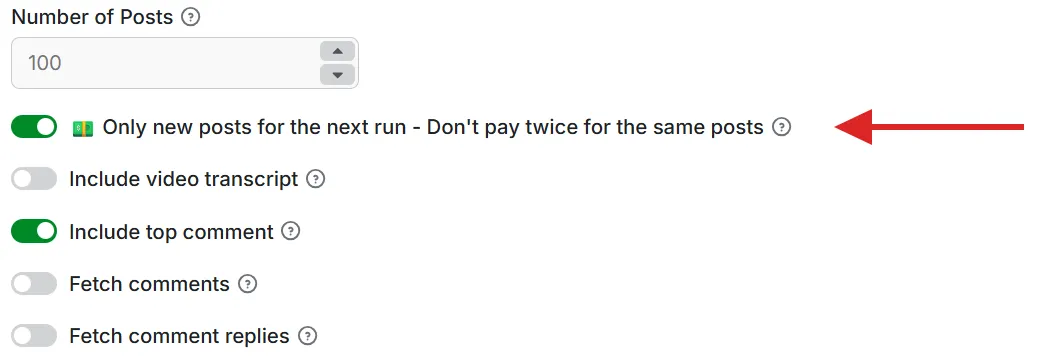
💵 Follow a Page daily and save money: get only new posts
Run it every day and pay only for new posts. Turn on Only new posts for the next run and each run skips the posts you already have. Normal runs read the same posts again and charge you again.
| Example: one Page with 5 new posts a day, checked daily for 30 days, Number of Posts at 100, Free plan | Results | Cost with start fees |
|---|---|---|
| Normal runs | 3,000 | $7.80 |
| With Only new posts | 245 | about $0.91 |
Set it up once:
- Paste the Page link and turn on Only new posts for the next run.
- Set Number of Posts higher than the new posts you expect between two runs.
- Click Save as a new task, then add a schedule. Daily suits most Pages; hourly suits a busy news Page.
| 🔗 Works with | Page names, numeric ids, profile.php?id=, /p/, /pages/, /people/, m. and web. links, and links to a Page's own posts |
| 💯 Links per run | No fixed cap. Every Page in a run is read at the same time. Tested with 99 Pages in one run. A link that fails is skipped and the others keep going. |
| 📄 Output | One row per post, with its comments inside the same row |
| 📊 Data | Text, time, reactions by type, comments, shares, views, photos, videos, shared links, top comment, video captions |
| ♾️ How many | As many posts as you ask for, up to what Facebook shows a logged-out visitor. Measured up to 1,000 posts from one Page. |
| ⚡ Speed | Up to 2,000 posts a minute across many Pages: 1,771 posts from 45 Pages in 53 seconds at 4 GB memory. 240 posts from 4 Pages in 49 seconds at 1 GB. One big Page alone: 1,000 posts in about 8 to 9 minutes at 4 GB. |
| 🔓 Account needed | None. No Facebook login or cookies. Public content only. |
| 💰 Price | $2.50 per 1,000 posts on the Free plan, down to $1.50 on Business. Apify's free $5 a month covers about 2,000 posts. |
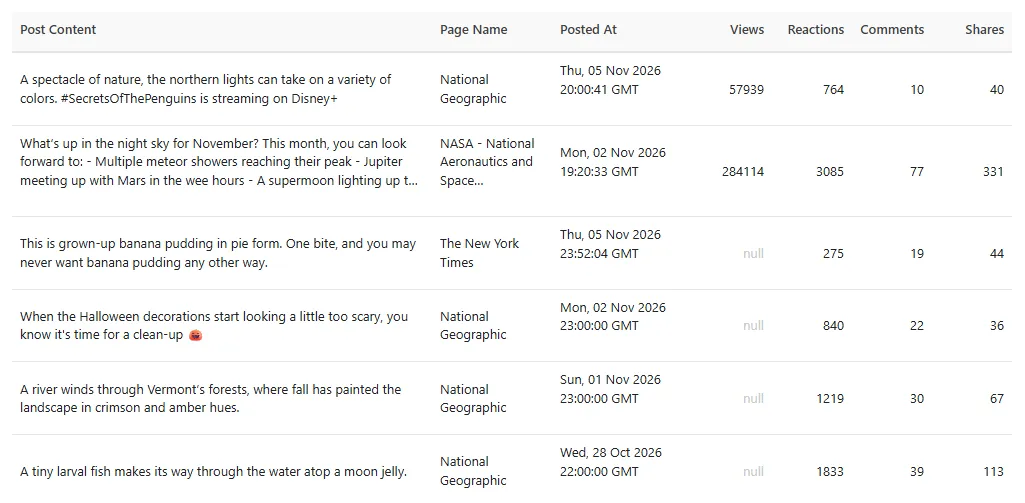
What you get: six posts from a run on 6 November 2026, showing the main columns.
| Using an AI agent? | |
|---|---|
| Actor | thedoor/facebook-page-scraper |
| The one required field | pageUrls, a list of links |
| Cap the bill | Set maxTotalChargeUsd on the run, for example 0.50 |
| Why a link gave nothing | Read the run's status message: it counts each kind of link that gave no posts |
| MCP link | https://mcp.apify.com/?tools=fetch-actor-details,thedoor/facebook-page-scraper |
What you can do with it
- Follow what competitors post, and which posts get the most reactions, comments and shares.
- Watch brands, news Pages or public figures on a schedule and pay only for new posts.
- Collect posts from a set date range for research or reports.
- Turn video captions and comments into text for a spreadsheet, a sentiment tool or an AI workflow.
How to use it
-
Paste your links into Facebook Page URLs, one per line.
-
Set Number of Posts, the most posts to get from each Page. Start with 10 to see the data.
-
Optional: add dates, comments or video captions.
-
Click Start. The status line at the top of the run shows each step:
Status line What is happening Checking links: 3 of 10Each link is checked: is it a public Page? Reading posts: 2 of 5 Pages done, 340 results so farPosts are being collected. Results appear in the Output tab as they arrive. Done: 240 posts from 4 of 5 links. 1 link could not be opened (private, deleted, or not a Page). The Log tab lists them.The run is finished, with what it got and why any link gave nothing. -
Download the results as JSON, CSV or Excel.
Need every comment on one post? Copy its post.url into the
Facebook Comment Scraper. For posts in public groups, use the
Facebook Group Post Scraper.
How much does it cost?
You pay for each post in your dataset. Each post is one result. Apify's platform costs are included.
| Apify plan | Price per 1,000 posts |
|---|---|
| Free | $2.50 |
| Starter | $1.99 |
| Scale | $1.70 |
| Business and higher | $1.50 |
Each run also has a start fee of $0.01 per GB of memory. Memory is set from the number of links: 1 GB for up to 39 links, 2 GB for 40 to 79, and 4 GB for 80 or more, so the fee is $0.01 to $0.04 unless you change the memory.
Comments, replies and video captions sit inside the post's row, so they add no results and cost nothing extra today.
| You collect, on the Free plan | Cost |
|---|---|
| 50 posts from each of 10 Pages (500 posts) | $1.25 + $0.01 start fee |
| 40 posts from each of 45 Pages (at most 1,800 posts) | at most $4.50 + $0.02 start fee |
| 2,000 posts, the amount Apify's free $5 a month covers | about $5 |
Four ways to keep the bill under control:
- Number of Posts: the most posts per Page. The most a run can give is
postsToScrape x links. - Dates:
postsNewerThanstops reading at your date, so old posts are never paid for. - Only new posts: see the next section.
- Maximum cost per run: set it in the run options (
maxTotalChargeUsdin the API). This is the most the run may charge you. Results already collected stay in your dataset.
More about only new posts
- First run: posts as usual, up to Number of Posts.
- Every next run: only posts published since your last run. Reading stops at your last post, so the run also ends sooner.
- No new posts: 0 results and no result fee, only the small start fee. The status line says so.
- A run fails partway: your place is kept, so the next run still picks up those posts.
When it is worth using:
- Competitor watch: see each new post without paying for the old ones.
- Brand or news monitoring: collect what a Page publishes, day by day.
- A growing archive: add only the new rows to your sheet, with no duplicates to clean.
- Daily AI summaries: send only today's posts to your AI workflow.
Good to know:
- Turn it on from the first run. Runs with the option off do not save your place.
- Keep Number of Posts high enough. You get the newest posts first. If a Page publishes 50 new posts and Number of Posts is 10, you get the newest 10, your place moves to the newest post, and the other 40 are not returned later.
- Your place is saved per Apify account and per Page. Different links to the same Page share it.
- Your place is saved when a Page finishes. If a run stops in the middle of a Page, the next run reads from the last saved place, so those posts come back and are charged again.
- New comments on old posts are not returned. Old posts are not read again.
- It works together with
postsNewerThan. A post must pass both. It cannot be used withpostsOlderThan.
What you give it
| Field | Default | What it does |
|---|---|---|
pageUrls | required | Facebook links, always as a list, even for one link. |
postsToScrape | 100 | The most posts to get from each Page. |
postsNewerThan | empty | Only posts from a recent period or date: 30 minutes, 24 hours, 7 days, 3 months, or 2026-10-01. |
postsOlderThan | empty | Only posts up to a date or age, in the same formats. A date includes that whole day in UTC. Use both for a date range. |
onlyNewPosts | off | Only posts published since your last run on that Page. See the section above. |
includeTopComment | on | Add the top comment of each post. |
fetchAllComments | off | Add up to 100 top-level comments per post, in Facebook's "All comments" order. They replace the top comment. |
fetchCommentReplies | off | Also add the replies to those comments, at every level. Needs fetchAllComments. Runs take longer. |
includeTranscript | off | Add the video captions as text, when the video has them. |
With postsOlderThan, Facebook usually starts the feed at your date. When it does not, the newer posts are loaded
first to reach the date. Those posts are not returned, and they make the run longer.
Links it accepts: facebook.com/<name>, facebook.com/<number>, profile.php?id=<number>,
/p/<name>-<number>/, /pages/<name>/<number>, /people/<name>/<number>, m. and web. versions, links with
no https://, links with ?locale= or ?ref=, and links to a Page's tabs or posts such as /<name>/videos/ or
/<name>/posts/<id>. Tabs and post links give you that Page's newest posts.
What you get back
One row per post. This is a real row from a run on 6 November 2026, with the commenter's details hidden and long links shortened:
What each field means:
| Field | In plain words |
|---|---|
post.id | The post's unique number. Use it to spot the same post across runs. |
post.type | regular for a normal post, reel for a reel. |
post.url | A direct link to the post. |
post.feedback_id | Facebook's id for the post's reactions and comments. Useful only for technical work. |
post.id_source | Where the post id came from. Useful only for technical work. |
post.text | What the Page wrote. |
post.hashtags | The hashtags in the text. [] means none. |
post.thumbnail | A picture for the post: the first photo, the video cover or the shared link's picture. |
page.id | The Page's Facebook id. |
page.name | The Page's name. |
page.url | The link you pasted, so you can see which link the post came from. |
created.time | When it was posted, as a readable date and time in UTC. |
created.timestamp | The same time as a number of seconds, handy for sorting in code. |
engagement.reactions | All reactions on the post added up. |
engagement.comments | How many comments the post has, as Facebook counts them. |
engagement.shares | How many times the post was shared. |
engagement.views | Video views. null when Facebook shows no view count, as on most photo and text posts. |
engagement.reaction_breakdown | The reactions split by type: like, love, haha, wow, sad, angry, care. null means Facebook showed no count for that type. |
media | Every photo and video in the post. [] means none. |
media[].id | The photo's or video's id. |
media[].type, media[].media_type, media[].__typename | The kind of item: photo or video, in Facebook's words and in lower case. |
media[].url, media[].uri, media[].permalink_url | Links to the item. For a photo, url opens it on Facebook and uri is the image file. |
media[].thumbnail | A picture of the item. |
media[].width, media[].height | Its size in pixels. |
media[].duration, media[].playable_duration_in_ms | A video's length, in seconds and in milliseconds. |
media[].video_id, media[].videoId | The same video id under two names. |
media[].captions_url, media[].video_available_captions_locales | Links to the video's caption files and their languages. |
media[].liveViewerCount | People watching, for a live video. |
media[].owner, media[].ocrText | The video's owner, and text Facebook read from the image. Often empty. |
video.is_video | true when the post has a video or reel. |
video.transcript | The video captions as text, with includeTranscript on and when the video has them. |
video.music | The music on a reel, when Facebook shows it. |
video.live_viewer_count | People watching, for a live video. |
shared_content | What the post shares. null means nothing is shared. |
shared_content.links | Every shared link or shared post, with its url, title and thumbnail. |
shared_content.post | The shared Facebook post, with its shared_post_id. |
shared_content.url | The main outside link in the post. |
comments.top_comments | The comments, see below. [] means none. |
comments.top_comment_text | The text of the first comment in the list. |
partnership.paid | true when Facebook marks the post as a paid partnership. |
partnership.collaborators | Other Pages or people credited on the post. |
ads.page_ad_library | The Page's Ad Library id and whether its business account is active. |
preview | The post's action button and link preview: action_link, title, description, source, target. null means none. |
references.text_references | Pages, people and hashtags linked in the text, with where each one sits in the text (offset, length). |
metadata.page_index, metadata.total_pages | The link's place in your list, and how many links the run had. |
metadata.actors, metadata.user | Who posted it: everyone listed as an author, and the first of them. |
comments.top_comments has two forms.
With includeTopComment only, it holds one comment with id, feedback_id, text, url, creation_timestamp,
replies_count, media, and the author in user (id, name, profileUrl, profilePic).
With fetchAllComments, it holds up to 100 comments, and their replies if you asked for them, as one flat list:
| Field | In plain words |
|---|---|
id, comment_url, post_url | The comment's unique number, a direct link to it, and the post's link. |
text | What the person wrote. |
comment_time, timestamp | When it was written, as a readable UTC time and as a number. |
author_name, author_id | The name and Facebook id of the person or Page that wrote it. |
author_profile_url, author_profile_picture | Links to the author's profile and picture. |
reactions_count, reaction_types | All reactions, and the same reactions split by type. {} means none. |
replies_count | How many direct replies the comment has. |
is_reply, replyto_comment_id, depth | false, null and 0 for a comment. A reply has true, the id of the comment it answers, and 1 or more. |
image_url, media | The photo attached to the comment, and everything attached to it. |
shared_link, shared_link_title, shared_link_source, shared_post | A link or Facebook post shared in the comment. |
Fields with no value come back as null, [] or an empty object. Counts are live and can change between runs.
When you get few or no results
The status line tells you how each link ended, and the Log tab names the Pages that failed. Links that give nothing add no rows to your dataset and no result fee.
| What you see | What it means | What to do |
|---|---|---|
1 link could not be opened (private, deleted, or not a Page) | No public Page was found. The Page may be deleted, renamed, or limited by age or country, or the link is a group, reel or share link. | Open the link in a private browser window. If you can see the Page there, run it again. |
1 link is not a Facebook link | The link is not on facebook.com. | Fix the link. |
1 Page had no posts to show | The Page is public and shows a logged-out visitor no posts. | Nothing to fix. |
1 Page had no posts in your dates | Nothing was published inside your dates. | Widen the dates. |
1 Page had no new posts since your last run | With onlyNewPosts, nothing new. | Nothing to fix. |
1 Page gave fewer posts because Facebook stopped showing more | Facebook stopped giving more posts partway. The posts read before that are kept. | Run it again. |
1 Page could not be read | The Page was found, but Facebook gave no posts. | Run it again. |
Stopped: ... | The input has a problem, and the message says which. No Page was read. | Fix the input and run again. |
| Fewer posts than you asked for, and none of the lines above | The Page has fewer posts, or fewer inside your dates. | Nothing to fix. |
| One or two posts differ between two runs | Facebook gives logged-out visitors a slightly different set each time. Two runs at the same moment differed by 3 to 4% in our tests. | Nothing to fix. |
No Done line, and the run shows Timed out | It reached the run timeout. Results read so far stay in your dataset. | Raise the timeout and run again. |
What it does not do
- Pages, not single posts or groups. A post link gives you that Page's feed. For one post's comments use the Comment Scraper, and for groups use the Group Post Scraper.
- No reel, photo, watch or share links. Use the Page's own link instead.
- Public content only. Private, deleted, login-only, and age or country limited Pages give no posts, and the other links still run.
- Personal profiles are not reliable. A public profile link can work, but the number of posts changes from run to run.
- At most 100 top-level comments per post. For every comment on a post, use the Comment Scraper. There is no limit on replies per comment.
- It does not remove duplicates between links. Two links to the same Page are read and charged twice.
- It gives links to photos and videos, not the files.
- A run has a time limit. The default is 1 hour. At the speed measured on one big Page, one hour reads about 6,600 to 7,800 posts. Raise the timeout for more. If the timeout is reached, the results collected so far stay in your dataset.
- No email or phone numbers. Commenters' contact details are not returned.
- It is not an official Facebook tool. theDoor is independent and is not affiliated with or endorsed by Facebook or Meta.
Questions people ask
Why did I get fewer posts than I asked for? The Page has fewer posts, fewer fall inside your dates, or Facebook stopped showing more to a logged-out visitor. The status line says which. See When you get few or no results.
Can I get posts from a date range?
Yes. Set postsNewerThan to 2026-09-01 and postsOlderThan to 2026-09-30. Both days are included, in UTC.
Do comments count as results? No. They sit inside the post's row, so 3 posts with 23 comments are 3 results.
Can I run it every day?
Yes. Save a task, add a schedule and turn on onlyNewPosts. See
the section above.
Can I call it from code, Make, n8n or an AI agent? Yes. The API tab has Python, JavaScript and HTTP examples. In Python:
Is it legal? It reads only public content. Posts, comments and author names can be personal data under GDPR and similar laws, so collect them only for a clear reason and keep only what you need.
Support
Open the Issues tab and paste the link you used and the run ID.


