The Cabinet of Index Cards That Makes a Database Fast and Slow


Picture a school registry holding 2 million exam scripts, filed in the order they arrived. A parent asks for one student’s script. Without any help, a clerk must open box after box until she finds it. Some days she is lucky. Most days she is not.
Now add a small cabinet of index cards, sorted by student name. The clerk goes to the card, reads which box and which position, and walks straight to it. The scripts did not move. The registry just gained a second, much smaller list that points into the first.
That cabinet is a database index. The PostgreSQL manual describes the same difference: without an index, the system has to scan the whole table row by row, while with one it might only walk a few levels deep into a search tree [S1]. The manual compares it to the index at the back of a non-fiction book, and notes that just as the author must anticipate what readers will look up, the database programmer must foresee which indexes will be useful [S1].
Indexes are the first tool most people reach for when a database is slow, and they are also the tool most often misused. Today is about using them well, on any of the four databases most teams run: PostgreSQL, SQL Server, Oracle and MongoDB. In a previous post here, we saw why a page that is instant with 10 records crawls with 10,000: the hidden query loop called N+1. An index makes each of those queries faster, but it cannot turn 10,000 queries into one, so fix the loop first and the lookup second.
1. Every index has a price
Back at the registry, imagine a new script arrives. Before, the clerk simply put it in a box. Now she must also write a card and slot it into the cabinet in the right place. If there are four cabinets (by name, by subject, by date, by school), she writes four cards.
Databases work the same way. PostgreSQL’s manual says that after an index is created, the system has to keep it synchronized with the table, which adds overhead to data manipulation operations, and that indexes that are seldom or never used should be removed [S1]. SQL Server’s design guide says a large number of indexes on a table affects the performance of INSERT, UPDATE, DELETE and MERGE statements, and calls out a common design mistake: creating many indexes speculatively to give the optimizer choices, which slows data modifications and can cause concurrency problems [S5]. Oracle’s documentation says the same: many indexes on a table degrade DML performance because the database must also update them [S7]. MongoDB’s documentation puts it in one line: indexes have a performance cost, but are worth it for frequent queries on large data sets, and indexes that are no longer used should be dropped [S10].
So the real question is never “should I add an index?” but “which query is slow enough, and run often enough, to be worth a card for every write?”
2. Which kind of index?
For most work, the answer is the default. Oracle’s documentation says B-trees, short for balanced trees, are the most common type of database index, and are excellent for highly selective indexes, where few rows match each entry, and for primary keys [S7]. PostgreSQL, SQL Server and MongoDB all use tree based indexes for ordinary lookups.
Two specialised cases are worth knowing:
Oracle has bitmap indexes, designed mainly for data warehouses and ad hoc queries across many columns, and best for columns with few distinct values on tables that are read only or rarely modified. Oracle says that because one key points to many rows, an update locks all of those rows, so bitmap indexes are not appropriate for many OLTP applications [S7]. If your system takes lots of small writes from many users, stay with B-tree.
SQL Server distinguishes clustered from nonclustered indexes. A clustered index stores all rows of the table sorted by the index key, and there can be only one per table. A nonclustered index holds a subset of the columns, sorted differently, plus a pointer back to the row [S5]. The clustered key is part of every nonclustered index on the table, so a narrow clustered key reduces the storage and memory cost of all of them [S5].
3. Column order is the whole game
Most real queries filter on more than one column. Take a common one: show this customer’s open orders, newest first, 20 at a time.
A composite index (an index on several columns) is like cards sorted by customer first, then by status within each customer, then by date within each status. The order of columns decides what the index can help with.
For PostgreSQL, the manual states the rule: equality constraints on leading columns, plus any inequality constraint on the first column without an equality constraint, are what limit the portion of the index scanned [S2]. Constraints on columns further right are checked inside the index, which saves visits to the table, but they do not necessarily reduce how much of the index must be read [S2]. MongoDB gives a name to its version of this rule, ESRb(Equality fields first), then Sort, then Range. The documentation says equality fields keep the remaining index entries in sorted order, and putting sort fields before range fields avoids in-memory sorts [S9]. It also notes one exception: if your range filter is very selective, you may place it before the sort fields [S9].
For our query, the same idea is written in each database like this.
PostgreSQL, SQL Server and Oracle:
sql
CREATE INDEX ix_orders_customer_status_created
ON orders (customer_id, status, created_at DESC);
MongoDB:
javascript
db.orders.createIndex({ customer_id: 1, status: 1, created_at: -1 })
Get Rufus Kehinde’s stories in your inbox
Join Medium for free to get updates from this writer.
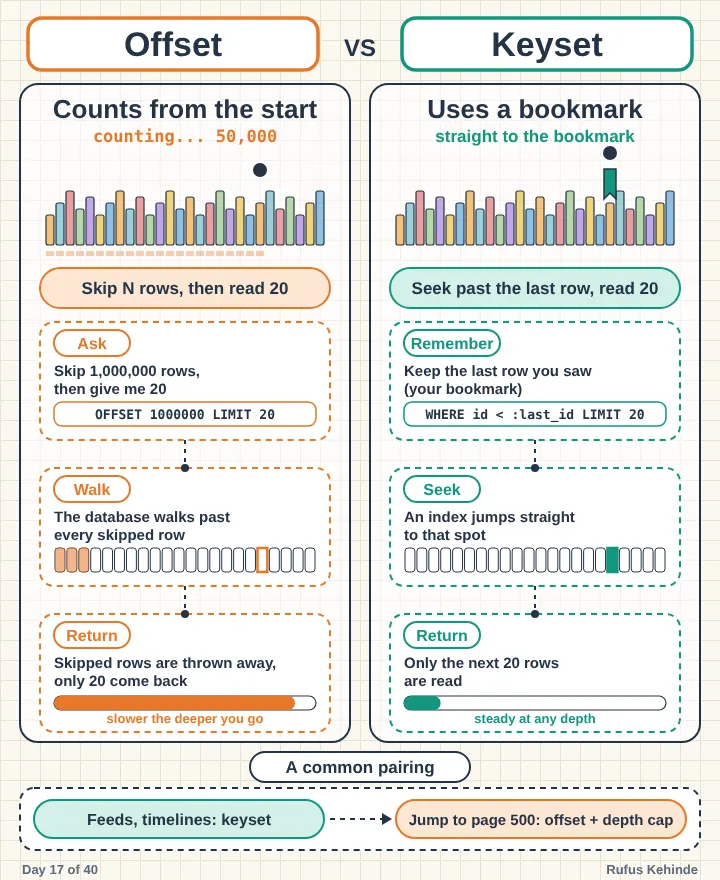
Customer and status are the equality conditions, so they come first. The creation date is the sort, so it comes next, and the first 20 rows are already in order. This is also what makes the keyset pagination from a previous post here fast. Keyset pagination only works well when an index matches the sort columns.
Resist the urge to add more columns. PostgreSQL’s manual says multicolumn indexes should be used sparingly, that a single column index is usually enough, and that indexes with more than three columns are unlikely to be helpful unless the usage of the table is extremely stylized [S2]. SQL Server’s guide says to keep indexes narrow, with as few columns as possible, and to avoid over-indexing heavily updated tables [S5].
4. Hiding the column hides the index
Here is a trap that catches experienced engineers. Suppose users log in by email, and you compare in lower case so that “Ada@Example.com” matches “ada@example.com”:
sql
SELECT * FROM users WHERE lower(email) = ‘ada@example.com’;
A plain index on email is sorted by the raw value, not by the lower case value, so the database usually cannot use it for this condition. PostgreSQL’s manual describes exactly this case: the query can use an index if one has been defined on the result of the lower function [S4]. The same idea exists in Oracle as a function-based index, which stores the value of a function or expression and is efficient for statements that contain that function in their WHERE clause [S7].
sql
- PostgreSQL
CREATE INDEX ix_users_lower_email ON users (lower(email));
- Oracle
CREATE INDEX ix_users_lower_email ON users (LOWER(email));
There is a cost. PostgreSQL’s manual says index expressions are relatively expensive to maintain because the expression must be computed for each row insertion and non-HOT update, so they make sense when retrieval speed matters more than insertion and update speed [S4]. Oracle notes that the database must still evaluate the function on every INSERT and UPDATE [S7]. For SQL Server and MongoDB, check how your version handles an indexed expression or computed value before relying on the same pattern.
Covering indexes. Sometimes the index can answer the whole question without visiting the table at all, because it already holds every column the query needs. SQL Server calls this a covering index: a nonclustered index that satisfies all data access by a query directly, which reduces disk reads [S5]. You can add extra columns to the leaf level with an INCLUDE clause, so they do not become part of the sort key [S5]. PostgreSQL has the same clause, and says an index-only scan can return the contents of those columns without visiting the table [S3]. MongoDB’s documentation says an index supports a query when it contains all the fields the query scans [S10].
sql
- SQL Server and PostgreSQL
CREATE INDEX ix_orders_customer_status
ON orders (customer_id, status)
INCLUDE (total);
Both vendors warn about overdoing it. PostgreSQL says to be conservative about adding non-key columns, especially wide ones [S3]. SQL Server says avoid creating a covering index with too many columns, because that diminishes its benefit while inflating storage, I/O and memory use [S5].
5. Adding an index to a live system
This is where many teams get hurt. On a busy production database, the question is not only “is the index good?” but “what happens to my users while it builds?”
PostgreSQL. A standard CREATE INDEX locks out writes, though not reads, until it finishes [S3]. The manual says that in production environments this is often unacceptable [S1]. The CONCURRENTLY option builds the index without taking locks that prevent concurrent inserts, updates or deletes [S3].
The trade-offs are real: it must perform two scans of the table, waits for existing transactions, takes significantly longer, and cannot run inside a transaction block [S3]. If it fails, for example from a deadlock or a uniqueness violation, it leaves behind an invalid index that is ignored for queries but still consumes update overhead, so you should drop it and try again [S3]. Only one concurrent build can run on a table at a time [S3].
sql
CREATE INDEX CONCURRENTLY ix_orders_customer_status_created
ON orders (customer_id, status, created_at DESC);
SQL Server. With ONLINE = ON, long-term table locks are not held for the duration of the index operation, and during the main phase only an intent shared lock is held on the source table so queries and updates can continue [S6]. Brief locks are still taken at the start and end [S6]. Online index operations are not available in every edition of SQL Server, so check your edition first [S6]. Newer versions also support RESUMABLE builds, which can be paused and restarted, and require ONLINE = ON [S6].
sql
CREATE INDEX ix_orders_customer_status_created
ON orders (customer_id, status, created_at DESC)
WITH (ONLINE = ON);
Oracle. The ONLINE keyword allows DML on the table during creation of the index [S8].
sql
CREATE INDEX ix_orders_customer_status_created
ON orders (customer_id, status, created_at DESC) ONLINE;
MongoDB. Index builds use an optimized process that holds an exclusive lock on the collection briefly at the beginning and end, while the rest of the build yields to interleaving reads and writes [S11]. There is no special flag. The documentation warns that building under heavy write load can reduce write performance and make the build longer, and recommends a maintenance window with reduced writes [S11].
javascript
db.orders.createIndex({ customer_id: 1, status: 1, created_at: -1 })
Test before you commit
Oracle can create an INVISIBLE index. It is maintained by DML but is not used by the optimizer unless you set a parameter to allow it, which lets you try an index before exposing it to every query [S8]. In general, try a new index on a copy of production data first, and check the query plan to confirm the database really uses it.
Clean up
PostgreSQL exposes per index statistics in its statistics views, which it describes as useful for determining which indexes are being used and how effective they are [S12]. SQL Server’s guide says to monitor index usage and remove unused indexes over time [S5]. MongoDB’s documentation says to drop indexes that are no longer used [S10]. Unused indexes are pure cost: they slow every write and give nothing back.
The common thread
An index is a trade. You pay a little on every write to save a lot on specific reads. That trade is excellent when the query is frequent, selective and well matched to the index, and wasteful when it is none of those.
A quick audit for your busiest table
List your table indexes and for each one, name the query that needs it. Check whether the column order matches that query’s equality, sort and range conditions. Look for functions wrapped around indexed columns in your queries. Then find the indexes nobody uses. The ones with no query to name are the first to go.
Sources
S1: PostgreSQL manual, Indexes: Introduction. https://www.postgresql.org/docs/current/indexes-intro.html
S2: PostgreSQL manual, Multicolumn Indexes. https://www.postgresql.org/docs/current/indexes-multicolumn.html
S3: PostgreSQL manual, CREATE INDEX (CONCURRENTLY and INCLUDE). https://www.postgresql.org/docs/current/sql-createindex.html
S4: PostgreSQL manual, Indexes on Expressions. https://www.postgresql.org/docs/current/indexes-expressional.html
S5: Microsoft Learn, SQL Server Index Architecture and Design Guide. https://learn.microsoft.com/en-us/sql/relational-databases/sql-server-index-design-guide?view=sql-server-ver17
S6: Microsoft Learn, CREATE INDEX (Transact-SQL). https://learn.microsoft.com/en-us/sql/t-sql/statements/create-index-transact-sql?view=sql-server-ver17
S7: Oracle Database Concepts, Indexes and Index-Organized Tables. https://docs.oracle.com/en/database/oracle/oracle-database/19/cncpt/indexes-and-index-organized-tables.html
S8: Oracle Database SQL Language Reference, CREATE INDEX. https://docs.oracle.com/en/database/oracle/oracle-database/19/sqlrf/CREATE-INDEX.html
S9: MongoDB manual, The ESR (Equality, Sort, Range) Guideline. https://www.mongodb.com/docs/manual/tutorial/equality-sort-range-guideline/
S10: MongoDB manual, Indexing Strategies. https://www.mongodb.com/docs/manual/applications/indexes/
S11: MongoDB manual, Index Builds on Populated Collections. https://www.mongodb.com/docs/manual/core/index-creation/
S12: PostgreSQL manual, The Cumulative Statistics System. https://www.postgresql.org/docs/current/monitoring-stats.html