The Map Pattern
CUDA Deep Dive · Part 2: Parallel Patterns · P-01
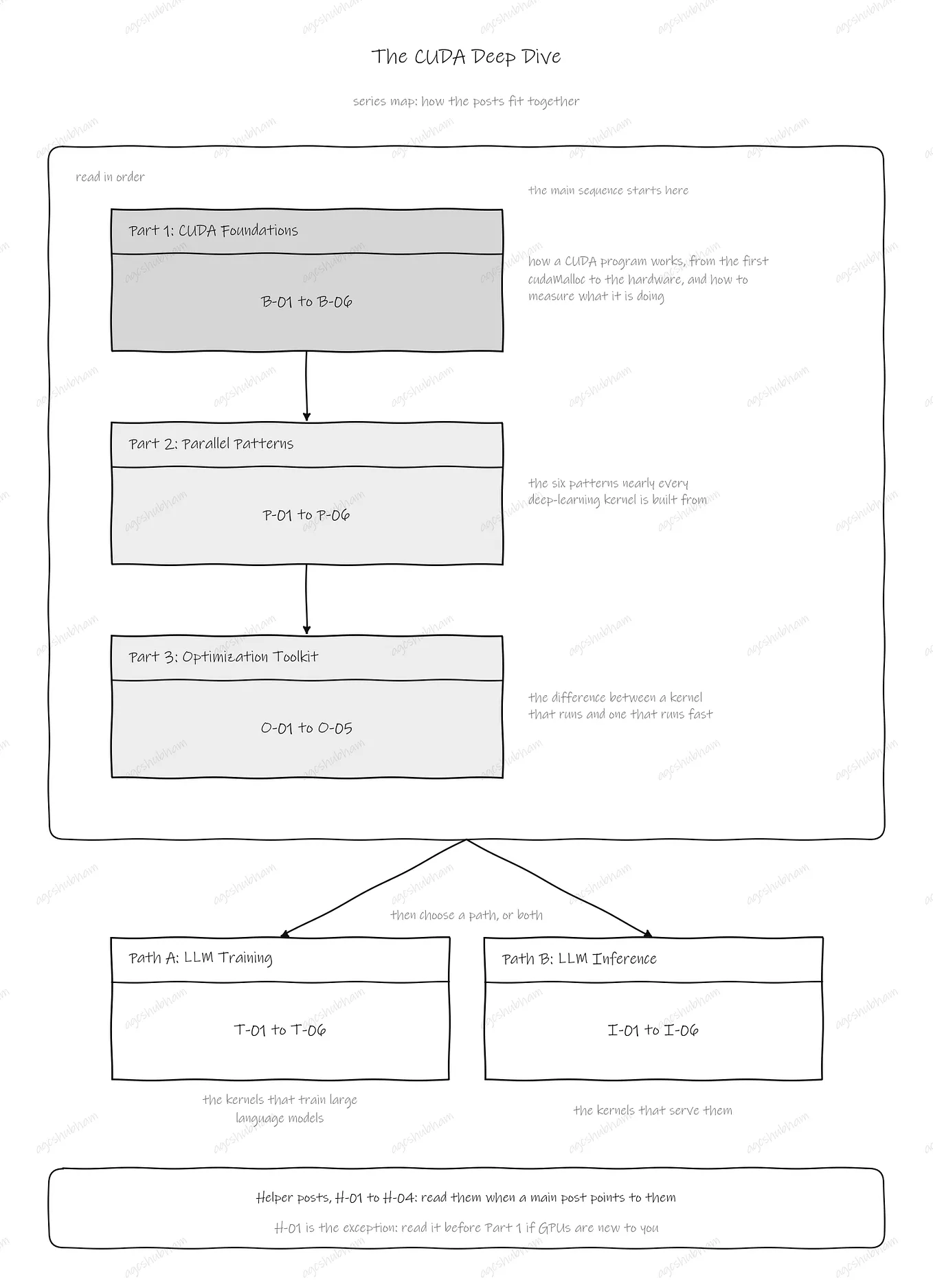
This post is one of a series. See the Series Map for the full plan and where this post fits. Previous: B-06 Measuring CUDA Programs (coming soon). Next: P-02 The Reduction Pattern (coming soon).
The kernel you have already written twice, given its name: one thread per element, no thread waiting on another, and why fusing two of them is the first optimization you will ever make.
Who this is for: a software engineer or ML practitioner who knows C++ basics (pointers, stack vs heap, manual memory allocation), may have used PyTorch, and has never written a CUDA kernel.
What this post does: it names the shape of the kernel B-01 wrote, and shows that every elementwise operation in deep learning has that same shape. It gives you one question that tells you whether a loop is a map. It shows four map kernels that differ by one line, counts their bytes, and explains why none of them is limited by arithmetic. Then it shows the two things the shape makes possible, fusing two kernels into one and loading four elements at a time, and the one place the shape stops working. It ends with a complete program you can compile and check.
Start here if you have read B-01 and B-02: you have launched one kernel, and you know that the GPU runs it as warps on SMs and that most kernels wait for memory. If you have not written a kernel, read B-01 The CUDA Program Lifecycle first; the kernel in it is the one this post names. If you want the hardware reasons behind “count bytes first,” B-02 The GPU Hardware Model (coming soon) has them; this post only uses the result.
Where B-02 left off
B-01 followed one program from start to finish. Its kernel added two vectors with one thread per element: c[i] = a[i] + b[i]. B-02 showed what the GPU did with that kernel. Each block went to one SM. The threads ran 32 at a time, as warps. And the kernel moved 12 bytes for every addition, so it spent its time waiting for memory, not doing arithmetic.
That kernel has a name. It is a map. The map is the first of six parallel patterns, and this part of the series covers one pattern per post. A pattern is a shape of work that keeps coming back. Once you can recognise the shape, you know which questions to ask and which fixes apply before you write a line of code. The six are: map (this post), reduction (many values become one), scan (running totals), histogram (counting into bins), stencil (each output from its neighbourhood), and matrix multiplication. Nearly every kernel inside a deep learning framework is one of these, or a few of them joined together.
If there is one sentence to keep from the whole post, it is this:
In a map, output i needs only the inputs at index i. Each thread writes only its own element and reads only arrays that no thread is writing. Change the work line and it is still the same kernel, so count its bytes, not its arithmetic.
The post has six parts. First, what a map is, and the one question that settles whether you have one. Second, four kernels that are all the same kernel with a different line of work: vector add, scale, ReLU and GELU. Third, fusion: how two map kernels become one and half the bytes disappear. Fourth, wider loads: four elements per thread with float4. Fifth, where a map ends, with softmax as the example. Sixth, a complete program you can compile and check. Figure P01.1 is the shape the first part describes.
Figure P01.1: In a map, output i depends only on the inputs at index i, so every thread works alone

What a map is
Look at B-01’s work line again: c[i] = a[i] + b[i]. Thread i reads position i of a, reads position i of b, and writes position i of c. It reads nothing else and writes nothing else. Thread 517 never looks at element 516 or element 518. It does not care whether those threads have run yet. It does not care whether they exist.
That is the definition. A map produces one output for each input position, and output i depends only on the inputs at position i.
To find out whether a loop is a map, ask one question. To compute output i, do I need any element other than the ones at position i? If the answer is no, you have a map. Launch one thread per element and you are done. If the answer is yes, you have a different pattern, and the rest of Part 2 is about those.
Here are three loops where the answer is yes. A running total needs output i minus 1 before it can produce output i. That is a scan, and P-03 covers it. A blur averages positions i minus 1, i and i plus 1. That is a stencil, P-05. Softmax divides each value in a row by the sum of the whole row. The sum needs every element, and that is a reduction, P-02. The lower half of Figure P01.1 draws all three under the map. The difference is visible at a glance. The map has one straight arrow per position. The other three have extra arrows coming in from other positions.
Two refinements, and both keep the answer at no. First, a thread can read several inputs, as long as each read is at its own position. a[i] and b[i] are two reads at the same index, and that is still a map. Second, a value shared by every thread does not count as "another element". A scalar such as a multiplier k is passed to the kernel by value, like any C function argument, and every thread gets its own copy. A small array that no thread writes, such as a bias vector that every row of a matrix shares, can be read at any index without harm, because nobody is changing it while you read.
The safety rule behind both refinements is short. Write only your own element. Read only from arrays that no thread in the kernel is writing. Follow it and no two threads can ever disagree about what is in memory, so the answer is the same on every run.
If a picture helps: a map is a line of workers who each hold one part, do one step to it, and put it in the out tray. Nobody waits for anybody, and nobody touches another worker’s part. The worker is the thread and the part is the element; that is the whole mapping.
Four kernels follow. They look different, and they are all this one kernel.
Four work lines, one kernel
Here is B-01’s kernel again, unchanged.
__global__ void vectorAdd(const float* a, const float* b, float* c, int n) {
    int i = blockIdx.x * blockDim.x + threadIdx.x;
    if (i < n) {
        c[i] = a[i] + b[i];
    }
}
It has three steps. The first line of the body computes which element this thread owns, from the block index, the block size and the thread index, as B-01 explained. The second line checks that the element exists. The grid is rounded up to whole blocks, so a launch often has a few more threads than elements, and those threads must do nothing. The third line is the work. Everything that is specific to vector addition is in that one line. The other lines are the same in every map kernel you will ever write.
So here are three more map kernels. Only the work line changes, and in one case the argument list.
__global__ void scale(const float* x, float* y, float k, int n) {
    int i = blockIdx.x * blockDim.x + threadIdx.x;
    if (i < n) y[i] = k * x[i];
}

__global__ void relu(const float* x, float* y, int n) {
    int i = blockIdx.x * blockDim.x + threadIdx.x;
    if (i < n) y[i] = fmaxf(0.0f, x[i]);
}
__global__ void gelu(const float* x, float* y, int n) {
    int i = blockIdx.x * blockDim.x + threadIdx.x;
    if (i < n) y[i] = 0.5f * x[i] * (1.0f + erff(x[i] * 0.70710678f));
}
scale multiplies every element by the same number k. Notice how k gets to the GPU. It is an ordinary argument, passed by value. It needs no cudaMalloc and no cudaMemcpy. Only arrays live in device memory and need both. Anything identical for every thread goes in the argument list.
relu is the activation function that most neural networks used for years. It keeps positive values and replaces negative ones with zero. fmaxf(0.0f, x) returns the larger of zero and x, which is exactly that rule. Written as an if and an else it would be if (x[i] > 0.0f) y[i] = x[i]; else y[i] = 0.0f;. The two forms do the same thing.
gelu is the activation that most transformer models use. It is a smooth relative of ReLU. Each value is multiplied by a factor between 0 and 1. The factor rises smoothly from 0 for large negative values to 1 for large positive values, and it is one half at zero. So large positive values pass through almost unchanged, large negative values go to almost zero, and values near zero are scaled rather than cut off. The formula is 0.5 times x times (1 plus erf of x divided by the square root of two). erff is the error function from the device math library, and 0.70710678 is one over the square root of two. A few numbers show the difference between the two activations. At minus 1.0, ReLU gives 0 and GELU gives minus 0.1587. At minus 0.5, ReLU gives 0 and GELU gives minus 0.1543. At 0.5, ReLU gives 0.5 and GELU gives 0.3457. At 1.0, ReLU gives 1.0 and GELU gives 0.8413. GELU lets a little of the negative side through, which ReLU never does. There is also a version of GELU built on tanhf instead of erff. It has the same shape and is a little cheaper to compute.
Now count what each kernel does for one element, the way B-02 counted vector add. Vector add reads 8 bytes, writes 4 and does one addition: 12 bytes per operation, or 0.083 operations per byte. Scale reads 4 bytes, writes 4 and does one multiply: 0.125 operations per byte. ReLU moves the same 8 bytes and does one compare and select: 0.125 again. GELU moves the same 8 bytes, but its work line is a multiply, an erff, an add and two more multiplies. The erff is not one instruction. The compiler expands it into a few dozen. Call the whole work line about 24 operations, which gives 3 operations per byte.
B-02 established that a GPU can use somewhere between 10 and 25 operations for every byte its memory delivers. All four kernels are below 10. Even GELU, with its special function, waits for memory. This is the fact that drives the rest of the post. Making the work line cheaper does not make a map faster. Moving fewer bytes does. Figure P01.2 puts the four kernels on B-02’s scale.
Figure P01.2: Changing the work line changes the arithmetic but not the shape, and none of the four maps comes near what the GPU can use per byte

One more thing before moving on. An activation inside a network is usually a matrix, not a vector. It is still a map. A thread can compute a row and a column and flatten them into one index, which is what B-02’s 16 x 16 block did. Or it can treat the matrix as one long array of rows times columns elements, which is what the next section does. B-04 Writing Your First Real Kernel (coming soon) has the indexing recipes for both.
If bytes decide the speed, the first thing to do is move fewer of them. The next section does that without changing a single work line.
Fusion: two kernels become one
Here is the situation that comes up after almost every matrix multiplication in a network. The layer adds a bias to its output, then applies an activation. Two map steps, one after the other. The obvious way to write them is two kernels.
Take an activation matrix of 256 rows and 4,096 columns. That is 1,048,576 elements, the same count as B-01’s vectors. Each column has its own bias value, so the bias is a vector of 4,096 numbers, and the same 4,096 numbers are added to every row. If the matrix is stored row after row in one array, element i is in column i % cols.
__global__ void biasAdd(const float* x, const float* bias, float* y, int n, int cols) {
    int i = blockIdx.x * blockDim.x + threadIdx.x;
    if (i < n) y[i] = x[i] + bias[i % cols];
}

__global__ void biasRelu(const float* x, const float* bias, float* y, int n, int cols) {
    int i = blockIdx.x * blockDim.x + threadIdx.x;
    if (i < n) y[i] = fmaxf(0.0f, x[i] + bias[i % cols]);
}
The two-kernel version launches biasAdd to write a temporary array tmp, then launches relu from the previous section to read tmp and write y:
biasAdd<<<4096, 256>>>(d_x, d_bias, d_tmp, n, cols);   // tmp = x + bias
relu<<<4096, 256>>>(d_tmp, d_y, n);                     // y = max(0, tmp)
The fused version is one launch:
biasRelu<<<4096, 256>>>(d_x, d_bias, d_y, n, cols); // y = max(0, x + bias)Look at bias[i % cols] before counting anything. It is a read at an index other than i. The one question from the first section still gets the answer no, because the bias is a shared input that no thread writes. Every thread can read it anywhere, at any time. The same read into an array the kernel was writing would be a different story, and the Gotchas return to it.
Now count the bytes that go through device memory. Each array of 1,048,576 floats is 4 MiB. In the two-kernel version, biasAdd reads x and writes tmp: 8 MiB. Then relu reads tmp and writes y: another 8 MiB. That is 16 MiB and two launches. In the fused version, biasRelu reads x and writes y: 8 MiB and one launch. The bias vector is 16 KiB. It is read from device memory once and then from the on-chip caches, so it barely counts in either version.
Half the bytes are gone, and the work lines did not change. What disappeared is the temporary array. In the fused kernel the sum x[i] + bias[i % cols] is a value in a register. It goes straight into fmaxf and is never written to device memory or read back. The general rule follows directly. Run k map steps as k separate kernels and you move about 8 bytes per element per step, 8kN bytes in total. Fuse them and you move 8 bytes per element once, plus whatever extra inputs the steps need. Figure P01.3 shows both versions with the bytes written on the arrows.
Get Agcshubham’s stories in your inbox
Join Medium for free to get updates from this writer.
Figure P01.3: Two map kernels move every byte twice, and the fused kernel moves it once

If a picture helps: fusion is doing two steps to a part while it is still in your hand, instead of putting it back on the shelf between the steps, where the shelf is device memory.
There is a cost to watch, and B-01 promised that this post would name it. A fused kernel keeps more values alive per thread at the same moment, so it can use more registers per thread. B-02 explained why that matters. Registers are budgeted per SM, so a kernel that uses more of them per thread fits fewer blocks on each SM. For two elementwise steps the increase is small. nvcc -Xptxas -v reports the count, as B-02's register listing showed. One build here gave 12 registers for biasRelu, the same as for vectorAdd, so this fusion cost nothing. The count varies by GPU and compiler version. When fusion joins many steps, or steps with large bodies, the count can grow enough to matter, and O-03 (coming soon) covers that trade.
Fusion has one hard limit. You can fuse any number of map steps into one kernel, because thread i only ever needs element i. You cannot fuse in a step that needs other elements, because thread i does not have them. The softmax section shows what that looks like. Deep learning frameworks and their compilers often perform this kind of fusion for you, behind the scenes, and T-02 and I-02 (coming soon) show where it matters in a transformer layer. B-06 Measuring CUDA Programs (coming soon) is where byte counts like these turn into measured bandwidth.
Fusion is the first lever: fewer bytes. The second lever moves the same bytes with fewer instructions.
Wider loads: four elements per thread
Every load in the kernels so far fetches one float, 4 bytes, in one instruction. CUDA has a type called float4 that holds four floats side by side, 16 bytes in all. A thread that loads a float4 gets four consecutive elements in one instruction. If each thread handles four elements instead of one, the kernel issues a quarter of the memory instructions for the same bytes, and the grid is a quarter of the size.
__global__ void relu4(const float* x, float* y, int n) {
    int i = blockIdx.x * blockDim.x + threadIdx.x;
    int n4 = n / 4;                                  // whole groups of four
    if (i < n4) {
        float4 v = reinterpret_cast<const float4*>(x)[i];
        v.x = fmaxf(0.0f, v.x);
        v.y = fmaxf(0.0f, v.y);
        v.z = fmaxf(0.0f, v.z);
        v.w = fmaxf(0.0f, v.w);
        reinterpret_cast<float4*>(y)[i] = v;
    }
    if (i == 0) {                                    // thread 0 finishes the tail
        for (int j = 4 * n4; j < n; j++) y[j] = fmaxf(0.0f, x[j]);
    }
}
The launch is one thread per group of four:
int n4 = n / 4;
int blocks = (n4 + 255) / 256;
relu4<<<blocks, 256>>>(d_x, d_y, n);
reinterpret_cast<const float4*>(x) tells the compiler to treat the array of floats as an array of float4. Element i of that view is elements 4i to 4i plus 3 of the original. The four fields of a float4 are named x, y, z and w, and the kernel applies the same work line to each. The write is one 16-byte store. The last few elements need separate handling. When n does not divide by four, the final n % 4 elements do not make a whole group, and thread 0 handles them with a plain loop, one at a time. There are at most three of them.
Two rules come with float4. First, alignment. A 16-byte load needs an address divisible by 16. Memory from cudaMalloc is aligned far more generously than that, so the start of an array is always safe. If you pass a pointer into the middle of an array, the offset must be a multiple of four elements. Second, the tail. Every float4 kernel has to do something about the elements that do not fill a group, and forgetting them is a silent bug: the kernel runs, and the last one to three outputs are wrong.
Here is what changed and what did not, for 1,048,576 elements. The bytes did not change: the kernel still reads 4 MiB and writes 4 MiB. The registers did, a little: the same build that gave relu 10 registers gave relu4 18, because each thread now holds four values at once instead of one. The instruction count did. Each array needed 1,048,576 scalar load instructions and now needs 262,144 float4 loads. One warp's load instruction used to bring in 32 lanes times 4 bytes, 128 bytes. Now it brings in 32 lanes times 16 bytes, 512 bytes. The grid shrinks from 4,096 blocks to 1,024. For an array of 1,000,003 elements, there are 250,000 groups of four and a tail of 3. Figure P01.4 draws one warp both ways.
Figure P01.4: A float4 load moves four elements per thread, so a warp’s one instruction moves 512 bytes instead of 128 and the kernel issues a quarter of the memory instructions for the same bytes

Whether fewer, wider instructions make a particular kernel faster depends on what that kernel is waiting for, and B-02 said what a warp touches together is what the hardware sees. O-01 Memory Coalescing and Access Patterns (coming soon) has the rules that decide it, and B-06 is where you measure it. What this section can say for certain is the arithmetic: same bytes, a quarter of the memory instructions, a quarter of the threads.
The last thing to know about a map is where it stops being one.
Where a map ends: softmax
Softmax turns a row of scores into probabilities that add up to one. It is the last step of most classifiers and one of the steps inside attention. It takes four steps. Find the largest value in the row and subtract it from every element, so that the exponentials that follow cannot overflow. Take the exponential of every element. Add them all up. Divide every element by that sum.
Here is the row [1.0, 3.0, 0.5, -2.0] through the four steps. The maximum is 3.0. Subtracting it gives [-2.0, 0.0, -2.5, -5.0]. The exponentials are [0.1353, 1.0, 0.0821, 0.0067]. Their sum is 1.2242. Dividing gives [0.1106, 0.8169, 0.0671, 0.0055], and those four numbers add up to one.
Now ask the one question of each step. The exponential: output i needs only element i. That is a map. The division: once the sum is known, output i needs only element i. That is a map too. Subtracting the maximum: the maximum needs every element in the row. The sum: every element again. Two of the four steps fail the test. Softmax is not a map.
It is worth seeing what happens if you write it as one anyway. Give each output its own thread. Each thread loops over its whole row to find the maximum, loops over the row again to add up the exponentials, then computes its own value. The answer is correct. The work is not. For a row of 4,096 values, each thread reads its row twice, 8,192 reads, to produce one output. The 4,096 threads of that row make 33,554,432 reads between them, where three plain passes over the row would make 12,288. Every thread repeats the same two row-wide calculations. Figure P01.5 marks which steps are maps and which are not.
Figure P01.5: Softmax is two maps and two steps that need the whole row, so it is not a map

P-02 The Reduction Pattern (coming soon) is the pattern for “every element in the row”. It gives the maximum and the sum to a whole block of threads working together, and the two map steps fuse onto either side of it, exactly as bias and ReLU fused in the previous section. What one thread can do alone ends at this boundary. What a block of threads can do together is where the next post starts.
The complete program: fused bias plus ReLU, checked
Here is the fused kernel in a complete program. It builds the 256 by 4,096 matrix and its bias from a fixed pattern, runs the kernel, computes the same result on the CPU, and compares every element. The stage numbers in the comments are B-01’s nine stages.
#include <stdio.h>
#include <stdlib.h>
#include <cuda_runtime.h>

__global__ void biasRelu(const float* x, const float* bias, float* y, int n, int cols) {
    int i = blockIdx.x * blockDim.x + threadIdx.x;
    if (i < n) y[i] = fmaxf(0.0f, x[i] + bias[i % cols]);
}
int main() {
    const int rows = 256, cols = 4096;
    const int n = rows * cols;                       // 1,048,576 elements
    size_t bytes = n * sizeof(float);
    size_t biasBytes = cols * sizeof(float);
    // Stages 1 and 2: host arrays, filled with a fixed pattern
    float* h_x = (float*)malloc(bytes);
    float* h_bias = (float*)malloc(biasBytes);
    float* h_y = (float*)malloc(bytes);
    for (int i = 0; i < n; i++) h_x[i] = ((i % 7) - 3) * 0.5f;     // -1.5 to 1.5
    for (int j = 0; j < cols; j++) h_bias[j] = (j % 3) * 0.25f;    // 0, 0.25, 0.5
    // Stage 3: device memory for x, bias and y
    float *d_x, *d_bias, *d_y;
    cudaMalloc(&d_x, bytes);
    cudaMalloc(&d_bias, biasBytes);
    cudaMalloc(&d_y, bytes);
    // Stage 4: copy the inputs in
    cudaMemcpy(d_x, h_x, bytes, cudaMemcpyHostToDevice);
    cudaMemcpy(d_bias, h_bias, biasBytes, cudaMemcpyHostToDevice);
    // Stage 5: one launch does both steps
    int threads = 256;
    int blocks = (n + threads - 1) / threads;        // 4,096 blocks
    biasRelu<<<blocks, threads>>>(d_x, d_bias, d_y, n, cols);
    // Stages 6 and 7: the blocking copy waits for the kernel, then brings y back
    cudaMemcpy(h_y, d_y, bytes, cudaMemcpyDeviceToHost);
    // Stage 8: the same work on the CPU, then compare every element
    int correct = 0;
    for (int i = 0; i < n; i++) {
        float expected = h_x[i] + h_bias[i % cols];
        if (expected < 0.0f) expected = 0.0f;
        if (h_y[i] == expected) correct++;
    }
    printf("%d of %d elements correct\n", correct, n);
    for (int i = 0; i < 8; i += 2) {
        printf("x[%d] = %5.2f  bias[%d] = %4.2f  y[%d] = %4.2f\n",
               i, h_x[i], i, h_bias[i], i, h_y[i]);
    }
    // Stage 9: free everything
    cudaFree(d_x); cudaFree(d_bias); cudaFree(d_y);
    free(h_x); free(h_bias); free(h_y);
    return 0;
}
Save it as bias_relu.cu, build it with nvcc -arch=native -o bias_relu bias_relu.cu, and run it. Here is what it prints:
1048576 of 1048576 elements correct
x[0] = -1.50  bias[0] = 0.00  y[0] = 0.00
x[2] = -0.50  bias[2] = 0.50  y[2] = 0.00
x[4] =  0.50  bias[4] = 0.25  y[4] = 0.75
x[6] =  1.50  bias[6] = 0.00  y[6] = 1.50
A few notes on the program. The input pattern is deliberately simple. x cycles through the values minus 1.5 to 1.5 in steps of 0.5, and the bias cycles through 0, 0.25 and 0.5. Every one of those values is exact in a float, and so are their sums, which is why the comparison in stage 8 can use == instead of a tolerance. The CPU check is two lines inside a loop, and it is the most valuable part of the program: a kernel that runs without an error message has not proved anything until its output is compared with a version you trust. The four printed samples show the three things the kernel can do to an element. Element 0 is negative and the bias does not rescue it, so it becomes zero. Element 2 lands exactly on zero. Elements 4 and 6 are positive and pass through with their bias added.
Three things to try. Change the work line in biasRelu to GELU and the CPU check with it; nothing else moves, except that the == becomes a small tolerance, because erff on the CPU and on the GPU can differ in the last digit. Change rows and cols; the launch arithmetic already handles any size. Then write the two-kernel version from the fusion section with a temporary array, and compare its output with this one element for element. They are identical, and the fused one moved half the bytes.
Gotchas
- The grid is rounded up, so the bounds check is not optional. For 1,000,000 elements and blocks of 256, the launch is 3,907 blocks, which is 1,000,192 threads. The last 192 threads have no element, and
if (i < n)is the only thing stopping them from touching memory beyond the array. - Write only your own element.
a[i] = a[i-1] + a[i]reads a neighbour that another thread may be overwriting at that very moment, so the answer can differ between runs. The one question gives it away: output i needs output i minus 1. That is a scan, not a map, and P-03 shows how to write it. - Writing over an input is not a race in a map, but the input is gone.
a[i] = a[i] + b[i]touches only index i, so it is safe for the pattern. It also destroysa. Keep a separate output array unless you are certain the original is never needed again. - A value shared by every thread goes by value.
kinscaleneeds nocudaMallocand nocudaMemcpy. Device memory is for arrays. A single float allocated on the device and copied in is not wrong, just three lines of work for nothing. - A read at another index is fine only if nobody is writing that array.
bias[i % cols]is read-only insidebiasRelu, so it is fine. The same read into an array the kernel writes is Gotcha 2. - The arithmetic in a map almost never matters. Even GELU offers about 3 operations per byte, against the 10 to 25 a GPU can use. Shortening a work line does not make a map faster. Moving fewer bytes does, which is what fusion is for.
- Fusion stops at the pattern boundary. Bias and ReLU fuse because both are maps. The softmax maximum does not fuse into them, because it needs the whole row and thread i has only element i.
float4needs alignment and a tail. Pointer offsets must be multiples of four elements, and the lastn % 4elements must be handled separately. For 1,000,003 elements the tail is 3, and a kernel that forgets it leaves three wrong outputs and no error message.- Pass n, never hard-code it. A bounds check against a literal protects exactly one array size. Every kernel in this post takes
int nand checks against it.
Summary
A map is one thread per element, where output i depends only on the inputs at index i. Vector add, scale, ReLU, GELU and bias add are all the same kernel with a different work line, and all of them wait for memory rather than arithmetic. Two map steps run as two kernels move every byte twice; fused into one kernel they move it once, and the temporary array between them never exists. Loading four elements per thread with float4 moves the same bytes with a quarter of the memory instructions, as long as the pointers are aligned and the tail is handled. And the pattern ends exactly where an output needs another element: softmax's maximum and sum are that case, and they belong to the next pattern.
So, the sentence from the top, one more time: in a map, output i needs only the inputs at index i. Each thread writes only its own element and reads only arrays that no thread is writing. Change the work line and it is still the same kernel, so count its bytes, not its arithmetic.
In This Series
Before this post: B-01 The CUDA Program Lifecycle wrote the kernel this post named and walked its nine stages, which the complete program above follows. B-02 The GPU Hardware Model (coming soon) explained warps, SMs and the memory wall, which is where “count bytes before operations” comes from. H-01 Why GPU? CPU vs GPU Architecture explains why the chip is built for exactly this kind of work.
What comes next: P-02 The Reduction Pattern (coming soon) is the pattern for “every element in the row”. It starts with the two softmax steps this post could not fuse, the maximum and the sum.
Related deep dives: B-04 Writing Your First Real Kernel (coming soon) has the indexing recipes and the block-size rule that every map kernel uses. B-06 Measuring CUDA Programs (coming soon) turns this post’s byte counts into measured bandwidth. O-01 Memory Coalescing and Access Patterns (coming soon) has the rules behind float4 and what a warp touches together. P-05 The Stencil Pattern (coming soon) is the pattern for reading neighbours from an input that nobody is writing. T-02 Optimizing Training Kernels and I-02 Optimizing Inference Kernels (coming soon) show fused bias and activation kernels inside a real transformer layer.
CUDA Deep Dive · Part 2: Parallel Patterns · P-01
The Series Map lists every post in the series and the order to read them. Previous: B-06 Measuring CUDA Programs (coming soon). Next: P-02 The Reduction Pattern (coming soon).