From Zero to Data Engineer: A Practical Roadmap for Complete Beginners

A beginner-friendly guide to databases, data warehousing, SQL, Python, cloud platforms, Spark, pipelines, and job-ready projects
Data engineering is one of the most important fields in the modern technology industry.
Almost every organisation generates data through websites, mobile applications, payment systems, customer support platforms, marketing tools, sensors, and internal business applications.
However, raw data is often scattered across different systems and stored in different formats. Before it can be used for reporting, analytics, artificial intelligence, or business decision-making, it must be collected, cleaned, transformed, organised, validated, and stored properly.
This is the responsibility of a data engineer.
For someone who is completely new to technology or data, the journey can initially feel overwhelming. You may hear unfamiliar terms such as:
- Databases
- Data warehouses
- SQL
- Python
- ETL
- ELT
- Data lakes
- Snowflake
- Databricks
- Apache Spark
- Apache Airflow
- Kafka
- Cloud computing
The good news is that you do not need to learn everything at the same time.
The key is to learn the right concepts in the right order and practise them through projects.
This article provides a practical roadmap for someone who is completely new to data engineering.
What Does a Data Engineer Do?
Imagine an online shopping company.
The company receives data from:
- Its website
- Its mobile application
- Customer registrations
- Product catalogues
- Orders
- Payments
- Deliveries
- Marketing campaigns
- Customer support systems
All this data may exist in different databases, files, applications, and cloud platforms.
A data engineer builds systems that:
- Collect data from different sources
- Move data between systems
- Clean incorrect or incomplete data
- Transform raw data into a useful format
- Store data in databases, data lakes, or data warehouses
- Make data available to analysts and business users
- Monitor pipelines and fix failures
- Validate whether the data is complete and accurate
- Protect sensitive information
In simple terms, a data engineer builds and maintains the roads through which data travels.
Step 1: Understand Computer and Data Fundamentals
Before learning programming languages or cloud platforms, you should understand the basic concepts of computers and data.
You should know:
- What files and folders are
- How applications store information
- What a server is
- What a client application is
- What a database is
- What tables, rows, and columns are
- How data moves through a network
- The difference between local and cloud storage
- The difference between structured and unstructured data
You should also become familiar with common data formats.
CSV
CSV stands for Comma-Separated Values. It stores tabular data in plain text.
Example:
customer_id,name,city
101,Aisha,Kuala Lumpur
102,Rahul,Bengaluru
JSON
JSON stores information using key-value pairs.
Example:
{
  "customer_id": 101,
  "name": "Aisha",
  "city": "Kuala Lumpur"
}
Excel
Excel files are commonly used by business teams and may contain multiple sheets, formulas, formatting, and tables.
Parquet
Parquet is a column-based file format commonly used in big data and cloud-based data processing.
At this stage, you do not need deep technical knowledge. Your goal is to understand how data can be represented and stored.
Beginner Exercise
Create a small CSV or Excel file containing customer information.
Customer IDNameCityEmail101AishaKuala Lumpuraisha@example.com102RahulBengalururahul@example.com103DanielSingaporedaniel@example.com
Try performing the following activities:
- Add a new customer
- Delete a record
- Sort customers by city
- Filter customers by country
- Identify missing email addresses
- Find duplicate customer IDs
This simple exercise will help you understand the basic structure of data.
Step 2: Learn Database Fundamentals
Before learning SQL, you should understand what a database is and why organisations use databases.
A database is an organised system for storing, managing, and retrieving information.
Instead of storing important business data across hundreds of Excel and CSV files, companies use databases to manage data in a structured, reliable, and secure way.
For example, an online shopping company may have separate tables for:
- Customers
- Products
- Orders
- Payments
- Deliveries
- Employees
Tables, Rows, and Columns
A table stores data in rows and columns.
For example:
Customer IDCustomer NameCity101AishaKuala Lumpur102RahulBengaluru
Each row represents one customer.
Each column represents one property of the customer.
Primary Keys
A primary key uniquely identifies each record in a table.
For example, Customer ID can be the primary key of a customer table because each customer should have a different ID.
Foreign Keys
A foreign key connects one table to another.
Consider the following Orders table:
Order IDCustomer IDProduct IDO1001101P01O1002102P02
The Customer ID connects the Orders table to the Customers table.
The Product ID connects the Orders table to the Products table.
Understanding table relationships will make SQL joins much easier to learn.
Database Schema
A schema is a logical container used to organise database objects such as tables, views, and procedures.
For example, a company may have separate schemas for:
- Sales
- Finance
- Human Resources
- Marketing
- Customer Service
Relational Databases
Relational databases store data in related tables.
Popular relational databases include:
- PostgreSQL
- MySQL
- Microsoft SQL Server
- Oracle Database
For beginner practice, PostgreSQL or MySQL is sufficient.
NoSQL Databases
NoSQL databases are designed for data that may not fit neatly into traditional rows and columns.
They may store:
- Documents
- Key-value pairs
- Graph relationships
- Wide-column data
Examples include:
- MongoDB
- Cassandra
- Redis
- Amazon DynamoDB
As a beginner, focus first on relational databases.
Operational Databases
Operational databases support day-to-day business activities.
Examples include:
- Creating an order
- Processing a payment
- Updating a customer address
- Checking available stock
These systems are often called OLTP systems, meaning Online Transaction Processing systems.
At this stage, focus on understanding:
- Databases
- Tables
- Rows
- Columns
- Primary keys
- Foreign keys
- Relationships
- Schemas
- Constraints
- Relational databases
- Operational databases
You can learn advanced concepts such as indexes, transactions, normalisation, and stored procedures later.
Step 3: Understand Data Warehousing Concepts
After understanding normal databases, the next step is to understand why organisations also need data warehouses.
An operational database is designed to support daily transactions.
A data warehouse is designed mainly for reporting, analysis, and historical comparison.
For example, an operational database may be used to:
- Place an order
- Process a payment
- Update customer information
- Check inventory
A data warehouse may be used to:
- Calculate total monthly revenue
- Compare sales across different countries
- Identify the most profitable products
- Analyse customer behaviour over several years
- Create dashboards for management
- Measure marketing campaign performance
Database Versus Data Warehouse
An operational database usually contains current transactional information.
A data warehouse combines data from multiple systems and stores it in a form that is suitable for analytics.
For example, a company may collect data from:
- A customer relationship management system
- An order management system
- A payment platform
- A website
- A mobile application
- A marketing platform
- A customer support application
A data engineer may bring all this information together inside a data warehouse.
Popular data warehouse platforms include:
- Snowflake
- Google BigQuery
- Amazon Redshift
- Azure Synapse Analytics
Data Lake
A data lake stores large amounts of raw or semi-processed data.
It may contain:
- CSV files
- JSON files
- Images
- Audio files
- Log files
- Parquet files
- Application events
- Sensor data
Data lakes are commonly built using cloud storage platforms.
Examples include:
- Azure Data Lake Storage
- Amazon S3
- Google Cloud Storage
Data Mart
A data mart is a smaller section of a data warehouse designed for a particular department or business area.
Examples include:
- Sales data mart
- Finance data mart
- Marketing data mart
- Customer service data mart
Fact Tables
Fact tables store measurable business events.
For an e-commerce company, a sales fact table may contain:
- Order ID
- Customer ID
- Product ID
- Order date
- Quantity
- Sales amount
- Discount amount
Dimension Tables
Dimension tables store descriptive information.
Examples include:
- Customer dimension
- Product dimension
- Store dimension
- Date dimension
- Employee dimension
Star Schema
A star schema contains a central fact table connected to multiple dimension tables.
For example:
- Sales fact table
- Customer dimension
- Product dimension
- Date dimension
- Store dimension
This structure makes analytical queries easier to understand and often improves reporting performance.
Snowflake Schema
A snowflake schema is similar to a star schema, but its dimension tables are further divided into related tables.
It can reduce data duplication, although it may make queries more complex.
Historical Data
Historical data contains records from previous days, months, or years.
For example, a company may store five years of sales data to analyse long-term trends.
Incremental Data
Incremental data contains only records that are newly created or updated since the previous pipeline run.
Instead of loading an entire table every day, a data engineer may load only the latest changes.
At this stage, focus on understanding:
- Data warehouses
- Data lakes
- Data marts
- Source systems
- Staging layers
- Fact tables
- Dimension tables
- Star schemas
- Historical loads
- Incremental loads
You do not need to master advanced data modelling yet. You first need to understand why analytical systems exist and how data is organised inside them.
Step 4: Learn SQL
After understanding databases and data warehouses, you can begin learning SQL.
SQL stands for Structured Query Language.
It is used to communicate with relational databases and data warehouses.
Using SQL, you can:
- Read data
- Filter records
- Sort results
- Combine tables
- Calculate totals
- Create new tables
- Update records
- Detect duplicates
- Transform data
- Validate source and target systems
- Create analytical reports
SQL is one of the most important skills for a data engineer.
Start With Basic SQL
Learn:
SELECTFROMWHEREORDER BYDISTINCTLIMIT- Column aliases
Example:
SELECT
    customer_id,
    customer_name,
    city
FROM customers
WHERE city = 'Kuala Lumpur'
ORDER BY customer_name;
Learn Aggregations
Learn functions such as:
COUNTSUMAVGMINMAX
Example:
SELECT
    city,
    COUNT(*) AS customer_count
FROM customers
GROUP BY city
ORDER BY customer_count DESC;
Learn Joins
Joins combine data from related tables.
Focus on:
INNER JOINLEFT JOINRIGHT JOINFULL OUTER JOIN
Example:
SELECT
    o.order_id,
    c.customer_name,
    o.order_amount
FROM orders o
LEFT JOIN customers c
    ON o.customer_id = c.customer_id;
Learn Intermediate SQL
After mastering the basics, learn:
GROUP BYHAVINGCASE WHENUNION- Subqueries
- Common Table Expressions
- Window functions
- Date functions
- String functions
- Null handling
- Temporary tables
- Views
Practise Real Problems
Do not only memorise syntax.
Practise solving business-related problems such as:
- Finding duplicate customer IDs
- Identifying null values
- Finding customers without orders
- Calculating daily and monthly revenue
- Finding the latest order for each customer
- Comparing source and target row counts
- Identifying records missing from a target table
- Finding the highest-selling product
- Ranking customers by total spending
SQL should become one of your strongest skills.
Step 5: Learn Python
Python is widely used in data engineering because it is simple, flexible, and supported by many data-processing libraries.
Start with Python fundamentals.
Learn:
- Variables
- Strings
- Integers
- Floats
- Booleans
- Lists
- Tuples
- Sets
- Dictionaries
- Conditions
- Loops
- Functions
- Error handling
- Reading and writing files
- Modules and packages
Example
customer = {
    "customer_id": 101,
    "name": "Aisha",
    "city": "Kuala Lumpur"
}print(customer["name"])Learn File Handling
A data engineer frequently works with files.
Learn how to:
- Read CSV files
- Write CSV files
- Read JSON files
- Write JSON files
- Move files
- Rename files
- Validate file contents
- Handle missing files
Learn Pandas
Pandas is useful for processing small and medium-sized datasets.
Example:
import pandas as pdcustomers = pd.read_csv("customers.csv")print(customers.head())
print(customers.isnull().sum())
Useful Python Libraries
You may eventually use:
pandascsvjsonrequestssqlalchemylogging- Database connector libraries
Beginner Python Project
Create a Python program that:
- Reads a customer CSV file
- Removes duplicate records
- Identifies missing customer IDs
- Standardises date formats
- Converts email addresses to lowercase
- Saves valid records into a clean file
- Saves invalid records into a rejected-records file
- Prints a summary of processed records
This is a simple version of a real data pipeline.
Step 6: Learn Linux and Command-Line Basics
Many data engineering systems run on Linux servers.
You do not need to become a Linux administrator, but you should be comfortable using the command line.
Learn commands such as:
pwd
ls
cd
mkdir
cp
mv
rm
cat
head
tail
grep
find
You should also understand:
- File paths
- File permissions
- Environment variables
- Processes
- Log files
- Shell scripts
- Scheduled jobs
Example:
head -n 10 customers.csvThis command displays the first ten lines of a file.
Basic Linux knowledge will make it easier to work with servers, cloud platforms, containers, and automated pipelines.
Step 7: Learn Git and GitHub
Git is used to track changes in code and collaborate with other developers.
Learn:
- Creating a repository
- Cloning a repository
- Adding files
- Committing changes
- Creating branches
- Merging branches
- Resolving simple conflicts
- Pushing code to GitHub
- Pulling recent changes
Basic Git commands include:
git init
git status
git add .
git commit -m "Add customer pipeline"
git push
GitHub can also serve as your project portfolio.
For every project, create a clear README file containing:
- Project objective
- Architecture
- Technologies used
- Setup instructions
- Sample input
- Expected output
- Data quality checks
- Known limitations
A well-documented project is much more valuable than a project containing code without explanation.
Step 8: Understand ETL and ELT
ETL and ELT are core data engineering concepts.
ETL
ETL means:
- Extract
- Transform
- Load
Data is extracted from a source, transformed, and then loaded into a destination.
Example:
- Extract customer data from a database
- Remove duplicate records
- Standardise customer addresses
- Load the cleaned data into a data warehouse
ELT
ELT means:
- Extract
- Load
- Transform
Data is extracted from a source, loaded into the destination, and transformed inside the destination system.
Modern cloud platforms commonly use ELT because cloud data warehouses can efficiently process large volumes of data.
Example:
- Extract order data from a source database
- Load the raw data into Snowflake
- Transform it using SQL
- Create reporting tables
Important Pipeline Questions
When designing a pipeline, ask:
- Where does the data come from?
- What format is the data in?
- How frequently does it arrive?
- Is it a full load or incremental load?
- What transformations are required?
- Where should the data be stored?
- What happens if the pipeline fails?
- How will duplicate records be prevented?
- How will data quality be validated?
- How will the pipeline be monitored?
Understanding these questions is more important than memorising the name of every tool.
Step 9: Learn Data Modelling in More Detail
You were introduced to data warehousing concepts earlier. After learning SQL, you can study data modelling more deeply.
Focus on:
- Fact tables
- Dimension tables
- Star schemas
- Snowflake schemas
- Natural keys
- Surrogate keys
- Slowly Changing Dimensions
- Data marts
- Staging tables
- Audit columns
- Historical tracking
Natural Key
A natural key comes from the business data.
Examples include:
- Email address
- National identification number
- Product code
Surrogate Key
A surrogate key is an artificial identifier created inside the data warehouse.
Example:
CUSTOMER_KEY = 100001Surrogate keys help manage historical changes and maintain consistency.
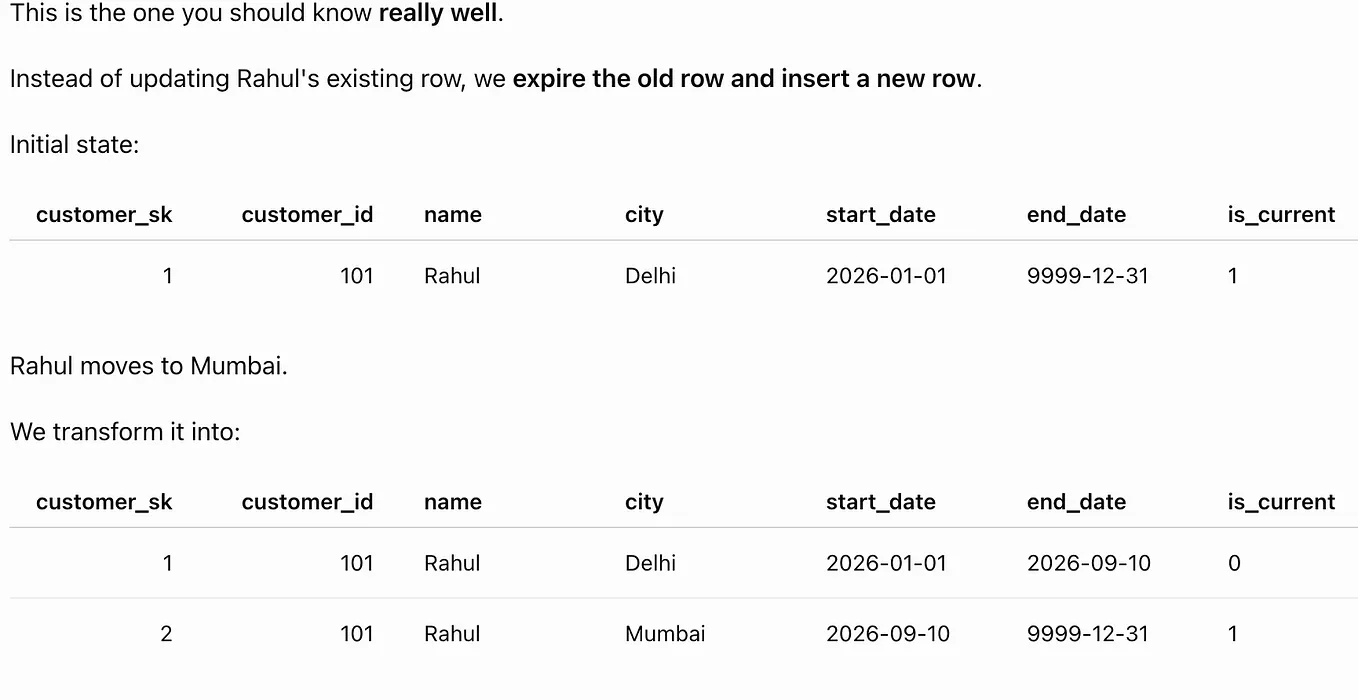
Slowly Changing Dimensions
Slowly Changing Dimensions are used to manage changes in dimension data.
For example, a customer may move from Kuala Lumpur to Penang.
The system must decide whether to:
- Replace the old city
- Preserve both the old and new city
- Store the previous city separately
These patterns are commonly known as:
- Type 1
- Type 2
- Type 3
Type 2 is especially important because it preserves the history of changes.
Step 10: Learn One Cloud Platform
Modern data engineering is strongly connected to cloud computing.
Choose one cloud platform first:
- Microsoft Azure
- Amazon Web Services
- Google Cloud Platform
Do not try to learn all three at the same time.
The underlying concepts are similar across cloud providers.
Azure Learning Path
Focus on:
- Azure Storage
- Azure Data Lake Storage
- Azure Data Factory
- Azure SQL Database
- Azure Synapse Analytics
- Azure Databricks
- Azure Key Vault
AWS Learning Path
Focus on:
- Amazon S3
- AWS Glue
- Amazon Redshift
- Amazon RDS
- AWS Lambda
- Amazon EMR
- AWS Secrets Manager
Google Cloud Learning Path
Focus on:
- Google Cloud Storage
- BigQuery
- Dataflow
- Dataproc
- Cloud Composer
- Pub/Sub
- Secret Manager
Choose the platform that is widely used in your local job market, current company, or target organisations.
Cloud Concepts to Understand
Learn:
- Cloud storage
- Compute services
- Managed databases
- Identity and access management
- Secrets management
- Networking basics
- Monitoring
- Cost management
- Regions and availability zones
You do not need to learn every service offered by a cloud provider.
Step 11: Learn Apache Spark
Apache Spark is used to process large datasets across multiple machines.
Before learning Spark, you should be comfortable with:
- SQL
- Python
- Databases
- DataFrames
- ETL concepts
Spark should not be the first tool you learn.
Important Spark Concepts
Learn:
- Spark architecture
- Driver
- Executors
- Clusters
- DataFrames
- Transformations
- Actions
- Lazy evaluation
- Partitions
- Shuffling
- Caching
- Broadcast joins
- File formats
PySpark Example
from pyspark.sql import SparkSessionspark = (
SparkSession.builder
.appName("CustomerAnalysis")
.getOrCreate()
)customers_df = (
spark.read
.option("header", True)
.option("inferSchema", True)
.csv("customers.csv")
)customers_df.groupBy("city").count().show()
Start by practising:
- Reading CSV and Parquet files
- Selecting columns
- Filtering records
- Creating calculated columns
- Joining DataFrames
- Grouping and aggregating data
- Removing duplicates
- Handling null values
- Writing output files
After that, learn basic performance optimisation.
Step 12: Learn Workflow Orchestration
A real data pipeline does not normally run manually.
Get Asif Mahaldar’s stories in your inbox
Join Medium for free to get updates from this writer.
Workflow orchestration tools schedule, monitor, and manage pipelines.
Popular tools include:
- Apache Airflow
- Azure Data Factory
- AWS Step Functions
- Google Cloud Composer
- Prefect
- Dagster
Important Orchestration Concepts
Learn:
- Tasks
- Dependencies
- Scheduling
- Retries
- Failure handling
- Logging
- Notifications
- Parameters
- Backfilling
- Service-level expectations
For example, a daily pipeline may perform the following tasks:
- Extract customer data
- Load raw data into cloud storage
- Transform the data
- Load it into a warehouse
- Run data quality checks
- Send a notification if the pipeline fails
In Airflow, a collection of connected tasks is called a DAG, or Directed Acyclic Graph.
Step 13: Learn Data Quality and Monitoring
Data engineering is not only about moving data.
The data must also be complete, accurate, valid, and trustworthy.
A pipeline that runs successfully but produces incorrect data is still a failed pipeline.
Important Data Quality Dimensions
Completeness
Are all expected records and values present?
Example:
The target table should contain all records from the source table.
Accuracy
Does the data correctly represent reality?
Example:
A customer’s age should be calculated correctly from their date of birth.
Uniqueness
Are duplicate records present?
Example:
An order ID should not appear more than once.
Validity
Does the data follow the expected format and business rules?
Example:
An email address should follow a valid pattern.
Consistency
Does the same information match across systems?
Example:
A customer status should not be “Active” in one system and “Inactive” in another without a valid reason.
Timeliness
Did the data arrive at the expected time?
Example:
The daily sales file should arrive before 7:00 a.m.
Referential Integrity
Do relationships between tables remain valid?
Example:
Every order should belong to an existing customer.
Common Data Quality Checks
A data engineer may check whether:
- Source and target row counts match
- Primary keys contain null values
- Duplicate records exist
- Dates are within an acceptable range
- Mandatory columns are populated
- Values follow expected formats
- Child records have matching parent records
- Incremental records were loaded successfully
- Data arrived before the required deadline
Monitoring
You should also monitor:
- Pipeline execution status
- Processing duration
- Number of processed records
- Number of rejected records
- Data freshness
- Schema changes
- Unexpected volume changes
- Resource utilisation
Monitoring helps detect problems before business users report them.
Step 14: Learn Batch and Streaming Processing
Most beginners should start with batch processing.
Batch Processing
Batch processing handles data at scheduled intervals.
Examples include:
- Every hour
- Every night
- Every week
- At the end of each month
Example:
A company processes all daily sales transactions at midnight.
Streaming Processing
Streaming processes data continuously as it arrives.
Examples include:
- Fraud detection
- Live vehicle tracking
- Website activity monitoring
- Real-time recommendations
- Payment transaction analysis
Streaming technologies include:
- Apache Kafka
- Spark Structured Streaming
- Apache Flink
- Amazon Kinesis
- Azure Event Hubs
- Google Pub/Sub
Streaming is an advanced topic. Learn it after becoming comfortable with batch pipelines.
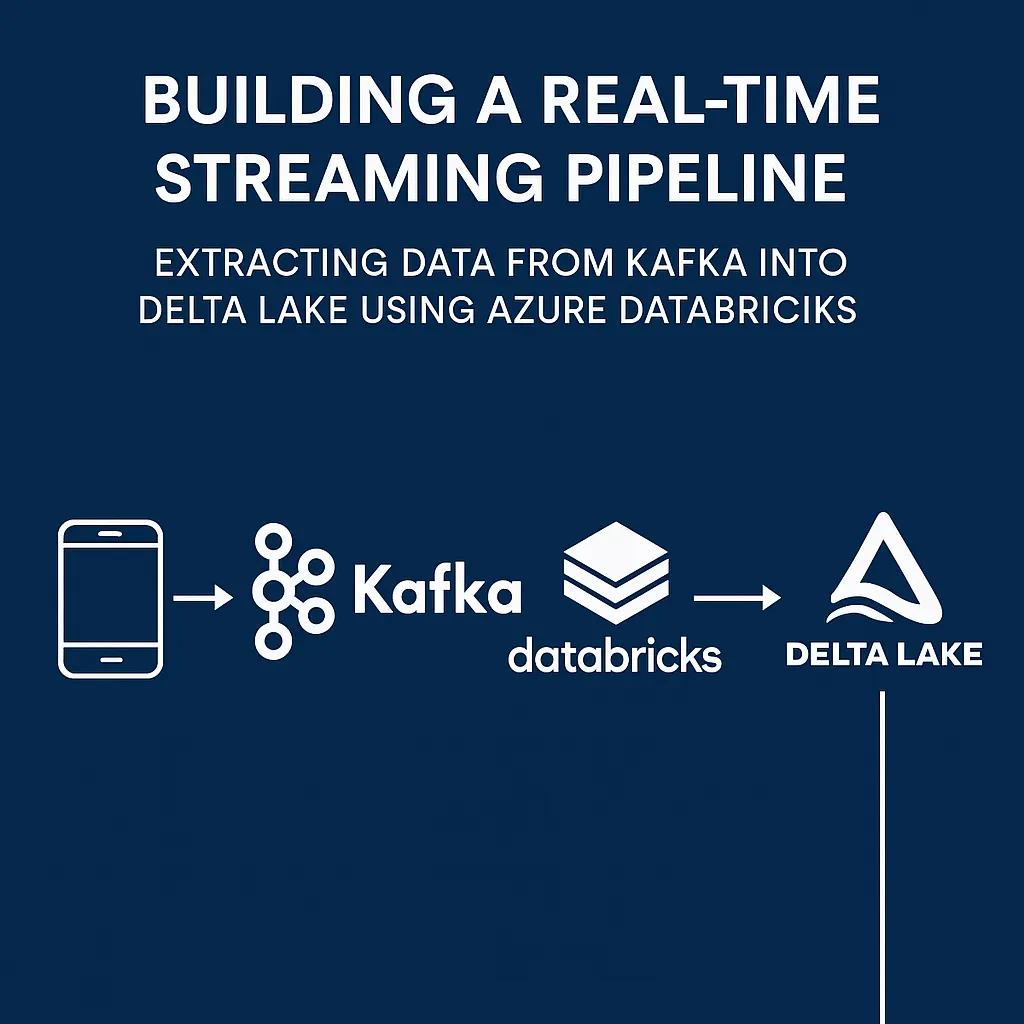
Kafka Fundamentals
When you start learning Kafka, understand:
- Producers
- Consumers
- Topics
- Partitions
- Offsets
- Consumer groups
- Message retention
Do not begin by trying to master the entire Kafka ecosystem.
Step 15: Understand Data Security and Governance
Data engineers often work with sensitive information.
You should understand basic security concepts such as:
- Authentication
- Authorisation
- Role-based access control
- Encryption
- Secrets management
- Data masking
- Auditing
- Personally identifiable information
- Data retention
- Data lineage
Authentication
Authentication confirms who a user is.
Authorisation
Authorisation determines what the user is allowed to access.
Data Masking
Data masking hides sensitive information.
For example:
Original phone number: 0123456789
Masked phone number:   ******6789
Data Lineage
Data lineage explains:
- Where data came from
- What transformations were applied
- Which tables or reports use the data
- Where the data moved
Security and governance become increasingly important as your responsibilities grow.
Step 16: Build End-to-End Projects
Projects are where your learning becomes practical.
Do not build only isolated SQL queries or Python scripts.
Build complete pipelines that show how data moves from source to destination.
Project 1: CSV Data Cleaning Pipeline
Build a Python pipeline that:
- Reads customer data from CSV
- Removes duplicate records
- Handles null values
- Validates email addresses
- Standardises dates
- Saves clean records
- Saves rejected records separately
- Produces an execution summary
Skills demonstrated:
- Python
- Pandas
- File handling
- Data quality
- Error handling
Project 2: E-Commerce Database
Create tables for:
- Customers
- Products
- Orders
- Payments
Then write SQL queries to answer:
- Which customer placed the most orders?
- Which product generated the highest revenue?
- What was the monthly revenue?
- Which customers never placed an order?
- What was the average order value?
Skills demonstrated:
- Databases
- SQL
- Joins
- Aggregations
- Data relationships
Project 3: E-Commerce Data Warehouse
Create:
- Sales fact table
- Customer dimension
- Product dimension
- Date dimension
- Store dimension
Then:
- Load data from operational tables
- Create surrogate keys
- Build a star schema
- Track customer history
- Create analytical queries
Skills demonstrated:
- Data warehousing
- Data modelling
- ETL
- SQL
Project 4: API-to-Database Pipeline
Build a Python pipeline that:
- Reads data from a public API
- Saves the raw response
- Cleans and transforms the data
- Loads the results into PostgreSQL
- Handles failures
- Creates log files
- Prevents duplicate records
Skills demonstrated:
- Python
- APIs
- Databases
- Logging
- Incremental processing
Project 5: Cloud Data Pipeline
Build a pipeline using one cloud platform.
For example:
- Upload raw files to cloud storage
- Use an orchestration service to move the data
- Transform the data using SQL or Spark
- Load the result into a cloud data warehouse
- Schedule the pipeline
- Add validation checks
- Configure failure notifications
Skills demonstrated:
- Cloud computing
- Orchestration
- Data warehouses
- Monitoring
- Data quality
Project 6: Incremental Data Load
Build a pipeline that loads only newly created or updated records.
Include:
- A timestamp or incremental key
- Duplicate prevention
- Update handling
- Audit columns
- Logging
- Row-count validation
- Failure recovery
Incremental loading is a common real-world and interview topic.
Project 7: Source-to-Target Validation Framework
Build a reusable validation tool that:
- Accepts a source and target table
- Compares row counts
- Compares column counts
- Identifies common columns
- Checks duplicate keys
- Creates row-level hashes
- Finds missing records
- Produces a validation report
Skills demonstrated:
- SQL
- Python
- Databases
- Data quality
- Reusable framework design
Step 17: Create a Strong Portfolio
Your portfolio should contain two or three complete projects.
For each project, include:
- Project objective
- Business problem
- Architecture diagram
- Technologies used
- Input data
- Data flow
- Setup instructions
- SQL scripts
- Python code
- Data quality checks
- Screenshots
- Results
- Challenges faced
- Known limitations
- Future improvements
Your project should be understandable to someone who did not build it.
A small, clean, and well-documented project is more valuable than a large project that nobody can understand or run.
Sample Project Structure
ecommerce-data-pipeline/
│
├── data/
│   ├── raw/
│   └── processed/
│
├── sql/
│   ├── create_tables.sql
│   └── transformations.sql
│
├── src/
│   ├── extract.py
│   ├── transform.py
│   └── load.py
│
├── tests/
│   └── data_quality_checks.py
│
├── architecture/
│   └── pipeline_diagram.png
│
├── requirements.txt
└── README.md
Step 18: Prepare for Data Engineering Interviews
Interview preparation should include practical skills and theoretical understanding.
SQL Preparation
Practise:
- Joins
- Aggregations
- Window functions
- CTEs
- Duplicate detection
- Ranking
- Date calculations
- Source-to-target comparison
- Latest-record selection
- Missing-record identification
Python Preparation
Practise:
- Lists and dictionaries
- Functions
- Loops
- File processing
- Error handling
- Data transformations
- Database connections
- Basic algorithms
Database Preparation
Be ready to explain:
- Primary keys
- Foreign keys
- Indexes
- Transactions
- Normalisation
- Views
- Relational databases
- Operational databases
Data Warehousing Preparation
Be ready to explain:
- Fact and dimension tables
- Star and snowflake schemas
- Surrogate keys
- Slowly Changing Dimensions
- Historical loads
- Incremental loads
- Data marts
Pipeline Concepts
Prepare to explain:
- ETL versus ELT
- Full load versus incremental load
- Batch versus streaming
- Data warehouse versus data lake
- Pipeline scheduling
- Pipeline retries
- Failure recovery
- Idempotency
- Data quality
- Monitoring
Scenario-Based Questions
You may be asked:
- How would you process one million records every day?
- How would you prevent duplicate records?
- What would you do if a pipeline failed halfway?
- How would you compare source and target data?
- How would you handle late-arriving records?
- How would you improve a slow SQL query?
- How would you manage a schema change?
- How would you protect sensitive customer data?
- How would you design an incremental load?
- What would you monitor in a production pipeline?
Do not only memorise definitions.
Practise explaining your reasoning clearly.
Recommended Learning Order
A complete beginner can follow this sequence:
- Computer and data fundamentals
- Database fundamentals
- Data warehousing fundamentals
- SQL
- Python
- Linux and command-line basics
- Git and GitHub
- ETL and ELT
- Advanced data modelling
- One cloud platform
- Apache Spark
- Workflow orchestration
- Data quality and monitoring
- Batch and streaming processing
- Data security and governance
- End-to-end projects
- Portfolio development
- Interview preparation
This order gives you context before introducing technical tools.
First, you understand what data is.
Then, you learn where data is stored.
After that, you understand why analytical systems such as data warehouses are needed.
Only then do you begin using SQL to work with the data.
A Six-Month Beginner Study Plan
Month 1: Data, Databases, and Data Warehousing
Focus on:
- Data formats
- Tables, rows, and columns
- Primary and foreign keys
- Relational databases
- Operational databases
- Data warehouses
- Data lakes
- Fact and dimension tables
- Star schemas
Practical task:
Create a simple e-commerce database design containing customers, products, and orders.
Month 2: SQL
Focus on:
- Basic queries
- Filtering
- Sorting
- Aggregations
- Joins
- Subqueries
- CTEs
- Window functions
- Data validation queries
Practical task:
Solve business questions using your e-commerce database.
Month 3: Python and File Processing
Focus on:
- Python fundamentals
- Functions
- Error handling
- CSV and JSON files
- Pandas
- Logging
Practical task:
Build a data-cleaning pipeline.
Month 4: ETL, Data Modelling, and Cloud Fundamentals
Focus on:
- ETL and ELT
- Full and incremental loads
- Data modelling
- Slowly Changing Dimensions
- One cloud platform
- Cloud storage
- Cloud databases
Practical task:
Build a simple cloud-based data pipeline.
Month 5: Spark and Orchestration
Focus on:
- PySpark
- DataFrames
- Joins and aggregations
- Partitioning
- Airflow or a cloud orchestration tool
- Scheduling
- Retries
- Monitoring
Practical task:
Build a scheduled pipeline that processes a larger dataset.
Month 6: Portfolio and Interview Preparation
Focus on:
- Improving your projects
- Writing documentation
- Creating architecture diagrams
- Uploading projects to GitHub
- SQL interview questions
- Python interview questions
- Data engineering scenarios
- Resume preparation
- Mock interviews
The timeline may be shorter or longer depending on your background and available study time.
Consistency is more important than speed.
Common Mistakes Beginners Should Avoid
Trying to Learn Every Tool
You do not need to learn Azure, AWS, Google Cloud, Snowflake, Databricks, Kafka, Spark, Airflow, dbt, Docker, and Kubernetes at the same time.
Start with the fundamentals and choose one tool from each category.
Learning SQL Without Understanding Databases
SQL becomes easier when you understand:
- Tables
- Relationships
- Keys
- Schemas
- Operational systems
- Data warehouses
Learn the context before memorising commands.
Starting With Advanced Tools Too Early
Spark, Kafka, and Kubernetes are useful, but they can overwhelm beginners who do not understand SQL, Python, databases, and pipelines.
Build strong foundations first.
Watching Tutorials Without Practising
Watching a long course may feel productive, but real learning happens when you:
- Write code
- Make mistakes
- Debug problems
- Create projects
- Explain your solution
Copying Projects Without Understanding Them
A project is valuable only when you can explain:
- Why it was built
- How data flows through it
- What every component does
- What can fail
- How failure is handled
- How data quality is checked
Ignoring Data Quality
A technically successful pipeline can still produce incorrect data.
Always validate:
- Record counts
- Duplicate records
- Null values
- Key relationships
- Business rules
- Data freshness
Ignoring Documentation
Code without documentation is difficult to understand and maintain.
Always document your assumptions, setup process, architecture, and results.
Ignoring Communication Skills
Data engineers work with:
- Analysts
- Data scientists
- Business users
- Software developers
- Architects
- Project managers
- Operations teams
You should be able to explain technical problems in simple language.
What Tools Should a Beginner Learn?
A practical beginner technology stack could include:
- SQL
- Python
- PostgreSQL
- Git and GitHub
- Linux basics
- Pandas
- One cloud platform
- One cloud data warehouse
- PySpark
- Airflow or a cloud orchestration service
For example, an Azure-focused stack could be:
- Python
- SQL
- PostgreSQL
- Azure Data Lake Storage
- Azure Data Factory
- Azure Databricks
- Azure Synapse Analytics
- GitHub
An AWS-focused stack could be:
- Python
- SQL
- PostgreSQL
- Amazon S3
- AWS Glue
- Amazon Redshift
- Amazon EMR
- Apache Airflow
A Google Cloud-focused stack could be:
- Python
- SQL
- PostgreSQL
- Google Cloud Storage
- BigQuery
- Dataflow
- Dataproc
- Cloud Composer
The exact tools matter less than your understanding of the underlying concepts.
Tools may change, but core data engineering concepts remain valuable.
How Do You Know When You Are Job-Ready?
You do not need to know everything before applying for jobs.
You are ready to start applying when you can:
- Explain how databases store data
- Explain the purpose of a data warehouse
- Write intermediate SQL queries
- Use Python to process files
- Create and query database tables
- Explain ETL and ELT
- Build a basic end-to-end pipeline
- Perform an incremental load
- Add data quality checks
- Use Git and GitHub
- Explain your project architecture
- Troubleshoot common pipeline failures
- Demonstrate two or three documented projects
Most job descriptions describe the ideal candidate, not the minimum possible candidate.
Do not wait until you satisfy every requirement.
Final Advice
Becoming a data engineer is not about collecting the largest number of tools, technologies, or certificates.
It is about understanding how data moves.
Start by understanding:
- What data is
- Where data is stored
- How databases organise information
- Why data warehouses are needed
- How SQL is used to work with data
- How Python automates data processing
- How pipelines move and transform information
- How cloud platforms provide storage and processing
- How data quality is validated
- How failures are monitored and handled
Learn database and data warehousing fundamentals before trying to master SQL.
Learn SQL deeply.
Become comfortable with Python.
Build projects that solve realistic problems.
Document your work.
Practise explaining your design decisions.
Most importantly, remain consistent.
One hour of focused practice every day is more valuable than studying for ten hours once a month.
You do not need to understand the entire data ecosystem before beginning your career.
Learn the fundamentals, build one complete pipeline, improve it gradually, and continue moving forward.
Every experienced data engineer was once a beginner who did not know where to start.