How to Sell Software License Keys on Discord (Automated Delivery)

Many indie developers sell tools, bots, plugins and desktop apps to communities that live on Discord. If your product is unlocked with a license key, you need three things: a way to take payment, a way to hand out a unique key to each buyer, and a way to avoid handing out the same key twice. Doing this by hand through DMs works for your first ten customers and breaks at the eleventh.
Here’s how to set up automated license key sales on Discord properly.

Why license keys need special handling
A file can be sent to every buyer. A license key can’t. Each key should:
- go to exactly one buyer
- be traceable to an order, so you can help with support or revoke it after a chargeback
- never be posted in a public channel
- be delivered right away, because people buying software want to use it now
That means you need a key pool: a list of unused keys that gets drawn down one at a time as orders come in.
Step 1: Generate your keys
Most licensing systems let you create keys in bulk. A few common approaches:
- Your own licensing server. Generate random keys (for example, UUIDs or base32 strings with a checksum), store them in a database, and have your app check them against an API on activation.
- A licensing service. Services like Keygen, Cryptlex or LemonSqueezy’s license API generate keys and validate activations for you.
- Game or platform keys. If you resell keys issued by another platform, make sure your agreement allows reselling on Discord. Many don’t.
Export a batch, say 100 keys, as a plain list with one key per line.
Security tip: keep the source list in a password manager or encrypted storage, not in a Discord channel or a shared Google Doc.
Step 2: Pick a delivery method
Manual DMs: free, but slow, error-prone and impossible to scale. You’ll eventually send the same key twice.
A custom bot: if you code, you can write a bot that listens for payment webhooks and sends keys. It’s a fun project, but payment security, webhook verification, retries and refund handling take real time to get right.
Get Cartcord’s stories in your inbox
Join Medium for free to get updates from this writer.
An off-the-shelf Discord store bot: a bot with built-in key pools handles checkout, matches each payment to an order and delivers the next unused key automatically. For most sellers, this is the practical choice.
Step 3: Set up automated key delivery (example with Cartcord)
Using Cartcord as the example (disclosure: I build it), the setup looks like this:
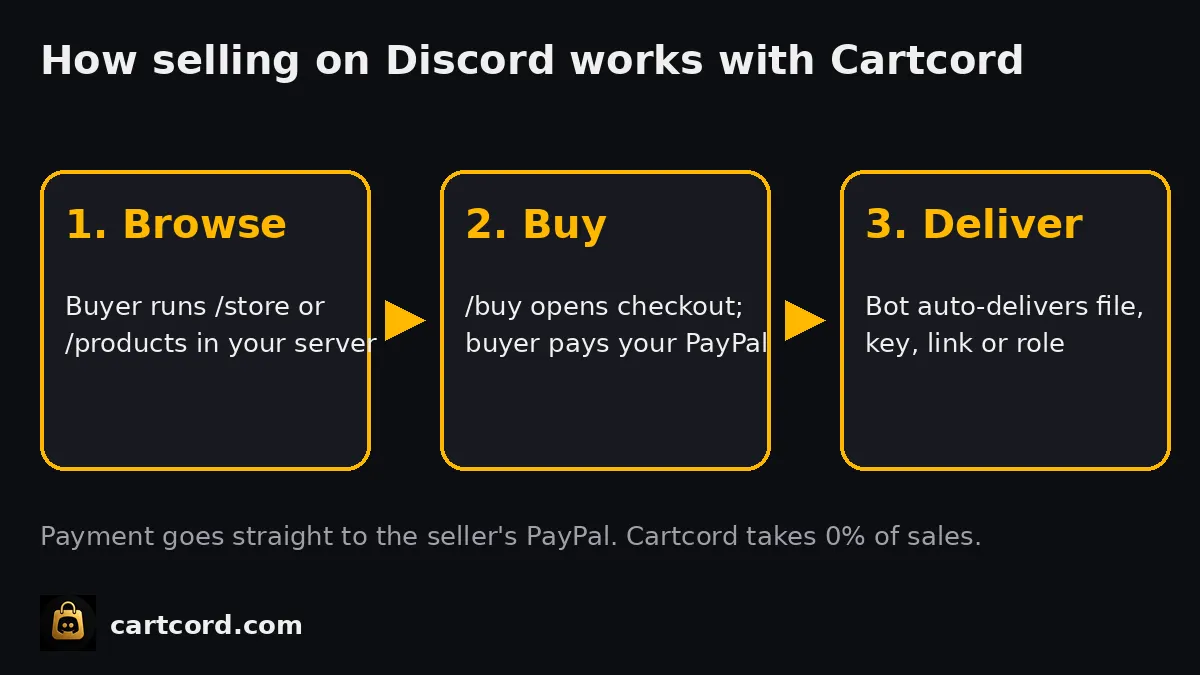
- Add the bot to your server and connect your PayPal account. Buyers pay into your PayPal directly, Cartcord takes 0% commission on sales, and standard PayPal fees apply.
- Create a product with the delivery type set to license key.
- Upload your key pool: paste in your list of keys.
- Buyers run
/storeor/products, pick your software and run/buy. - After PayPal captures the payment, the bot DMs the buyer the next unused key from the pool and marks it as used.
Because each key is drawn from the pool once, two buyers never get the same key, and you can see which order received which key.
Step 4: Keep stock topped up
Running out of keys mid-launch is the most common failure. To avoid it:
- upload more keys than you expect to sell during a launch week
- check pool levels after big announcements
- keep a second batch generated and ready in secure storage
Step 5: Handle activation and support
- Explain activation in the product description: where to paste the key and what to do if it says “invalid”.
- Make a #support channel or ticket system. Ask buyers for their order ID, never for their key in public.
- Limit activations per key in your licensing system (for example, 2 devices) to cut down on key sharing.
- On Cartcord’s Pro and Enterprise plans, you can publish store docs, which is handy for install guides and changelogs so buyers aren’t left guessing.
Step 6: Plan for refunds and chargebacks
When payments go straight to your PayPal, refunds and disputes are handled in PayPal, by you. Have a written policy (for example, refunds within 7 days if the key hasn’t been activated), and when you refund, revoke the key in your licensing system. That’s why order-to-key tracking matters.
Step 7: Stay compliant
- Only sell keys you have the right to sell. Grey-market resold keys get servers banned and accounts limited.
- Follow the rules of any ecosystem you build for. Some games and platforms have their own licensing or official monetization partners. A store bot handles payment and delivery, but it doesn’t replace any license a platform requires.
- Taxes: selling directly means you may be responsible for sales tax or VAT on digital goods, depending on where you and your buyers are.
Pricing your software on Discord
- Offer a lifetime key at a clear price. Discord audiences respond well to simple one-time pricing.
- If you want recurring revenue, issue time-limited keys (for example, 30-day keys) and sell renewals as a new purchase. Discord roles granted by Cartcord are one-time grants, not auto-renewing subscriptions, so for true recurring billing, use a subscription-capable platform.
- Run a launch discount for server members to reward early supporters.
What it costs
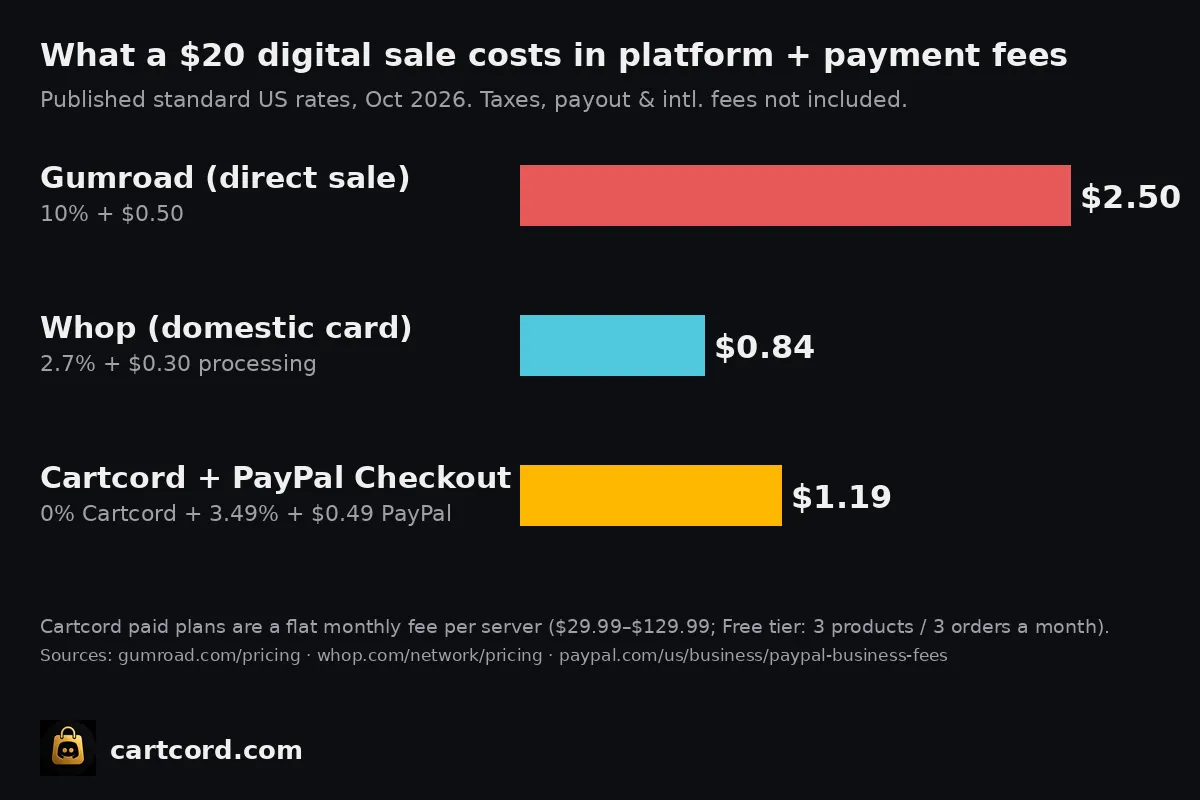
Cartcord has a Free tier (3 products and 3 orders a month) that’s enough to test the full key-delivery flow. Paid plans are a flat fee per server, starting at $29.99/month. Details are on the pricing page. Add PayPal’s processing fee per sale and compare that with the percentage cut of whatever you’re using now.
Checklist
- Keys generated and stored securely
- Licensing check / activation limit in your app
- Store bot installed, PayPal connected
- Product created with a license-key delivery type and the pool uploaded
- Test purchase done, key received by DM
- Refund + revoke policy written and pinned
- Support channel live
Automating license key delivery turns your Discord server into a real storefront that sells while you sleep, and it saves you from ever DMing “sorry, wrong key” again.