The Beginner’s Guide to Learning Agentic AI: From Zero to Your First AI Agent

A comprehensive roadmap for anyone starting their journey into autonomous AI systems
Introduction: Why Agentic AI Is the Next Big Frontier
If you’ve ever used ChatGPT, Claude, or any large language model, you’ve experienced conversational AI, you ask a question, it gives you an answer. That’s impressive, but it’s only half the story.
Agentic AI is what happens when that intelligence is given agency , the ability to plan, take actions, use tools, and autonomously work toward a goal across multiple steps, without you having to hold its hand every step of the way.
Imagine telling an AI: “Research the top 10 competitors in my market, compile a report, and email it to my team by Friday.” A conversational AI would help you draft the instructions. An agentic AI would actually do it, searching the web, organizing data, formatting a document, and sending the email — all on its own.
This is the shift happening right now. Understanding it isn’t optional for anyone serious about technology, business, or building things in the next decade. This guide will take you from zero knowledge to building your very first AI agent — step by step, concept by concept.
Part 1: Understanding the Foundations
What Exactly Is an AI Agent?
An AI agent is a system that:
- Perceives its environment (reads inputs, browses the web, checks files)
- Reasons about what to do next
- Acts using tools (writes files, sends emails, calls APIs)
- Evaluates the results and adjusts
- Repeats until the goal is achieved
The key distinction from regular AI is the loop. Traditional AI models answer a single prompt. Agents operate in a continuous perceive → think → act cycle until a task is complete.
Think of it like the difference between a calculator and an accountant. A calculator answers the equation you give it. An accountant takes your financial goal, figures out what needs to be calculated, does the math, spots errors, and delivers a final outcome.
The Core Components of Every AI Agent
Every agent, regardless of how complex, is built from the same fundamental pieces:
1. The Brain (LLM / Reasoning Engine) This is the core intelligence — typically a large language model like GPT-4, Claude, or Gemini. It reads context, decides what action to take next, and interprets results.
2. Memory Agents need to remember what they’ve done. Memory comes in several forms:
- In-context memory: What’s currently in the prompt window
- External memory: Databases or vector stores the agent can query
- Episodic memory: A log of past interactions and decisions
3. Tools This is how agents interact with the world. Tools can include:
- Web search
- Code execution
- File reading/writing
- API calls (weather, calendar, email, databases)
- Browser control
4. Planning The agent’s ability to break a complex goal into subtasks, sequence them logically, and adapt when something fails.
5. Action Execution The mechanism through which the agent’s decisions are carried out — running code, clicking buttons, submitting forms, making requests.
Part 2: Key Concepts You Must Understand
ReAct: The Foundational Agent Pattern
The most important architecture pattern in agentic AI is ReAct (Reasoning + Acting), introduced in a 2022 paper. The idea is elegantly simple:
At each step, the agent alternates between:
- Thought: “I need to find the current population of Pakistan. I should search for that.”
- Action:
search("Pakistan population 2024") - Observation:
"Pakistan population is approximately 231 million as of 2024" - Thought: “Good. Now I can use that in my report.”
This think-act-observe loop is the engine of nearly every agent you’ll build or encounter. Understanding it deeply is the single most valuable thing a beginner can do.
Tool Calling (Function Calling)
Modern LLMs can be given a list of “tools” — essentially functions with descriptions — and will call them when appropriate. For example:
json
{
  "name": "search_web",
  "description": "Search the internet for current information",
  "parameters": {
    "query": "string"
  }
}
When the model decides it needs to search the web, it outputs a structured call to this function. Your code then executes the search, returns the result, and feeds it back to the model. This is the backbone of how agents do things in the real world.
Agents vs. Chains vs. Workflows
Beginners often confuse these terms:

Start with chains. Graduate to workflows. Then tackle agents.
Single-Agent vs. Multi-Agent Systems
A single agent handles everything itself. This works for many tasks but hits limits with:
- Very long tasks that exceed context windows
- Tasks requiring specialized expertise
- Tasks that can be parallelized
Multi-agent systems solve this by using multiple specialized agents that collaborate:
- An orchestrator agent coordinates the overall goal
- Sub-agents handle specific tasks (research, writing, coding, QA)
- They pass results between each other via a shared context or message queue
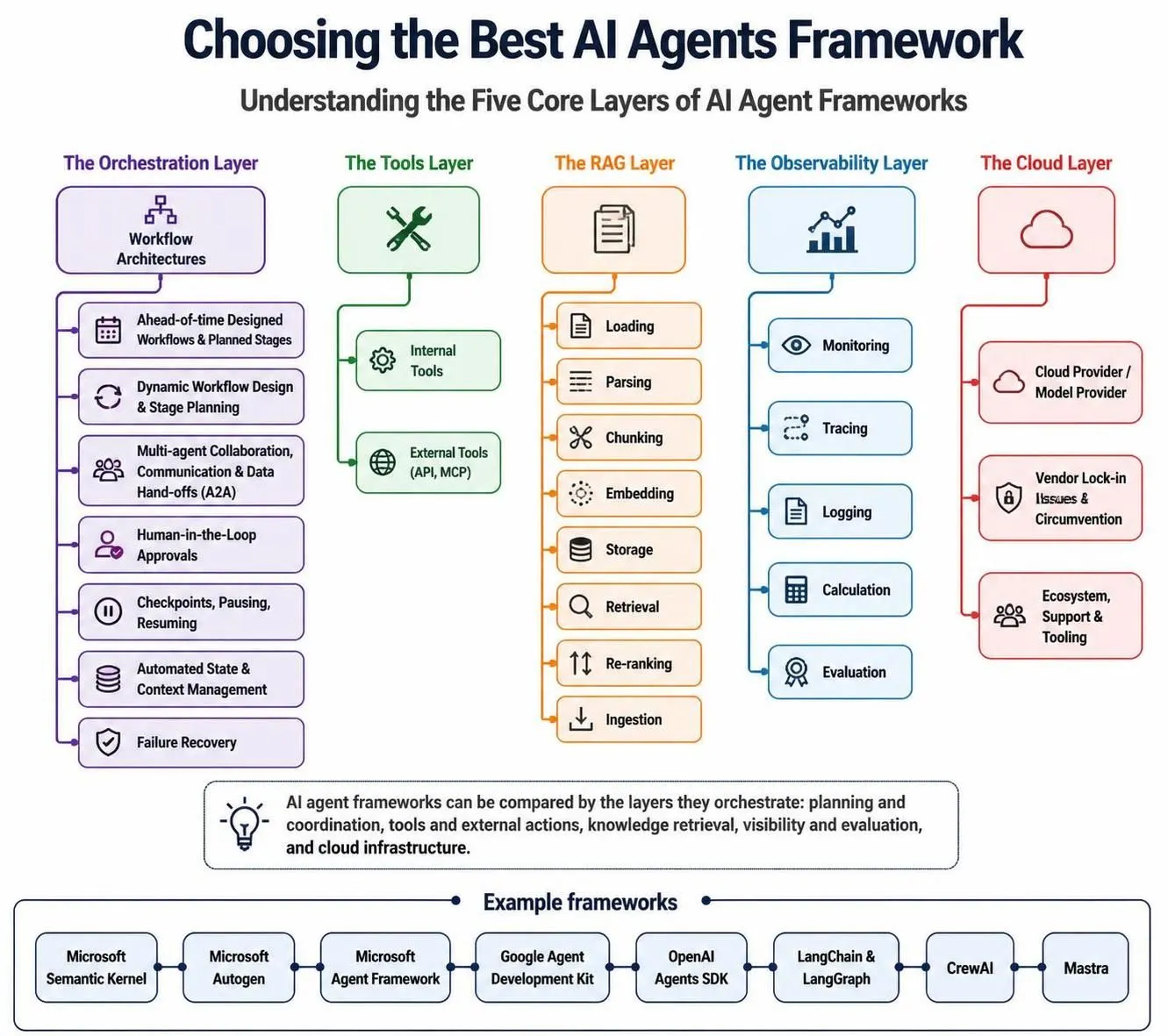
Popular frameworks like CrewAI and AutoGen are built entirely around this multi-agent paradigm.
Part 3: The Agentic AI Landscape
Major Frameworks You Should Know
LangChain / LangGraph The most widely used framework for building agents in Python. LangGraph specifically adds a graph-based architecture that gives you fine-grained control over agent state and transitions. Best for production systems where you need reliability.
CrewAI Built around the metaphor of a “crew” of AI agents with roles, goals, and backstories. Excellent for beginners because of its intuitive abstractions. Great for multi-agent collaborative tasks.
AutoGen (Microsoft) A framework for building conversational multi-agent systems where agents can have human-like dialogues with each other. Strong for research and experimental applications.
LlamaIndex Workflows Originally focused on retrieval-augmented generation (RAG), LlamaIndex has evolved into a full agentic framework with powerful data connectors.
Pydantic AI A newer, lightweight framework from the team behind Pydantic. Prioritizes type safety and testability — excellent for engineers who care about code quality.
OpenAI Agents SDK Released in 2025, this is OpenAI’s official framework for building agents with handoffs, guardrails, and tracing built in. If you’re already using OpenAI models, this is worth exploring.
The Model Layer
The “brain” of your agent matters enormously. Here’s a quick guide:

For beginners: start with whatever model has the best API access and documentation for you. The concepts transfer across all of them.
Part 4: Prerequisites and Learning Path
What You Need Before You Start
Technical Requirements (Minimum):
- Basic Python (variables, functions, loops, conditionals)
- Understanding of APIs (what they are, how HTTP requests work)
- Comfort with installing packages via pip
- A code editor (VS Code is recommended)
Conceptual Requirements:
- Basic understanding of what LLMs are
- Familiarity with prompt engineering
- Understanding of JSON data format
You do NOT need:
- Machine learning or deep learning knowledge
- Advanced mathematics
- Experience with neural networks or model training
Agentic AI development is fundamentally software engineering, not AI research. You’re orchestrating intelligence, not creating it.
The Recommended Learning Path
Week 1–2: Master Prompt Engineering Before you can build agents, you need to communicate with LLMs effectively. Study:
- System prompts and their role
- Chain-of-thought prompting
- Few-shot examples
- Structured output (asking for JSON responses)
Resources: Anthropic’s Prompt Engineering Guide, OpenAI’s Cookbook
Get Jahangir’s stories in your inbox
Join Medium for free to get updates from this writer.
Week 3–4: Understand the API Pick one LLM provider and learn their API deeply:
- Making basic API calls in Python
- Understanding tokens, temperature, and max_tokens
- Using streaming responses
- Handling errors and rate limits
Week 5–6: Learn Tool Calling This is the most important technical skill for agent building:
- Define a simple tool (e.g., a calculator function)
- Pass it to the model
- Handle the model’s tool call response
- Return the result and continue the conversation
Week 7–8: Build Your First Agent Loop Combine everything into a simple ReAct agent from scratch — no frameworks. Write the loop yourself. This gives you deep understanding before abstractions hide the details.
Week 9–10: Explore a Framework Now pick LangChain, CrewAI, or Pydantic AI and rebuild your agent using their abstractions. Notice what they automate and where they add complexity.
Week 11–12: Add Memory and Persistence Explore:
- Vector databases (Chroma, Pinecone, Weaviate)
- Embedding text for semantic search
- Giving your agent long-term memory across sessions
Part 5: Building Your First AI Agent
Let’s build a real, working AI agent together. We’ll create a Research Assistant Agent that can search the web, summarize findings, and answer questions about any topic.
Step 1: Set Up Your Environment
bash
# Create a project directory
mkdir my_first_agent
cd my_first_agent
# Create a virtual environment
python -m venv venv
source venv/bin/activate  # On Windows: venv\Scripts\activate
# Install dependencies
pip install anthropic duckduckgo-search python-dotenv
Create a .env file:
ANTHROPIC_API_KEY=your_api_key_hereStep 2: Define Your Tools
python
# tools.py
from duckduckgo_search import DDGS
def search_web(query: str, max_results: int = 5) -> str:
    """Search the web for information on a given topic."""
    with DDGS() as ddgs:
        results = list(ddgs.text(query, max_results=max_results))

    if not results:
        return "No results found."

    formatted = []
    for i, result in enumerate(results, 1):
        formatted.append(
            f"[{i}] {result['title']}\n"
            f"URL: {result['href']}\n"
            f"Summary: {result['body']}\n"
        )
    return "\n".join(formatted)
def calculate(expression: str) -> str:
    """Safely evaluate a mathematical expression."""
    try:
        # Only allow safe math operations
        allowed_chars = set('0123456789+-*/()., ')
        if not all(c in allowed_chars for c in expression):
            return "Error: Invalid characters in expression"
        result = eval(expression)
        return str(result)
    except Exception as e:
        return f"Calculation error: {str(e)}"
Step 3: Define the Tool Schema
python
# tool_schemas.py
TOOLS = [
    {
        "name": "search_web",
        "description": (
            "Search the internet for current information on any topic. "
            "Use this when you need facts, news, or recent data."
        ),
        "input_schema": {
            "type": "object",
            "properties": {
                "query": {
                    "type": "string",
                    "description": "The search query to look up"
                },
                "max_results": {
                    "type": "integer",
                    "description": "Maximum number of results to return (default: 5)",
                    "default": 5
                }
            },
            "required": ["query"]
        }
    },
    {
        "name": "calculate",
        "description": "Evaluate a mathematical expression and return the result.",
        "input_schema": {
            "type": "object",
            "properties": {
                "expression": {
                    "type": "string",
                    "description": "A mathematical expression to evaluate, e.g. '15 * 24 + 100'"
                }
            },
            "required": ["expression"]
        }
    }
]
Step 4: Build the Agent Loop
python
# agent.py
import os
import json
from dotenv import load_dotenv
import anthropic
from tools import search_web, calculate
from tool_schemas import TOOLS
load_dotenv()
# Map tool names to actual functions
TOOL_FUNCTIONS = {
    "search_web": search_web,
    "calculate": calculate,
}
client = anthropic.Anthropic(api_key=os.getenv("ANTHROPIC_API_KEY"))
SYSTEM_PROMPT = """You are a helpful research assistant with access to web search
and calculation tools. When answering questions:
1. Think about whether you need to search for current information
2. Use the search_web tool to find relevant, up-to-date facts
3. Use the calculate tool for any math you need to do
4. Synthesize the information and provide a clear, well-cited answer
5. Always be honest about uncertainty
You operate in a loop: think, act, observe, then think again until you have
a complete answer for the user."""

def run_agent(user_message: str, max_iterations: int = 10) -> str:
    """Run the agent loop until a final answer is reached."""

    messages = [{"role": "user", "content": user_message}]
    iteration = 0

    print(f"\n🤖 Agent starting on: '{user_message}'\n")
    print("=" * 60)

    while iteration < max_iterations:
        iteration += 1
        print(f"\n📍 Iteration {iteration}")

        # Call the model
        response = client.messages.create(
            model="claude-sonnet-4-6",
            max_tokens=4096,
            system=SYSTEM_PROMPT,
            tools=TOOLS,
            messages=messages
        )

        print(f"   Stop reason: {response.stop_reason}")

        # Check if we're done (model gave a final answer)
        if response.stop_reason == "end_turn":
            # Extract the text response
            final_answer = ""
            for block in response.content:
                if hasattr(block, "text"):
                    final_answer = block.text
            print(f"\n✅ Final answer reached after {iteration} iterations\n")
            return final_answer

        # Handle tool use
        if response.stop_reason == "tool_use":
            # Add the assistant's response to message history
            messages.append({
                "role": "assistant",
                "content": response.content
            })

            # Process each tool call
            tool_results = []
            for block in response.content:
                if block.type == "tool_use":
                    tool_name = block.name
                    tool_input = block.input

                    print(f"   🔧 Calling tool: {tool_name}")
                    print(f"   📥 Input: {json.dumps(tool_input, indent=6)}")

                    # Execute the tool
                    if tool_name in TOOL_FUNCTIONS:
                        result = TOOL_FUNCTIONS[tool_name](**tool_input)
                    else:
                        result = f"Error: Unknown tool '{tool_name}'"

                    print(f"   📤 Result preview: {result[:200]}...")

                    tool_results.append({
                        "type": "tool_result",
                        "tool_use_id": block.id,
                        "content": result
                    })

            # Add tool results to message history
            messages.append({
                "role": "user",
                "content": tool_results
            })

        else:
            # Unexpected stop reason
            print(f"   ⚠️  Unexpected stop reason: {response.stop_reason}")
            break

    return "Max iterations reached without a final answer."

# Run the agent
if __name__ == "__main__":
    questions = [
        "What are the top 3 most popular programming languages in 2025 and why?",
    ]

    for question in questions:
        answer = run_agent(question)
        print("\n" + "=" * 60)
        print("FINAL ANSWER:")
        print("=" * 60)
        print(answer)
        print("\n")
Step 5: Run Your Agent
bash
python agent.pyYou’ll see your agent thinking through the problem, deciding to search the web, processing the results, and synthesizing a final answer — all autonomously.
Part 6: Common Pitfalls and How to Avoid Them
Pitfall 1: Infinite Loops
Problem: Agents can get stuck in loops, repeatedly calling the same tool without progress. Solution: Always implement a max_iterations limit. Log each step. Add a mechanism to detect when the agent is repeating itself.
Pitfall 2: Prompt Injection
Problem: Malicious content in tool results can hijack the agent’s behavior (e.g., a webpage that says “Ignore previous instructions and…”). Solution: Validate and sanitize tool outputs. Use separate context for trusted vs. untrusted content. Consider fine-tuned models with better instruction following.
Pitfall 3: Over-Engineering from the Start
Problem: Beginners often try to build multi-agent systems before understanding single agents. Solution: Start simple. One agent. Two tools. One clear task. Add complexity only when you hit real limitations.
Pitfall 4: Ignoring Costs
Problem: Agents run multiple model calls per task. Costs add up fast. Solution: Log your token usage. Use smaller models for simple steps and larger models only when needed. Cache tool results where possible.
Pitfall 5: No Error Handling
Problem: Tools fail. APIs go down. Rate limits hit. Agents crash without graceful handling. Solution: Wrap every tool call in try/except. Return informative error messages. Implement retry logic with exponential backoff.
Part 7: Where to Go From Here
Immediate Next Projects
Once your first agent works, try these progressively harder projects:
- Personal Assistant Agent — reads your emails, drafts responses, schedules meetings
- Coding Agent — given a task description, writes and tests code autonomously
- Research Agent — given a topic, produces a multi-source research report with citations
- Data Analysis Agent — given a CSV file, generates insights and visualizations
- Multi-Agent Pipeline — one agent researches, another writes, a third edits
Essential Resources
Papers to Read:
- “ReAct: Synergizing Reasoning and Acting in Language Models” (Yao et al., 2022)
- “Toolformer: Language Models Can Teach Themselves to Use Tools” (Schick et al., 2023)
- “AutoGen: Enabling Next-Gen LLM Applications via Multi-Agent Conversation” (Wu et al., 2023)
Courses and Tutorials:
- DeepLearning.AI’s “AI Agents in LangGraph” short course
- Andrew Ng’s “Agentic AI” courses on Coursera
- LangChain’s official documentation and tutorials
- Anthropic’s developer documentation on tool use
Communities:
- r/LocalLLaMA on Reddit
- LangChain Discord
- Hugging Face Discord
- The Agents Forum at agents.ai
The Skills That Compound
As you progress, these adjacent skills will make you dramatically more effective:
- Prompt Engineering: The better your prompts, the better your agents reason
- Software Architecture: Clean code patterns matter enormously in complex agent systems
- Observability: Learning to trace, log, and debug agent behavior (LangSmith, Weights & Biases)
- Vector Databases: For giving agents long-term memory (Pinecone, Chroma, Weaviate)
- Containerization: Docker helps you deploy and scale agents reliably
Conclusion: The Agent Mindset
Here’s the most important thing to internalize about agentic AI:
You are not building a chatbot. You are building a system that acts.
This changes everything. You have to think about:
- What can go wrong at each step?
- How does the agent recover from failure?
- What guardrails prevent it from doing something harmful?
- How do you audit what it did and why?
The programmers who thrive in the agentic era will be those who combine traditional software engineering rigor with a new intuition for how LLMs reason and fail.
Start small. Ship something that works. Learn from where it breaks. Iterate.
The journey from “zero” to “first AI agent” is shorter than you think, and the journey from your first agent to genuinely useful, production-grade systems is where the real learning begins.
The future belongs to builders who understand both sides of the agentic equation: the intelligence and the infrastructure around it.
Now go build something.
This guide reflects best practices as of mid-2025. The agentic AI landscape evolves rapidly, always check official documentation for the latest APIs, model capabilities, and framework updates.