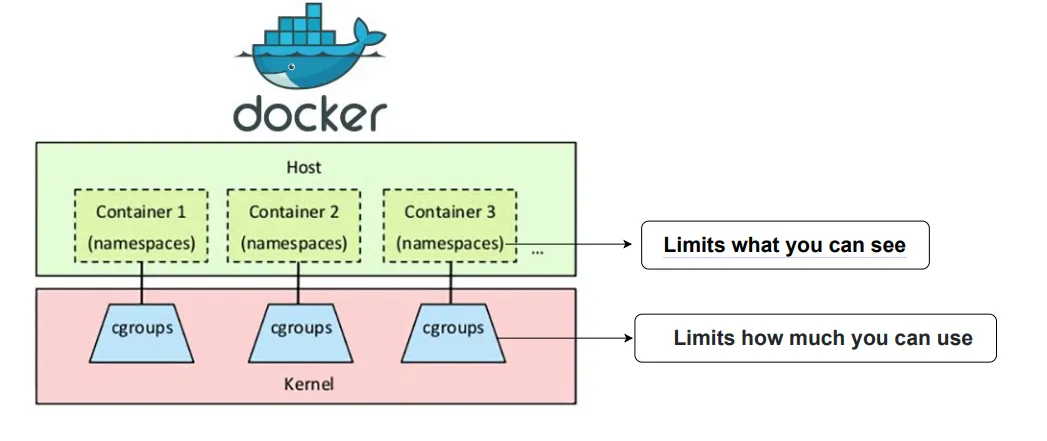
Linux Containers that they run are powered by two underlying Linux Kernel technologies: cgroups and namespaces.
When you start a container, behind the scenes, Docker creates a set of namespaces and control groups for the container.
What is Namespace?
Press enter or click to view image in full size
Namespaces provide a layer of isolation for containers.
Each aspect of a container runs in a separate namespace and its access is limited to that namespace.
When you run a container, Docker creates a set of namespaces for that container.
Namespace makes processes running inside that namespace believe they have their own instance of that resource.
A namespace can limit visibility to certain process trees, network interfaces, user IDs, or filesystem mounts.
Docker Engine uses the following namespaces on Linux
PID — It is used to assign a set of PIDs to processes that are independent of the set of PIDs in other namespaces.
Network namespace is for managing network interfaces such as private routing tables, set of IP addresses, socket listings, firewalls, etc.
Interprocess communication (IPC) namespace has its own IPC resources, for example, POSIX message queues.
Mount namespace has an independent list of mount points for managing filesystem mount points.
UNIX Time-Sharing (UTS) namespace allows a single system to appear to have different host and domain names to different processes.
What is Cgroup?
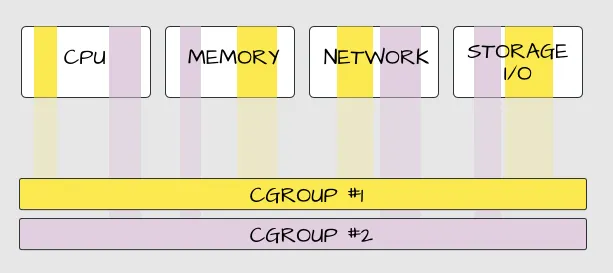
A control group (cgroup) is a Linux kernel feature that limits an application to a specific set of resource usage (CPU, memory, disk I/O, network, and so on).
Control groups allow Docker Engine to share available hardware resources to containers and optionally enforce limits and constraints.
For example, you can limit the memory available to a specific container.
Cgroups involve resource metering and limiting:
memory
CPU
block I/O
network
For example,
Get MrDevSecOps’s stories in your inbox
Join Medium for free to get updates from this writer.
To run an instance of an Ubuntu container and set the memory limit to 1 GB and access to 1 CPU the command is:
sudo docker run -it --memory="1g" -cpus="1.0" ubuntu