

 README

Ebiten Tiled
[!WARNING] This is still a work in progress.
A high-performance, optimized helper library for
Ebitengine to load, parse, and render maps exported
from the Tiled Editor (currently supporting .tmj
and .tsj formats).
Introduction
Unlike naive rendering approaches that draw the entire map every frame, this library implements Frustum Culling. By calculating which tiles are actually visible within the camera's view, it significantly reduces the number of draw calls and CPU/GPU overhead.
For example you can see the entire map in the screenshot below.
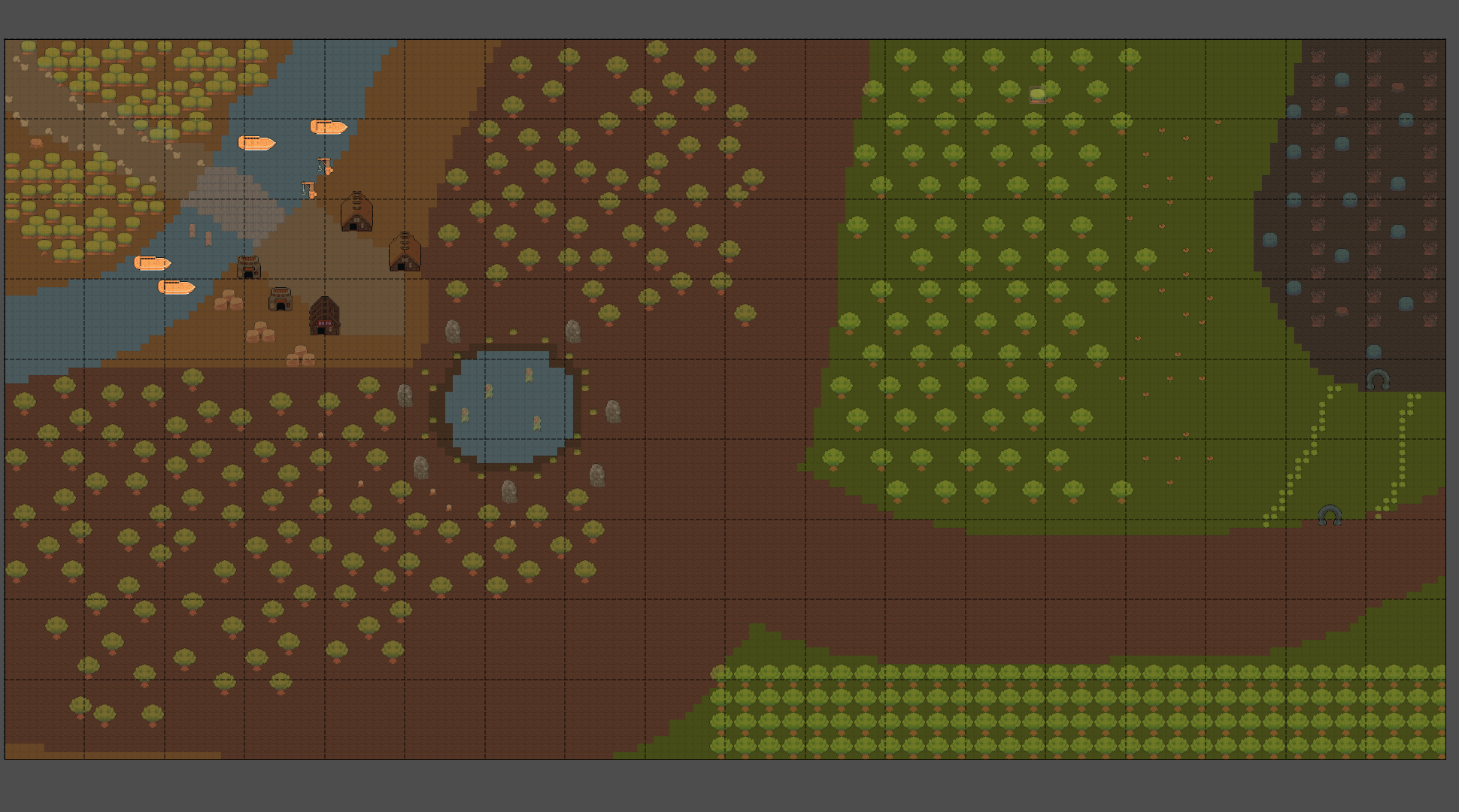
Only tiles inside the viewport (the green rectangle) are drawn.
Features
- Parse
.tmjfiles into a structured domain model. - Support for Tile Layers and Tileset Sources.
- Tilemap rendering integration for Ebitengine.
- Optimized Rendering: Native Frustum Culling out of the box.
- Pre-calculated Cache: Tile textures and source rectangles are cached at load time for maximum efficiency.
- Single-Image Tilesets: Full support for spritesheets with margins and spacing.
- Collection of Images: Support for tilesets composed of multiple individual image files.
- Multi-Layer Support: Renders layers in the correct Z-order as defined in Tiled.
Planned Features
- Collision Handling: Parsing and retrieving collision shapes (hitboxes) for objects and tiles.
- XML Support: Support for
.tmxand.tsxfile formats.
Installation
go get codeberg.org/garma/ebiten-tiled@latest
Usage
See the examples/ directory for a full example.
package main

import (
 "log"

 ebitentiled "codeberg.org/garma/ebiten-tiled"
 "github.com/hajimehoshi/ebiten/v2"
)

var (
 viewportWidth  = 1280
 viewportHeight = 960
)

type Game struct {
 Tilemap  *ebitentiled.Tilemap
 Viewport ebitentiled.Viewport
}

func (g *Game) Update() error { return nil }

func (g *Game) Draw(screen *ebiten.Image) {
 g.Tilemap.Draw(screen, g.Viewport)
}

func (g *Game) Layout(outsideWidth, outsideHeight int) (screenWidth, screenHeight int) {
 return viewportWidth, viewportHeight
}

func main() {
 ebiten.SetWindowSize(viewportWidth, viewportHeight)
 ebiten.SetWindowTitle("map loading example")

 tm, err := ebitentiled.NewTilemap("assets/map.tmj")
 if err != nil {
  panic(err.Error())
 }

 if err := ebiten.RunGame(&Game{Tilemap: tm, Viewport: ebitentiled.NewViewport(0, 0, viewportWidth, viewportHeight)}); err != nil {
  log.Fatal(err)
 }
}
Reference
Credits
Examples use assets from Ninja Adventure Asset Pack. Huge thank you!
 Documentation

Overview 
Package ebitentiled provides utilities for parsing and loading Tiled Editor maps (`.tmj`) into a domain model suitable for use with the Ebitengine game engine. It handles the conversion from the Tiled JSON format to a more ergonomic structure for tile-based gameplay.
Index 
Constants 
This section is empty.
Variables 
This section is empty.
Functions 
This section is empty.
Types 
type Tilemap 
type Tilemap struct {
	CompressionLevel int      // The compression level to use for tile layer data (defaults to -1, which means to use the algorithm default)
	Height           int      // Number of tile rows.
	Infinite         bool     // Whether the map has infinite dimensions.
	Layers           []*layer // Array of layers.
	Orientation      string
	RenderOrder      string
	TiledVersion     string
	TileHeight       int              // Map grid height.
	Tilesets         []*tilesetSource // An array of external tilesets.
	TileWidth        int              // Map grid width
	Type             string           // the value is always 'map' since Tiled v1.0.
	Width            int              // Number of tile columns
	WidthInPixels    int              // Map's width in pixels.
	HeightInPixels   int              // Map's height in pixels.
	// contains filtered or unexported fields
}
Tilemap represents a map exported from Tiled editor.
For more information check out https://doc.mapeditor.org/en/stable/reference/json-map-format/#map.
func NewTilemap 
NewTilemap loads a Tilemap from a `.tmj` file at the specified path. It parses the JSON structure, resolves relative paths for tilesets, and pre-caches tiles for efficient rendering.
Example:
tilemap, err := ebitentiled.NewTilemap("./assets/map.tmj")
if err != nil {
    log.Fatal(err)
}
func (*Tilemap) Draw 
Draw renders the visible layers of the tilemap onto the provided Ebitengine image. It automatically handles frustum culling to ensure high performance even on very large maps.
Parameters:
- screen: The target *ebiten.Image where the map will be drawn (usually the main game screen).
- viewport: The camera configuration defining which part of the map is visible.
Implementation details: The method iterates through each layer in the order they were defined in Tiled (bottom to top). For each layer, it only loops through the tiles identified by calculateVisibleIndices. Screen coordinates are calculated by subtracting the viewport's position from the tile's world position:
screenX = (tileColumn * tileWidth) - viewportX
type Viewport 
Viewport represents the visible window of the game world. It defines which part of the map is currently being rendered to the screen.
Example:
v := Viewport{X: 100, Y: 50, Width: 640, Height: 480}
This viewport starts at pixel (100, 50) in the world and covers an area of 640x480 pixels.
func NewViewport 
NewViewport creates a new Viewport with the given position and dimensions.
 Source Files
 Directories